Function Calling & Tool Use: The Complete Guide for GPT, Claude, and Gemini (2026)
TL;DR
Function calling (also called tool use) lets LLMs invoke external functions — databases, APIs, calculators, or any code you define. This guide covers the complete implementation across OpenAI GPT, Anthropic Claude, and Google Gemini with working Python code for each. You will learn the format differences, how to handle parallel tool calls, build multi-step agent loops, manage errors gracefully, and deploy function calling in production. All code examples are tested against the latest 2026 APIs.
What Is Function Calling / Tool Use?
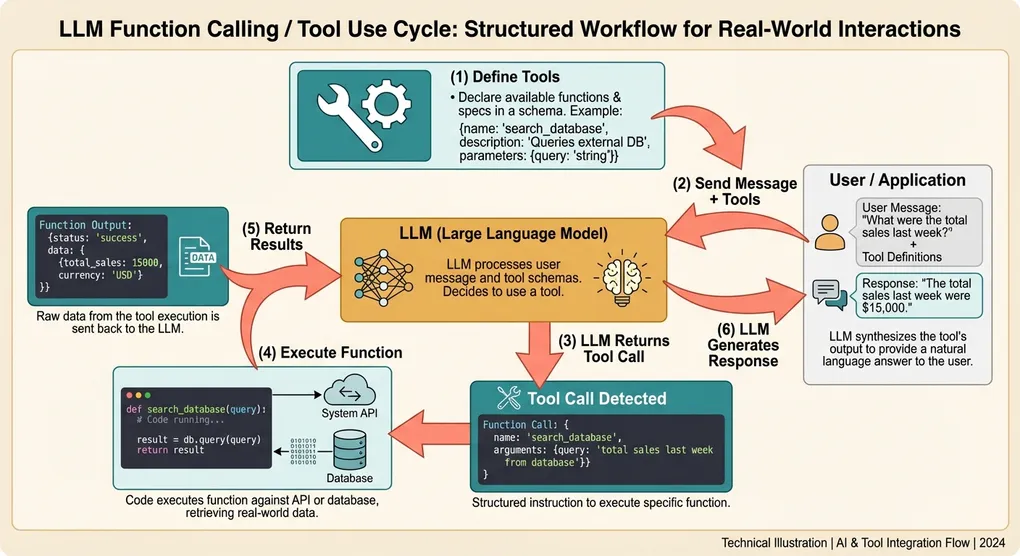
Function calling is a mechanism where you describe available functions (tools) to an LLM, and the model can decide when and how to call them. The model does not execute the functions itself — it returns structured arguments that your code executes, then you feed the results back to the model.
This creates a powerful loop:
User message → LLM decides to call function(s) → Your code executes function(s)
→ Results sent back to LLM → LLM generates final response
Why It Matters
Without function calling, LLMs are limited to their training data. With it, they can:
- Query live data: current weather, stock prices, database records
- Perform actions: send emails, create tickets, update records
- Use specialized tools: calculators, code interpreters, search engines
- Chain operations: multi-step workflows where each step depends on previous results
Function calling is the foundation of AI agents. Every agent framework — LangChain, CrewAI, AutoGen, OpenAI Assistants — is built on top of this primitive.
The Universal Pattern
Despite format differences across providers, the pattern is always the same:
- Define tools: describe function names, parameters, and what they do
- Send message with tools: include tool definitions in the API call
- Detect tool calls: check if the model wants to call a function
- Execute functions: run your code with the model’s arguments
- Return results: send the function output back to the model
- Get final response: the model uses the results to answer the user
Let’s implement this for each provider.
OpenAI Function Calling (GPT-5.4 / GPT-4o)
OpenAI was the first major provider to introduce function calling (June 2023) and has since evolved the format through several iterations. The current format uses a tools parameter with type "function".
Basic Implementation
from openai import OpenAI
import json

client = OpenAI()

# Step 1: Define your tools
tools = [
    {
        "type": "function",
        "function": {
            "name": "get_weather",
            "description": "Get the current weather for a given location. Use this when the user asks about weather conditions.",
            "parameters": {
                "type": "object",
                "properties": {
                    "location": {
                        "type": "string",
                        "description": "City and country, e.g. 'London, UK' or 'Tokyo, Japan'"
                    },
                    "unit": {
                        "type": "string",
                        "enum": ["celsius", "fahrenheit"],
                        "description": "Temperature unit. Defaults to celsius."
                    }
                },
                "required": ["location"]
            }
        }
    },
    {
        "type": "function",
        "function": {
            "name": "search_flights",
            "description": "Search for available flights between two airports on a given date.",
            "parameters": {
                "type": "object",
                "properties": {
                    "origin": {
                        "type": "string",
                        "description": "Departure airport IATA code, e.g. 'LAX'"
                    },
                    "destination": {
                        "type": "string",
                        "description": "Arrival airport IATA code, e.g. 'NRT'"
                    },
                    "date": {
                        "type": "string",
                        "description": "Travel date in YYYY-MM-DD format"
                    }
                },
                "required": ["origin", "destination", "date"]
            }
        }
    }
]


# Step 2: Your actual function implementations
def get_weather(location: str, unit: str = "celsius") -> dict:
    """In production, call a real weather API."""
    # Simulated response
    return {
        "location": location,
        "temperature": 22,
        "unit": unit,
        "condition": "partly cloudy",
        "humidity": 65
    }


def search_flights(origin: str, destination: str, date: str) -> dict:
    """In production, call a flight search API."""
    return {
        "flights": [
            {"airline": "JAL", "departure": "10:30", "arrival": "14:45", "price": 850},
            {"airline": "ANA", "departure": "13:15", "arrival": "17:30", "price": 780},
        ],
        "origin": origin,
        "destination": destination,
        "date": date
    }


# Map function names to implementations
AVAILABLE_FUNCTIONS = {
    "get_weather": get_weather,
    "search_flights": search_flights,
}


# Step 3: The complete function calling loop
def chat_with_tools(user_message: str) -> str:
    messages = [{"role": "user", "content": user_message}]

    # First API call — model may request tool calls
    response = client.chat.completions.create(
        model="gpt-5.4",
        messages=messages,
        tools=tools,
        tool_choice="auto",  # Let the model decide (default)
    )

    assistant_message = response.choices[0].message

    # Check if the model wants to call functions
    if assistant_message.tool_calls:
        # Add the assistant's response (with tool calls) to the conversation
        messages.append(assistant_message)

        # Execute each tool call
        for tool_call in assistant_message.tool_calls:
            function_name = tool_call.function.name
            function_args = json.loads(tool_call.function.arguments)

            print(f"Calling {function_name} with args: {function_args}")

            # Execute the function
            func = AVAILABLE_FUNCTIONS.get(function_name)
            if func:
                result = func(**function_args)
            else:
                result = {"error": f"Unknown function: {function_name}"}

            # Add the function result to the conversation
            messages.append({
                "role": "tool",
                "tool_call_id": tool_call.id,
                "content": json.dumps(result),
            })

        # Second API call — model generates final response using function results
        final_response = client.chat.completions.create(
            model="gpt-5.4",
            messages=messages,
            tools=tools,
        )

        return final_response.choices[0].message.content

    # No tool calls — return the direct response
    return assistant_message.content


# Usage
print(chat_with_tools("What's the weather like in Tokyo?"))
# Output: The weather in Tokyo is currently 22°C and partly cloudy with 65% humidity.

print(chat_with_tools("Find flights from LAX to NRT on March 15, 2026"))
# Output: I found 2 flights from LAX to NRT on March 15...
Key OpenAI Details
- tool_choice options:
"auto"(model decides),"none"(no tools),"required"(must call at least one), or a specific function name - Parallel tool calls: enabled by default — the model may return multiple
tool_callsin one response - Tool call IDs: every tool call has a unique
idthat you must reference in the tool result message - Structured outputs: you can combine tools with
response_formatfor typed return values
Controlling Tool Choice
# Force the model to call a specific function
response = client.chat.completions.create(
    model="gpt-5.4",
    messages=messages,
    tools=tools,
    tool_choice={"type": "function", "function": {"name": "get_weather"}},
)

# Prevent any tool calls
response = client.chat.completions.create(
    model="gpt-5.4",
    messages=messages,
    tools=tools,
    tool_choice="none",
)

# Require at least one tool call (but model chooses which)
response = client.chat.completions.create(
    model="gpt-5.4",
    messages=messages,
    tools=tools,
    tool_choice="required",
)
Anthropic Claude Tool Use (Claude Opus 4.6 / Sonnet 4.6)
Anthropic calls this feature “tool use” and has a distinctly different format from OpenAI. Claude uses a content-block-based architecture where tool calls and text appear as separate blocks within the assistant’s response.
Basic Implementation
import anthropic
import json

client = anthropic.Anthropic()

# Step 1: Define tools in Anthropic's format
tools = [
    {
        "name": "get_weather",
        "description": "Get the current weather for a given location. Use this when the user asks about weather conditions.",
        "input_schema": {
            "type": "object",
            "properties": {
                "location": {
                    "type": "string",
                    "description": "City and country, e.g. 'London, UK' or 'Tokyo, Japan'"
                },
                "unit": {
                    "type": "string",
                    "enum": ["celsius", "fahrenheit"],
                    "description": "Temperature unit. Defaults to celsius."
                }
            },
            "required": ["location"]
        }
    },
    {
        "name": "search_flights",
        "description": "Search for available flights between two airports on a given date.",
        "input_schema": {
            "type": "object",
            "properties": {
                "origin": {
                    "type": "string",
                    "description": "Departure airport IATA code, e.g. 'LAX'"
                },
                "destination": {
                    "type": "string",
                    "description": "Arrival airport IATA code, e.g. 'NRT'"
                },
                "date": {
                    "type": "string",
                    "description": "Travel date in YYYY-MM-DD format"
                }
            },
            "required": ["origin", "destination", "date"]
        }
    }
]

# Reuse the same function implementations from above
AVAILABLE_FUNCTIONS = {
    "get_weather": get_weather,
    "search_flights": search_flights,
}


def chat_with_tools_claude(user_message: str) -> str:
    messages = [{"role": "user", "content": user_message}]

    # First API call
    response = client.messages.create(
        model="claude-sonnet-4-6-20260301",
        max_tokens=1024,
        tools=tools,
        messages=messages,
    )

    # Check if the model wants to use tools
    if response.stop_reason == "tool_use":
        # Claude's response contains content blocks — both text and tool_use blocks
        assistant_content = response.content

        # Add assistant's response to conversation
        messages.append({"role": "assistant", "content": assistant_content})

        # Process each tool use block
        tool_results = []
        for block in assistant_content:
            if block.type == "tool_use":
                function_name = block.name
                function_args = block.input  # Already a dict, no JSON parsing needed

                print(f"Calling {function_name} with args: {function_args}")

                func = AVAILABLE_FUNCTIONS.get(function_name)
                if func:
                    result = func(**function_args)
                else:
                    result = {"error": f"Unknown function: {function_name}"}

                tool_results.append({
                    "type": "tool_result",
                    "tool_use_id": block.id,
                    "content": json.dumps(result),
                })

        # Send tool results back
        messages.append({"role": "user", "content": tool_results})

        # Second API call — Claude generates final response
        final_response = client.messages.create(
            model="claude-sonnet-4-6-20260301",
            max_tokens=1024,
            tools=tools,
            messages=messages,
        )

        # Extract text from the response
        return "".join(
            block.text for block in final_response.content if block.type == "text"
        )

    # No tool use — extract text directly
    return "".join(
        block.text for block in response.content if block.type == "text"
    )


# Usage
print(chat_with_tools_claude("What's the weather in London?"))
Key Anthropic Differences
input_schemavsparameters: Anthropic usesinput_schemafor the JSON Schema definition, notparameters- No wrapper object: tools are defined directly with
name,description, andinput_schema— no{"type": "function", "function": {...}}wrapper - Content blocks: the response contains an array of content blocks (
textandtool_use), not a single message with optionaltool_calls stop_reason: checkstop_reason == "tool_use"instead of checking fortool_callson the messageblock.inputis a dict: Claude returns parsed arguments directly, not a JSON string- Tool results are in the user role: results go in a
"role": "user"message with"type": "tool_result"blocks
Controlling Tool Choice (Anthropic)
# Force a specific tool
response = client.messages.create(
    model="claude-sonnet-4-6-20260301",
    max_tokens=1024,
    tools=tools,
    tool_choice={"type": "tool", "name": "get_weather"},
    messages=messages,
)

# Require any tool (model chooses which)
response = client.messages.create(
    model="claude-sonnet-4-6-20260301",
    max_tokens=1024,
    tools=tools,
    tool_choice={"type": "any"},
    messages=messages,
)

# Let model decide (default)
response = client.messages.create(
    model="claude-sonnet-4-6-20260301",
    max_tokens=1024,
    tools=tools,
    tool_choice={"type": "auto"},
    messages=messages,
)

# Disable tools for this request
# Simply omit the tools parameter — Anthropic doesn't have a "none" option
Google Gemini Function Declarations
Google uses the term “function declarations” and has its own format that differs from both OpenAI and Anthropic. The Gemini API uses Protocol Buffer-style type definitions.
Basic Implementation
from google import genai
from google.genai import types
import json

client = genai.Client()

# Step 1: Define tools using Gemini's format
get_weather_declaration = types.FunctionDeclaration(
    name="get_weather",
    description="Get the current weather for a given location.",
    parameters=types.Schema(
        type=types.Type.OBJECT,
        properties={
            "location": types.Schema(
                type=types.Type.STRING,
                description="City and country, e.g. 'London, UK'"
            ),
            "unit": types.Schema(
                type=types.Type.STRING,
                enum=["celsius", "fahrenheit"],
                description="Temperature unit"
            ),
        },
        required=["location"],
    ),
)

search_flights_declaration = types.FunctionDeclaration(
    name="search_flights",
    description="Search for available flights between two airports on a given date.",
    parameters=types.Schema(
        type=types.Type.OBJECT,
        properties={
            "origin": types.Schema(
                type=types.Type.STRING,
                description="Departure airport IATA code"
            ),
            "destination": types.Schema(
                type=types.Type.STRING,
                description="Arrival airport IATA code"
            ),
            "date": types.Schema(
                type=types.Type.STRING,
                description="Travel date in YYYY-MM-DD format"
            ),
        },
        required=["origin", "destination", "date"],
    ),
)

gemini_tools = types.Tool(
    function_declarations=[get_weather_declaration, search_flights_declaration]
)

AVAILABLE_FUNCTIONS = {
    "get_weather": get_weather,
    "search_flights": search_flights,
}


def chat_with_tools_gemini(user_message: str) -> str:
    # First API call
    response = client.models.generate_content(
        model="gemini-2.0-flash",
        contents=user_message,
        config=types.GenerateContentConfig(
            tools=[gemini_tools],
        ),
    )

    # Check for function calls in the response
    candidate = response.candidates[0]
    parts = candidate.content.parts

    function_call_parts = [p for p in parts if p.function_call]

    if function_call_parts:
        # Execute each function call
        function_responses = []
        for part in function_call_parts:
            fc = part.function_call
            function_name = fc.name
            function_args = dict(fc.args)

            print(f"Calling {function_name} with args: {function_args}")

            func = AVAILABLE_FUNCTIONS.get(function_name)
            if func:
                result = func(**function_args)
            else:
                result = {"error": f"Unknown function: {function_name}"}

            function_responses.append(
                types.Part.from_function_response(
                    name=function_name,
                    response=result,
                )
            )

        # Build the full conversation for the second call
        contents = [
            types.Content(role="user", parts=[types.Part.from_text(text=user_message)]),
            candidate.content,  # Assistant's response with function calls
            types.Content(role="user", parts=function_responses),
        ]

        # Second API call with function results
        final_response = client.models.generate_content(
            model="gemini-2.0-flash",
            contents=contents,
            config=types.GenerateContentConfig(
                tools=[gemini_tools],
            ),
        )

        return final_response.text

    return response.text


# Usage
print(chat_with_tools_gemini("What's the weather in Paris?"))
Key Gemini Differences
- Type system: uses
types.Schemaandtypes.Typeenums instead of raw JSON Schema - Tool wrapping: function declarations are wrapped in a
types.Toolobject - Response structure: function calls appear as
Partobjects with afunction_callattribute - Function responses: use
Part.from_function_response()to construct result parts - Conversation format: uses
Contentobjects withpartsarrays, not simple message dicts
Controlling Tool Choice (Gemini)
# Restrict to specific functions
config = types.GenerateContentConfig(
    tools=[gemini_tools],
    tool_config=types.ToolConfig(
        function_calling_config=types.FunctionCallingConfig(
            mode="ANY",
            allowed_function_names=["get_weather"],
        )
    ),
)

# Force the model to call a function (any of the defined ones)
config = types.GenerateContentConfig(
    tools=[gemini_tools],
    tool_config=types.ToolConfig(
        function_calling_config=types.FunctionCallingConfig(
            mode="ANY",
        )
    ),
)

# Disable function calling
config = types.GenerateContentConfig(
    tools=[gemini_tools],
    tool_config=types.ToolConfig(
        function_calling_config=types.FunctionCallingConfig(
            mode="NONE",
        )
    ),
)
Side-by-Side Comparison
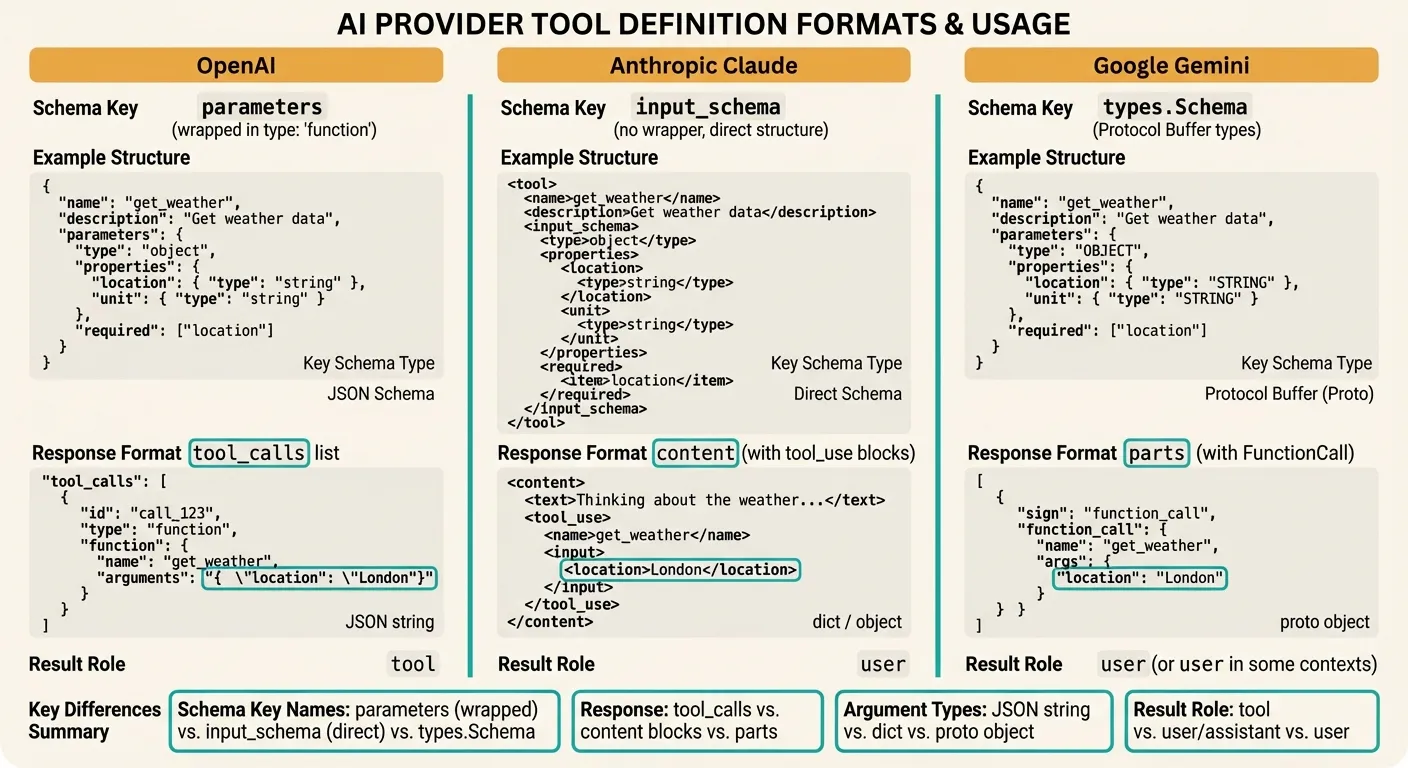
Understanding the format differences between providers is critical when building multi-provider applications or migrating between them. Here is a detailed comparison:
Tool Definition Format
| Aspect | OpenAI | Anthropic | Gemini |
|---|---|---|---|
| Wrapper | {"type": "function", "function": {...}} | Direct object (no wrapper) | types.Tool(function_declarations=[...]) |
| Schema key | parameters | input_schema | parameters (as types.Schema) |
| Schema format | JSON Schema | JSON Schema | Protocol Buffer types |
| Max tools | 128 | 128 | 128 |
API Call Format
| Aspect | OpenAI | Anthropic | Gemini |
|---|---|---|---|
| Tools parameter | tools=[...] | tools=[...] | config.tools=[...] |
| Tool choice | tool_choice | tool_choice | tool_config.function_calling_config |
| Force one tool | {"type": "function", "function": {"name": "X"}} | {"type": "tool", "name": "X"} | mode="ANY", allowed_function_names=["X"] |
| Force any tool | "required" | {"type": "any"} | mode="ANY" |
| No tools | "none" | Omit tools param | mode="NONE" |
Response Format
| Aspect | OpenAI | Anthropic | Gemini |
|---|---|---|---|
| Tool call location | message.tool_calls[] | content[] blocks with type="tool_use" | parts[] with function_call |
| Detection method | Check message.tool_calls | Check stop_reason == "tool_use" | Check for function_call in parts |
| Arguments type | JSON string (needs parsing) | Dict (pre-parsed) | Proto object (use dict()) |
| Call ID | tool_call.id | block.id | None (matched by name) |
Tool Result Format
| Aspect | OpenAI | Anthropic | Gemini |
|---|---|---|---|
| Role | "tool" | "user" | "user" (as parts) |
| ID reference | tool_call_id | tool_use_id | Function name |
| Content type | String | String | Dict |
| Error handling | Return error as content string | Return is_error: true block | Return error in response dict |
Parallel Tool Calls
Modern LLMs can request multiple function calls in a single response. This is essential for efficiency — if a user asks “What’s the weather in Tokyo and London?”, the model should call get_weather twice simultaneously rather than making two round trips.
OpenAI Parallel Tool Calls
OpenAI enables parallel tool calls by default. The model returns multiple entries in tool_calls:
from openai import OpenAI
import json
import asyncio
from concurrent.futures import ThreadPoolExecutor

client = OpenAI()

def handle_parallel_tool_calls(user_message: str) -> str:
    messages = [{"role": "user", "content": user_message}]

    response = client.chat.completions.create(
        model="gpt-5.4",
        messages=messages,
        tools=tools,
        parallel_tool_calls=True,  # Default, shown for clarity
    )

    assistant_message = response.choices[0].message

    if assistant_message.tool_calls:
        messages.append(assistant_message)

        # Execute all tool calls in parallel using threads
        def execute_tool(tool_call):
            func_name = tool_call.function.name
            func_args = json.loads(tool_call.function.arguments)
            func = AVAILABLE_FUNCTIONS.get(func_name)
            result = func(**func_args) if func else {"error": "Unknown function"}
            return tool_call.id, result

        with ThreadPoolExecutor() as executor:
            futures = [executor.submit(execute_tool, tc) for tc in assistant_message.tool_calls]
            results = [f.result() for f in futures]

        # Add all results to messages
        for tool_call_id, result in results:
            messages.append({
                "role": "tool",
                "tool_call_id": tool_call_id,
                "content": json.dumps(result),
            })

        # Get final response with all results
        final = client.chat.completions.create(
            model="gpt-5.4",
            messages=messages,
            tools=tools,
        )
        return final.choices[0].message.content

    return assistant_message.content


# The model will call get_weather twice in parallel
print(handle_parallel_tool_calls("What's the weather in Tokyo and London?"))
Anthropic Parallel Tool Use
Claude returns multiple tool_use content blocks in a single response:
import anthropic
import json
from concurrent.futures import ThreadPoolExecutor

client = anthropic.Anthropic()

def handle_parallel_tool_use_claude(user_message: str) -> str:
    messages = [{"role": "user", "content": user_message}]

    response = client.messages.create(
        model="claude-sonnet-4-6-20260301",
        max_tokens=1024,
        tools=tools,  # Anthropic-format tools defined earlier
        messages=messages,
    )

    if response.stop_reason == "tool_use":
        messages.append({"role": "assistant", "content": response.content})

        # Collect all tool_use blocks
        tool_use_blocks = [b for b in response.content if b.type == "tool_use"]

        # Execute in parallel
        def execute_tool(block):
            func = AVAILABLE_FUNCTIONS.get(block.name)
            result = func(**block.input) if func else {"error": "Unknown"}
            return block.id, result

        with ThreadPoolExecutor() as executor:
            futures = [executor.submit(execute_tool, b) for b in tool_use_blocks]
            results = [f.result() for f in futures]

        # Build tool results
        tool_results = [
            {
                "type": "tool_result",
                "tool_use_id": tool_id,
                "content": json.dumps(result),
            }
            for tool_id, result in results
        ]

        messages.append({"role": "user", "content": tool_results})

        final = client.messages.create(
            model="claude-sonnet-4-6-20260301",
            max_tokens=1024,
            tools=tools,
            messages=messages,
        )

        return "".join(b.text for b in final.content if b.type == "text")

    return "".join(b.text for b in response.content if b.type == "text")
Disabling Parallel Calls
Sometimes you want sequential execution — for example, when the second function depends on the first function’s result:
# OpenAI: disable parallel tool calls
response = client.chat.completions.create(
    model="gpt-5.4",
    messages=messages,
    tools=tools,
    parallel_tool_calls=False,  # Force sequential
)

# Anthropic: use tool_choice to force one tool at a time
# (Claude doesn't have a direct flag — use the agent loop pattern below)

# Gemini: no direct flag — handled via tool_config or agent loop
Multi-Step Tool Chains (Agent Loops)
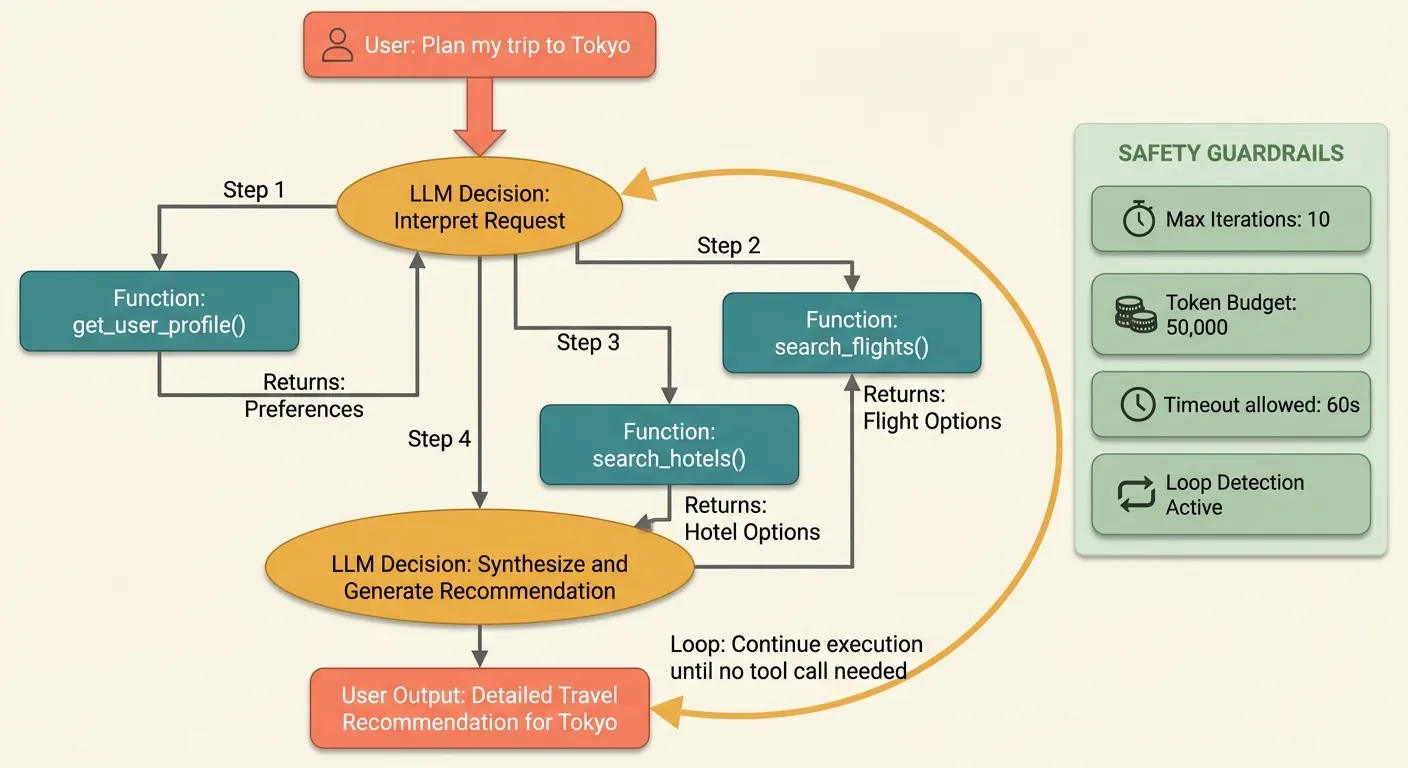
Real-world applications often require multiple sequential tool calls where each step depends on the previous result. This is the “agent loop” pattern — the foundation of autonomous AI agents.
The Agent Loop Pattern
from openai import OpenAI
import json

client = OpenAI()

# Extended tool set for a travel agent
agent_tools = [
    {
        "type": "function",
        "function": {
            "name": "search_flights",
            "description": "Search for flights between two airports.",
            "parameters": {
                "type": "object",
                "properties": {
                    "origin": {"type": "string", "description": "IATA code"},
                    "destination": {"type": "string", "description": "IATA code"},
                    "date": {"type": "string", "description": "YYYY-MM-DD"},
                },
                "required": ["origin", "destination", "date"]
            }
        }
    },
    {
        "type": "function",
        "function": {
            "name": "search_hotels",
            "description": "Search for hotels in a city for given dates.",
            "parameters": {
                "type": "object",
                "properties": {
                    "city": {"type": "string"},
                    "check_in": {"type": "string", "description": "YYYY-MM-DD"},
                    "check_out": {"type": "string", "description": "YYYY-MM-DD"},
                    "max_price": {"type": "number", "description": "Max price per night in USD"},
                },
                "required": ["city", "check_in", "check_out"]
            }
        }
    },
    {
        "type": "function",
        "function": {
            "name": "book_reservation",
            "description": "Book a flight or hotel reservation.",
            "parameters": {
                "type": "object",
                "properties": {
                    "type": {"type": "string", "enum": ["flight", "hotel"]},
                    "reservation_id": {"type": "string"},
                    "passenger_name": {"type": "string"},
                },
                "required": ["type", "reservation_id", "passenger_name"]
            }
        }
    },
    {
        "type": "function",
        "function": {
            "name": "get_user_profile",
            "description": "Get the current user's profile including preferences and payment info.",
            "parameters": {
                "type": "object",
                "properties": {},
            }
        }
    },
]

# Simulated function implementations
def search_hotels(city: str, check_in: str, check_out: str, max_price: float = 500) -> dict:
    return {
        "hotels": [
            {"name": "Grand Hyatt Tokyo", "price": 320, "rating": 4.5, "id": "htl-001"},
            {"name": "Shinjuku Granbell", "price": 180, "rating": 4.2, "id": "htl-002"},
        ]
    }

def book_reservation(type: str, reservation_id: str, passenger_name: str) -> dict:
    return {"confirmation": f"BK-{reservation_id}", "status": "confirmed", "name": passenger_name}

def get_user_profile() -> dict:
    return {"name": "Alice Chen", "preferred_airline": "ANA", "budget": "moderate"}

AGENT_FUNCTIONS = {
    "search_flights": search_flights,
    "search_hotels": search_hotels,
    "book_reservation": book_reservation,
    "get_user_profile": get_user_profile,
}


def run_agent(user_message: str, max_iterations: int = 10) -> str:
    """Run a multi-step agent loop that handles sequential tool calls."""
    messages = [
        {
            "role": "system",
            "content": (
                "You are a travel assistant. Help users plan trips by searching "
                "flights, hotels, and making bookings. Always check the user profile "
                "first to personalize recommendations. Confirm with the user before booking."
            ),
        },
        {"role": "user", "content": user_message},
    ]

    for iteration in range(max_iterations):
        response = client.chat.completions.create(
            model="gpt-5.4",
            messages=messages,
            tools=agent_tools,
        )

        assistant_message = response.choices[0].message
        messages.append(assistant_message)

        # If no tool calls, the agent is done
        if not assistant_message.tool_calls:
            return assistant_message.content

        # Execute tool calls
        for tool_call in assistant_message.tool_calls:
            func_name = tool_call.function.name
            func_args = json.loads(tool_call.function.arguments)

            print(f"[Step {iteration + 1}] Calling {func_name}({func_args})")

            func = AGENT_FUNCTIONS.get(func_name)
            if func:
                result = func(**func_args)
            else:
                result = {"error": f"Unknown function: {func_name}"}

            messages.append({
                "role": "tool",
                "tool_call_id": tool_call.id,
                "content": json.dumps(result),
            })

    return "Agent reached maximum iterations without completing."


# This will trigger multiple tool calls:
# 1. get_user_profile (to check preferences)
# 2. search_flights (LAX → NRT)
# 3. search_hotels (Tokyo)
# 4. Respond with recommendations
result = run_agent("I want to plan a trip from LA to Tokyo, March 20-25, 2026")
print(result)
Agent Loop with Anthropic Claude
The pattern is similar but adapted for Claude’s content-block format:
import anthropic
import json

client = anthropic.Anthropic()

def run_agent_claude(user_message: str, max_iterations: int = 10) -> str:
    """Multi-step agent loop for Claude."""
    messages = [{"role": "user", "content": user_message}]

    system_prompt = (
        "You are a travel assistant. Help users plan trips by searching "
        "flights, hotels, and making bookings. Always check the user profile "
        "first to personalize recommendations."
    )

    # Convert tools to Anthropic format
    anthropic_tools = [
        {
            "name": t["function"]["name"],
            "description": t["function"]["description"],
            "input_schema": t["function"]["parameters"],
        }
        for t in agent_tools
    ]

    for iteration in range(max_iterations):
        response = client.messages.create(
            model="claude-sonnet-4-6-20260301",
            max_tokens=2048,
            system=system_prompt,
            tools=anthropic_tools,
            messages=messages,
        )

        # Add assistant response
        messages.append({"role": "assistant", "content": response.content})

        # If no tool use, we're done
        if response.stop_reason != "tool_use":
            return "".join(b.text for b in response.content if b.type == "text")

        # Process tool calls
        tool_results = []
        for block in response.content:
            if block.type == "tool_use":
                print(f"[Step {iteration + 1}] Calling {block.name}({block.input})")

                func = AGENT_FUNCTIONS.get(block.name)
                result = func(**block.input) if func else {"error": "Unknown"}

                tool_results.append({
                    "type": "tool_result",
                    "tool_use_id": block.id,
                    "content": json.dumps(result),
                })

        messages.append({"role": "user", "content": tool_results})

    return "Agent reached maximum iterations."
Safeguards for Production Agent Loops
Agent loops need guardrails to prevent runaway execution and excessive costs:
import time
from dataclasses import dataclass, field

@dataclass
class AgentConfig:
    max_iterations: int = 10
    max_total_tokens: int = 50000
    timeout_seconds: float = 120.0
    allowed_functions: set = field(default_factory=lambda: set(AGENT_FUNCTIONS.keys()))
    require_confirmation: set = field(default_factory=lambda: {"book_reservation"})

def run_safe_agent(user_message: str, config: AgentConfig = AgentConfig()) -> str:
    """Agent loop with safety guardrails."""
    messages = [{"role": "user", "content": user_message}]
    total_tokens = 0
    start_time = time.time()

    for iteration in range(config.max_iterations):
        # Check timeout
        elapsed = time.time() - start_time
        if elapsed > config.timeout_seconds:
            return f"Agent timed out after {elapsed:.1f}s"

        response = client.chat.completions.create(
            model="gpt-5.4",
            messages=messages,
            tools=agent_tools,
        )

        # Track token usage
        total_tokens += response.usage.total_tokens
        if total_tokens > config.max_total_tokens:
            return f"Agent exceeded token budget ({total_tokens:,} tokens used)"

        assistant_message = response.choices[0].message
        messages.append(assistant_message)

        if not assistant_message.tool_calls:
            return assistant_message.content

        for tool_call in assistant_message.tool_calls:
            func_name = tool_call.function.name

            # Validate function is allowed
            if func_name not in config.allowed_functions:
                messages.append({
                    "role": "tool",
                    "tool_call_id": tool_call.id,
                    "content": json.dumps({"error": f"Function '{func_name}' is not permitted"}),
                })
                continue

            # Check if confirmation is required
            if func_name in config.require_confirmation:
                messages.append({
                    "role": "tool",
                    "tool_call_id": tool_call.id,
                    "content": json.dumps({
                        "status": "pending_confirmation",
                        "message": "This action requires user confirmation before proceeding."
                    }),
                })
                continue

            func_args = json.loads(tool_call.function.arguments)
            func = AGENT_FUNCTIONS[func_name]
            result = func(**func_args)

            messages.append({
                "role": "tool",
                "tool_call_id": tool_call.id,
                "content": json.dumps(result),
            })

    return "Agent completed maximum iterations."
Error Handling and Edge Cases
Production function calling requires robust error handling. Models can produce malformed arguments, call nonexistent functions, or enter infinite loops. Here are the patterns you need.
Handling Malformed Arguments
import json

def safe_execute_tool(tool_call, available_functions: dict) -> dict:
    """Execute a tool call with comprehensive error handling."""
    func_name = tool_call.function.name

    # Validate function exists
    if func_name not in available_functions:
        return {
            "error": f"Function '{func_name}' not found. Available: {list(available_functions.keys())}"
        }

    # Parse arguments safely
    try:
        func_args = json.loads(tool_call.function.arguments)
    except json.JSONDecodeError as e:
        return {
            "error": f"Invalid JSON arguments: {e}. Raw: {tool_call.function.arguments[:200]}"
        }

    # Validate argument types
    if not isinstance(func_args, dict):
        return {"error": f"Expected dict arguments, got {type(func_args).__name__}"}

    # Execute with exception handling
    func = available_functions[func_name]
    try:
        result = func(**func_args)
        return result
    except TypeError as e:
        return {"error": f"Invalid arguments for {func_name}: {e}"}
    except Exception as e:
        return {"error": f"{func_name} failed: {type(e).__name__}: {e}"}
Handling Anthropic Tool Errors
Anthropic has a specific mechanism for reporting tool errors — the is_error field:
def execute_tool_anthropic(block, available_functions: dict) -> dict:
    """Execute a Claude tool_use block with error handling."""
    func = available_functions.get(block.name)

    if not func:
        return {
            "type": "tool_result",
            "tool_use_id": block.id,
            "content": f"Error: function '{block.name}' not found",
            "is_error": True,
        }

    try:
        result = func(**block.input)
        return {
            "type": "tool_result",
            "tool_use_id": block.id,
            "content": json.dumps(result),
        }
    except Exception as e:
        return {
            "type": "tool_result",
            "tool_use_id": block.id,
            "content": f"Error executing {block.name}: {e}",
            "is_error": True,  # Tells Claude the tool failed
        }
Timeout Handling
External API calls can hang. Always set timeouts:
import signal
import functools

class ToolTimeoutError(Exception):
    pass

def with_timeout(seconds: float):
    """Decorator to add a timeout to function execution."""
    def decorator(func):
        @functools.wraps(func)
        def wrapper(*args, **kwargs):
            def handler(signum, frame):
                raise ToolTimeoutError(
                    f"{func.__name__} timed out after {seconds}s"
                )

            old_handler = signal.signal(signal.SIGALRM, handler)
            signal.alarm(int(seconds))
            try:
                return func(*args, **kwargs)
            finally:
                signal.alarm(0)
                signal.signal(signal.SIGALRM, old_handler)
        return wrapper
    return decorator


# Apply to your tool functions
@with_timeout(10.0)
def get_weather(location: str, unit: str = "celsius") -> dict:
    # This will raise ToolTimeoutError if it takes > 10 seconds
    return call_external_weather_api(location, unit)
Retry Logic for Transient Failures
import time
from typing import Callable

def execute_with_retry(
    func: Callable,
    args: dict,
    max_retries: int = 3,
    backoff_factor: float = 1.0,
) -> dict:
    """Execute a tool function with exponential backoff retry."""
    last_error = None

    for attempt in range(max_retries):
        try:
            return func(**args)
        except ToolTimeoutError:
            last_error = "timeout"
        except ConnectionError as e:
            last_error = str(e)
        except Exception as e:
            # Non-retryable error — return immediately
            return {"error": f"{type(e).__name__}: {e}"}

        if attempt < max_retries - 1:
            wait = backoff_factor * (2 ** attempt)
            time.sleep(wait)

    return {"error": f"Failed after {max_retries} attempts. Last error: {last_error}"}
Preventing Infinite Loops
Models occasionally enter loops where they repeatedly call the same function. Detect and break these cycles:
from collections import Counter

class LoopDetector:
    def __init__(self, max_repeated_calls: int = 3):
        self.call_history: list[str] = []
        self.max_repeated = max_repeated_calls

    def record_call(self, function_name: str, arguments: str) -> bool:
        """Record a call and return True if a loop is detected."""
        call_key = f"{function_name}:{arguments}"
        self.call_history.append(call_key)

        # Check last N calls for repetition
        recent = self.call_history[-self.max_repeated:]
        if len(recent) == self.max_repeated and len(set(recent)) == 1:
            return True  # Same call repeated max_repeated times

        return False

# Usage in your agent loop
loop_detector = LoopDetector(max_repeated_calls=3)

for tool_call in assistant_message.tool_calls:
    is_loop = loop_detector.record_call(
        tool_call.function.name,
        tool_call.function.arguments,
    )
    if is_loop:
        messages.append({
            "role": "tool",
            "tool_call_id": tool_call.id,
            "content": json.dumps({
                "error": "Loop detected — this function was called with identical "
                         "arguments 3 times. Please try a different approach."
            }),
        })
        continue
    # ... normal execution
Best Practices for Production
After deploying function calling in production systems processing millions of requests, these patterns consistently prove their value.
1. Write Descriptive Tool Definitions
The quality of your tool descriptions directly affects how accurately the model selects and calls tools. Be specific about when to use each tool and what it returns:
# Bad: vague description
{
    "name": "search",
    "description": "Search for things",
    "parameters": {...}
}

# Good: specific, with usage guidance
{
    "name": "search_knowledge_base",
    "description": (
        "Search the internal knowledge base for company policies, procedures, "
        "and documentation. Use this when the user asks about company-specific "
        "information that wouldn't be in your training data. Returns the top 5 "
        "matching documents with relevance scores."
    ),
    "parameters": {...}
}
2. Minimize Tool Count Per Request
Every tool definition consumes input tokens. If you have 50 tools but a given request only needs 3, filter dynamically:
def select_relevant_tools(user_message: str, all_tools: list[dict]) -> list[dict]:
    """Pre-filter tools based on the user's message to reduce token usage."""
    # Simple keyword-based filtering (use embeddings for production)
    tool_keywords = {
        "get_weather": ["weather", "temperature", "forecast", "rain", "sunny"],
        "search_flights": ["flight", "fly", "airport", "airline", "travel"],
        "search_hotels": ["hotel", "stay", "accommodation", "room", "lodge"],
        "book_reservation": ["book", "reserve", "confirm", "purchase"],
    }

    message_lower = user_message.lower()
    selected = []

    for tool in all_tools:
        func_name = tool["function"]["name"]
        keywords = tool_keywords.get(func_name, [])
        if any(kw in message_lower for kw in keywords):
            selected.append(tool)

    # Always include at least a minimum set to avoid missing tools
    return selected if selected else all_tools[:5]
3. Validate and Sanitize Tool Outputs
Never trust external API responses blindly. Validate before sending to the model:
def sanitize_tool_result(result: dict, max_length: int = 5000) -> str:
    """Sanitize and truncate tool results before sending to the model."""
    result_str = json.dumps(result, default=str)

    # Truncate excessively long results (saves output tokens on the next call)
    if len(result_str) > max_length:
        result_str = result_str[:max_length] + '... [truncated]'

    return result_str
4. Log Everything for Debugging
Function calling adds complexity. Comprehensive logging is essential:
import logging
from datetime import datetime

logger = logging.getLogger("tool_use")

def log_tool_call(tool_call, result, latency_ms: float):
    """Log tool call details for monitoring and debugging."""
    logger.info(
        "tool_call",
        extra={
            "function": tool_call.function.name,
            "arguments": tool_call.function.arguments,
            "result_length": len(json.dumps(result)),
            "has_error": "error" in result if isinstance(result, dict) else False,
            "latency_ms": latency_ms,
            "timestamp": datetime.utcnow().isoformat(),
        },
    )
5. Use Type-Safe Function Definitions with Pydantic
For complex tools, define schemas with Pydantic to catch errors early:
from pydantic import BaseModel, Field
from typing import Optional

class WeatherRequest(BaseModel):
    location: str = Field(description="City and country, e.g. 'London, UK'")
    unit: Optional[str] = Field(
        default="celsius",
        description="Temperature unit",
        pattern="^(celsius|fahrenheit)$",
    )

class FlightSearchRequest(BaseModel):
    origin: str = Field(description="IATA code", min_length=3, max_length=3)
    destination: str = Field(description="IATA code", min_length=3, max_length=3)
    date: str = Field(description="YYYY-MM-DD format")

def execute_validated(func_name: str, raw_args: dict) -> dict:
    """Validate arguments with Pydantic before execution."""
    validators = {
        "get_weather": WeatherRequest,
        "search_flights": FlightSearchRequest,
    }

    validator = validators.get(func_name)
    if validator:
        try:
            validated = validator(**raw_args)
            return AVAILABLE_FUNCTIONS[func_name](**validated.model_dump())
        except Exception as e:
            return {"error": f"Validation failed: {e}"}

    return AVAILABLE_FUNCTIONS[func_name](**raw_args)
6. Build a Unified Abstraction Layer
If you work across multiple providers, abstract the differences away. Alternatively, use an OpenAI-compatible API aggregation platform like Ofox.ai that normalizes the interface so you can use the OpenAI SDK format to access Claude, Gemini, and other models without changing your tool-calling code:
from openai import OpenAI

# Using an aggregation gateway — same OpenAI tool format works for all models
client = OpenAI(
    api_key="your-key",
    base_url="https://api.ofox.ai/v1",
)

# This exact code works with GPT, Claude, Gemini, DeepSeek, etc.
response = client.chat.completions.create(
    model="claude-sonnet-4-6-20260301",  # Or any supported model
    messages=messages,
    tools=tools,  # Standard OpenAI tool format
)
This eliminates the need to maintain separate code paths for each provider. You define tools once in OpenAI format and the aggregation layer handles format translation.
7. Test Tool Definitions Systematically
Create test suites that verify tool selection accuracy:
import pytest

TEST_CASES = [
    {
        "message": "What's the weather in Paris?",
        "expected_tool": "get_weather",
        "expected_args_contain": {"location": "Paris"},
    },
    {
        "message": "Find me a flight from JFK to LAX tomorrow",
        "expected_tool": "search_flights",
        "expected_args_contain": {"origin": "JFK", "destination": "LAX"},
    },
    {
        "message": "What is the capital of France?",
        "expected_tool": None,  # Should not call any tool
    },
]

@pytest.mark.parametrize("case", TEST_CASES)
def test_tool_selection(case):
    response = client.chat.completions.create(
        model="gpt-5.4",
        messages=[{"role": "user", "content": case["message"]}],
        tools=tools,
    )

    msg = response.choices[0].message

    if case["expected_tool"] is None:
        assert not msg.tool_calls, f"Expected no tool call, got {msg.tool_calls}"
    else:
        assert msg.tool_calls, "Expected a tool call but got none"
        assert msg.tool_calls[0].function.name == case["expected_tool"]

        if case.get("expected_args_contain"):
            import json
            args = json.loads(msg.tool_calls[0].function.arguments)
            for key, value in case["expected_args_contain"].items():
                assert key in args
                assert value.lower() in args[key].lower()
8. Monitor Costs Carefully
Tool-calling requests are more expensive than regular completions because:
- Tool definitions add input tokens (typically 100-300 per tool)
- Multi-step loops multiply the number of API calls
- Tool results add input tokens on follow-up calls
Track cost per agent execution, not just per API call:
class CostTracker:
    PRICING = {  # Per 1M tokens
        "gpt-5.4": {"input": 2.00, "output": 8.00},
        "claude-sonnet-4-6-20260301": {"input": 3.00, "output": 15.00},
        "gemini-2.0-flash": {"input": 0.50, "output": 3.00},
    }

    def __init__(self, model: str):
        self.model = model
        self.total_input_tokens = 0
        self.total_output_tokens = 0
        self.api_calls = 0

    def record(self, usage):
        self.total_input_tokens += usage.prompt_tokens
        self.total_output_tokens += usage.completion_tokens
        self.api_calls += 1

    @property
    def total_cost(self) -> float:
        prices = self.PRICING.get(self.model, {"input": 5.0, "output": 25.0})
        input_cost = (self.total_input_tokens / 1_000_000) * prices["input"]
        output_cost = (self.total_output_tokens / 1_000_000) * prices["output"]
        return input_cost + output_cost

    def report(self) -> str:
        return (
            f"Model: {self.model} | API Calls: {self.api_calls} | "
            f"Input: {self.total_input_tokens:,} | Output: {self.total_output_tokens:,} | "
            f"Cost: ${self.total_cost:.4f}"
        )
Conclusion
Function calling transforms LLMs from text generators into capable agents that interact with the real world. The core concept is consistent across providers — define tools, detect calls, execute functions, return results — but the implementation details differ significantly between OpenAI, Anthropic, and Google.
Here is what to remember:
- Start simple: implement one tool with a single-step loop before building complex agents
- Handle errors everywhere: malformed arguments, missing functions, timeouts, and infinite loops are all common in production
- Validate inputs: use Pydantic or similar validation before executing tool functions
- Control costs: tool definitions consume tokens, and agent loops multiply API calls
- Test systematically: verify tool selection, argument accuracy, and edge cases
- Consider an abstraction layer: if you use multiple providers, an OpenAI-compatible gateway or a framework like LangChain saves significant development time
Function calling is the building block of the AI agent era. Master it across providers, and you can build systems that integrate with any API, any database, and any service — using the best model for each task.