
How to Reduce AI API Costs by 60%: 7 Proven Strategies for 2026
TL;DR
AI API costs can spiral quickly in production. This guide covers seven proven strategies — prompt caching, model tiering, Batch API, token budgets, output limits, semantic caching, and API aggregation — that together can cut your spending by 60% or more. Each strategy includes Python code you can deploy today, plus a pricing comparison of major models in 2026.
The State of AI API Pricing in 2026
Before diving into optimization strategies, let’s establish the current pricing landscape. Understanding what you’re paying per token across providers is the foundation of any cost-reduction plan.
Current Model Pricing (per 1M tokens)
| Model | Input Price | Output Price | Context Window | Best For |
|---|---|---|---|---|
| GPT-5.4 | $2.00 | $8.00 | 256K | Complex reasoning, creative writing |
| GPT-4o | $2.50 | $10.00 | 128K | General-purpose, multimodal |
| GPT-4o-mini | $0.15 | $0.60 | 128K | Simple tasks, high volume |
| Claude Opus 4.6 | $5.00 | $25.00 | 200K | Deep analysis, code generation |
| Claude Sonnet 4.6 | $3.00 | $15.00 | 200K | Balanced quality/cost |
| Claude Haiku 3.5 | $0.80 | $4.00 | 200K | Fast, lightweight tasks |
| Gemini 3 Pro | $2.00 | $12.00 | 2M | Long context, multimodal |
| Gemini Flash | $0.50 | $3.00 | 1M | Speed-critical applications |
| DeepSeek V3.2 | $0.27 | $1.10 | 128K | Cost-effective reasoning |
The price difference between the cheapest and most expensive options is nearly 20x. That gap is where your savings live.
Strategy 1: Prompt Caching — Save Up to 90% on Repeated Context
Prompt caching is the single highest-impact optimization for applications that reuse system prompts, few-shot examples, or large context documents across requests.
How It Works
When you send a request with a long system prompt, the provider caches the processed tokens. Subsequent requests that share the same prefix hit the cache instead of reprocessing everything. Anthropic offers a 90% discount on cached input tokens; OpenAI offers 50%.
Implementation with Anthropic (Claude)
Anthropic’s prompt caching is automatic for prompts longer than 1,024 tokens (Haiku) or 2,048 tokens (Sonnet/Opus). You can also explicitly mark cache breakpoints:
import anthropic

client = anthropic.Anthropic()

# The system prompt will be cached after the first request.
# Subsequent calls with the same prefix get 90% input discount.
SYSTEM_PROMPT = """You are a legal document analyzer specializing in
contract review. You follow these detailed guidelines...
[imagine 3000+ tokens of detailed instructions and examples here]
"""

def analyze_contract(contract_text: str) -> str:
    response = client.messages.create(
        model="claude-sonnet-4-6-20260301",
        max_tokens=2000,
        system=[
            {
                "type": "text",
                "text": SYSTEM_PROMPT,
                "cache_control": {"type": "ephemeral"}
            }
        ],
        messages=[
            {"role": "user", "content": f"Analyze this contract:\n\n{contract_text}"}
        ],
    )

    # Check cache performance
    usage = response.usage
    print(f"Input tokens: {usage.input_tokens}")
    print(f"Cache read tokens: {usage.cache_read_input_tokens}")
    print(f"Cache creation tokens: {usage.cache_creation_input_tokens}")

    return response.content[0].text
Implementation with OpenAI (GPT)
OpenAI’s caching is fully automatic — no code changes needed. Prompts longer than 1,024 tokens are cached automatically, and cached tokens are billed at 50% of the input price.
from openai import OpenAI

client = OpenAI()

SYSTEM_PROMPT = """You are a legal document analyzer specializing in
contract review. You follow these detailed guidelines...
[imagine 3000+ tokens of detailed instructions and examples here]
"""

def analyze_contract(contract_text: str) -> str:
    response = client.chat.completions.create(
        model="gpt-5.4",
        max_tokens=2000,
        messages=[
            {"role": "system", "content": SYSTEM_PROMPT},
            {"role": "user", "content": f"Analyze this contract:\n\n{contract_text}"},
        ],
    )

    # OpenAI reports cached tokens in usage
    usage = response.usage
    print(f"Total input tokens: {usage.prompt_tokens}")
    print(f"Cached tokens: {usage.prompt_tokens_details.cached_tokens}")

    return response.choices[0].message.content
Cost Impact Calculation
Consider a system prompt of 4,000 tokens processing 1,000 requests per day:
- Without caching: 4,000 × 1,000 = 4M input tokens/day
- With caching (Anthropic, 90% discount): First request full price, remaining 999 at 10% = ~400K effective tokens/day
- Daily savings: ~$10.80 on Claude Sonnet (at $3/1M input)
- Monthly savings: ~$324
For applications with longer system prompts or higher volume, savings scale proportionally.
Strategy 2: Model Tiering — Use the Right Model for Each Task
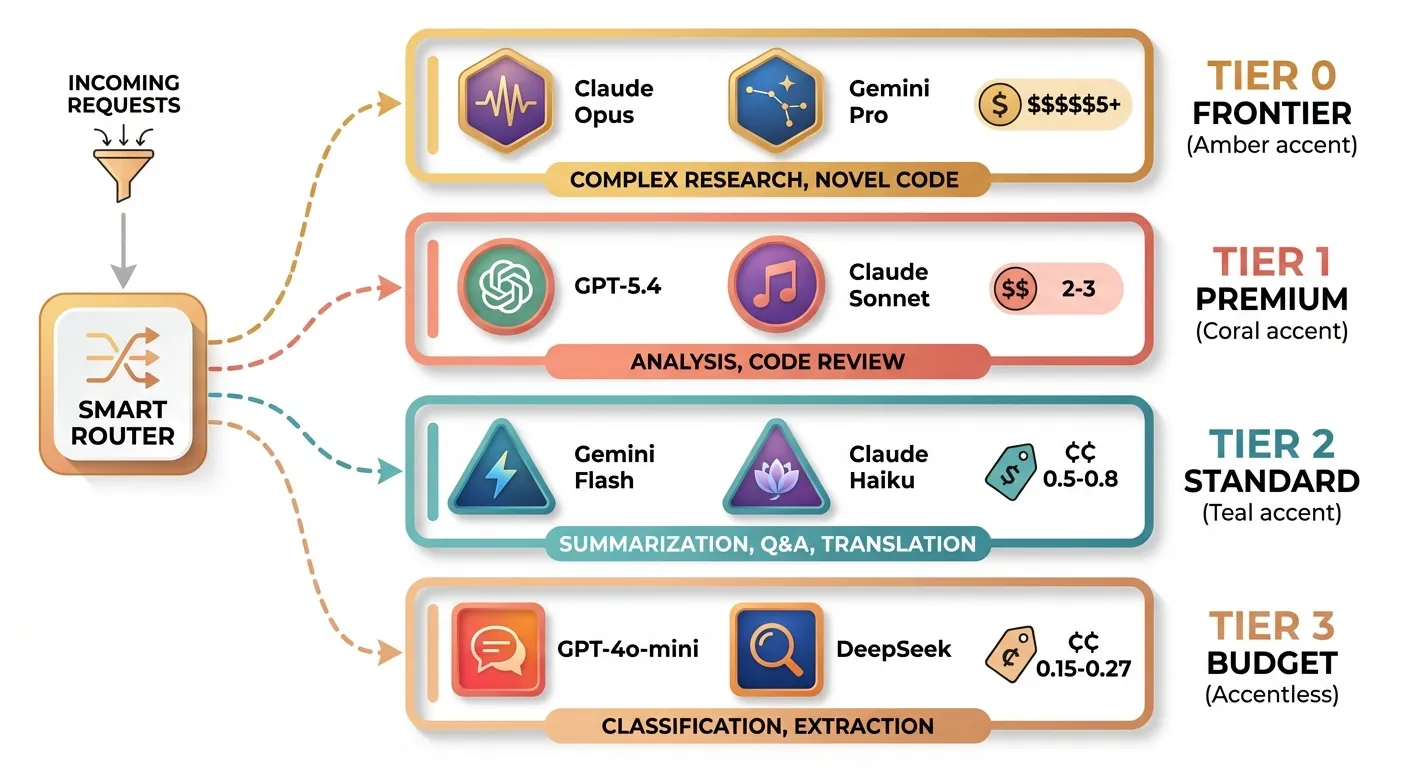
This is the strategy with the highest potential savings and the one most teams neglect. The core idea: not every request needs a frontier model.
The Tiering Framework
| Task Complexity | Recommended Tier | Example Models | Cost Level |
|---|---|---|---|
| Simple classification, extraction | Tier 3 (Budget) | GPT-4o-mini, DeepSeek V3.2 | $0.15-0.27/1M input |
| Summarization, Q&A, translation | Tier 2 (Standard) | Gemini Flash, Claude Haiku 3.5 | $0.50-0.80/1M input |
| Complex reasoning, analysis | Tier 1 (Premium) | GPT-5.4, Claude Sonnet 4.6 | $2-3/1M input |
| Research, novel code generation | Tier 0 (Frontier) | Claude Opus 4.6, Gemini 3 Pro | $5+/1M input |
Implementation: Automatic Task Router
from openai import OpenAI
from enum import Enum

client = OpenAI()  # Works with any OpenAI-compatible endpoint

class ModelTier(Enum):
    BUDGET = "gpt-4o-mini"
    STANDARD = "gemini-2.0-flash"
    PREMIUM = "claude-sonnet-4-6-20260301"
    FRONTIER = "claude-opus-4-6-20260301"

# Define routing rules based on task type
TASK_ROUTING = {
    "classify": ModelTier.BUDGET,
    "extract": ModelTier.BUDGET,
    "summarize": ModelTier.STANDARD,
    "translate": ModelTier.STANDARD,
    "analyze": ModelTier.PREMIUM,
    "code_review": ModelTier.PREMIUM,
    "research": ModelTier.FRONTIER,
    "complex_code": ModelTier.FRONTIER,
}

def route_request(task_type: str, prompt: str, max_tokens: int = 1000) -> str:
    """Route to the most cost-effective model for the task."""
    tier = TASK_ROUTING.get(task_type, ModelTier.STANDARD)

    response = client.chat.completions.create(
        model=tier.value,
        max_tokens=max_tokens,
        messages=[{"role": "user", "content": prompt}],
    )

    return response.choices[0].message.content

# Usage examples
result = route_request("classify", "Is this email spam or not spam? Email: ...")
result = route_request("research", "Analyze the implications of quantum computing on RSA encryption...")
Confidence-Based Escalation
A more sophisticated approach: start with a cheap model and only escalate if confidence is low.
import json
from openai import OpenAI

client = OpenAI()

def classify_with_escalation(text: str, categories: list[str]) -> dict:
    """Classify text, escalating to a better model if confidence is low."""

    prompt = f"""Classify this text into one of these categories: {categories}

Text: {text}

Respond with JSON: {{"category": "...", "confidence": 0.0-1.0}}"""

    # Try budget model first
    response = client.chat.completions.create(
        model="gpt-4o-mini",
        max_tokens=100,
        response_format={"type": "json_object"},
        messages=[{"role": "user", "content": prompt}],
    )

    result = json.loads(response.choices[0].message.content)

    # Escalate if confidence is below threshold
    if result.get("confidence", 0) < 0.85:
        response = client.chat.completions.create(
            model="gpt-5.4",
            max_tokens=100,
            response_format={"type": "json_object"},
            messages=[{"role": "user", "content": prompt}],
        )
        result = json.loads(response.choices[0].message.content)
        result["escalated"] = True

    return result
Savings Example
A team processing 100K requests/day with this distribution:
- 60% simple tasks (Tier 3): 60K × $0.15/1M = $0.009/day
- 25% moderate tasks (Tier 2): 25K × $0.50/1M = $0.0125/day
- 12% complex tasks (Tier 1): 12K × $3.00/1M = $0.036/day
- 3% frontier tasks (Tier 0): 3K × $5.00/1M = $0.015/day
Blended cost: ~$0.073/day per 1K input tokens vs. using Tier 1 for everything: ~$0.30/day per 1K input tokens Savings: ~76%
Strategy 3: Batch API — 50% Off for Non-Urgent Workloads
The Batch API is designed for workloads that don’t need real-time responses. You submit a batch of requests and get results within 24 hours, at a 50% discount.
When to Use Batch API
- Content moderation pipelines
- Bulk data extraction or classification
- Evaluation and testing suites
- Nightly report generation
- Dataset labeling
Implementation
import json
import time
from openai import OpenAI

client = OpenAI()

def create_batch_job(requests: list[dict]) -> str:
    """Submit a batch of requests for async processing at 50% discount."""

    # Prepare JSONL file
    batch_lines = []
    for i, req in enumerate(requests):
        batch_lines.append(json.dumps({
            "custom_id": f"request-{i}",
            "method": "POST",
            "url": "/v1/chat/completions",
            "body": {
                "model": req.get("model", "gpt-5.4"),
                "messages": req["messages"],
                "max_tokens": req.get("max_tokens", 1000),
            }
        }))

    # Write to temp file
    batch_file_path = "/tmp/batch_requests.jsonl"
    with open(batch_file_path, "w") as f:
        f.write("\n".join(batch_lines))

    # Upload the file
    with open(batch_file_path, "rb") as f:
        batch_file = client.files.create(file=f, purpose="batch")

    # Create the batch
    batch = client.batches.create(
        input_file_id=batch_file.id,
        endpoint="/v1/chat/completions",
        completion_window="24h",
    )

    print(f"Batch created: {batch.id}")
    print(f"Status: {batch.status}")
    return batch.id


def poll_batch_results(batch_id: str) -> list[dict]:
    """Poll for batch completion and retrieve results."""

    while True:
        batch = client.batches.retrieve(batch_id)
        print(f"Status: {batch.status} | Completed: {batch.request_counts.completed}/{batch.request_counts.total}")

        if batch.status == "completed":
            # Download results
            result_file = client.files.content(batch.output_file_id)
            results = []
            for line in result_file.text.strip().split("\n"):
                results.append(json.loads(line))
            return results
        elif batch.status in ("failed", "expired", "cancelled"):
            raise Exception(f"Batch {batch_id} failed with status: {batch.status}")

        time.sleep(60)  # Check every minute


# Example: Batch classify 1000 support tickets
tickets = [
    {"messages": [{"role": "user", "content": f"Classify this support ticket: {ticket}"}]}
    for ticket in load_tickets()  # Your data loading function
]

batch_id = create_batch_job(tickets)
results = poll_batch_results(batch_id)
Strategy 4: Token Budget Control — Stop Paying for Wasted Tokens
Most developers send far more tokens than necessary. Optimizing your prompts and managing token budgets can save 20-40% on input costs alone.
Techniques
1. Trim conversation history aggressively
def trim_conversation(messages: list[dict], max_tokens: int = 4000) -> list[dict]:
    """Keep conversation history within a token budget.

    Preserves the system message and most recent messages.
    """
    import tiktoken
    enc = tiktoken.encoding_for_model("gpt-4o")

    system_messages = [m for m in messages if m["role"] == "system"]
    non_system = [m for m in messages if m["role"] != "system"]

    # Always keep system prompt
    system_tokens = sum(len(enc.encode(m["content"])) for m in system_messages)
    remaining_budget = max_tokens - system_tokens

    # Add messages from most recent, going backwards
    trimmed = []
    for msg in reversed(non_system):
        msg_tokens = len(enc.encode(msg["content"]))
        if remaining_budget - msg_tokens < 0:
            break
        trimmed.insert(0, msg)
        remaining_budget -= msg_tokens

    return system_messages + trimmed
2. Compress system prompts
def compress_prompt(verbose_prompt: str) -> str:
    """Use a cheap model to compress a verbose prompt while preserving meaning."""
    from openai import OpenAI
    client = OpenAI()

    response = client.chat.completions.create(
        model="gpt-4o-mini",
        max_tokens=500,
        messages=[
            {"role": "system", "content": "Compress the following instructions to be as concise as possible while preserving all requirements. Use abbreviations and shorthand."},
            {"role": "user", "content": verbose_prompt},
        ],
    )

    return response.choices[0].message.content

# Example:
# Before: 2,000 tokens -> After: ~600 tokens (70% reduction)
3. Use structured output to reduce output tokens
from openai import OpenAI

client = OpenAI()

# Instead of asking for a free-form analysis, request structured JSON
response = client.chat.completions.create(
    model="gpt-5.4",
    max_tokens=300,
    response_format={"type": "json_object"},
    messages=[
        {"role": "system", "content": "Analyze the sentiment. Return JSON with: sentiment (positive/negative/neutral), confidence (0-1), key_phrases (list of max 3)."},
        {"role": "user", "content": "The product exceeded my expectations in every way!"},
    ],
)

# Output: {"sentiment": "positive", "confidence": 0.97, "key_phrases": ["exceeded expectations"]}
# ~20 tokens instead of 200+ tokens for a verbose analysis
Strategy 5: Output Length Limits — The Overlooked Money Drain
Output tokens are 2-5x more expensive than input tokens across all providers. Yet many developers never set max_tokens, allowing models to ramble.
Cost of Uncapped Output
| Model | Input (1M) | Output (1M) | Output/Input Ratio |
|---|---|---|---|
| GPT-5.4 | $2.00 | $8.00 | 4x |
| Claude Opus 4.6 | $5.00 | $25.00 | 5x |
| Claude Sonnet 4.6 | $3.00 | $15.00 | 5x |
| Gemini 3 Pro | $2.00 | $12.00 | 6x |
Implementation: Task-Specific Token Limits
from openai import OpenAI

client = OpenAI()

# Define max_tokens per task type
TOKEN_LIMITS = {
    "classification": 50,
    "entity_extraction": 200,
    "summarization": 500,
    "translation": 1500,
    "code_generation": 2000,
    "long_form_content": 4000,
}

def call_with_budget(task_type: str, model: str, messages: list[dict]) -> str:
    """Make an API call with task-appropriate token limits."""
    max_tokens = TOKEN_LIMITS.get(task_type, 1000)

    response = client.chat.completions.create(
        model=model,
        max_tokens=max_tokens,
        messages=messages,
    )

    usage = response.usage
    print(f"Task: {task_type} | Input: {usage.prompt_tokens} | Output: {usage.completion_tokens}/{max_tokens}")

    return response.choices[0].message.content
Prompt Engineering for Brevity
Adding explicit length instructions to your prompts dramatically reduces output tokens:
# Bad: No length guidance
prompt_verbose = "Explain the benefits of microservices architecture."
# Typical output: 500-1000 tokens

# Good: Explicit length constraint
prompt_concise = "List the top 5 benefits of microservices architecture. One sentence each. No preamble."
# Typical output: 80-120 tokens

# Even better: Structured constraint
prompt_structured = """Benefits of microservices architecture.
Format: numbered list, max 5 items, max 15 words each. No intro or conclusion."""
# Typical output: 50-70 tokens
Strategy 6: Semantic Caching — Cache Similar Queries
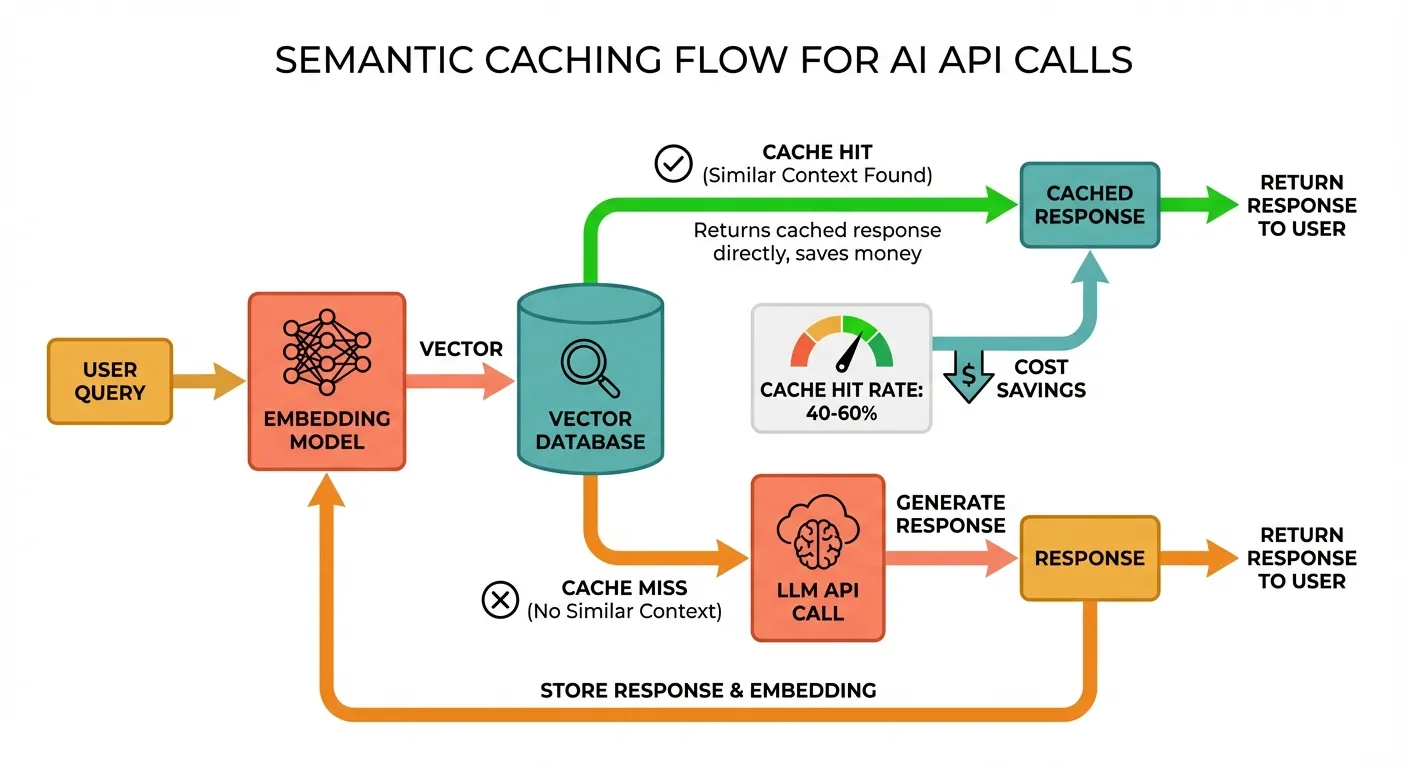
While provider-level prompt caching handles identical prefixes, semantic caching catches similar (not identical) user queries. This is transformative for customer-facing applications where users ask the same questions in different ways.
Architecture
Implementation
import hashlib
import json
import numpy as np
from openai import OpenAI

client = OpenAI()

# In production, use Redis or a vector DB. This is a simplified in-memory example.
class SemanticCache:
    def __init__(self, similarity_threshold: float = 0.95):
        self.threshold = similarity_threshold
        self.cache: list[dict] = []  # {"embedding": [...], "query": "...", "response": "..."}

    def _get_embedding(self, text: str) -> list[float]:
        response = client.embeddings.create(
            model="text-embedding-3-small",
            input=text,
        )
        return response.data[0].embedding

    def _cosine_similarity(self, a: list[float], b: list[float]) -> float:
        a, b = np.array(a), np.array(b)
        return float(np.dot(a, b) / (np.linalg.norm(a) * np.linalg.norm(b)))

    def get(self, query: str) -> str | None:
        """Check if a semantically similar query exists in cache."""
        query_embedding = self._get_embedding(query)

        best_match = None
        best_similarity = 0.0

        for entry in self.cache:
            similarity = self._cosine_similarity(query_embedding, entry["embedding"])
            if similarity > best_similarity:
                best_similarity = similarity
                best_match = entry

        if best_match and best_similarity >= self.threshold:
            print(f"Cache HIT (similarity: {best_similarity:.3f})")
            return best_match["response"]

        print(f"Cache MISS (best similarity: {best_similarity:.3f})")
        return None

    def put(self, query: str, response: str):
        """Store a query-response pair in the cache."""
        embedding = self._get_embedding(query)
        self.cache.append({
            "embedding": embedding,
            "query": query,
            "response": response,
        })


# Usage
cache = SemanticCache(similarity_threshold=0.92)

def ask(question: str) -> str:
    # Check cache first
    cached = cache.get(question)
    if cached:
        return cached

    # Cache miss — call the LLM
    response = client.chat.completions.create(
        model="gpt-5.4",
        max_tokens=500,
        messages=[{"role": "user", "content": question}],
    )
    answer = response.choices[0].message.content

    # Store in cache
    cache.put(question, answer)
    return answer

# These will likely hit the same cache entry:
ask("What is the capital of France?")
ask("What's France's capital city?")  # Cache HIT
ask("Tell me the capital of France")  # Cache HIT
Cost Analysis
For a customer support chatbot handling 10,000 queries/day where 40% are semantically similar:
- Without semantic caching: 10,000 LLM calls/day
- With semantic caching: 6,000 LLM calls + 10,000 embedding calls
- Embedding cost: 10K × ~200 tokens × $0.02/1M = $0.04/day (negligible)
- LLM savings: 4,000 fewer calls × ~$0.002/call = $8/day = $240/month
Strategy 7: API Aggregation Platforms — Unified Access, Consolidated Savings
Using an API aggregation platform that provides a single OpenAI-compatible endpoint to access multiple models offers several cost advantages:
Benefits
- Model flexibility: Switch between GPT, Claude, Gemini, and DeepSeek with a one-line change
- Consolidated billing: One invoice instead of managing multiple provider accounts
- Volume pricing: Aggregators often negotiate bulk rates
- Automatic routing: Some platforms offer intelligent routing to the cheapest capable model
- No vendor lock-in: Standard OpenAI format works with any compatible client
Implementation with an OpenAI-Compatible Endpoint
Platforms like Ofox.ai provide a unified endpoint that supports 100+ models through the standard OpenAI SDK:
from openai import OpenAI

# Single client for all models via aggregation platform
client = OpenAI(
    api_key="your-aggregation-api-key",
    base_url="https://api.ofox.ai/v1",  # OpenAI-compatible endpoint
)

# Access any model with the same code
def query_model(model: str, prompt: str) -> str:
    response = client.chat.completions.create(
        model=model,
        max_tokens=1000,
        messages=[{"role": "user", "content": prompt}],
    )
    return response.choices[0].message.content

# Same code, different models
result_gpt = query_model("gpt-5.4", "Explain quantum computing")
result_claude = query_model("claude-sonnet-4-6-20260301", "Explain quantum computing")
result_gemini = query_model("gemini-3-pro", "Explain quantum computing")
result_deepseek = query_model("deepseek-v3.2", "Explain quantum computing")
Building a Cost-Optimized Router
Combine aggregation with model tiering for maximum savings:
from openai import OpenAI
from dataclasses import dataclass

client = OpenAI(
    api_key="your-api-key",
    base_url="https://api.ofox.ai/v1",
)

@dataclass
class ModelOption:
    name: str
    input_cost: float   # per 1M tokens
    output_cost: float  # per 1M tokens
    quality_tier: int   # 1=highest, 4=lowest

MODEL_OPTIONS = [
    ModelOption("deepseek-v3.2", 0.27, 1.10, 3),
    ModelOption("gpt-4o-mini", 0.15, 0.60, 4),
    ModelOption("gemini-2.0-flash", 0.50, 3.00, 3),
    ModelOption("claude-haiku-3-5", 0.80, 4.00, 3),
    ModelOption("gpt-5.4", 2.00, 8.00, 1),
    ModelOption("claude-sonnet-4-6-20260301", 3.00, 15.00, 1),
    ModelOption("claude-opus-4-6-20260301", 5.00, 25.00, 1),
]

def cheapest_model(min_quality_tier: int = 4) -> ModelOption:
    """Find the cheapest model that meets the quality requirement."""
    eligible = [m for m in MODEL_OPTIONS if m.quality_tier <= min_quality_tier]
    return min(eligible, key=lambda m: m.input_cost + m.output_cost)

def smart_request(prompt: str, task_complexity: str = "simple") -> str:
    tier_map = {"simple": 4, "moderate": 3, "complex": 2, "frontier": 1}
    min_tier = tier_map.get(task_complexity, 3)
    model = cheapest_model(min_quality_tier=min_tier)

    print(f"Using {model.name} (${model.input_cost}/${model.output_cost} per 1M tokens)")

    response = client.chat.completions.create(
        model=model.name,
        max_tokens=1000,
        messages=[{"role": "user", "content": prompt}],
    )
    return response.choices[0].message.content
Putting It All Together: A Complete Cost-Optimized Pipeline
Here’s how these strategies combine in a real production pipeline:
from openai import OpenAI
import json

client = OpenAI(
    api_key="your-api-key",
    base_url="https://api.ofox.ai/v1",  # Aggregation endpoint
)

class CostOptimizedPipeline:
    def __init__(self):
        self.semantic_cache = SemanticCache(similarity_threshold=0.92)
        self.token_usage = {"input": 0, "output": 0, "cached": 0, "saved_by_cache": 0}

    def process(self, query: str, task_type: str = "general") -> str:
        # 1. Check semantic cache
        cached = self.semantic_cache.get(query)
        if cached:
            self.token_usage["saved_by_cache"] += 1
            return cached

        # 2. Select model based on task complexity
        model = self._select_model(task_type)

        # 3. Apply token budget
        max_tokens = self._get_token_limit(task_type)

        # 4. Make the call with optimized parameters
        response = client.chat.completions.create(
            model=model,
            max_tokens=max_tokens,
            messages=[
                {"role": "system", "content": self._get_system_prompt(task_type)},
                {"role": "user", "content": query},
            ],
        )

        result = response.choices[0].message.content

        # 5. Update cache
        self.semantic_cache.put(query, result)

        # 6. Track usage
        self.token_usage["input"] += response.usage.prompt_tokens
        self.token_usage["output"] += response.usage.completion_tokens

        return result

    def _select_model(self, task_type: str) -> str:
        routing = {
            "classify": "gpt-4o-mini",
            "summarize": "gemini-2.0-flash",
            "analyze": "claude-sonnet-4-6-20260301",
            "general": "gpt-5.4",
        }
        return routing.get(task_type, "gpt-5.4")

    def _get_token_limit(self, task_type: str) -> int:
        limits = {
            "classify": 50,
            "summarize": 300,
            "analyze": 1500,
            "general": 1000,
        }
        return limits.get(task_type, 1000)

    def _get_system_prompt(self, task_type: str) -> str:
        # Short, cached system prompts per task type
        prompts = {
            "classify": "Classify into: bug, feature, question, other. JSON only.",
            "summarize": "Summarize in 2-3 sentences. No preamble.",
            "analyze": "Provide structured analysis with sections: Overview, Key Points, Recommendations.",
            "general": "Be concise and helpful.",
        }
        return prompts.get(task_type, "Be concise and helpful.")

    def report(self):
        print(f"Total input tokens: {self.token_usage['input']:,}")
        print(f"Total output tokens: {self.token_usage['output']:,}")
        print(f"Requests served from cache: {self.token_usage['saved_by_cache']}")
Cost Savings Summary
| Strategy | Effort to Implement | Potential Savings | Best For |
|---|---|---|---|
| Prompt Caching | Low (automatic) | 30-90% on input | Repeated system prompts |
| Model Tiering | Medium | 50-80% overall | Mixed workloads |
| Batch API | Low | 50% per request | Offline processing |
| Token Budget Control | Medium | 20-40% on input | Chatbots, long conversations |
| Output Length Limits | Low | 20-50% on output | All applications |
| Semantic Caching | High | 30-60% overall | Customer-facing apps |
| API Aggregation | Low | 10-30% overall | Multi-model workflows |
Combined potential: 60-80% reduction in total AI API spend.
What to Do Next
- Audit your current spend — break down costs by model, task type, and token category (input vs output)
- Implement the easy wins first — set
max_tokenson every call, enable prompt caching - Build a model routing layer — even a simple if/else based on task type saves money
- Monitor continuously — track cost per request and per task type, not just total spend
- Re-evaluate monthly — new models launch frequently, and pricing drops regularly
The most expensive API call is the one you didn’t need to make. Start with caching and tiering, and you’ll see meaningful savings within the first week.