Multimodal AI APIs: Vision, Text-to-Speech & Transcription in One Guide (2026)
TL;DR
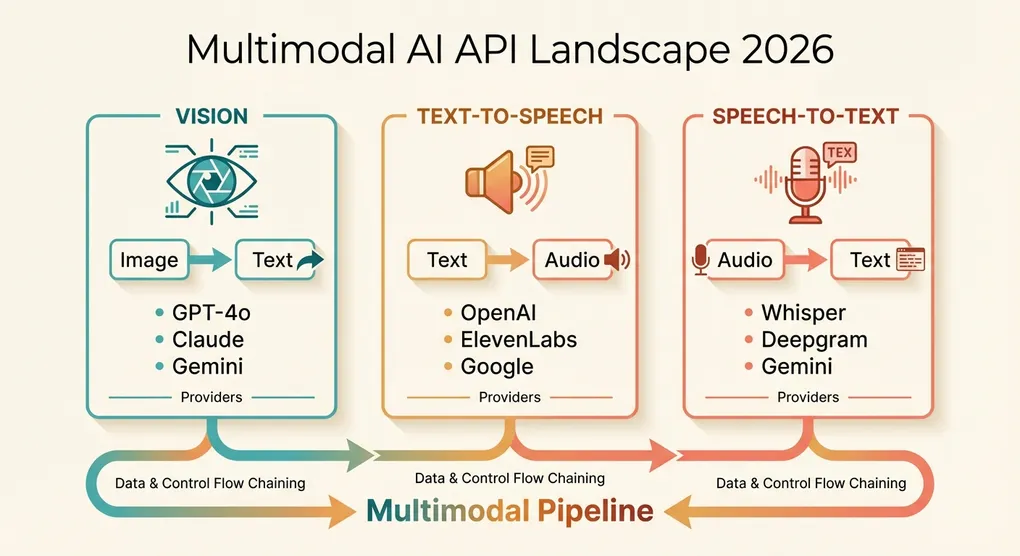
Multimodal AI has moved from research demos to production-ready APIs. This guide covers the three most practically useful modalities beyond text: vision (analyzing images), text-to-speech (generating spoken audio), and speech-to-text (transcription). You’ll get side-by-side comparisons of GPT-4o vs Claude Sonnet 4.6 vs Gemini 3 Pro for vision, OpenAI TTS vs ElevenLabs vs Google Cloud TTS for speech synthesis, and Whisper vs Gemini vs Deepgram for transcription. Each section includes working Python code, pricing tables, and practical guidance on when to use what.
The Multimodal Landscape in 2026
A year ago, “multimodal AI” mostly meant sending an image to GPT-4 Vision and getting a text description back. The landscape in 2026 is dramatically broader and more mature.
Vision has become a commodity. Every major model provider now offers image understanding through their chat completions API. The quality gap between providers has narrowed — the differences now lie in pricing, speed, context limits, and edge-case handling rather than fundamental capability.
Text-to-speech has crossed the uncanny valley. The latest models from OpenAI and ElevenLabs produce speech that most listeners cannot distinguish from human recordings. Real-time voice generation enables conversational AI agents that sound natural.
Speech-to-text continues to be dominated by Whisper and its derivatives, but cloud-native alternatives like Deepgram have carved out a strong niche in real-time transcription. Gemini’s native audio understanding adds a new option for teams already in the Google ecosystem.
The key shift in 2026 is that these capabilities are no longer standalone novelties — they’re building blocks. Production applications routinely chain modalities: a customer uploads a photo of a damaged product (vision), the system generates a claims report (text), reads it aloud over the phone (TTS), and transcribes the customer’s spoken response (STT). Building these pipelines requires understanding the strengths, limitations, and costs of each API.
Vision APIs: GPT-4o vs Claude Sonnet 4.6 vs Gemini 3 Pro
Capability Comparison
| Feature | GPT-4o | Claude Sonnet 4.6 | Gemini 3 Pro |
|---|---|---|---|
| Max images per request | 10 | 20 | 16 |
| Max image size | 20 MB | 5 MB (base64) | 20 MB |
| Supported formats | PNG, JPEG, GIF, WebP | PNG, JPEG, GIF, WebP | PNG, JPEG, GIF, WebP, BMP |
| Context window | 128K tokens | 200K tokens | 2M tokens |
| Detail levels | Low / High / Auto | Automatic | Automatic |
| Video frame support | Via extracted frames | Via extracted frames | Native video input |
| Document understanding | Excellent | Excellent | Excellent |
| Diagram/chart reading | Excellent | Very good | Excellent |
| Handwriting recognition | Good | Good | Very good |
| Spatial reasoning | Very good | Very good | Good |
Pricing Comparison (per 1M input tokens, including image tokens)
| Model | Text Input | Image Cost (approx.) | Output | Notes |
|---|---|---|---|---|
| GPT-4o (high detail) | $2.50 | ~$7.50 per 1K images (1024x1024) | $10.00 | detail: low cuts image cost ~85% |
| GPT-4o-mini | $0.15 | ~$1.50 per 1K images (1024x1024) | $0.60 | Great for simple visual tasks |
| Claude Sonnet 4.6 | $3.00 | ~$4.80 per 1K images (1024x1024) | $15.00 | Consistent pricing model |
| Gemini 3 Pro | $2.00 | ~$2.60 per 1K images (1024x1024) | $12.00 | Cheapest for high-resolution |
| Gemini Flash | $0.50 | ~$0.65 per 1K images (1024x1024) | $3.00 | Best budget option |
Image token costs depend on resolution. All providers charge more for larger images because they consume more context tokens. The numbers above assume 1024x1024 images as a baseline.
When to Use Each
- GPT-4o: General-purpose visual tasks, UI/UX analysis, creative image description. The
detail: lowoption makes it the cheapest for simple tasks like image classification. - Claude Sonnet 4.6: Document understanding, structured data extraction from images, multi-page PDF analysis. Excels at following complex instructions about what to extract.
- Gemini 3 Pro: High-resolution image analysis, video understanding (native support), and tasks requiring very long context (combining many images with text). Best price-to-quality ratio.
- GPT-4o-mini / Gemini Flash: Cost-sensitive applications where vision is a nice-to-have, not the core feature. Image classification, basic OCR, content moderation.
Vision Implementation in Python
GPT-4o Vision
from openai import OpenAI
import base64
from pathlib import Path

client = OpenAI(api_key="your-api-key")

def analyze_image_gpt4o(
    image_path: str,
    prompt: str = "Describe this image in detail.",
    detail: str = "high"
) -> str:
    """Analyze an image using GPT-4o vision."""
    image_data = base64.b64encode(Path(image_path).read_bytes()).decode("utf-8")
    suffix = Path(image_path).suffix.lstrip(".")
    media_type = f"image/{'jpeg' if suffix == 'jpg' else suffix}"

    response = client.chat.completions.create(
        model="gpt-4o",
        max_tokens=1024,
        messages=[{
            "role": "user",
            "content": [
                {"type": "text", "text": prompt},
                {
                    "type": "image_url",
                    "image_url": {
                        "url": f"data:{media_type};base64,{image_data}",
                        "detail": detail  # "low", "high", or "auto"
                    }
                }
            ]
        }]
    )
    return response.choices[0].message.content
Claude Sonnet 4.6 Vision
import anthropic
import base64
from pathlib import Path

client = anthropic.Anthropic(api_key="your-anthropic-key")

def analyze_image_claude(
    image_path: str,
    prompt: str = "Describe this image in detail."
) -> str:
    """Analyze an image using Claude Sonnet 4.6."""
    image_data = base64.b64encode(Path(image_path).read_bytes()).decode("utf-8")
    suffix = Path(image_path).suffix.lstrip(".")
    media_type = f"image/{'jpeg' if suffix == 'jpg' else suffix}"

    response = client.messages.create(
        model="claude-sonnet-4-6-20260301",
        max_tokens=1024,
        messages=[{
            "role": "user",
            "content": [
                {
                    "type": "image",
                    "source": {
                        "type": "base64",
                        "media_type": media_type,
                        "data": image_data
                    }
                },
                {"type": "text", "text": prompt}
            ]
        }]
    )
    return response.content[0].text
Gemini 3 Pro Vision
import google.generativeai as genai
from pathlib import Path

genai.configure(api_key="your-google-key")

def analyze_image_gemini(
    image_path: str,
    prompt: str = "Describe this image in detail."
) -> str:
    """Analyze an image using Gemini 3 Pro."""
    model = genai.GenerativeModel("gemini-3-pro")

    image_bytes = Path(image_path).read_bytes()
    suffix = Path(image_path).suffix.lstrip(".")
    media_type = f"image/{'jpeg' if suffix == 'jpg' else suffix}"

    response = model.generate_content([
        prompt,
        {"mime_type": media_type, "data": image_bytes}
    ])
    return response.text
Multi-Image Comparison
A common production use case is comparing multiple images — before/after photos, product variants, or document pages:
def compare_images(image_paths: list[str], prompt: str) -> str:
    """Compare multiple images using GPT-4o."""
    content = [{"type": "text", "text": prompt}]

    for path in image_paths:
        image_data = base64.b64encode(Path(path).read_bytes()).decode("utf-8")
        suffix = Path(path).suffix.lstrip(".")
        media_type = f"image/{'jpeg' if suffix == 'jpg' else suffix}"
        content.append({
            "type": "image_url",
            "image_url": {
                "url": f"data:{media_type};base64,{image_data}",
                "detail": "high"
            }
        })

    response = client.chat.completions.create(
        model="gpt-4o",
        max_tokens=2048,
        messages=[{"role": "user", "content": content}]
    )
    return response.choices[0].message.content

# Example: compare before and after renovation photos
result = compare_images(
    ["before.jpg", "after.jpg"],
    "Compare these two photos. Describe all the differences you can see between the before and after images."
)
Image Cost Optimization
The single most effective optimization for vision API costs is controlling image resolution:
from PIL import Image
from io import BytesIO
import base64

def optimize_image_for_api(
    image_path: str,
    max_dimension: int = 1024,
    quality: int = 85
) -> str:
    """Resize and compress an image before sending to a vision API."""
    img = Image.open(image_path)

    # Resize if larger than max_dimension
    if max(img.size) > max_dimension:
        ratio = max_dimension / max(img.size)
        new_size = (int(img.size[0] * ratio), int(img.size[1] * ratio))
        img = img.resize(new_size, Image.LANCZOS)

    # Convert to JPEG for smaller size (unless transparency is needed)
    buffer = BytesIO()
    if img.mode == "RGBA":
        img = img.convert("RGB")
    img.save(buffer, format="JPEG", quality=quality)

    return base64.b64encode(buffer.getvalue()).decode("utf-8")
Resizing a 4K image (3840x2160) to 1024 pixels on the longest side typically reduces token cost by 70-80% while maintaining sufficient detail for most analysis tasks. For classification or simple detection tasks, even 512 pixels is often enough.
Text-to-Speech: OpenAI TTS vs ElevenLabs vs Google Cloud TTS
Comparison Table
| Feature | OpenAI TTS | ElevenLabs | Google Cloud TTS |
|---|---|---|---|
| Voices | 6 built-in | 1000+ (community + custom) | 300+ (WaveNet + Neural2) |
| Voice cloning | No | Yes (from 1 minute of audio) | No |
| Max input | 4,096 characters | 5,000 characters | 5,000 characters |
| Streaming | Yes | Yes | Yes |
| Emotional control | Limited | Extensive | Limited |
| SSML support | No | No (style controls instead) | Full SSML |
| Languages | 50+ | 29 | 40+ |
| Output formats | MP3, Opus, AAC, FLAC, WAV, PCM | MP3, WAV, OGG, FLAC, PCM | MP3, WAV, OGG |
Pricing
| Provider | Model/Tier | Price | Unit |
|---|---|---|---|
| OpenAI | tts-1 | $15.00 | per 1M characters |
| OpenAI | tts-1-hd | $30.00 | per 1M characters |
| ElevenLabs | Starter | $5/mo | 30,000 characters |
| ElevenLabs | Scale | $99/mo | 2,000,000 characters (~$49.50/1M) |
| ElevenLabs | Growth | $22/mo | 200,000 characters (~$110/1M) |
| Google Cloud | Neural2 | $16.00 | per 1M characters |
| Google Cloud | WaveNet | $16.00 | per 1M characters |
| Google Cloud | Standard | $4.00 | per 1M characters |
When to Use Each
- OpenAI TTS: Best all-around choice. Clean integration if you’re already using the OpenAI SDK, very natural speech, competitive pricing.
tts-1is fine for most applications;tts-1-hdadds noticeable quality for narration and audiobook use cases. - ElevenLabs: The premium choice when voice quality and customization matter most. Voice cloning is its killer feature — clone a specific voice from a short audio sample and use it at scale. Best for media production, personalized voice agents, and content creators.
- Google Cloud TTS: Best for multilingual applications with SSML requirements. Full SSML support allows fine-grained control over pronunciation, pauses, emphasis, and prosody. Good for IVR systems and accessibility applications.
TTS Implementation in Python
OpenAI TTS
from openai import OpenAI
from pathlib import Path

client = OpenAI(api_key="your-api-key")

def text_to_speech_openai(
    text: str,
    output_path: str = "output.mp3",
    voice: str = "nova",
    model: str = "tts-1-hd",
    speed: float = 1.0
) -> str:
    """Generate speech audio from text using OpenAI TTS."""
    response = client.audio.speech.create(
        model=model,      # "tts-1" (fast) or "tts-1-hd" (quality)
        voice=voice,       # alloy, echo, fable, onyx, nova, shimmer
        input=text,
        speed=speed,       # 0.25 to 4.0
        response_format="mp3"
    )
    response.stream_to_file(output_path)
    return output_path

# Generate speech
text_to_speech_openai(
    "Welcome to our quarterly earnings call. Today I'll walk you through our key metrics.",
    output_path="earnings_intro.mp3",
    voice="onyx"  # Deep, authoritative voice
)
OpenAI TTS with Streaming
For real-time applications, stream audio as it’s generated instead of waiting for the full file:
from openai import OpenAI

client = OpenAI(api_key="your-api-key")

def stream_speech(text: str, output_path: str = "streamed_output.mp3") -> None:
    """Stream TTS audio to a file in real-time."""
    with client.audio.speech.with_streaming_response.create(
        model="tts-1",
        voice="nova",
        input=text,
        response_format="mp3"
    ) as response:
        response.stream_to_file(output_path)

# For web applications, you can stream chunks directly to the client:
def stream_speech_chunks(text: str):
    """Yield audio chunks for streaming to a web client."""
    with client.audio.speech.with_streaming_response.create(
        model="tts-1",
        voice="nova",
        input=text,
        response_format="mp3"
    ) as response:
        for chunk in response.iter_bytes(chunk_size=4096):
            yield chunk
ElevenLabs TTS
from elevenlabs import ElevenLabs

eleven = ElevenLabs(api_key="your-elevenlabs-key")

def text_to_speech_elevenlabs(
    text: str,
    output_path: str = "output.mp3",
    voice_id: str = "21m00Tcm4TlvDq8ikWAM",  # "Rachel" voice
    model_id: str = "eleven_multilingual_v2"
) -> str:
    """Generate speech using ElevenLabs."""
    audio = eleven.text_to_speech.convert(
        text=text,
        voice_id=voice_id,
        model_id=model_id,
        output_format="mp3_44100_128"
    )

    with open(output_path, "wb") as f:
        for chunk in audio:
            f.write(chunk)

    return output_path

# With voice settings for more control
def text_to_speech_custom(text: str, output_path: str = "output.mp3") -> str:
    """Generate speech with custom voice settings."""
    from elevenlabs import VoiceSettings

    audio = eleven.text_to_speech.convert(
        text=text,
        voice_id="21m00Tcm4TlvDq8ikWAM",
        model_id="eleven_multilingual_v2",
        voice_settings=VoiceSettings(
            stability=0.5,           # Lower = more variable/expressive
            similarity_boost=0.75,   # Higher = closer to original voice
            style=0.3,               # Style exaggeration
            use_speaker_boost=True
        ),
        output_format="mp3_44100_128"
    )

    with open(output_path, "wb") as f:
        for chunk in audio:
            f.write(chunk)

    return output_path
Handling Long Text
All TTS APIs have character limits per request. Here’s how to handle documents that exceed those limits:
from pydub import AudioSegment
from pathlib import Path
import tempfile

def tts_long_text(
    text: str,
    output_path: str = "full_output.mp3",
    max_chars: int = 4000,
    pause_ms: int = 500
) -> str:
    """Convert long text to speech by splitting into chunks."""
    # Split on sentence boundaries, respecting max_chars
    sentences = text.replace("\n", " ").split(". ")
    chunks = []
    current_chunk = ""

    for sentence in sentences:
        candidate = f"{current_chunk}. {sentence}" if current_chunk else sentence
        if len(candidate) <= max_chars:
            current_chunk = candidate
        else:
            if current_chunk:
                chunks.append(current_chunk + ".")
            current_chunk = sentence

    if current_chunk:
        chunks.append(current_chunk + ".")

    # Generate audio for each chunk
    audio_segments = []
    silence = AudioSegment.silent(duration=pause_ms)

    for i, chunk in enumerate(chunks):
        temp_path = f"{tempfile.gettempdir()}/tts_chunk_{i}.mp3"
        text_to_speech_openai(chunk, output_path=temp_path)
        segment = AudioSegment.from_mp3(temp_path)
        audio_segments.append(segment)
        audio_segments.append(silence)
        Path(temp_path).unlink()  # Clean up temp file

    # Concatenate all segments
    combined = sum(audio_segments[1:], audio_segments[0])
    combined.export(output_path, format="mp3")

    return output_path
Speech-to-Text: Whisper vs Gemini vs Deepgram
Comparison Table
| Feature | OpenAI Whisper API | Self-hosted Whisper large-v3 | Gemini 3 Pro | Deepgram Nova-3 |
|---|---|---|---|---|
| Accuracy (WER on English) | ~5.2% | ~5.2% | ~5.8% | ~5.5% |
| Real-time streaming | No | Yes (with faster-whisper) | No | Yes |
| Max file size | 25 MB | Unlimited | Inline audio only | 2 GB |
| Max duration | ~4 hours | Unlimited | ~15 minutes | Unlimited |
| Languages | 57 | 57 | 100+ | 36 |
| Speaker diarization | No | Via pyannote | No | Yes |
| Word-level timestamps | Yes | Yes | No | Yes |
| Punctuation | Auto | Auto | Auto | Auto |
| Custom vocabulary | No | No | No | Yes |
Pricing
| Service | Price per Minute | Price per Hour | Notes |
|---|---|---|---|
| OpenAI Whisper API | $0.006 | $0.36 | Per audio minute |
| Self-hosted Whisper | ~$0.001 | ~$0.06 | A100 GPU cost only |
| Gemini 3 Pro | ~$0.003 | ~$0.18 | Via audio tokens |
| Deepgram Nova-3 | $0.0043 | $0.26 | Pay-as-you-go |
| Deepgram Nova-3 (Growth) | $0.0036 | $0.22 | With commitment |
| Google Cloud STT (Chirp) | $0.016 | $0.96 | Most expensive |
When to Use Each
- OpenAI Whisper API: Simplest integration, excellent accuracy, good for batch transcription of files under 25 MB. No infrastructure to manage.
- Self-hosted Whisper: Cheapest at scale, full control, supports real-time streaming with faster-whisper. Requires GPU infrastructure.
- Gemini 3 Pro: Useful if you’re already sending audio to Gemini for other analysis (summarization, translation). Not a dedicated transcription API, but competent.
- Deepgram Nova-3: Best for real-time streaming transcription, production telephony, and applications needing speaker diarization or custom vocabulary. The WebSocket API is mature and well-documented.
STT Implementation in Python
OpenAI Whisper API
from openai import OpenAI
from pathlib import Path

client = OpenAI(api_key="your-api-key")

def transcribe_audio(
    audio_path: str,
    language: str | None = None,
    response_format: str = "verbose_json"
) -> dict:
    """Transcribe audio using OpenAI Whisper API."""
    with open(audio_path, "rb") as audio_file:
        response = client.audio.transcriptions.create(
            model="whisper-1",
            file=audio_file,
            language=language,           # ISO 639-1 code, e.g., "en"
            response_format=response_format,  # "json", "text", "srt", "verbose_json", "vtt"
            timestamp_granularities=["word", "segment"]
        )

    if response_format == "verbose_json":
        return {
            "text": response.text,
            "language": response.language,
            "duration": response.duration,
            "segments": [
                {
                    "start": seg.start,
                    "end": seg.end,
                    "text": seg.text
                }
                for seg in (response.segments or [])
            ],
            "words": [
                {
                    "start": word.start,
                    "end": word.end,
                    "word": word.word
                }
                for word in (response.words or [])
            ]
        }
    return {"text": response.text if hasattr(response, "text") else response}

# Basic transcription
result = transcribe_audio("meeting_recording.mp3")
print(f"Duration: {result['duration']:.1f}s")
print(f"Language: {result['language']}")
print(f"Text: {result['text'][:200]}...")
Handling Large Audio Files
The Whisper API has a 25 MB file limit. For larger files, split them:
from pydub import AudioSegment
import tempfile
from pathlib import Path

def transcribe_large_file(
    audio_path: str,
    chunk_duration_ms: int = 600_000  # 10 minutes
) -> str:
    """Transcribe audio files of any size by splitting into chunks."""
    audio = AudioSegment.from_file(audio_path)
    total_duration = len(audio)
    full_transcript = []

    for start_ms in range(0, total_duration, chunk_duration_ms):
        end_ms = min(start_ms + chunk_duration_ms, total_duration)
        chunk = audio[start_ms:end_ms]

        # Export chunk to temp file
        temp_path = f"{tempfile.gettempdir()}/audio_chunk_{start_ms}.mp3"
        chunk.export(temp_path, format="mp3", bitrate="128k")

        # Transcribe chunk
        result = transcribe_audio(temp_path)
        full_transcript.append(result["text"])

        # Clean up
        Path(temp_path).unlink()

        print(f"Transcribed {end_ms / 1000:.0f}s / {total_duration / 1000:.0f}s")

    return " ".join(full_transcript)
Deepgram Real-Time Streaming
import asyncio
import json
import websockets

DEEPGRAM_API_KEY = "your-deepgram-key"

async def stream_transcribe(audio_stream):
    """Real-time streaming transcription with Deepgram."""
    url = "wss://api.deepgram.com/v1/listen"
    params = "?model=nova-3&punctuate=true&diarize=true&smart_format=true"

    headers = {"Authorization": f"Token {DEEPGRAM_API_KEY}"}

    async with websockets.connect(url + params, additional_headers=headers) as ws:
        # Task to receive transcription results
        async def receive():
            async for message in ws:
                result = json.loads(message)
                if result.get("type") == "Results":
                    channel = result["channel"]
                    transcript = channel["alternatives"][0]["transcript"]
                    if transcript:
                        is_final = result.get("is_final", False)
                        prefix = "[FINAL]" if is_final else "[INTERIM]"
                        print(f"{prefix} {transcript}")

        # Task to send audio data
        async def send():
            async for chunk in audio_stream:
                await ws.send(chunk)
            # Signal end of audio
            await ws.send(json.dumps({"type": "CloseStream"}))

        await asyncio.gather(send(), receive())

# Example: stream from a microphone (using sounddevice)
async def microphone_stream(sample_rate: int = 16000, chunk_size: int = 4096):
    """Yield audio chunks from the microphone."""
    import sounddevice as sd
    import queue

    q = queue.Queue()

    def callback(indata, frames, time_info, status):
        q.put(bytes(indata))

    with sd.RawInputStream(
        samplerate=sample_rate,
        blocksize=chunk_size,
        dtype="int16",
        channels=1,
        callback=callback
    ):
        while True:
            yield q.get()
Self-Hosted Whisper with faster-whisper
For maximum throughput and minimum cost at scale:
from faster_whisper import WhisperModel

# Load model (downloads on first run, ~3GB for large-v3)
model = WhisperModel("large-v3", device="cuda", compute_type="float16")

def transcribe_local(audio_path: str, language: str | None = None) -> dict:
    """Transcribe audio using self-hosted faster-whisper."""
    segments, info = model.transcribe(
        audio_path,
        language=language,
        beam_size=5,
        word_timestamps=True,
        vad_filter=True  # Filters out silence for faster processing
    )

    all_text = []
    all_segments = []

    for segment in segments:
        all_text.append(segment.text)
        all_segments.append({
            "start": segment.start,
            "end": segment.end,
            "text": segment.text.strip(),
            "words": [
                {"start": w.start, "end": w.end, "word": w.word}
                for w in (segment.words or [])
            ]
        })

    return {
        "text": " ".join(all_text).strip(),
        "language": info.language,
        "language_probability": info.language_probability,
        "duration": info.duration,
        "segments": all_segments
    }

# Transcribe
result = transcribe_local("interview.wav")
print(f"Detected language: {result['language']} ({result['language_probability']:.1%})")
print(result["text"][:500])
Combining Modalities: Practical Use Cases
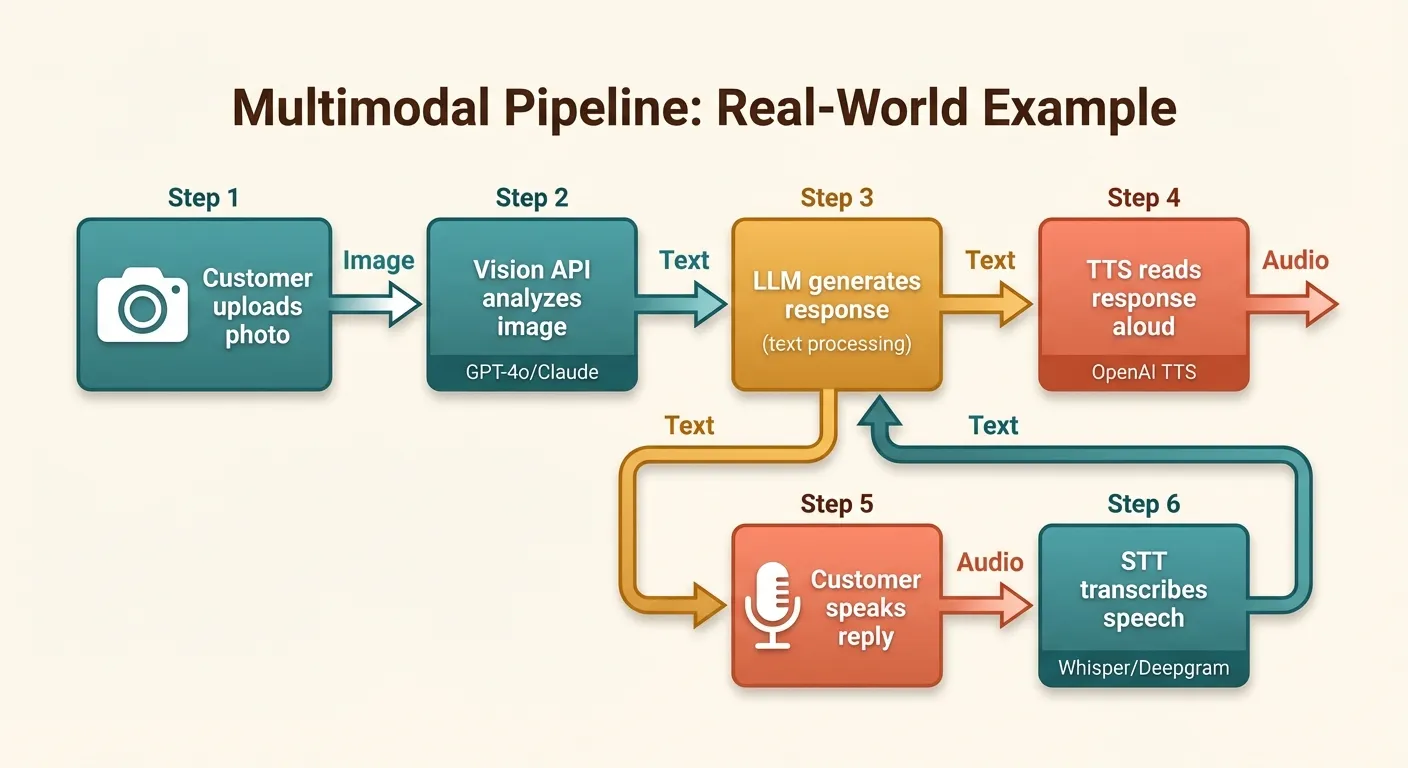
The real power of multimodal APIs emerges when you chain multiple modalities together. Here are four production-ready patterns.
1. Visual Document Q&A with Voice Output
A user photographs a document (insurance form, receipt, manual), asks a question about it, and gets a spoken answer:
def document_qa_voice(image_path: str, question: str, output_audio: str = "answer.mp3") -> str:
    """Answer a question about a document image, return spoken audio."""
    # Step 1: Analyze the document
    analysis = analyze_image_gpt4o(
        image_path,
        prompt=f"Read and understand this document thoroughly. Then answer this question: {question}"
    )

    # Step 2: Convert answer to speech
    text_to_speech_openai(analysis, output_path=output_audio, voice="nova")

    return analysis

# Usage
answer = document_qa_voice(
    "insurance_claim.jpg",
    "What is the deductible amount and claim deadline?"
)
2. Meeting Transcription with Summary
Record a meeting, transcribe it, generate a structured summary, and optionally create an audio brief:
def meeting_pipeline(
    audio_path: str,
    generate_audio_summary: bool = True
) -> dict:
    """Full meeting processing pipeline."""
    # Step 1: Transcribe
    transcript = transcribe_audio(audio_path)

    # Step 2: Generate structured summary
    summary_response = client.chat.completions.create(
        model="gpt-4o",
        max_tokens=2000,
        messages=[{
            "role": "user",
            "content": f"""Analyze this meeting transcript and provide:
1. Key decisions made
2. Action items (who, what, deadline)
3. Open questions
4. 3-sentence executive summary

Transcript:
{transcript['text']}"""
        }]
    )
    summary = summary_response.choices[0].message.content

    result = {
        "transcript": transcript["text"],
        "duration_seconds": transcript["duration"],
        "summary": summary
    }

    # Step 3: Optional audio brief
    if generate_audio_summary:
        text_to_speech_openai(
            summary,
            output_path="meeting_brief.mp3",
            voice="nova"
        )
        result["audio_brief"] = "meeting_brief.mp3"

    return result
3. Product Image Catalog Enrichment
Process product images to generate descriptions, tags, and alt text at scale:
import json

def enrich_product_image(image_path: str) -> dict:
    """Generate structured product metadata from an image."""
    response = client.chat.completions.create(
        model="gpt-4o",
        max_tokens=1024,
        messages=[{
            "role": "user",
            "content": [
                {"type": "text", "text": """Analyze this product image and return a JSON object with:
- "title": concise product name
- "description": 2-3 sentence marketing description
- "alt_text": accessibility-friendly image description
- "tags": array of relevant category tags
- "color": primary color(s)
- "condition": new/used/refurbished if determinable

Return only valid JSON, no markdown."""},
                {
                    "type": "image_url",
                    "image_url": {
                        "url": f"data:image/jpeg;base64,{optimize_image_for_api(image_path)}",
                        "detail": "high"
                    }
                }
            ]
        }],
        response_format={"type": "json_object"}
    )

    return json.loads(response.choices[0].message.content)
4. Accessibility Pipeline
Convert visual and audio content into accessible formats:
def make_accessible(content_path: str) -> dict:
    """Convert any media into accessible text and audio formats."""
    suffix = Path(content_path).suffix.lower()
    result = {}

    if suffix in (".png", ".jpg", ".jpeg", ".gif", ".webp"):
        # Image → description → audio description
        description = analyze_image_gpt4o(
            content_path,
            prompt="Provide a detailed, accessibility-focused description of this image. Describe spatial layout, colors, text content, and any information conveyed visually."
        )
        result["text_description"] = description
        text_to_speech_openai(description, output_path="audio_description.mp3")
        result["audio_description"] = "audio_description.mp3"

    elif suffix in (".mp3", ".wav", ".m4a", ".ogg", ".flac"):
        # Audio → transcript
        transcript = transcribe_audio(content_path)
        result["transcript"] = transcript["text"]

    return result
Cost Comparison and Optimization
Monthly Cost Estimates by Scale
Here’s what multimodal processing costs at different scales, assuming typical usage patterns:
| Operation | 1K/month | 10K/month | 100K/month | Best Budget Option |
|---|---|---|---|---|
| Image analysis (1024x1024) | $4-8 | $40-80 | $400-800 | Gemini Flash (~$0.65/1K) |
| TTS (avg 500 chars each) | $7.50 | $75 | $750 | OpenAI tts-1 ($15/1M chars) |
| Transcription (avg 5 min each) | $0.18 | $1.80 | $18 | Self-hosted Whisper |
| Full pipeline (image + text + TTS) | $12-16 | $120-160 | $1,200-1,600 | Mix providers per modality |
Optimization Strategies
1. Match model to task complexity. Use GPT-4o-mini or Gemini Flash for simple tasks (classification, basic description) and reserve frontier models for complex analysis (detailed document understanding, nuanced visual reasoning). This alone can cut costs by 60-80%.
def smart_analyze(image_path: str, task: str) -> str:
    """Route to the appropriate model based on task complexity."""
    simple_tasks = ["classify", "detect_text", "count_objects", "identify_color"]
    complex_tasks = ["detailed_analysis", "document_extraction", "chart_interpretation"]

    if task in simple_tasks:
        model = "gpt-4o-mini"
        detail = "low"
    else:
        model = "gpt-4o"
        detail = "high"

    return analyze_image_with_model(image_path, model=model, detail=detail)
2. Resize images aggressively. As shown earlier, resizing from 4K to 1024px cuts costs by 70-80% with minimal quality loss for most tasks. For classification tasks, 256-512px is often sufficient.
3. Use an aggregation platform for multi-provider access. When your pipeline uses GPT-4o for vision, ElevenLabs for TTS, and Whisper for STT, managing three API keys, billing accounts, and SDKs adds operational overhead. Platforms like Ofox.ai provide a unified OpenAI-compatible endpoint for accessing models from multiple providers through a single API key, simplifying both integration code and billing management.
4. Cache aggressively. If the same image is analyzed multiple times (product catalogs, avatars), cache the results. TTS output for the same text never changes — cache it permanently.
import hashlib
import json
from pathlib import Path

class MultimodalCache:
    """Cache multimodal API results to avoid redundant calls."""

    def __init__(self, cache_dir: str = ".mm_cache"):
        self.cache_dir = Path(cache_dir)
        self.cache_dir.mkdir(exist_ok=True)

    def _hash(self, *args) -> str:
        raw = "|".join(str(a) for a in args)
        return hashlib.sha256(raw.encode()).hexdigest()

    def get_json(self, key: str) -> dict | None:
        path = self.cache_dir / f"{key}.json"
        return json.loads(path.read_text()) if path.exists() else None

    def set_json(self, key: str, data: dict) -> None:
        (self.cache_dir / f"{key}.json").write_text(json.dumps(data))

    def get_binary(self, key: str, ext: str = "mp3") -> bytes | None:
        path = self.cache_dir / f"{key}.{ext}"
        return path.read_bytes() if path.exists() else None

    def set_binary(self, key: str, data: bytes, ext: str = "mp3") -> None:
        (self.cache_dir / f"{key}.{ext}").write_bytes(data)

cache = MultimodalCache()

def cached_tts(text: str, voice: str = "nova") -> str:
    """TTS with caching — never generate the same audio twice."""
    key = cache._hash("tts", text, voice)
    cached = cache.get_binary(key, "mp3")
    if cached:
        output_path = f"/tmp/tts_{key}.mp3"
        Path(output_path).write_bytes(cached)
        return output_path

    output_path = text_to_speech_openai(text, voice=voice)
    cache.set_binary(key, Path(output_path).read_bytes(), "mp3")
    return output_path
5. Batch processing with async. Process multiple items concurrently to maximize throughput:
import asyncio
from openai import AsyncOpenAI

async_client = AsyncOpenAI(api_key="your-api-key")

async def batch_analyze_images(
    image_paths: list[str],
    prompt: str,
    max_concurrent: int = 10
) -> list[str]:
    """Analyze multiple images concurrently."""
    semaphore = asyncio.Semaphore(max_concurrent)

    async def analyze_one(path: str) -> str:
        async with semaphore:
            image_data = base64.b64encode(Path(path).read_bytes()).decode("utf-8")
            response = await async_client.chat.completions.create(
                model="gpt-4o-mini",
                max_tokens=512,
                messages=[{
                    "role": "user",
                    "content": [
                        {"type": "text", "text": prompt},
                        {"type": "image_url", "image_url": {"url": f"data:image/jpeg;base64,{image_data}", "detail": "low"}}
                    ]
                }]
            )
            return response.choices[0].message.content

    return await asyncio.gather(*[analyze_one(p) for p in image_paths])

# Process 500 product images
results = asyncio.run(batch_analyze_images(
    image_paths=["product_001.jpg", "product_002.jpg"],  # ... up to 500
    prompt="Classify this product into one of: electronics, clothing, furniture, food, other."
))
6. Monitor and set budgets. Track per-modality costs and set alerts:
from dataclasses import dataclass, field
from datetime import datetime

@dataclass
class UsageTracker:
    """Track multimodal API usage and costs."""
    records: list[dict] = field(default_factory=list)

    def log(self, modality: str, model: str, input_units: int, cost: float) -> None:
        self.records.append({
            "timestamp": datetime.now().isoformat(),
            "modality": modality,
            "model": model,
            "input_units": input_units,
            "cost_usd": cost
        })

    def total_cost(self, modality: str | None = None) -> float:
        records = self.records
        if modality:
            records = [r for r in records if r["modality"] == modality]
        return sum(r["cost_usd"] for r in records)

    def summary(self) -> dict:
        modalities = set(r["modality"] for r in self.records)
        return {m: f"${self.total_cost(m):.4f}" for m in modalities}

tracker = UsageTracker()
# After each API call:
tracker.log("vision", "gpt-4o-mini", input_units=1, cost=0.004)
tracker.log("tts", "tts-1", input_units=500, cost=0.0075)
print(tracker.summary())  # {"vision": "$0.0040", "tts": "$0.0075"}
Conclusion
Multimodal AI APIs have reached the point where image understanding, speech synthesis, and transcription are reliable enough for production applications. The key to success is pragmatic model selection: use the cheapest model that meets your quality bar, resize images before sending them, cache everything you can, and chain modalities together to build experiences that were impossible just two years ago.
For vision, Gemini Flash and GPT-4o-mini handle most simple tasks at a fraction of frontier model costs. For TTS, OpenAI’s offering hits the sweet spot of quality and price for most teams. For transcription, the OpenAI Whisper API is the easiest to integrate, but self-hosted Whisper is hard to beat at scale.
The multimodal toolbox is now standard equipment for any AI application. The providers and pricing will continue to shift, but the patterns — image analysis pipelines, voice interfaces, transcription workflows — are stable enough to build on with confidence.