Building AI Agents from Scratch with Python: A Practical Guide (2026)
TL;DR
AI agents go beyond chatbots by taking autonomous actions — calling APIs, executing code, and making decisions in a loop. This guide builds agents from scratch in Python, starting with function calling fundamentals and progressing to a complete working agent with memory, multi-tool orchestration, and the ReAct pattern. All code is production-ready, using the OpenAI Python SDK with any OpenAI-compatible endpoint. No frameworks required.
What Is an AI Agent?
The term “agent” gets applied to everything from simple chatbots to complex autonomous systems, so let us define it precisely.
An AI agent is a program that uses a language model to decide what actions to take in pursuit of a goal. The key word is “decide.” A chatbot generates text. An agent generates text and takes actions — calling functions, querying databases, hitting APIs, reading files — and then uses the results of those actions to decide what to do next.
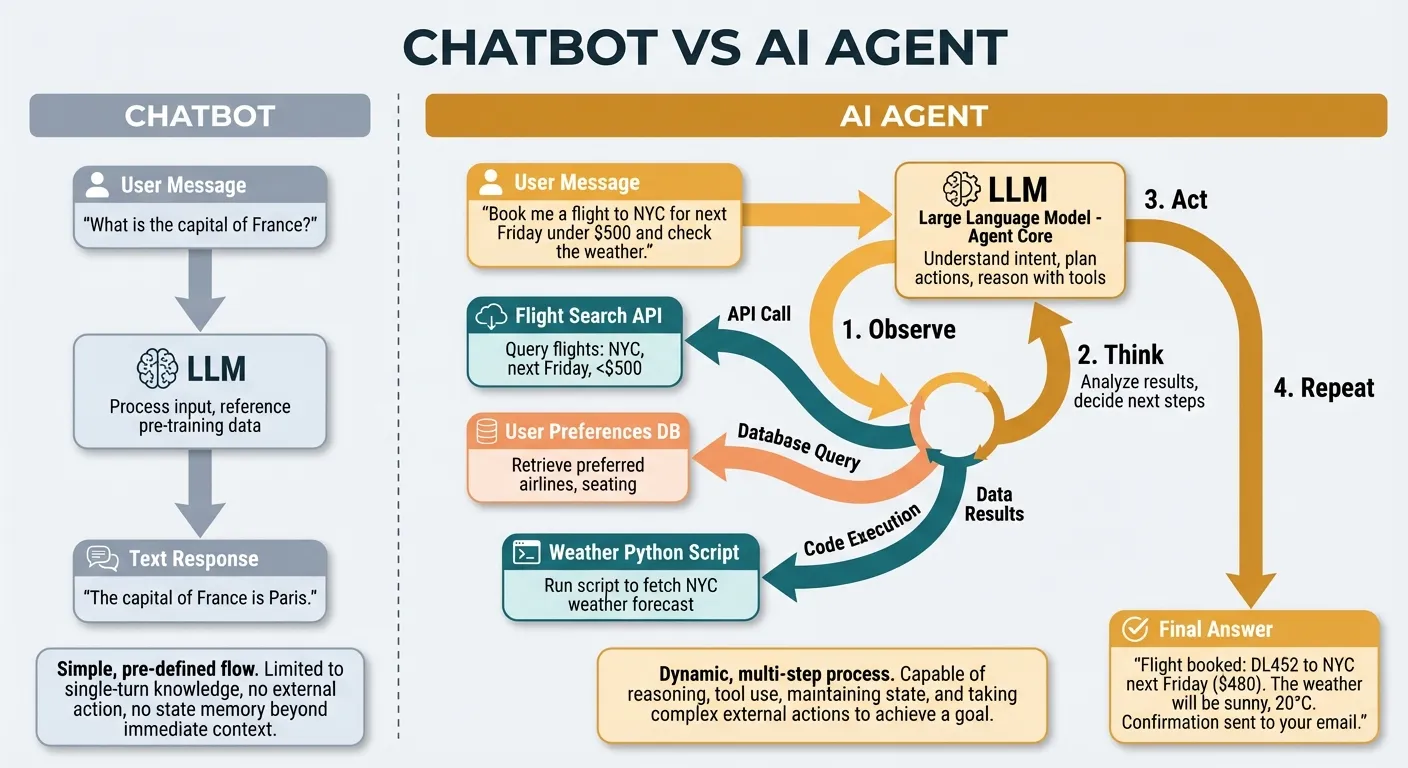
The simplest mental model:
Chatbot:  User message → LLM → Text response
Agent:    User message → LLM → Action → Result → LLM → Action → Result → ... → Final answer
What makes this powerful is the loop. The agent does not need a pre-programmed sequence of steps. It observes results, reasons about them, and picks the next action dynamically. This means it can handle tasks it has never seen before, recover from errors, and adapt to unexpected situations.
What Agents Are Not
Agents are not magic. They are constrained by:
- The tools you give them: An agent can only take actions you define. No tool for sending email means no email.
- The model’s reasoning ability: Weaker models make worse decisions about which tools to use and how.
- The context window: Long-running agents accumulate history that can exceed the model’s context limit.
- Cost: Every tool call adds tokens. Complex tasks can burn through significant API credits.
Understanding these constraints is essential for building agents that work reliably in production rather than just in demos.
The Agent Loop: Observe, Think, Act
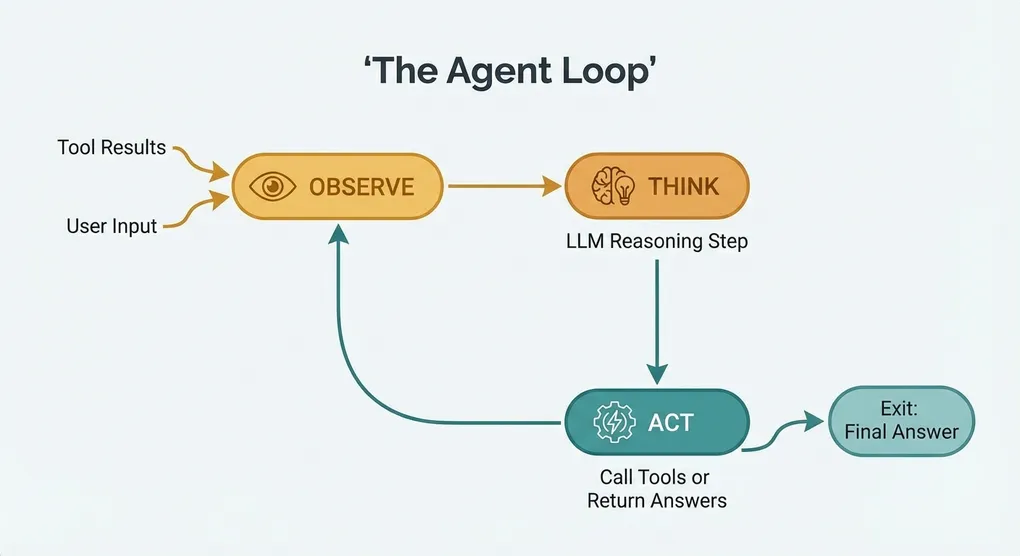
Every AI agent, regardless of implementation, follows the same core loop:
┌─────────────────────────────────┐
│                                 │
│   ┌─────────┐                  │
│   │ OBSERVE │ ← tool results   │
│   └────┬────┘                  │
│        │                       │
│   ┌────▼────┐                  │
│   │  THINK  │ ← LLM reasoning │
│   └────┬────┘                  │
│        │                       │
│   ┌────▼────┐                  │
│   │   ACT   │ → call tool OR   │
│   └────┬────┘   return answer  │
│        │                       │
│ └───────────────────────┘- Observe: The agent receives input — either the user’s initial message or the result of a previous action.
- Think: The language model processes all context (system prompt, conversation history, tool definitions, previous results) and decides what to do.
- Act: The model either calls a tool (returning structured arguments) or produces a final text response.
If the model calls a tool, the result is fed back into step 1, and the loop continues. If the model produces a text response, the loop ends.
This is the entire architecture. Everything else — memory, guardrails, multi-tool orchestration — is built on top of this loop.
Foundation: Function Calling
Function calling (also called tool use) is the mechanism that lets language models trigger actions in your code. Without function calling, an agent would have to output something like “I want to call the weather API for London” as plain text, and you’d need to parse that text to figure out what it wants. Fragile, unreliable, and error-prone.
Modern function calling is structured. You define tools as JSON schemas, and the model returns structured tool_call objects with exact function names and typed arguments.
Defining Tools
Here is how you define a tool for the OpenAI-compatible API:
tools = [
    {
        "type": "function",
        "function": {
            "name": "get_weather",
            "description": "Get the current weather for a given city",
            "parameters": {
                "type": "object",
                "properties": {
                    "city": {
                        "type": "string",
                        "description": "The city name, e.g. 'London' or 'San Francisco'"
                    },
                    "units": {
                        "type": "string",
                        "enum": ["celsius", "fahrenheit"],
                        "description": "Temperature units"
                    }
                },
                "required": ["city"]
            }
        }
    }
]
The schema tells the model: “You have a tool called get_weather. It takes a required city string and an optional units string.” The description fields are critical — they are the model’s only documentation for understanding when and how to use the tool.
Making a Tool Call
When you send a message with tools defined, the model may respond with a tool call:
import openai
import json

client = openai.OpenAI(
    base_url="https://api.openai.com/v1",  # or your custom endpoint
    api_key="your-api-key"
)

messages = [
    {"role": "user", "content": "What's the weather in Tokyo?"}
]

response = client.chat.completions.create(
    model="gpt-4o",
    messages=messages,
    tools=tools
)

message = response.choices[0].message

if message.tool_calls:
    tool_call = message.tool_calls[0]
    print(f"Function: {tool_call.function.name}")
    print(f"Arguments: {tool_call.function.arguments}")
    # Output:
    # Function: get_weather
    # Arguments: {"city": "Tokyo", "units": "celsius"}
Returning Tool Results
After executing the function, you return the result to the model:
# Execute the actual function
def get_weather(city: str, units: str = "celsius") -> dict:
    # In production, call a real weather API
    return {"temperature": 22, "condition": "sunny", "city": city, "units": units}

# Parse the arguments and call the function
args = json.loads(tool_call.function.arguments)
result = get_weather(**args)

# Add the assistant's tool call and the result to the conversation
messages.append(message.model_dump())
messages.append({
    "role": "tool",
    "tool_call_id": tool_call.id,
    "content": json.dumps(result)
})

# Get the final response
final_response = client.chat.completions.create(
    model="gpt-4o",
    messages=messages,
    tools=tools
)

print(final_response.choices[0].message.content)
# Output: "The current weather in Tokyo is 22°C and sunny."
This two-step process — model returns tool call, you execute it, model processes the result — is the building block for everything that follows.
Building a Minimal Agent
Let us build a complete, working agent. This agent can check weather and perform calculations — simple enough to understand fully, complex enough to demonstrate all the core patterns.
Complete Working Code
"""
Minimal AI Agent with Weather and Calculator Tools
Works with any OpenAI-compatible API endpoint.
"""

import json
import math
import openai

# --- Configuration ---
client = openai.OpenAI(
    base_url="https://api.openai.com/v1",  # Replace with your endpoint
    api_key="your-api-key"                  # Replace with your key
)
MODEL = "gpt-4o"  # Replace with your preferred model
MAX_ITERATIONS = 10

# --- Tool Definitions ---
tools = [
    {
        "type": "function",
        "function": {
            "name": "get_weather",
            "description": "Get current weather for a city. Returns temperature, condition, and humidity.",
            "parameters": {
                "type": "object",
                "properties": {
                    "city": {
                        "type": "string",
                        "description": "City name (e.g., 'London', 'New York')"
                    }
                },
                "required": ["city"]
            }
        }
    },
    {
        "type": "function",
        "function": {
            "name": "calculate",
            "description": "Evaluate a mathematical expression. Supports +, -, *, /, ** (power), and common math functions like sqrt, sin, cos, log.",
            "parameters": {
                "type": "object",
                "properties": {
                    "expression": {
                        "type": "string",
                        "description": "Math expression to evaluate (e.g., '2 + 3 * 4', '144 ** 0.5', '2**10')"
                    }
                },
                "required": ["expression"]
            }
        }
    }
]

# --- Tool Implementations ---
WEATHER_DATA = {
    "london": {"temperature": 14, "condition": "cloudy", "humidity": 78},
    "new york": {"temperature": 25, "condition": "sunny", "humidity": 45},
    "tokyo": {"temperature": 22, "condition": "partly cloudy", "humidity": 60},
    "sydney": {"temperature": 19, "condition": "rainy", "humidity": 85},
    "paris": {"temperature": 17, "condition": "overcast", "humidity": 70},
}


def get_weather(city: str) -> dict:
    """Look up weather data for a city."""
    city_lower = city.lower().strip()
    if city_lower in WEATHER_DATA:
        return {
            "city": city,
            "temperature_celsius": WEATHER_DATA[city_lower]["temperature"],
            "condition": WEATHER_DATA[city_lower]["condition"],
            "humidity_percent": WEATHER_DATA[city_lower]["humidity"],
        }
    return {"error": f"Weather data not available for '{city}'"}


def calculate(expression: str) -> dict:
    """
    Safely evaluate a mathematical expression using AST parsing.
    Only allows numeric literals and basic math operations.
    """
    import ast
    import operator

    # Supported binary operators
    ops = {
        ast.Add: operator.add,
        ast.Sub: operator.sub,
        ast.Mult: operator.mul,
        ast.Div: operator.truediv,
        ast.Pow: operator.pow,
        ast.Mod: operator.mod,
        ast.FloorDiv: operator.floordiv,
    }

    # Supported unary operators
    unary_ops = {
        ast.UAdd: operator.pos,
        ast.USub: operator.neg,
    }

    # Supported function names mapped to math module
    safe_functions = {
        "sqrt": math.sqrt,
        "abs": abs,
        "round": round,
        "pow": pow,
        "log": math.log,
        "log10": math.log10,
        "sin": math.sin,
        "cos": math.cos,
        "tan": math.tan,
        "pi": math.pi,
        "e": math.e,
    }

    def safe_eval_node(node):
        """Recursively evaluate an AST node safely."""
        if isinstance(node, ast.Expression):
            return safe_eval_node(node.body)
        elif isinstance(node, ast.Constant) and isinstance(node.value, (int, float)):
            return node.value
        elif isinstance(node, ast.BinOp) and type(node.op) in ops:
            left = safe_eval_node(node.left)
            right = safe_eval_node(node.right)
            return ops[type(node.op)](left, right)
        elif isinstance(node, ast.UnaryOp) and type(node.op) in unary_ops:
            operand = safe_eval_node(node.operand)
            return unary_ops[type(node.op)](operand)
        elif isinstance(node, ast.Call):
            if isinstance(node.func, ast.Name) and node.func.id in safe_functions:
                func = safe_functions[node.func.id]
                if callable(func):
                    args = [safe_eval_node(arg) for arg in node.args]
                    return func(*args)
            raise ValueError(f"Unsupported function: {ast.dump(node.func)}")
        elif isinstance(node, ast.Name) and node.id in safe_functions:
            val = safe_functions[node.id]
            if not callable(val):
                return val  # constants like pi, e
            raise ValueError(f"'{node.id}' is a function and must be called with arguments")
        else:
            raise ValueError(f"Unsupported expression: {ast.dump(node)}")

    try:
        tree = ast.parse(expression, mode="eval")
        result = safe_eval_node(tree)
        return {"expression": expression, "result": result}
    except Exception as e:
        return {"expression": expression, "error": str(e)}


# --- Tool Dispatcher ---
TOOL_FUNCTIONS = {
    "get_weather": get_weather,
    "calculate": calculate,
}


def execute_tool(name: str, arguments: str) -> str:
    """Execute a tool and return the result as a JSON string."""
    if name not in TOOL_FUNCTIONS:
        return json.dumps({"error": f"Unknown tool: {name}"})

    try:
        args = json.loads(arguments)
        result = TOOL_FUNCTIONS[name](**args)
        return json.dumps(result)
    except Exception as e:
        return json.dumps({"error": f"Tool execution failed: {str(e)}"})


# --- Agent Loop ---
def run_agent(user_message: str) -> str:
    """Run the agent loop until it produces a final text response."""
    messages = [
        {
            "role": "system",
            "content": (
                "You are a helpful assistant with access to weather data and a calculator. "
                "Use the available tools when needed to answer questions accurately. "
                "Always show your work when doing calculations."
            ),
        },
        {"role": "user", "content": user_message},
    ]

    for iteration in range(MAX_ITERATIONS):
        response = client.chat.completions.create(
            model=MODEL,
            messages=messages,
            tools=tools,
        )

        message = response.choices[0].message

        # If no tool calls, the agent is done
        if not message.tool_calls:
            return message.content

        # Add the assistant message (with tool calls) to history
        messages.append(message.model_dump())

        # Execute each tool call
        for tool_call in message.tool_calls:
            print(f"  [Tool] {tool_call.function.name}({tool_call.function.arguments})")
            result = execute_tool(tool_call.function.name, tool_call.function.arguments)
            print(f"  [Result] {result}")

            messages.append({
                "role": "tool",
                "tool_call_id": tool_call.id,
                "content": result,
            })

    return "Agent reached maximum iterations without producing a final answer."


# --- Main ---
if __name__ == "__main__":
    test_queries = [
        "What's the weather like in London and Tokyo?",
        "If it's 14 degrees in London and 22 degrees in Tokyo, what's the average temperature?",
        "What's the square root of the humidity in Sydney?",
    ]

    for query in test_queries:
        print(f"\nUser: {query}")
        print(f"Agent: {run_agent(query)}")
        print("-" * 60)
How It Works
Walk through the code from bottom to top:
run_agent()is the core loop. It sends messages to the model, checks if the response contains tool calls, executes them, and loops until the model returns a plain text response.execute_tool()is the dispatcher. It maps tool names to Python functions, parses JSON arguments, and handles errors.- Tool functions (
get_weather,calculate) are ordinary Python functions. In production,get_weatherwould call a real API. The calculator uses safe AST-based parsing that only allows numeric literals and whitelisted math operations. - Tool definitions tell the model what tools exist. The descriptions and parameter schemas are what the model reads to decide when and how to use each tool.
The agent handles multi-step tasks naturally. If asked “What’s the average temperature in London and Tokyo?”, it will:
- Call
get_weather("London")andget_weather("Tokyo")(possibly in parallel) - Receive both results
- Call
calculate("(14 + 22) / 2") - Receive the result
- Formulate a natural language answer
No explicit orchestration code. The model decides the sequence.
Adding Memory and Context
The agent above is stateless — each call to run_agent() starts fresh. Real agents need memory.
Short-Term Memory: Conversation History
The simplest form of memory is keeping the message list between calls:
class Agent:
    def __init__(self, system_prompt: str):
        self.messages = [{"role": "system", "content": system_prompt}]
        self.client = openai.OpenAI(
            base_url="https://api.openai.com/v1",
            api_key="your-api-key"
        )

    def chat(self, user_message: str) -> str:
        self.messages.append({"role": "user", "content": user_message})

        for _ in range(MAX_ITERATIONS):
            response = self.client.chat.completions.create(
                model=MODEL,
                messages=self.messages,
                tools=tools,
            )

            message = response.choices[0].message

            if not message.tool_calls:
                self.messages.append({"role": "assistant", "content": message.content})
                return message.content

            self.messages.append(message.model_dump())

            for tool_call in message.tool_calls:
                result = execute_tool(tool_call.function.name, tool_call.function.arguments)
                self.messages.append({
                    "role": "tool",
                    "tool_call_id": tool_call.id,
                    "content": result,
                })

        return "Max iterations reached."
Now the agent remembers previous exchanges:
agent = Agent("You are a helpful weather assistant.")
print(agent.chat("What's the weather in London?"))
# -> "It's 14 degrees C and cloudy in London."

print(agent.chat("How about Tokyo?"))
# -> "Tokyo is 22 degrees C and partly cloudy." (remembers context)

print(agent.chat("Which city is warmer?"))
# -> "Tokyo is warmer at 22 degrees C compared to London's 14 degrees C."
Long-Term Memory: Persistent Storage
For memory that survives across sessions, store facts externally:
import json
from pathlib import Path


class PersistentMemory:
    def __init__(self, filepath: str = "agent_memory.json"):
        self.filepath = Path(filepath)
        self.data = self._load()

    def _load(self) -> dict:
        if self.filepath.exists():
            return json.loads(self.filepath.read_text())
        return {"facts": [], "preferences": {}}

    def save(self):
        self.filepath.write_text(json.dumps(self.data, indent=2))

    def add_fact(self, fact: str):
        if fact not in self.data["facts"]:
            self.data["facts"].append(fact)
            self.save()

    def set_preference(self, key: str, value: str):
        self.data["preferences"][key] = value
        self.save()

    def get_context(self) -> str:
        lines = []
        if self.data["facts"]:
            lines.append("Known facts: " + "; ".join(self.data["facts"]))
        if self.data["preferences"]:
            prefs = [f"{k}: {v}" for k, v in self.data["preferences"].items()]
            lines.append("User preferences: " + "; ".join(prefs))
        return "\n".join(lines)
Inject the memory context into the system prompt:
memory = PersistentMemory()
memory.set_preference("temperature_units", "fahrenheit")
memory.add_fact("User lives in Berlin")

system_prompt = f"""You are a helpful assistant.

{memory.get_context()}

Use this information to personalize your responses."""
Context Window Management
Long conversations will exceed the model’s context window. Implement a sliding window or summarization strategy:
def trim_messages(messages: list, max_tokens: int = 100000) -> list:
    """Keep the system prompt and most recent messages within token budget."""
    # Always keep the system message
    system_msg = messages[0] if messages[0]["role"] == "system" else None
    other_msgs = messages[1:] if system_msg else messages

    # Rough token estimation (4 chars ~ 1 token)
    total_chars = sum(len(json.dumps(m)) for m in other_msgs)
    max_chars = max_tokens * 4

    while total_chars > max_chars and len(other_msgs) > 2:
        removed = other_msgs.pop(0)
        total_chars -= len(json.dumps(removed))

    if system_msg:
        return [system_msg] + other_msgs
    return other_msgs
Multi-Tool Orchestration
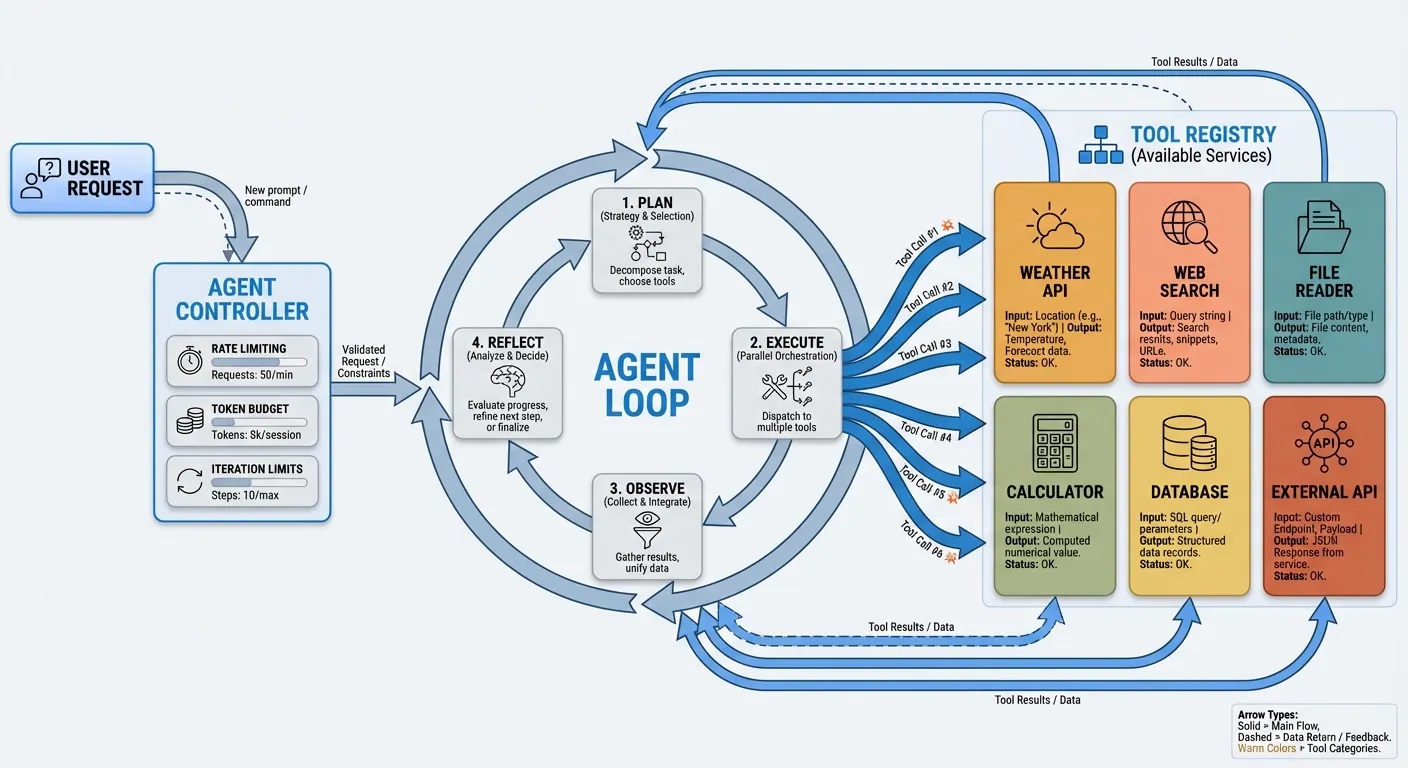
Real agents need more than two tools. Here is a pattern for cleanly managing many tools:
from typing import Callable
from dataclasses import dataclass


@dataclass
class Tool:
    name: str
    description: str
    parameters: dict
    function: Callable


class ToolRegistry:
    def __init__(self):
        self._tools: dict[str, Tool] = {}

    def register(self, name: str, description: str, parameters: dict):
        """Decorator to register a function as a tool."""
        def decorator(func: Callable):
            self._tools[name] = Tool(
                name=name,
                description=description,
                parameters=parameters,
                function=func,
            )
            return func
        return decorator

    def get_openai_tools(self) -> list[dict]:
        """Return tool definitions in OpenAI format."""
        return [
            {
                "type": "function",
                "function": {
                    "name": tool.name,
                    "description": tool.description,
                    "parameters": tool.parameters,
                },
            }
            for tool in self._tools.values()
        ]

    def execute(self, name: str, arguments: str) -> str:
        """Execute a tool by name with JSON arguments."""
        if name not in self._tools:
            return json.dumps({"error": f"Unknown tool: {name}"})
        try:
            args = json.loads(arguments)
            result = self._tools[name].function(**args)
            return json.dumps(result)
        except Exception as e:
            return json.dumps({"error": str(e)})


# Usage
registry = ToolRegistry()


@registry.register(
    name="search_web",
    description="Search the web for current information",
    parameters={
        "type": "object",
        "properties": {
            "query": {"type": "string", "description": "Search query"}
        },
        "required": ["query"],
    },
)
def search_web(query: str) -> dict:
    # Implement with a real search API
    return {"results": [f"Result for: {query}"]}


@registry.register(
    name="read_file",
    description="Read the contents of a file",
    parameters={
        "type": "object",
        "properties": {
            "path": {"type": "string", "description": "File path to read"}
        },
        "required": ["path"],
    },
)
def read_file(path: str) -> dict:
    try:
        content = Path(path).read_text()
        return {"path": path, "content": content}
    except Exception as e:
        return {"error": str(e)}
This registry pattern scales to dozens of tools. The agent code itself does not change — it just passes registry.get_openai_tools() to the API and calls registry.execute() for each tool call.
The ReAct Pattern
ReAct (Reasoning + Acting) structures the agent’s behavior so its reasoning is explicit. Instead of the model silently deciding to call a tool, it first outputs its thought process.
Implementation
The key is in the system prompt:
REACT_SYSTEM_PROMPT = """You are an AI assistant that solves problems step by step.

For each step, follow this exact format:

Thought: [Your reasoning about what to do next]
Action: [The tool to call, or "finish" if you have the answer]

When you have enough information to answer the user's question, respond with:

Thought: [Your final reasoning]
Answer: [Your final response to the user]

Always think before acting. Never call a tool without explaining why first."""
With this prompt, the model’s responses become transparent:
User: Is it warmer in London or Tokyo right now?

Thought: I need to check the weather in both cities to compare temperatures.
I'll start by getting London's weather.
Action: get_weather({"city": "London"})

[Result: {"temperature_celsius": 14, ...}]

Thought: London is 14 degrees C. Now I need Tokyo's temperature.
Action: get_weather({"city": "Tokyo"})

[Result: {"temperature_celsius": 22, ...}]

Thought: London is 14 degrees C and Tokyo is 22 degrees C. Tokyo is clearly warmer.
Answer: Tokyo is warmer right now at 22 degrees C, compared to London's 14 degrees C
 — a difference of 8 degrees.
Why ReAct Matters
- Debuggability: You can see exactly why the agent made each decision.
- Reliability: Forcing the model to think before acting reduces impulsive or incorrect tool calls.
- Auditability: For production systems, the thought chain provides a log of the agent’s reasoning.
- Correction: If the model’s reasoning is wrong, you can detect it before the action executes.
The tradeoff is token usage — the explicit reasoning adds output tokens. For cost-sensitive applications, you may want to use ReAct during development and switch to a more concise format in production.
Error Handling and Guardrails
Production agents need robust error handling. An unguarded agent will happily loop forever, exhaust your API budget, or return nonsensical results.
Iteration Limits and Token Budgets
MAX_ITERATIONS = 15


def run_agent_safe(user_message: str) -> str:
    messages = [
        {"role": "system", "content": SYSTEM_PROMPT},
        {"role": "user", "content": user_message},
    ]

    total_tokens = 0

    for iteration in range(MAX_ITERATIONS):
        response = client.chat.completions.create(
            model=MODEL,
            messages=messages,
            tools=tools,
        )

        # Track token usage
        if response.usage:
            total_tokens += response.usage.total_tokens

        # Budget guard
        if total_tokens > 50000:
            return (
                "I've used a large number of tokens on this task. "
                "Here's what I've found so far: "
                + summarize_findings(messages)
            )

        message = response.choices[0].message

        if not message.tool_calls:
            return message.content

        messages.append(message.model_dump())

        for tool_call in message.tool_calls:
            result = execute_tool_with_timeout(
                tool_call.function.name,
                tool_call.function.arguments,
                timeout_seconds=30,
            )
            messages.append({
                "role": "tool",
                "tool_call_id": tool_call.id,
                "content": result,
            })

    return "I wasn't able to complete this task within the allowed steps."
Tool Execution Timeouts
import signal


class ToolTimeout(Exception):
    pass


def execute_tool_with_timeout(name: str, arguments: str, timeout_seconds: int = 30) -> str:
    """Execute a tool with a timeout guard."""
    def handler(signum, frame):
        raise ToolTimeout(f"Tool {name} timed out after {timeout_seconds}s")

    old_handler = signal.signal(signal.SIGALRM, handler)
    signal.alarm(timeout_seconds)

    try:
        result = execute_tool(name, arguments)
        return result
    except ToolTimeout:
        return json.dumps({"error": f"Tool execution timed out after {timeout_seconds} seconds"})
    finally:
        signal.alarm(0)
        signal.signal(signal.SIGALRM, old_handler)
Input Validation
Always validate tool arguments before execution:
def execute_tool_validated(name: str, arguments: str) -> str:
    if name not in TOOL_FUNCTIONS:
        return json.dumps({"error": f"Unknown tool: {name}"})

    try:
        args = json.loads(arguments)
    except json.JSONDecodeError:
        return json.dumps({"error": "Invalid JSON arguments"})

    # Type checking and sanitization per tool
    if name == "read_file" and "path" in args:
        path = args["path"]
        # Block path traversal attacks
        if ".." in path or path.startswith("/etc") or path.startswith("/root"):
            return json.dumps({"error": "Path not allowed"})

    try:
        result = TOOL_FUNCTIONS[name](**args)
        return json.dumps(result)
    except TypeError as e:
        return json.dumps({"error": f"Invalid arguments: {str(e)}"})
    except Exception as e:
        return json.dumps({"error": f"Execution error: {str(e)}"})
Retry Logic
When a tool call fails, give the model a chance to self-correct:
# The tool returns an error
result = execute_tool(tool_call.function.name, tool_call.function.arguments)

# Add the error result to messages
messages.append({
    "role": "tool",
    "tool_call_id": tool_call.id,
    "content": result,  # Contains {"error": "..."}
})

# The model sees the error and can try a different approach
# No special retry code needed — the agent loop handles it naturally
This is one of the elegant properties of the agent loop: errors are just tool results. The model reads the error, adjusts its approach, and tries again. The iteration limit prevents infinite retries.
Production Deployment Considerations
Moving from a script to a production agent involves several additional concerns.
Async Execution
Production agents should use async I/O to handle concurrent requests:
import asyncio
import openai


async def run_agent_async(user_message: str) -> str:
    client = openai.AsyncOpenAI(
        base_url="https://api.openai.com/v1",
        api_key="your-api-key"
    )

    messages = [
        {"role": "system", "content": SYSTEM_PROMPT},
        {"role": "user", "content": user_message},
    ]

    for _ in range(MAX_ITERATIONS):
        response = await client.chat.completions.create(
            model=MODEL,
            messages=messages,
            tools=tools,
        )

        message = response.choices[0].message

        if not message.tool_calls:
            return message.content

        messages.append(message.model_dump())

        # Execute tool calls concurrently
        async def execute_and_format(tc):
            result = await asyncio.to_thread(
                execute_tool, tc.function.name, tc.function.arguments
            )
            return {
                "role": "tool",
                "tool_call_id": tc.id,
                "content": result,
            }

        tool_results = await asyncio.gather(
            *[execute_and_format(tc) for tc in message.tool_calls]
        )
        messages.extend(tool_results)

    return "Max iterations reached."
Structured Logging
Log every step of the agent loop for debugging and monitoring:
import logging
import time

logger = logging.getLogger("agent")


def run_agent_logged(user_message: str, request_id: str) -> str:
    start_time = time.time()
    total_tokens = 0

    logger.info("Agent started", extra={
        "request_id": request_id,
        "user_message": user_message[:200],
    })

    messages = [
        {"role": "system", "content": SYSTEM_PROMPT},
        {"role": "user", "content": user_message},
    ]

    for iteration in range(MAX_ITERATIONS):
        response = client.chat.completions.create(
            model=MODEL,
            messages=messages,
            tools=tools,
        )

        if response.usage:
            total_tokens += response.usage.total_tokens

        message = response.choices[0].message

        if not message.tool_calls:
            elapsed = time.time() - start_time
            logger.info("Agent completed", extra={
                "request_id": request_id,
                "iterations": iteration + 1,
                "total_tokens": total_tokens,
                "elapsed_seconds": round(elapsed, 2),
            })
            return message.content

        for tool_call in message.tool_calls:
            logger.info("Tool call", extra={
                "request_id": request_id,
                "iteration": iteration + 1,
                "tool": tool_call.function.name,
                "arguments": tool_call.function.arguments,
            })

        messages.append(message.model_dump())
        for tool_call in message.tool_calls:
            result = execute_tool(tool_call.function.name, tool_call.function.arguments)
            messages.append({
                "role": "tool",
                "tool_call_id": tool_call.id,
                "content": result,
            })

    return "Max iterations reached."
API Endpoint Considerations
For production agent deployments, your choice of API endpoint matters more than in simple chat applications. Agents make multiple sequential API calls, so latency compounds. They generate more tokens, so pricing differences are amplified. And they depend on reliable tool calling, which varies by provider.
If you are running agents that need access to multiple model families — say, Claude for complex reasoning steps and GPT-4o-mini for simple classification sub-tasks — an aggregation platform simplifies the architecture. Rather than managing multiple API clients with different authentication, you use a single endpoint. Platforms like Ofox.ai provide this unified access through an OpenAI-compatible interface, which means your agent code works without modification regardless of which underlying model handles each request.
Rate Limiting and Queuing
Agents can generate bursts of API calls. Implement client-side rate limiting:
import asyncio
from asyncio import Semaphore


class RateLimiter:
    def __init__(self, max_concurrent: int = 5, requests_per_minute: int = 60):
        self.semaphore = Semaphore(max_concurrent)
        self.rpm = requests_per_minute
        self.interval = 60.0 / requests_per_minute
        self._last_request = 0.0

    async def acquire(self):
        await self.semaphore.acquire()
        now = asyncio.get_event_loop().time()
        wait_time = self._last_request + self.interval - now
        if wait_time > 0:
            await asyncio.sleep(wait_time)
        self._last_request = asyncio.get_event_loop().time()

    def release(self):
        self.semaphore.release()
Framework Comparison
You do not need a framework to build agents — this entire guide uses only the OpenAI Python SDK. But frameworks can accelerate development for complex use cases. Here is an honest comparison.
Raw API (What This Guide Uses)
Pros: Full control, no dependencies beyond the SDK, easy to debug, no abstraction overhead, works with any OpenAI-compatible endpoint.
Cons: You build everything yourself — memory, tool management, error handling, observability.
Best for: Teams that want to understand exactly what their agent does, simple to moderate complexity agents, situations where framework abstractions get in the way.
LangChain / LangGraph
Pros: Massive ecosystem of integrations (vector stores, document loaders, output parsers), LangGraph handles complex stateful workflows, large community.
Cons: Heavy abstraction layers make debugging difficult, frequent breaking changes between versions, “framework lock-in” where your code becomes deeply coupled to LangChain patterns, excessive boilerplate for simple tasks.
Best for: Complex multi-step workflows with branching logic, teams that need lots of pre-built integrations, RAG applications.
CrewAI
Pros: Multi-agent orchestration is first-class, role-based agent design is intuitive, good for simulating team workflows.
Cons: Opinionated architecture that does not fit all use cases, less mature than LangChain, debugging multi-agent interactions is inherently complex.
Best for: Multi-agent systems where agents have distinct roles (researcher, writer, reviewer), complex tasks that benefit from decomposition into agent teams.
Claude Agent SDK (Anthropic)
Pros: Native integration with Claude models, designed for Anthropic’s tool use patterns, clean API design.
Cons: Anthropic-only (no OpenAI or Gemini models), newer and less battle-tested, smaller ecosystem.
Best for: Teams committed to Claude, projects that need deep integration with Anthropic’s specific features like extended thinking.
OpenAI Agents SDK
Pros: First-party support from OpenAI, well-integrated with GPT models, supports handoffs between agents.
Cons: OpenAI-centric, ties you to their model ecosystem, newer framework still evolving.
Best for: Teams using GPT models, applications that need multi-agent handoffs with guaranteed format compatibility.
Comparison Table
| Feature | Raw API | LangChain | CrewAI | Claude SDK | OpenAI SDK |
|---|---|---|---|---|---|
| Learning curve | Low | High | Medium | Low | Low |
| Debugging | Easy | Hard | Medium | Easy | Easy |
| Multi-model support | Any | Any | Any | Claude only | GPT only |
| Multi-agent | Manual | LangGraph | Native | Manual | Native |
| Dependencies | Minimal | Heavy | Moderate | Light | Light |
| Production readiness | You build it | Mature | Growing | Growing | Growing |
The Pragmatic Recommendation
Start with the raw API approach from this guide. Build your first agent without any framework. You will understand every line of code, every API call, and every decision point. When (and if) you hit a wall — say, you need complex multi-agent orchestration or dozens of pre-built tool integrations — evaluate frameworks based on the specific capability you need, not on marketing promises.
Many production agents at serious companies run on fewer than 200 lines of code, using nothing more than the OpenAI SDK and standard Python libraries. Complexity is not a feature.
Putting It All Together
Here is the architecture of a production-ready agent, incorporating everything from this guide:
User Request
    |
    v
Agent Controller
  - Rate limiting
  - Token budgeting
  - Iteration limits
  - Structured logging
    |
    v
Agent Loop (Observe -> Think -> Act)
    |
    v
Tool Registry
  [Weather] [Search] [Files]
  [Math]    [DB]     [API]
    |
    v
Memory Layer
  - Conversation history (short-term)
  - Persistent storage (long-term)
  - Context window management
The agent controller handles cross-cutting concerns (limits, logging, rate limiting). The agent loop is the core observe-think-act cycle. The tool registry manages available tools. The memory layer handles state across turns and sessions.
This architecture scales from a hobby project to a production service. The only thing that changes between them is the robustness of each layer — more comprehensive logging, stricter guardrails, better monitoring, and more reliable tool implementations.
Next Steps
Building your first agent is the beginning, not the end. Here are directions to explore:
- Add real tools: Replace mock data with actual API integrations — weather APIs, search engines, databases, file systems.
- Implement streaming: Stream agent responses to users as they are generated, rather than waiting for the full loop to complete.
- Build a web interface: Wrap your agent in a FastAPI or Flask server and connect it to a frontend.
- Add evaluation: Build a test suite that runs your agent against known tasks and measures success rate, token usage, and latency.
- Explore multi-agent systems: Create specialized agents that hand off to each other — a router agent that delegates to a researcher agent, a writer agent, and a reviewer agent.
The code in this guide is complete, working, and production-oriented. Copy it, modify it, break it, and rebuild it. That is the fastest path to understanding AI agents deeply enough to build them with confidence.