12 AI Agents Worth Trying in Late 2026: From Manus to Lovart
Choose an AI agent for research, writing, slides, visuals or operations. Five hands-on workflows, real screenshots and seven clearly labeled documentation reviews.
 Ofox
Ofox 
A useful AI agent should leave you with something you can use: a sourced report, an editable article, a presentation, an image, or a completed piece of routine work. The interesting part comes when you ask it to change one thing. Does it keep the facts, preserve the design, and deliver a file you can actually take away?
For late 2026, Manus, YouMind, Genspark, Lovart and Ofox are concrete starting points for research, writing, presentations and visual creation, based on the small task checks below. ChatGPT Work, Claude Cowork, Skywork, Krea Agent, HeyGen Video Agent, invideo Agent and Lindy broaden the shortlist into cross-app work, video and operations; those seven receive documentation-based assessments, not hands-on verdicts.
This is an editorial shortlist of 12 products, not a measured popularity ranking. We tested five workflows on October 21, 2026, including a follow-up revision for each. Different products received tasks suited to their positioning, so there is no cross-category score or speed leaderboard. Ofox publishes this article and is included in the comparison; its failed submission attempts and limitations are recorded too. Testing and writing were AI-assisted, with browser records and a separate AI editorial review. There was no human review of each test.
The shortlist: choose the deliverable first
| Agent | Start here when you need… | Evidence in this article | Main boundary |
|---|---|---|---|
| Manus | A researched comparison with source links | Hands-on research + revision | Relevant citations still need editorial judgment |
| YouMind | An article developed from selected sources | Hands-on document + revision | Fluent prose can overstate what sources prove |
| Genspark | A designed presentation from a brief | Hands-on five-slide deck + revision | Export required an upgraded plan in our session |
| Lovart | A poster or visual concept on a canvas | Hands-on poster + headline edit | It invented a product size in our artwork |
| Ofox | A generated image followed by a conversational edit | Hands-on image + background change | Submission friction; exact product fidelity unproven |
| ChatGPT Work | Research and deliverables within ChatGPT | Official documentation | Replaces the old agent-mode recommendation; access varies |
| Claude Cowork | Work spanning local files and applications | Official documentation | Requires an appropriate desktop/file-access setup |
| Skywork | A workspace with several output formats | Previously collected official documentation | No hands-on session completed for this article |
| Krea Agent | Image/video creative variations | Official product interface and documentation | Template examples are not our consistency tests |
| HeyGen Video Agent | Presenter-led explainers and training videos | Official documentation | No rendered video or lip-sync assessment here |
| invideo Agent | Prompt-led videos combining script and media | Official documentation | The cited Agent page specifically describes Agentspace |
| Lindy | Recurring work across business tools | Official documentation | Integration and action permissions determine usefulness |
If your actual task is writing software, use our separate comparison of nine coding agent harnesses. This list concentrates on knowledge work and content creation.
1. Manus: a research assistant that produces a usable comparison
Evidence: hands-on. We used Manus 2.0 Lite to compare HeyGen, Synthesia and invideo for a solo educator. The brief required official sources, a best-fit task, editing/export details, avatar and voice capabilities, one limitation per tool, and an English Markdown deliverable under 700 words. It prohibited prices and instructed the agent to mark unverified facts.
The useful part was the structure: the report separated editing inside a service from exporting an editable project for a different editor. It supplied direct official links and marked the latter capability as unverified. We inspected the complete report in Manus’s preview; the interface offered a Markdown download, but we did not complete that download.
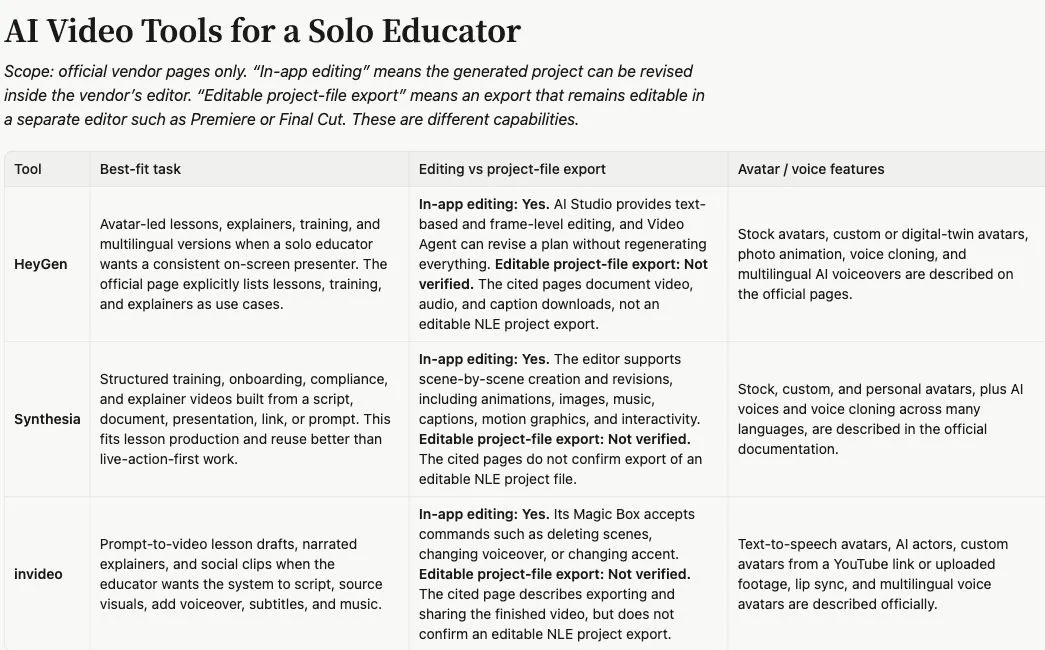
Actual report preview, cropped to its English content. This tests Manus’s research workflow, not the three video tools themselves.
We then asked Manus to remove numeric language/avatar/voice counts and replace invideo’s free-credit limitation with a documented editing or export limitation. The revision did so, choosing a page that labeled multiplayer editing as forthcoming. That is also the catch: collaboration is a weak deciding factor for a solo educator. The replacement followed the requested category without finding the most useful limitation for that reader.
Manus is worth trying when the difficult part is turning several sources into a comparison you can inspect. Give it the decision context as well as the columns. A tidy table and valid links do not automatically mean that every row helps you decide. The official product is the entry point; our recommendation here rests on this one report and revision, not a reliability percentage.
2. YouMind: turn a source collection into an editable article
Evidence: hands-on. YouMind’s interesting role in this shortlist is the step between collecting material and developing a piece of writing. We supplied two specific help articles—HeyGen’s export guide and Synthesia’s product overview—and requested an evidence outline followed by a roughly 400-word editable article. It was told to use only those sources and no existing private board material.
The result opened as a document alongside the conversation, with linked claims and a clear editorial angle about revision versus downloadable output. That makes YouMind a plausible starting point for a newsletter or article based on material you have already chosen. In this session we verified the document and its revision interface, not a separate downloaded file or every requested planning artifact.
The first draft also contained a real problem. It described the exported result as “not a project you can reopen,” even though its final paragraph acknowledged that the sources did not establish project-file export support. It had turned missing documentation into a negative product claim.
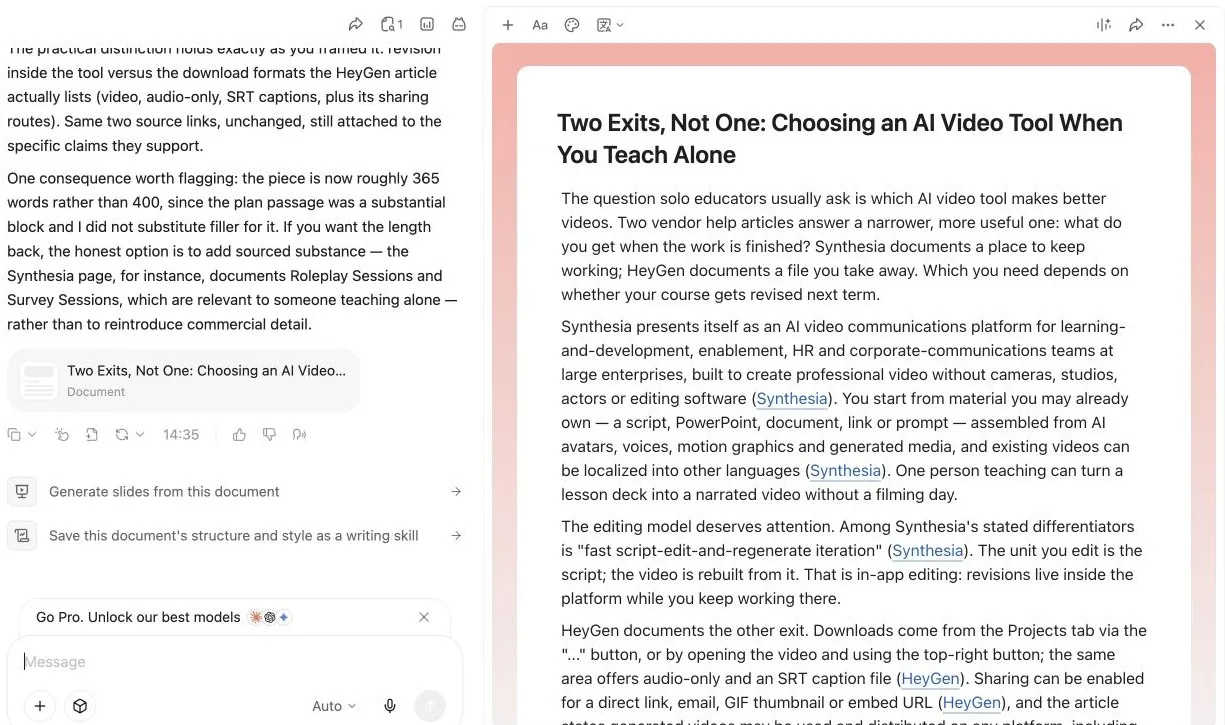
Actual document after accepting the proposed corrections. The conversation and revised article remain visible side by side.
We requested removal of plan/credit discussion and correction of that inference. YouMind proposed changes in place; we accepted them through its revision controls and checked the resulting text. The explicit unsupported denial was removed. Its opening contrast between the two vendors remained somewhat sharper than the limited sources justified, so a human editor would still need to soften that framing before publishing the test article.
Choose YouMind when source material and ongoing editing matter more than producing an isolated answer. Budget attention for the argument, not just grammar: an attractive angle can create a false distinction between products.
3. Genspark: a brief becomes a designed slide deck
Evidence: hands-on. We asked Genspark for five English slides launching Morrow, a fictional refillable notebook. The only product facts were a reusable cover, replaceable paper inserts and three sizes. The brief specified freelance designers, orange and cream, and five sections: problem, product, use cases, refill process and invitation. Prices, sustainability statistics, customers and testimonials were prohibited.
Genspark created a five-slide HTML presentation with a consistent palette and typography. Its visible workflow included writing individual slides, running layout checks and revising a layout that it considered awkward. The rendered result mattered more than those completion messages: we could see the deck, the five-slide navigation and the edited use-case slide.
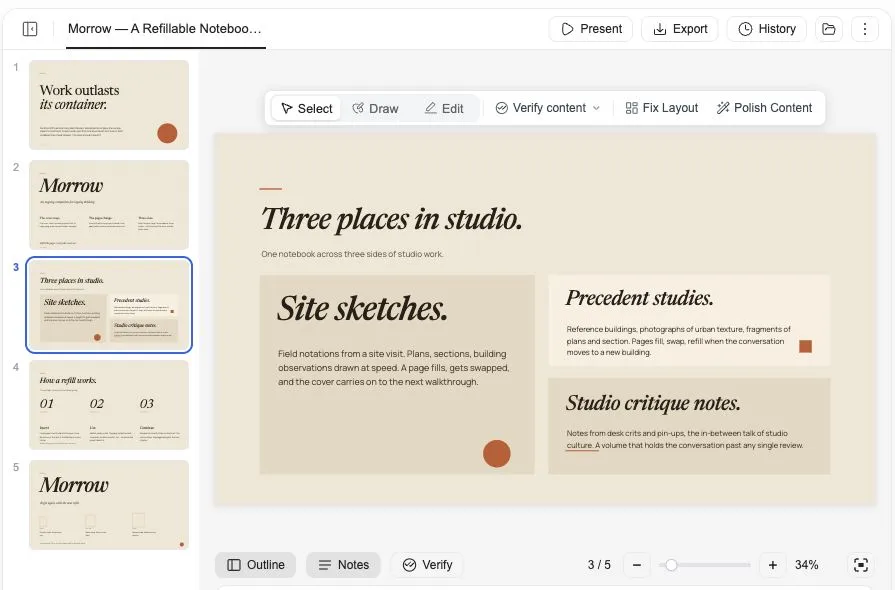
We then requested a change only to slide 3, replacing the use cases with site sketches, precedent studies and studio critique notes for architecture students. The visible slide adopted all three and retained the deck’s visual style. We did not perform a file-level diff proving that every other slide was untouched, so that stronger assertion remains the agent’s report rather than our verification.
Genspark also introduced small, medium and large size labels in its completion summary, although the brief only said “three sizes.” Those labels need confirmation before real product use, just like the invented specifications in the Lovart example below.
The practical limitation appeared at handoff. The Export dialog listed PDF, PPTX and Google Slides, but said export was available to Plus, Pro and Team members. We did not upgrade, download a PPTX or test its editability in PowerPoint.
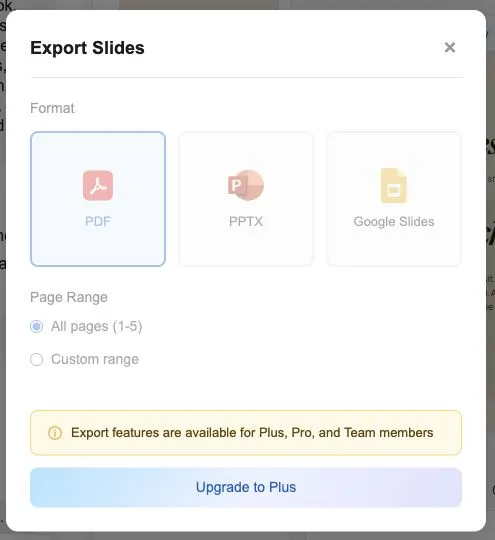
Use Genspark’s presentation workflow for turning a brief into a visual draft you can iterate on. Check the export entitlement before treating a generated deck as a client-ready file.
4. Lovart: visual direction and revisions on one canvas
Evidence: hands-on. Lovart received the same fictional Morrow product facts, but its task was one square poster: restrained orange and cream, a notebook visual, editorial typography and the exact headline “Keep the cover. Change the page.”
It produced a recognizable poster rather than a prompt suggestion. The brand name, headline, notebook and product-fact area formed a coherent composition. The session identified the generation tool as GPT Image Flare. We then requested only a new headline—“New pages. Same notebook.”—and asked for the revision beside the original.
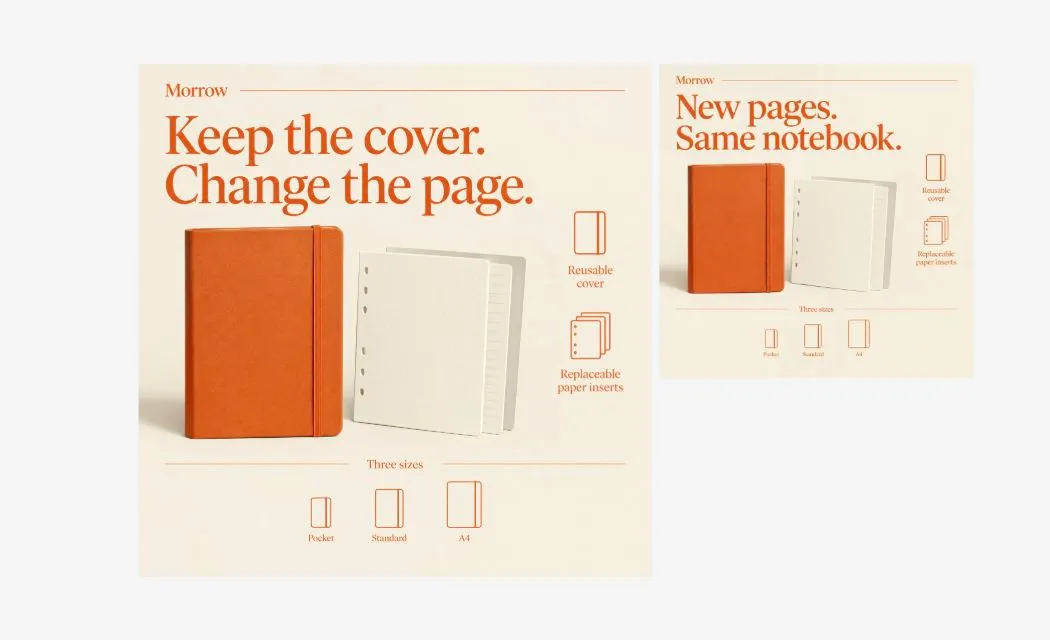
Actual canvas. The two displayed objects have different sizes on the canvas; that alone does not establish their exported pixel dimensions.
The headline changed correctly and both versions were visible together. However, the artwork also named the three sizes Pocket, Standard and A4. We had supplied no size names or dimensions. A4 was an invented specification, and the revision retained it. We therefore would not publish this as a real product advertisement without another correction.
Lovart is compelling for a creator who wants a visual direction, feedback and alternatives in one place. In our example, visual coherence was stronger than factual restraint. Its statement that everything else was unchanged should not be mistaken for a pixel-level comparison: we inspected the rendered compositions, not a layered design file or an image-difference measurement.
5. Ofox: create an image, then change its background in conversation
Evidence: hands-on; publisher relationship disclosed. We tested Ofox’s Agent workspace with a text-only brief for an orange refillable notebook and separate paper inserts on a cream studio background. It asked for realistic materials, soft side lighting, a square image, and no text or logo. No real product reference photo was supplied, so this is a fictional concept test, not proof of matching an existing SKU.
There was friction before generation. Two submissions with Claude Opus 5.5 returned to the input screen without a completed task. We did not establish the cause. After selecting GPT-6.1 Sol, the task completed; the image result identified qwen/qwen-image-3.0 at 1024 × 1024. The conversational model and the image-generation model were therefore different.

We asked it to change only the background to muted sage green, keeping the notebook, inserts, composition and lighting as close as possible. The second image had the requested background and retained the general notebook arrangement. It was not identical: the paper block’s proportions and some shading changed. That makes it useful as a creative variation, with further inspection needed for precise commercial product work.

Both images are cropped screenshots of the actual result previews. The edited output also displayed Qwen-Image 3.0 and 1024 × 1024. We do not present the UI’s estimated charge as a verified price quotation.
Ofox is worth trying for generating an image and continuing to edit it in the same conversation. This run does not establish video quality, perfect subject preservation or consistent submission reliability. For a real product, start with a reference and compare its details carefully; our product-photo background workflow covers that more focused task.
6. ChatGPT Work: the current option to check instead of old agent mode
Evidence: official documentation; no task run for this article. There is an important product transition for anyone finding older “best AI agents” lists: OpenAI’s ChatGPT agent help page now says that ChatGPT agent is no longer available and directs readers to Work. That page still contains older agent-mode sections, so do not use its old quotas as a current purchasing guide.
The current Work documentation describes longer, multi-step tasks and finished documents, spreadsheets, presentations, reports and Sites. It distinguishes cloud work from desktop work with permitted local files and applications. Availability depends on plan and workspace access.
Our suggested scenario is a sourced research brief that becomes a comparison spreadsheet and a presentation in the same task. That is an editorial use-case recommendation based on the documented scope, not an observed completion. Choose this route if ChatGPT is already where your work lives; verify access and the actual output formats before assuming an older agent tutorial still applies.
7. Claude Cowork: knowledge work that starts in your files
Evidence: official documentation; not tested here. Anthropic’s Cowork product guide emphasizes local files, connected applications and browser work, with documents, spreadsheets and presentations as deliverables. It explicitly separates Cowork from conversational Chat and repository-focused Claude Code.
The representative scenario is straightforward: read a folder of vendor PDFs and a supplied requirements sheet, produce a comparison workbook, then update it when one requirement changes. The value would come from handling the source files and the deliverable together.
We did not run that scenario, verify formulas or open a generated workbook. The desktop setup, allowed folders and relevant app connections are part of the evaluation, not incidental details. Shortlist Cowork for file-heavy work; for an article built from a small curated reading collection, YouMind’s document workflow is the more directly illustrated example in this review.
8. Skywork: several deliverable types in one workspace
Evidence: official materials collected October 19; no hands-on session. The Skywork help center materials already collected for this research list General, Documents, Slides, Sheets, Images, Websites and Videos. They position General as a workspace for multi-step tasks. This supports including Skywork as a multi-format workspace candidate; it does not independently prove citation quality or output accuracy.
A useful scenario to evaluate would be a short industry report followed by a deck built from the same findings. The important question is whether source links survive that transition and support the claims on the final slides, not simply whether both export buttons exist.
Browser access was unavailable to us for this article, so there is no Skywork test screenshot, generated report or export verification. We have not penalized the product for that access limitation. Its place here is a documented alternative to investigate when a report and its presentation need to stay together, with lower confidence than our hands-on entries.
9. Krea Agent: creative variations across image and video workflows
Evidence: official interface and product materials; not tested here. Krea Agent exposes creative templates spanning marketing, branding, film and explainers. Its examples include changing an outfit or location, product campaigns, and architectural visualizations. Krea’s broader creative suite also lists generation, editing and enhancement tools.
The scenario we would prioritize is a product reference turned into several visual directions, followed by one controlled background change. This is attractive when a creator wants to explore images and motion within a creative environment rather than begin with a blank research chat.
The templates show intended use, not our proof that a product, face or movement remains unchanged. We did not render a Krea output, measure reference fidelity or verify a downloaded video. In particular, a template called “swap” should not be treated as a guarantee of exact preservation. Compare Krea with Lovart for visual work; our Lovart example shows why even a good-looking result still needs a specification check.
10. HeyGen Video Agent: presenter-led explainers with an editing stage
Evidence: official documentation; no video rendered here. HeyGen’s Video Agent page describes a scene blueprint, conversational refinement, presenter footage, B-roll and motion graphics. It also describes changing motion elements in AI Studio after generation. Those are documented in-app editing capabilities, not evidence of exporting an editable project to every professional video editor.
The best-fit scenario to investigate is a short lesson or product explainer with a consistent presenter, supporting visuals and captions. The useful revision is replacing one sentence and checking the resulting speech, captions and timing together.
We did not run that revision, assess lip sync or inspect a finished video. The export help page documents downloadable output and an HDR limitation; neither establishes universal project-file compatibility. Choose HeyGen as a candidate when the presenter is central to the communication. A beautiful still image or a source-comparison report about HeyGen is not a video-quality test.
11. invideo Agent: assemble a video from a topic and brief
Evidence: official documentation; not tested here. The invideo Agent page specifically describes an Agent through Google Agentspace that writes a script and assembles visuals, voiceover and subtitles. Check access to that integration before assuming the same Agent workflow is included in your regular invideo account.
A representative use case is a short narrated explainer where the main work is converting a topic into a sequence of scenes. Compared with a presenter-first evaluation, the questions become script structure, visual relevance, pacing and whether a requested scene replacement disturbs the rest.
We did not create a video, test scene replacement or verify access to the Agentspace route. We also do not infer current export capabilities from a different invideo marketing page. Consider this entry if your bottleneck is assembling a complete narrative from a brief; investigate the exact entry point and handoff format before choosing it for a production pipeline.
12. Lindy: the work around content creation
Evidence: official documentation; not tested here. Lindy positions itself around work across connected business tools. Its executive-assistant page illustrates inbox, calendar, meeting preparation and catch-up tasks. These are vendor demonstrations, not outcomes from our account.
For a small content business, the useful scenario may be turning a client brief and recent correspondence into a meeting summary and draft follow-up. That is a different job from producing the campaign image or writing the finished article. Lindy’s fit would depend on the applications you already use and the permissions you are prepared to grant.
We did not connect a mailbox, run recurring jobs or send messages. Start an evaluation with a draft-only task and check source references, recipients and repeated-run behavior before enabling consequential actions. Shortlist Lindy when coordination is the bottleneck; choose one of the creative agents above when you mainly need a new asset.
What the hands-on checks actually changed about our recommendations
The most useful findings came after the first output. Manus could replace a limitation without making it relevant to the reader. YouMind could organize a persuasive article while overstating a source. Lovart could preserve the visual direction while inventing a product specification. Genspark could generate and revise a deck while its export path remained unavailable on the account we used. Ofox could produce the requested background variation after submission problems, but its paper block changed too.
Those are different failure modes. A single “best overall” score would hide them.
For AI agents for content creation, we would start with YouMind when you already have sources, Manus when you need a structured research comparison, Genspark when the deliverable is a deck, and Lovart or Ofox when it is a visual concept. HeyGen, invideo and Krea are the documented video/creative candidates in this list, with no video-quality winner established by our tests. ChatGPT Work, Cowork, Skywork and Lindy deserve attention when the task crosses files, formats or business applications.
A brief you can reuse before committing to an agent
Use a small real task with non-sensitive material, and make the second turn part of the evaluation:
Deliverable: [one article / five-slide deck / square poster / short video].
Audience: [the person who will use it].
Allowed facts and sources: [paste an explicit list].
Do not invent: prices, dimensions, customers, statistics or testing claims.
Output: [the format you need to edit or hand off].
Flag anything you cannot verify. Do not publish or send it.

Follow-up:
Change only [one specific element]. Preserve [named facts and elements].
Show the revised result and explain what could not be preserved.
For the Genspark and Lovart tasks featuring Morrow, the facts were deliberately sparse: a reusable cover, replaceable paper inserts and three sizes. That made invented specifications easy to spot. For research, we inspected whether links supported the conclusion, not just whether citations existed. For slides, we opened the export dialog rather than accepting the phrase “fully editable.”
Judge the final artifact, its revision and its handoff separately. Keep the prompt, original output and correction together. Before adopting an agent, try an initial draft and a follow-up edit on a real task, then check that you can open and use the final output.