Codex keeps testing but never finishes: what to change
Give Codex a clear stopping condition, inspect repeated test failures and preserve useful work. Compare completed tasks rather than token counts alone.
 Ofox
Ofox 
If Codex keeps testing without finishing, interrupt the loop, inspect the latest diff and failure, then resume with a specific acceptance criterion. Keep the tests that verify the requested change. Repeatedly running an unchanged command without new evidence is different from fixing a newly discovered defect.
This is a workflow diagnosis, not a claim that one model or every Codex installation has a defect. A slow run can also be waiting on a process, network request, permission or an unusually large test suite.
Find out what is actually repeating
Before changing the model, look at the last command and its result. Did the test fail? Did the agent change relevant code before running it again? Is the process still producing output? Is the same environmental failure being mistaken for a code bug?
| Observation | Next check |
|---|---|
| Same failing test and unchanged code | Ask for the specific new hypothesis before another run |
| New failure after a real change | Investigate the regression; another test run may be justified |
| No output from a running command | Inspect process status and external dependencies |
| Agent keeps widening the test plan | Restate the requested deliverable and scope |
| Task interrupted by a usage limit | Check the actual limit window before diagnosing the code |
Do not discard the working tree to escape a loop. Preserve a checkpoint and inspect changes first. The Codex reset guide covers account limits; a test loop and a weekly quota are separate problems.
Give the task a finish line
An acceptance criterion should describe an observable result. “Make the app robust” invites an open-ended project. “Prevent an empty search from throwing, and verify the empty and nonempty paths” is something a reviewer can assess.
Try this instruction, adapted to your repository:
Fix the empty-search failure in the existing component.
Keep unrelated refactors outside this task.
Before editing, name the smallest relevant acceptance check.
After a meaningful change, run that check and the required project checks.
Repeat a check only after a change or a new failure explains why.
If the same failure persists without a new hypothesis, stop and report it.
Finish with the changed behavior, checks run and any remaining uncertainty.
This is an editorial example, not a measured guarantee of lower usage. Keep repository-required security and regression checks. The goal is to connect validation to a change, not to instruct the agent to skip all tests.
Review the instructions the task inherits
Look for overlapping instructions in the task, project guidance and skills. One instruction may require a bounded fix while another implicitly expands the assignment into a broad audit. Clarify which checks are required for the actual change and which are future work.
If a command is blocked by an environment problem, report that separately from a failing acceptance test. Do not ask the agent to bypass permissions, disable protections or manufacture a passing result to finish sooner.
For an interruption while receiving an answer, consult the stream disconnection guide. Replaying a whole task can duplicate work; inspect the checkpoint and existing files before restarting.
Compare cost per completed task
A large token counter does not by itself tell you whether the task was expensive or productive. Cache reads, uncached input and output can have different API rates, and a ChatGPT subscription limit is not an API invoice. OpenAI’s Codex pricing guidance is the reference for plan usage; use your own account’s displayed limits.
For API work, the official caching guide explains why input categories must be separated.
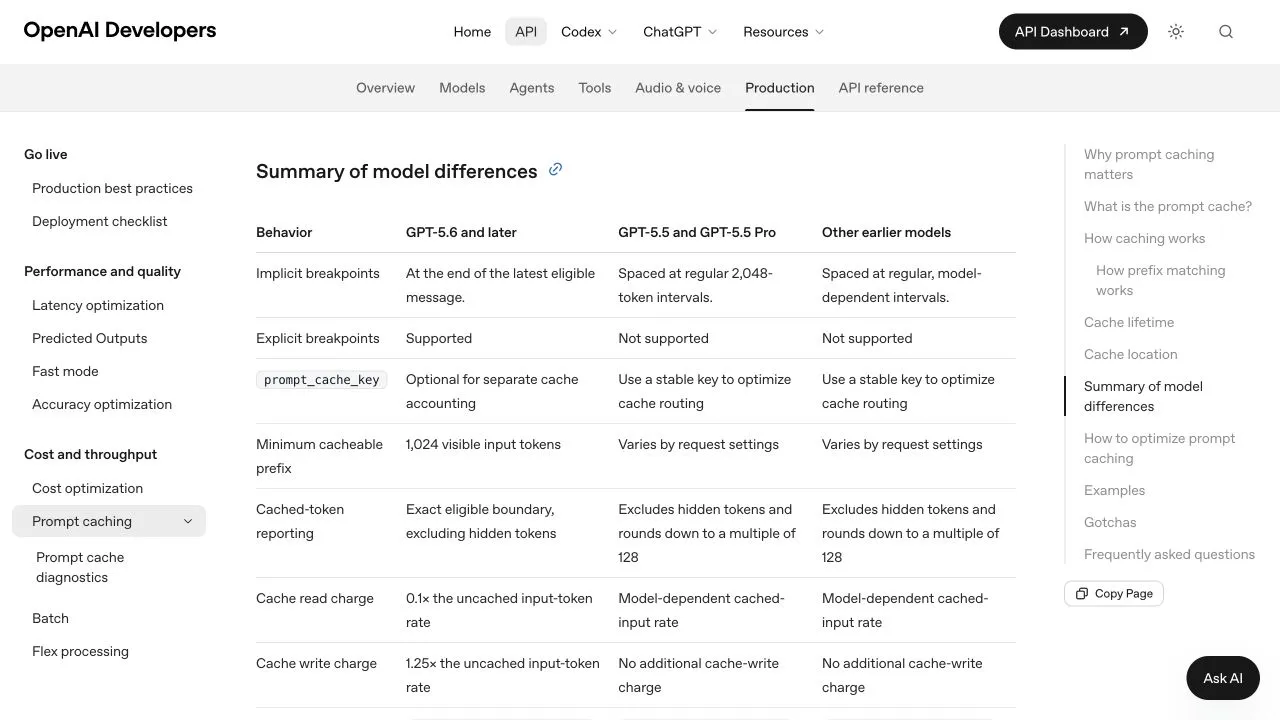
OpenAI API documentation, captured September 16, 2026. This table explains API token categories; it is not a Codex subscription quota conversion table.
Record elapsed time, acceptance result, manual repair and any billed retries. If comparing models, begin from the same repository snapshot and give each the same task and permissions. Use the Astra versus Sol comparison for provider-specific cost distinctions. Do not infer which model wins from a single unusually good run.
Frequently Asked Questions
- Should I tell Codex never to write tests?
- No. Specify the required verification and stop conditions. Removing all tests can hide the very defect you asked the agent to fix.
- Will starting a new task reset my weekly allowance?
- A new conversation is not a quota reset. Check the account's usage dashboard and preserve the current task's checkpoint before moving work.
- Should I switch models immediately?
- First identify whether the blocker is a failing command, unclear scope or repeated reasoning without progress. A model comparison is useful only when the task and acceptance check stay comparable.