Connect n8n to a third-party API with your own key
Import an n8n workflow, connect Ofox with an OpenAI credential, and verify a read-only tool call and JSON result. Includes setup, billing boundaries and failure checks.
 Ofox
Ofox 
You can connect an n8n AI Agent to a third-party OpenAI-compatible API by creating an OpenAI credential with your own API key and the provider’s Base URL, then selecting that credential in the OpenAI Chat Model sub-node. The provider must support the model and features your workflow actually uses. A successful credential test alone is not enough.
This tutorial supplies a credential-free workflow JSON that classifies a synthetic billing ticket, calls a read-only lookup tool, and validates the result. Ofox is the example API provider and the publisher of this article. The workflow uses the classic AI Agent, not the separate Agent Builder experience. It neither issues refunds nor sends messages.
We ran it through the n8n 2.43.8 server CLI on October 20, 2026, using deepseek/deepseek-v4.1-flash-1017 through Ofox. The corrected run completed with a successful tool response and validated output. We also found an earlier run that looked successful while its tool had failed. That distinction is the reason the download includes a validator. This is a small synthetic integration test, not evidence of production reliability across all models or n8n versions.
What you need before importing
Use an n8n instance you can edit, an Ofox account with access to the selected model and sufficient balance, and permission to send the test input to that provider. Keep this first workflow separate from production. Our runtime was a local self-hosted installation; we did not test n8n Cloud or Agent Builder.
Check the current Ofox model catalog before copying the model ID. A catalog entry establishes advertised availability, not the success of your account’s tool calls. If you choose a different model, repeat the acceptance checks below. OpenAI-compatible does not mean that every OpenAI endpoint, built-in tool or response format is implemented.
The imported workflow has five nodes:
| Node | Purpose | What to verify |
|---|---|---|
| Manual Trigger | Starts one intentional test | No scheduled trigger or public webhook |
| Classify demo ticket | AI Agent with a fixed synthetic ticket | Prompt is defined in the node; no chat trigger needed |
| Ofox Chat Model | Supplies the model to the agent | Your credential, exact model ID and endpoint mode |
| lookup_demo_ticket | Local JavaScript Code Tool | Returns fixture data; no network request or write |
| Validate result | Checks final fields and the tool observation | Stops execution when either result is wrong |
The Agent connects to the model through its Chat Model connection and to the Code Tool through Tool. The normal execution path is Manual Trigger → Classify demo ticket → Validate result. These are different connection types; drawing every connection as a normal main connection will not produce the same workflow.
Import the template and attach your credential
- Download the workflow JSON and inspect it before importing. It contains prompts and JavaScript but no API key, credential reference, pinned response or live customer data.
- In an empty n8n workflow, open the workflow menu and choose Import from File. Select the downloaded JSON. n8n also supports importing from a URL; its export/import documentation explains the available methods.
- Open Ofox Chat Model. In its credential field, create an OpenAI credential. This credential type describes the compatible interface; it does not require that the key be issued by OpenAI.
- Create or copy your Ofox key from API Keys. Paste it into API Key, and set Base URL to
https://api.ofox.ai/v1. Leave Organization ID empty for this example. Save the credential and select it in the model node. - Keep the model ID as
deepseek/deepseek-v4.1-flash-1017only if it remains available to your account. If the UI offers a model selection mode, use the exact ID rather than the display name. Inspect the saved value after changing it. - Leave Use Responses API off for this template. The tested route is Chat Completions. Keep Maximum Number of Tokens at
2048, Timeout at60000milliseconds, Max Retries at0, and the Agent’s Max Iterations at3for the initial check.
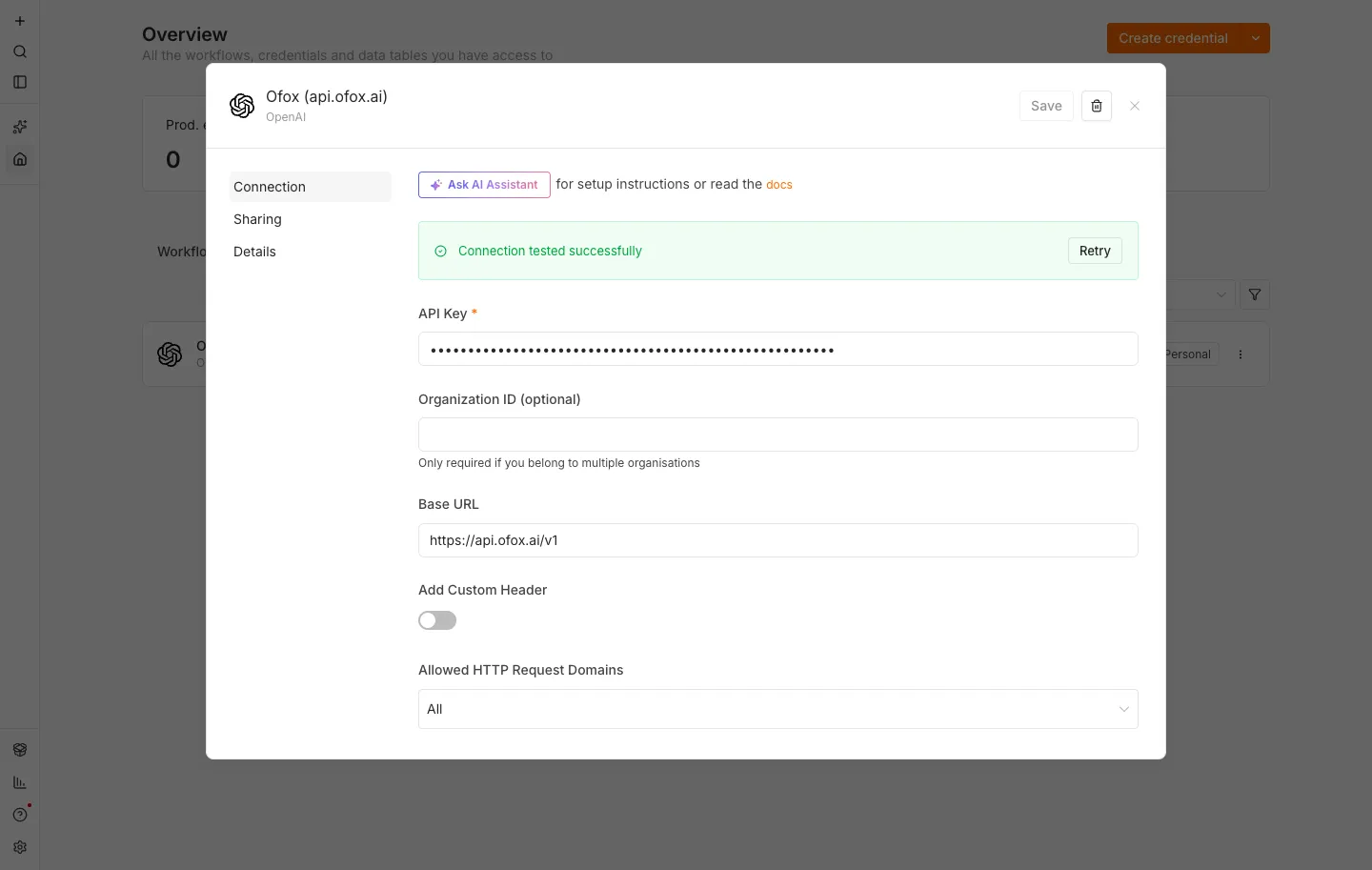
An existing English-interface screenshot from our earlier n8n credential guide, reused to show where the Base URL belongs. It is not a screenshot of the October 20 execution or proof that this workflow passed. Labels can differ by n8n version; the current test evidence is the server-CLI execution data described below.
Do not paste the complete /chat/completions operation URL into a field that expects the API root, and do not add /v1 twice. If the credential turns green but the workflow returns 404, use the separate n8n endpoint troubleshooting guide. This tutorial adds a complete task and output verification rather than another version of that route diagnosis.
The OpenAI Chat Model documentation distinguishes Chat Completions from Responses. Turning Responses off here selects the route we tested; it is not a universal fix for schema errors, 403s or unsupported tools. The ordinary local Code Tool in this template is also different from OpenAI’s built-in web search or file search tools.
Run the ticket and inspect both results
The supplied input is deliberately small:
Request ID: DEMO-1020
Message: I was charged USD 19.50 twice.
I have not supplied a payment ID.
The agent must first call lookup_demo_ticket with request_id equal to DEMO-1020. The tool looks up no real account: its JavaScript returns this fixed local fixture:
{"request_id":"DEMO-1020","payment_id_present":false}The tool is useful here because it makes the test exercise a round trip: the model chooses a tool, n8n executes it, and the model receives its result before answering. For a production workflow, a real authorized lookup would replace the fixture. This demo does not establish that an arbitrary CRM or payment connector works.
Keep the workflow inactive and select Execute workflow for a manual run. The import and current execution were validated through the server CLI; these editor instructions follow n8n’s documented import path and the saved node configuration, not a separately tested Cloud UI session.
Inspect Classify demo ticket. Its output should be JSON with exactly these fields and values:
{
  "request_id": "DEMO-1020",
  "category": "billing",
  "amount": 19.5,
  "currency": "USD",
  "action": "request_payment_id"
}
Also inspect the intermediate steps. A matching tool name is insufficient: the observation must contain the fixture’s request ID and payment_id_present: false, without an error. The download enables Return Intermediate Steps so the last node can check this evidence.
Finally, open Validate result. A passing execution returns the same business fields plus validated: true and tool_verified: true. Extra fields, the wrong action, malformed JSON, a missing tool call or a failed tool observation cause the node to throw an error. Nothing downstream sends an email or acts on the requested refund.
This validator intentionally knows the correct answer for this one fixture. Changing only the ticket text while retaining its exact-value assertions will fail. Before adapting it, write the expected rules for your new cases, keep field/type validation, and explicitly test unknown IDs and unavailable lookup data. Do not make it accept any well-formed JSON just to turn the workflow green.
The failure our first run concealed
In our first local run, the model called the tool, but the tool observation reported:
Received tool input did not match expected schema
Unrecognized key(s) in object: 'toolCallId'
The overall workflow still finished successfully and produced the expected classification. Our original validator checked that a tool had been called, but not that it had returned usable data. We rejected that run as a failed integration test.
For the corrected fixture, the Code Tool’s input schema requires a string request_id and allows extra properties. Its code uses only the allowlisted request ID and returns fixed data; it does not forward the input to another service or perform a write. This accommodates the extra field observed in this installed stack. The final output schema remains exact, and the validator now verifies the tool observation. Do not remove strict validation from a production action merely to suppress this error. For a tool that changes data, investigate the node/runtime behavior and define an explicit input contract before proceeding.
The corrected run used two model calls: the first requested the tool; the second returned the classification after the successful lookup. n8n recorded 1,019 input tokens and 101 output tokens across the two calls. The rejected first run used three calls. These are recorded usage counts, not an invoice or a promise that later runs will use the same amount.
Separate local tests confirmed that the validator rejects five negative cases: malformed JSON, an extra field, a wrong action, no tool call, and a tool error. Those tests used synthetic validator inputs; we did not induce a real provider outage, rate limit or billing failure. The toolCallId observation is also not a reproduction of Agent Builder’s separate get_environment schema reports.
Who bills the workflow when you use your own key?
There are separate costs to keep track of:
| Cost | What to check |
|---|---|
| n8n plan or self-hosting | Workflow execution allowance or your hosting resources |
| Model provider | Usage charged to the account whose key the node uses |
| Other tools | Any paid search, database or external service used by tools |
With an Ofox credential, check the Ofox account’s request records and billing for that model. Do not expect a balance shown as n8n Gateway credits to pay for the Ofox key. Conversely, adding provider balance does not top up n8n Gateway credits or Assistant credits. The Gateway credits documentation distinguishes those balances and the self-managed credential path.
Our Code Tool is local fixture code and makes no external tool-service request. A real search or scraping tool could add separate charges. An agent can also make several model calls within one workflow execution, as the two test runs demonstrate.
For budgeting, total the input, output and any separately reported cache categories across all calls, including retries and failed attempts that generated billable usage. Apply the exact model/provider/account rates and add external tool fees. Avoid applying a text model’s output rate to all tokens or assuming that one n8n execution equals one API request. This article does not quote an Ofox tariff or claim a measured cost saving.
Start with synthetic data and a small budget. Keep retries disabled until you understand the error, then use a bounded policy appropriate to that error. Increasing retries and agent iterations together can multiply calls without fixing an invalid key or unsupported schema.
If the imported workflow fails
| Symptom | Next action |
|---|---|
| Missing credential after import | Expected: attach your own credential in Ofox Chat Model. The shared JSON deliberately has none. |
| 401 or authentication rejection | Check the selected credential, provider host and key status. Repeating an unchanged invalid key will not help. |
| 403 | Inspect whether the response is provider JSON or an HTML gateway/WAF page. Preserve the request time and trace ID. A 403 alone does not establish insufficient balance. |
| 404 or model not found | Check the actual endpoint, exact model ID and account availability separately; a green credential test does not verify generation. |
| Tool schema error | Inspect the actual tool arguments and observation, node typeVersion and schema. Keep Agent Builder reports separate from classic AI Agent tests. |
| Timeout, 429 or 5xx | Stop the initial test and inspect request records. For transient failures, follow provider retry guidance with a finite retry count; avoid immediate repeated manual runs. |
| Agent output exists but validation fails | Read the validator’s error and intermediate steps. Check JSON, exact values and successful tool data instead of skipping validation. |
If this is a DeepSeek routing or service issue, continue with the DeepSeek API errors and fallback guide. A fallback must preserve the required protocol, tools and result contract; changing the model name alone does not validate a migration.
Before connecting a real task, remove fixture-specific assumptions, verify access to the intended data, and keep write operations behind their own authorization and duplicate-prevention checks. The first milestone is small but meaningful: your own credential, a completed model/tool round trip, and a result that passes explicit checks. Once that works, use the Ofox authentication documentation and account request records to carry the same checks into your actual workflow.