Qwen Image 3.0 Pro API: Free-Trial Test and Current Pricing
A July 2026 free-trial test of Qwen Image 3.0 Pro, its 429 errors and image outputs, with current paid pricing and free-route availability caveats.
 Ofox
Ofox 
Pricing and availability update (2026-09-16): This article preserves the July 23 free-trial test, including its code, outputs and observed limits. The old
bailian/qwen-image-3.0-pro:freeID is absent from the current catalog; that alone proves neither closure nor continued free access. Verify it before using the historical examples. The currentqwen/qwen-image-3.0-proentry is $0.07 per image (list and primary Aliyun supplier quote). Do not budget current production usage at $0.
Alibaba released Qwen Image 3.0 Pro on 2026-07-21, and it went up on ofox at $0. Not $0 tokens with a per-image charge hiding underneath, which is how most image models on this gateway are priced. Nothing per image either. That was the trial price recorded on July 23, not a current offer.
Even during that trial, it was not a free tier to build a product on, and the reason is written on the model card in Chinese where most English coverage has skipped past it: 本版本为限时免费体验版,目前为限量体验阶段. Limited-time free trial version, currently in a limited-quota phase. Two separate constraints, and the second one is the one that will actually interrupt your afternoon.
Here is what the free tier gives you, what it takes away, and the three integration details that will break code you copied from a gpt-image-2 tutorial. Every image in this post is raw output from the model, generated on 2026-07-23.
What the July 23 Trial Allowed
| What you can do | July 23 trial: generate images at $0, tokens and per-image both, through an OpenAI-compatible endpoint, text-to-image, at arbitrary sizes |
| Time required | About 3 minutes if you already have an ofox key |
| What you need | An ofox API key, Python 3.8+ or Node 18+, and the openai SDK you probably already have installed |
| What you can’t do | Run a batch. Plan around a published quota. Assume the price holds next month. Get base64 back. Use reference images (see below) |
Lessons from the July 23 Trial
Use it when:
- You are evaluating image models and want to test Qwen 3.0 Pro’s text rendering against your own prompts before committing budget anywhere.
- You generate images occasionally and interactively, a few per hour, where a 429 costs you a retry rather than a failed job.
- You need Chinese text inside images and your current model mangles it. This is the capability where Qwen is genuinely differentiated, and the historical trial let us test it without an image charge.
Don’t use it when:
- You are generating in bulk. The quota phase makes throughput unpredictable, and unpredictable throughput in a batch job is worse than a known price.
- You have a latency SLA. Backoff on a 429 is measured in tens of seconds here, not hundreds of milliseconds.
- You are writing something that must still work in three months without anyone looking at it. The free listing is explicitly time-boxed.
Stop rule: if all you wanted was to know whether the text rendering claim is real, read the four test images below and skip the rest of this guide. The short version is that it holds for words and fails for sequences, and you do not need to integrate anything to benefit from knowing that.
System Requirements
- An ofox API key from the ofox dashboard.
- Python 3.8 or later with
openai>=1.0, or Node 18+ with theopenaipackage. No Alibaba account, no DashScope key, no separate region config. - Somewhere to write files. The endpoint hands you a URL, not bytes, and that URL does not live forever.
Step-by-Step Setup
Step 1: Point the SDK at ofox
Historical trial example; verify availability and current pricing before reuse.
from openai import OpenAI

client = OpenAI(
    base_url="https://api.ofox.ai/v1",
    api_key="YOUR_OFOX_KEY",
)
Expected result: no output. If the import fails, upgrade with pip install -U openai.
Step 2: Call the model
Historical trial example; verify availability and current pricing before reuse.
resp = client.images.generate(
    model="bailian/qwen-image-3.0-pro:free",
    prompt="A ceramic mug on a linen cloth, morning light, shallow depth of field",
    size="1024x1024",
    n=1,
)
print(resp.data[0].url)
Expected result: an https://dashscope-*.oss-accelerate.aliyuncs.com/... URL printed to stdout.
Node, if that is your stack:
Historical trial example; verify availability and current pricing before reuse.
import OpenAI from "openai";

const client = new OpenAI({
  baseURL: "https://api.ofox.ai/v1",
  apiKey: process.env.OFOX_API_KEY,
});

const r = await client.images.generate({
  model: "bailian/qwen-image-3.0-pro:free",
  prompt: "A ceramic mug on a linen cloth, morning light",
  size: "1024x1024",
  n: 1,
});
console.log(r.data[0].url);
Step 3: Download the bytes before they expire
Historical trial example; verify availability and current pricing before reuse.
import urllib.request

urllib.request.urlretrieve(resp.data[0].url, "out.png")
Expected result: out.png on disk, typically 1 to 1.5 MB at 1024x1024.
This step is not optional housekeeping. Read the next section before you write the URL into a database.
The Two Integration Details That Break Copied Code
It returns a URL, not base64
Most image-generation tutorials in circulation are written against gpt-image-2, which returns b64_json. Qwen 3.0 Pro on this endpoint returns url and leaves b64_json empty. Code that does this:
Historical trial example; verify availability and current pricing before reuse.
raw = base64.b64decode(resp.data[0].b64_json) # TypeError on Qwenfails on a None. Handle both shapes if you route across models:
Historical trial example; verify availability and current pricing before reuse.
item = resp.data[0]
raw = (base64.b64decode(item.b64_json) if item.b64_json
       else urllib.request.urlopen(item.url).read())
The URL points at Alibaba’s OSS and carries a signed expiry. Persist the bytes. A URL stored in your database is a broken image later.
The free quota is per-moment, not per-day
There is no published requests-per-minute number, so we measured what we could observe. Firing requests back to back returned 429 Requests rate limit exceeded on the second call. Running two generation processes concurrently caused both to 429 and neither to progress until one was killed. A single sequential worker with escalating backoff starting at 45 seconds completed every request it attempted.
That shape, immediate 429 under any concurrency, generous success when strictly serial, is what a limited-quota trial phase looks like from the outside. It is not an outage and retrying harder makes it worse.
| Call pattern | Result |
|---|---|
| Two requests back to back | Second returns 429 immediately |
| Two processes in parallel, same key | Both 429, neither completes until one is killed |
| One worker, 45s backoff, 20s gap between jobs | Every request completed |
| Same pattern, four jobs in a row | All four completed, no 429 after the first clear |
The practical reading: the limiter cares about concurrency and burst far more than about total volume. A single-threaded loop with a pause is not a workaround, it is the intended usage shape.
Historical trial example; verify availability and current pricing before reuse.
import time, openai

def generate(prompt, size="1024x1024", tries=6):
    for i in range(tries):
        try:
            r = client.images.generate(
                model="bailian/qwen-image-3.0-pro:free",
                prompt=prompt, size=size, n=1)
            return r.data[0].url
        except openai.RateLimitError:
            time.sleep(45 * (i + 1))
    raise RuntimeError("quota never cleared")

# Through the OpenAI SDK a 429 arrives as openai.RateLimitError.
# You only catch urllib's HTTPError(429) if you call the HTTP endpoint directly.
Does the Text Rendering Claim Hold Up?
Alibaba’s pitch for this generation is typography: small text staying legible, long prompts staying coherent, multiple scripts in one frame. Those are checkable, so we checked them. Every image below is raw model output at the size given, no retouching and no cherry-picking across attempts.
Test 1: small print in a spec table. The prompt asked for four labelled rows with exact values and a fine-print serial line at the bottom.
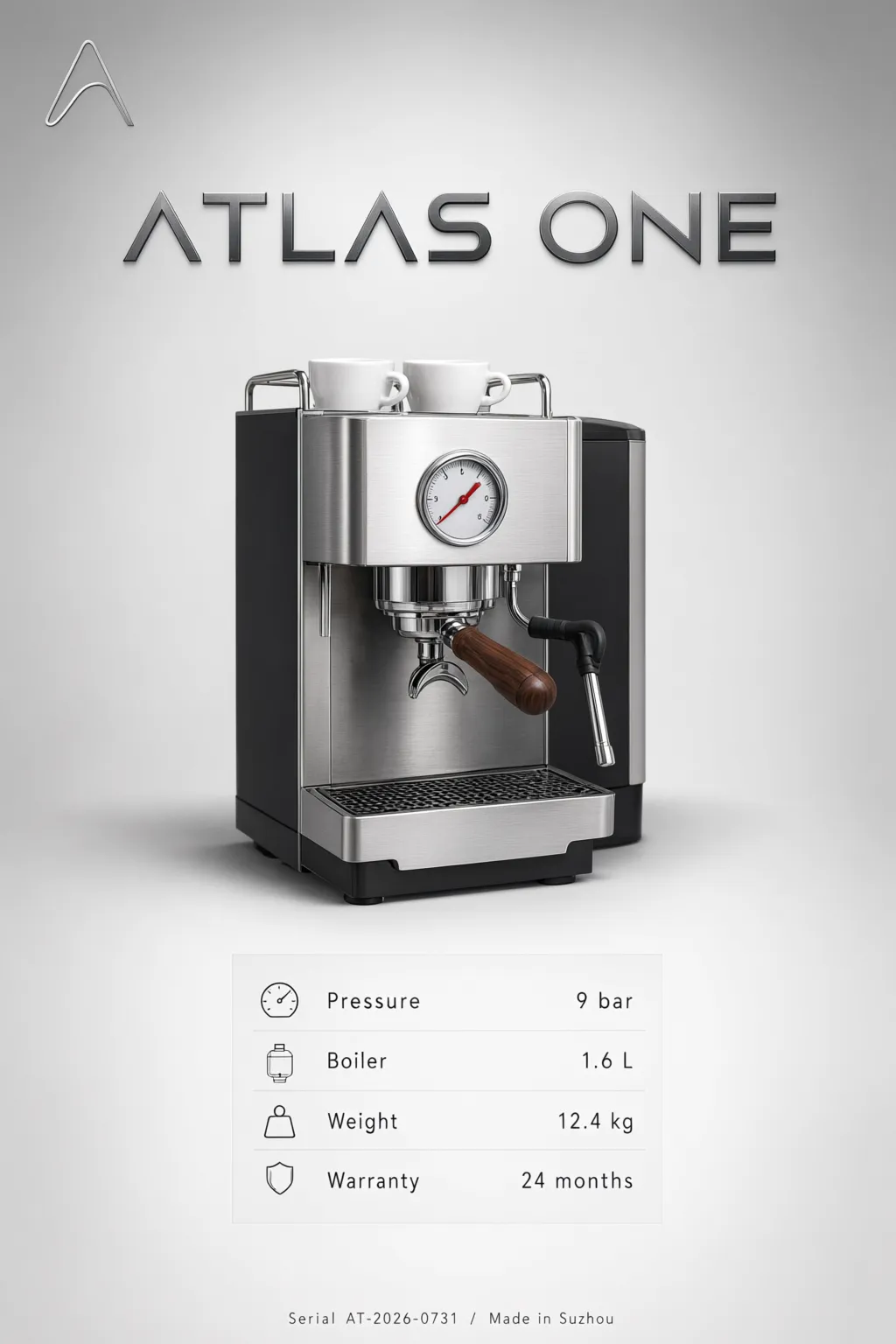
Every value landed: Pressure 9 bar, Boiler 1.6 L, Weight 12.4 kg, Warranty 24 months. The bottom line reads Serial AT-2026-0731 / Made in Suzhou, correct down to the slash and the hyphenated serial. At 1024x1536 that fine print is roughly 8pt equivalent. No dropped glyphs, no invented characters, no melted letterforms in the small sizes, which is where image models usually give themselves away.
Test 2: two scripts in one frame. Mixed English and Chinese on a single sign, each with its own line and a shared numeric field.
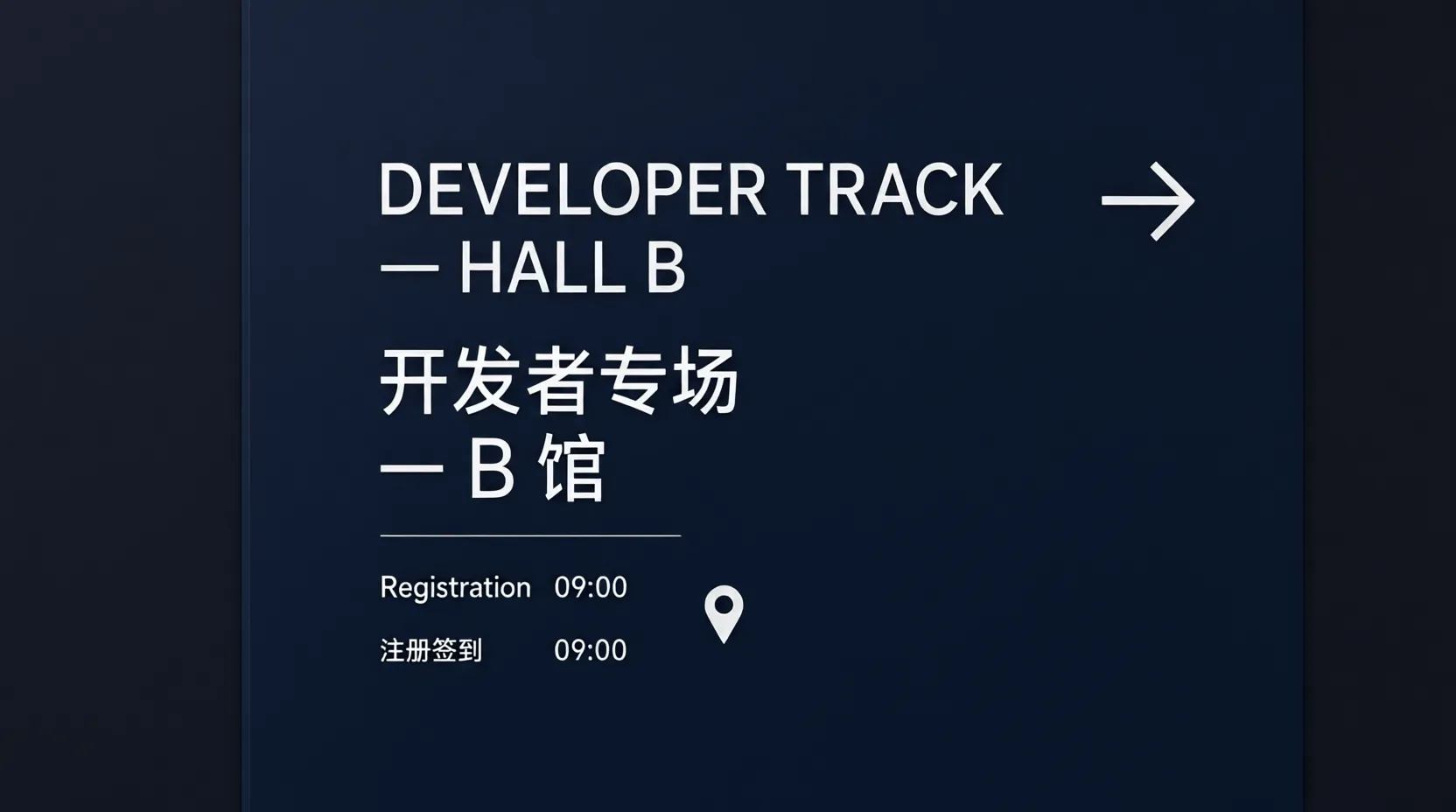
Both scripts are correct. 开发者专场 and 注册签到 are properly formed characters, not the character-shaped noise that most image models produce for CJK. The Latin and Chinese lines share a consistent weight and the 09:00 matches on both rows.
For anyone who has tried to get a usable Chinese-language poster out of a Western image model, this is the interesting result in the whole post, and it was tested during the July free trial.
Test 3: a technical diagram with many labelled parts. This is the case that usually collapses. The prompt named five strings that had to appear (CLIENT, GATEWAY, MODEL, RESPONSE, and a legend of auth / route / inference) and left the captions under each block unspecified.
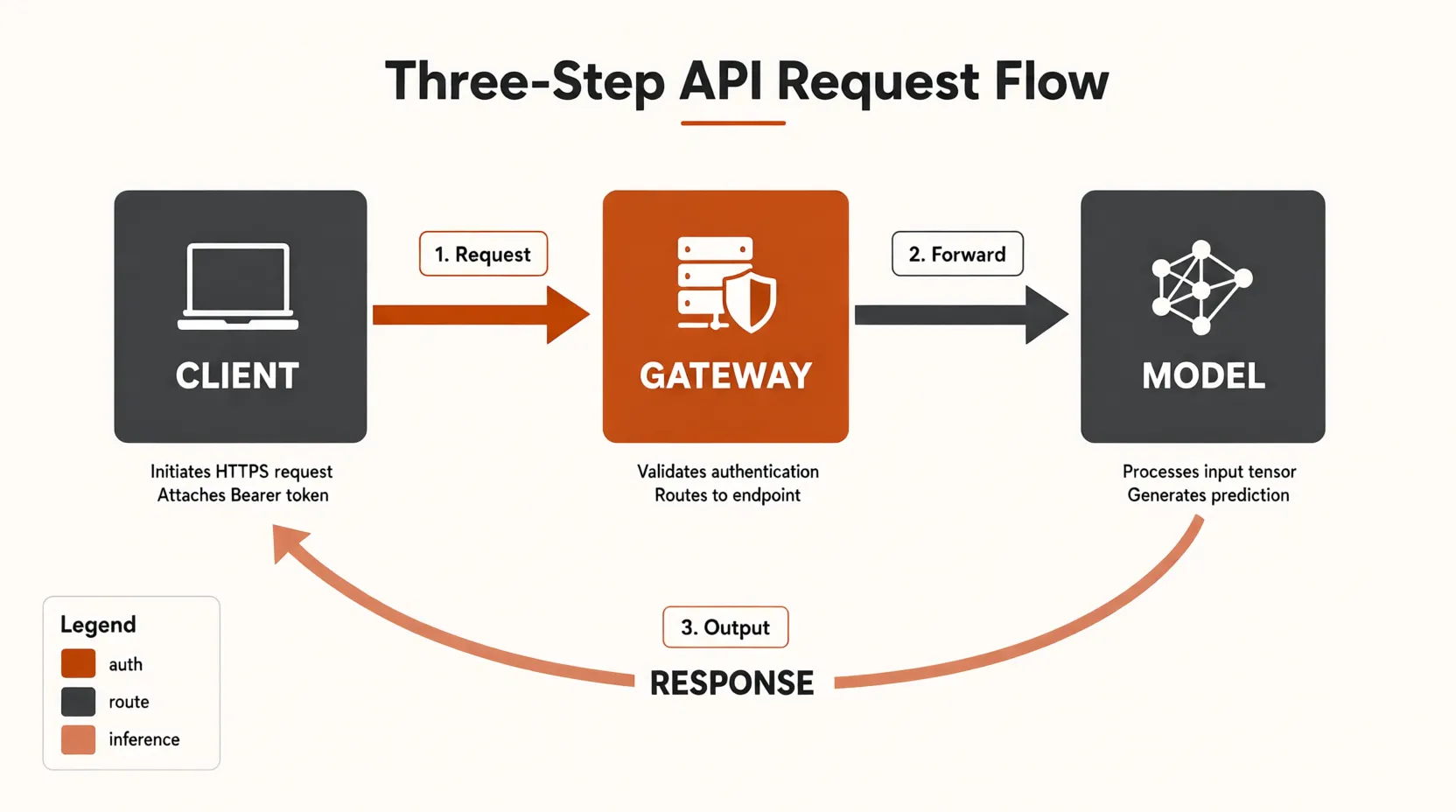
All five specified strings rendered correctly and in the right positions. What the model did unprompted is the part worth noting: it added a title, numbered the arrows 1. Request / 2. Forward / 3. Output, and wrote its own captions that are technically coherent rather than lorem-ipsum shaped (“Validates authentication / Routes to endpoint” under the gateway). The spelling holds throughout.
That makes it plausible for first-draft documentation diagrams. It does not make it reliable, because the captions it invents are its own guesses about your architecture and it will state them just as confidently when they are wrong.
Test 4: where it actually breaks. We asked for a code editor screenshot with a file tree, syntax-highlighted Python, and visible line numbers 1 through 14.
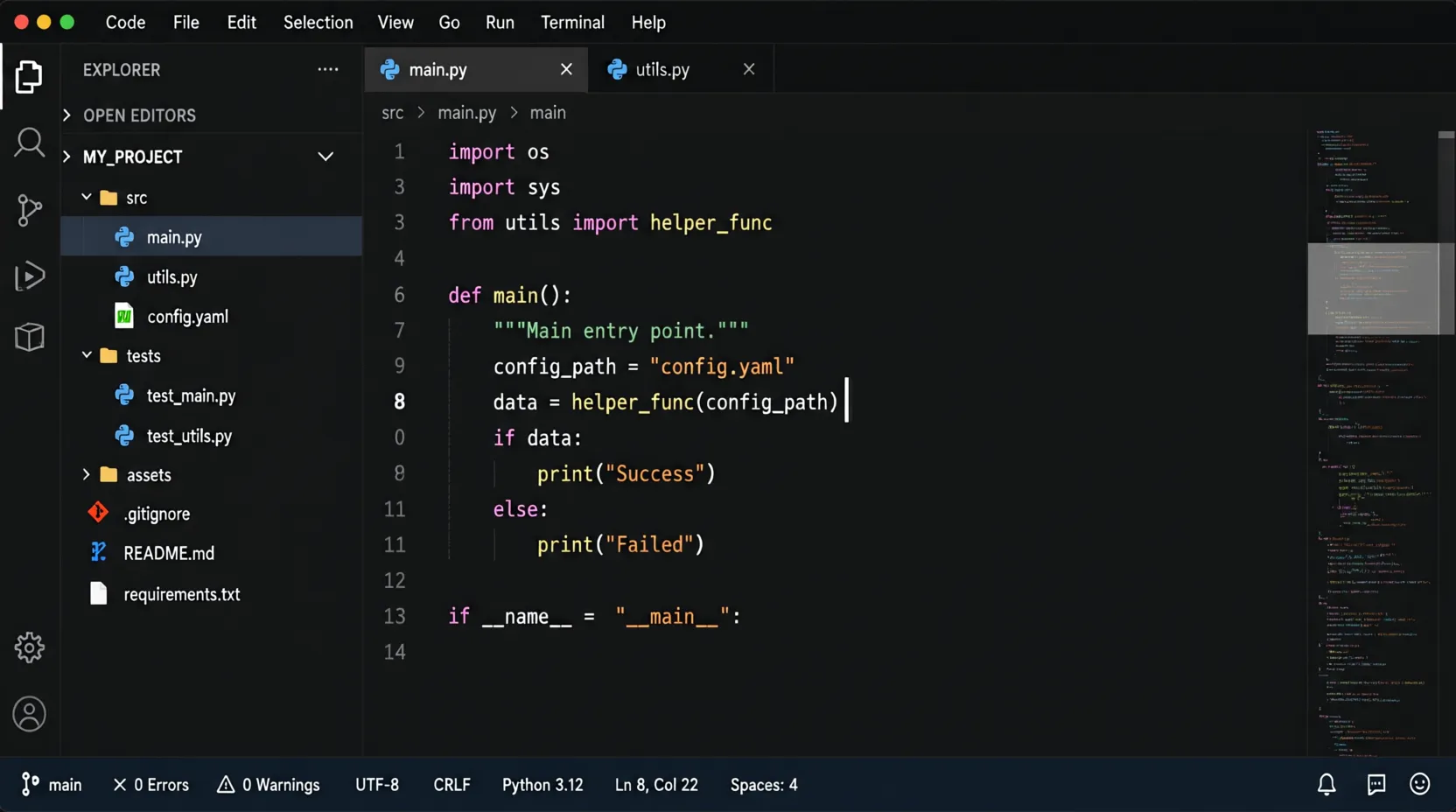
The chrome is close to perfect. Filenames are correct and correctly icon-matched, the status bar reads UTF-8 CRLF Python 3.12 Ln 8, Col 22 Spaces: 4 exactly as prompted, the menu bar is coherent, and the syntax highlighting assigns plausible colours to keywords, strings and function names.
Now read the gutter. The line numbers run 1, 3, 3, 4, 6, 7, 9, 8, 0, 8, 11, 11, 12, 13, 14. There is no 2, no 5, no 10, several duplicates, and a stray 0. Then look at the last line of code: if __name__ = "__main__":, with a single equals sign where Python needs two.
This is the honest boundary of the model. Words and labels, including small ones and Chinese ones, come out right. Sequences and code operators do not. A line-number gutter is the purest test of monotonic counting there is, and the model produced something that looks like counting from a distance and falls apart on inspection. The same weakness shows up as the = where == belongs.
Practical rule: use it for anything where a human reads the text as language. Do not use it for screenshots that a reader will treat as literally correct code, or for charts where the axis labels have to be a real sequence. That is not a prompt engineering problem you can fix with a better prompt, it is what the model is currently bad at.
Sizes: There Is No Aspect Ratio Enum
Several image endpoints accept a fixed list of sizes and reject anything else, which is why so much generation code carries a lookup table mapping “widescreen” to whatever string that particular vendor blessed. This one does not appear to work that way.
| Size passed | Returned | Use |
|---|---|---|
1024x1024 | As requested | Default square |
1024x1536 | As requested | Portrait, posters and spec cards |
1664x928 | As requested | Widescreen, close to 16:9 |
Every value we passed came back at exactly that resolution. If you are generating blog heroes or social cards at a fixed aspect ratio, you can ask for the final dimensions directly instead of generating square and cropping, which is one fewer place for a composition to get its head cut off.
The caveat is that this is observed behaviour rather than a documented contract. Validate the dimensions of what comes back rather than assuming, especially if you are feeding the output into a layout that breaks on the wrong ratio.
Reference Images: We Could Not Get Them to Work
The model card lists reference-image input alongside text-to-image. We could not make it work through this endpoint, and the way it fails is worth documenting because it fails quietly.
Three shapes tried, all against the same source image (the espresso poster from Test 1) with a prompt asking for an ink-sketch restyle that preserved the layout and spec values:
| Attempt | Result |
|---|---|
images.generate(..., image="data:image/png;base64,...") | HTTP 200, image returned, reference ignored entirely |
images.generate(..., image_url="data:image/png;base64,...") | HTTP 200, image returned, reference not reproduced |
POST /images/edits | HTTP 400 You must provide a model parameter, with model present in the body |
The first attempt is the clearest. Given a photograph-style poster of an espresso machine, it returned a botanical serum advertisement. Correct style, entirely unrelated subject. Nothing from the reference survived.
The second attempt looked closer at a glance and is more instructive on inspection:
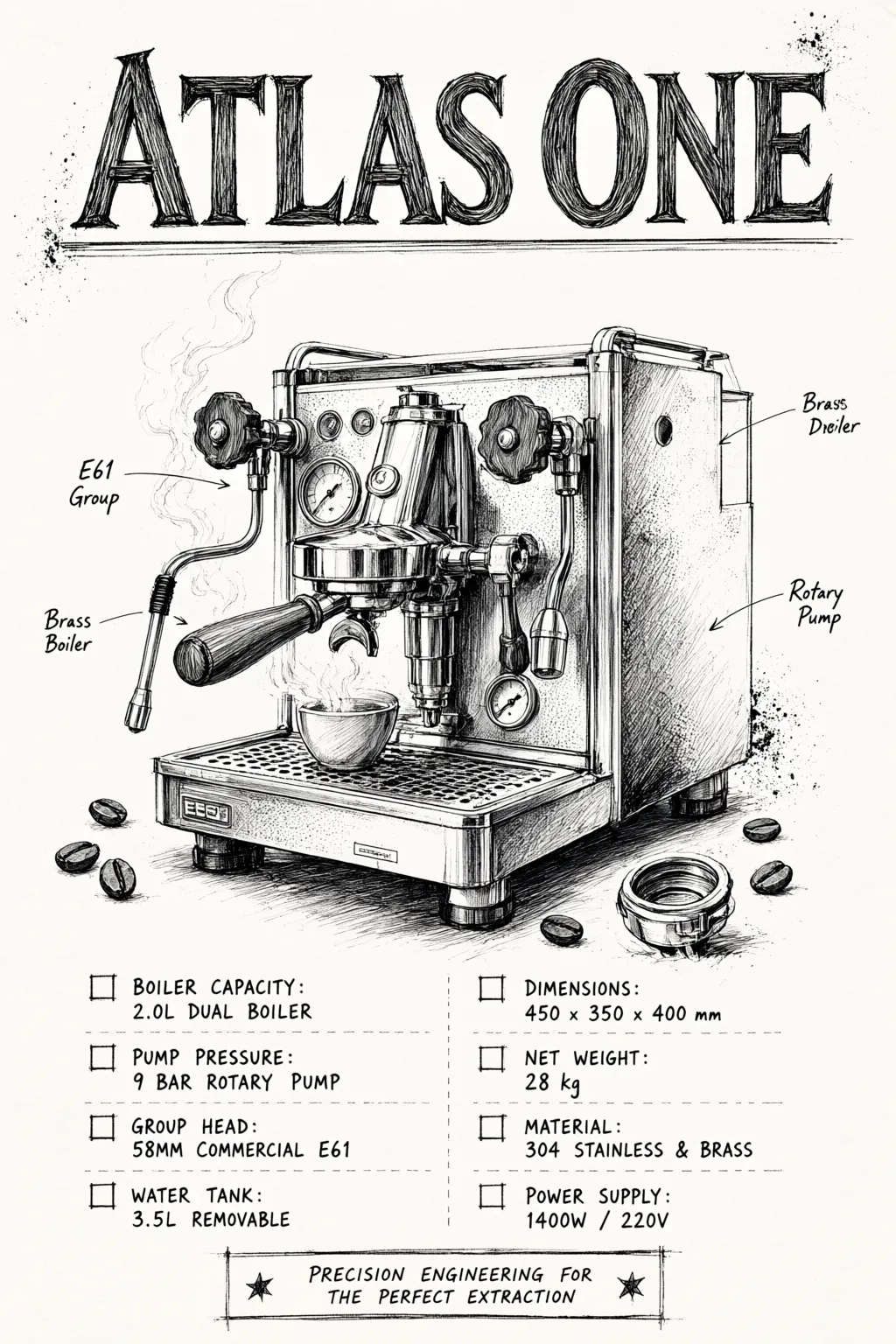
That is on-topic, but only because the prompt named the subject in words. Compare the numbers against Test 1. The source poster says boiler 1.6 L and weight 12.4 kg; this one says 2.0 L and 28 kg. The four-row table became an eight-cell grid, the product shot became a cutaway with callouts, and the warranty row vanished. The one value that matches, 9 bar, is the standard pressure for every espresso machine ever built, so it is not evidence of anything.
In other words the model generated a fresh image from the prompt text and did not use the reference. The third attempt is worse than either, because a 400 complaining about a missing model parameter that is demonstrably present will send you debugging your own serialization for twenty minutes.
What we can say precisely: reference-image input is documented for this model, and we did not find a parameter shape that delivers it through ofox’s OpenAI-compatible image endpoint. It may work through Alibaba’s native DashScope API, or the correct parameter name may be something we did not try. What it does not do is fail loudly, so if you build on it, verify that the output actually reflects your input rather than assuming a 200 means it worked.
Common Errors During Setup
| Error | What it means | Fix |
|---|---|---|
429 Requests rate limit exceeded | Free-tier quota, not an outage | Serialize requests, back off 45s and up. Do not parallelize |
TypeError: expected str, got None on b64_json | You copied gpt-image-2 code | Read data[0].url and fetch it |
| Image URL 403s later | OSS signed URL expired | Download at generation time, store the bytes |
model_not_found | Old or unavailable model ID | Verify the current catalog and account access; adding :free does not guarantee availability |
Empty data array | Prompt hit a content filter | Rephrase. The endpoint does not always return an explicit refusal reason |
Team / Multi-Developer Configuration
The quota behaviour has a consequence that matters more for teams than for individuals: your developers throttle each other. Two people iterating on prompts against the same free model at the same time is the concurrency case that reliably 429s.
Three ways to handle it, in increasing order of effort:
- One key, one queue. Put generation behind a single-worker job queue rather than letting each developer’s laptop call the endpoint directly. This is the change that actually fixes it.
- Current paid alternatives must be selected by model, price and workload. The historical trial does not establish a free failover route today. A lower listed rate also does not guarantee throughput.
- Use a verified paid fallback. Check its current price, rate limits and account availability before routing retries to it. The per-image Seedream rates below do not establish the cost or throughput of every fallback in the example chain.
Because everything sits behind one base URL and one key, option 3 is a model string change rather than a second integration.
Historical trial example; verify availability and current pricing before reuse.
CHAIN = [
    "bailian/qwen-image-3.0-pro:free",   # July 23 trial: $0, quota-capped
    "volcengine/doubao-seedream-5.0-lite",  # $0.035/image
    "openai/gpt-image-2",                # July 23 historical promotion; current rates below
]

def generate_with_failover(prompt, size="1024x1024"):
    for model in CHAIN:
        try:
            r = client.images.generate(
                model=model, prompt=prompt, size=size, n=1)
            return model, r.data[0]
        except Exception as e:
            if "429" not in str(e):
                raise
    raise RuntimeError("all providers throttled")
Return the model name alongside the image. When you later wonder why one batch looks different from another, knowing which model actually served each request saves an hour.
Planning for the Day the Free Window Closes
“Limited-time” with no published end date is a scheduling problem disguised as a pricing note. The failure mode is not that you get a bill. It is that one morning the model ID stops resolving, or starts resolving to a paid variant, and whatever you wired it into stops working for reasons nobody on your team remembers.
Three cheap precautions, none of which take longer than the setup itself:
- Keep the model ID in config. One string in an environment variable, not scattered through six call sites. This is the whole mitigation for most teams.
- Log which model served each image. If output quality shifts, you want to know whether the model changed under you before you start blaming your prompts.
- Know your fallback’s price before you need it. The alternatives table below exists so that the decision is already made when the 429s turn permanent.
If you are archiving generated images, this matters more than it sounds. The signed OSS URLs expire on their own schedule, so an image you generated for free and linked rather than downloaded is a broken asset waiting to happen regardless of what the pricing does.
Current paid alternatives (September 16, 2026)
| Model | Current Ofox price | Basis |
|---|---|---|
qwen/qwen-image-3.0-pro | $0.07 / per image | list = Aliyun |
volcengine/doubao-seedream-5.0-lite | $0.035 / per image | list = Volcengine |
volcengine/doubao-seedream-4.5 | $0.04 / per image | list = Volcengine |
volcengine/doubao-seedream-5.0-pro | list $0.05; Volcengine $0.04 / per image | primary supplier |
google/gemini-3.1-flash-lite-image | text input $0.25/M; image output $30/M | list |
google/gemini-3.1-flash-image | text input $0.50/M; image output $60/M | list |
openai/gpt-image-2 | text input $5/M; image output $30/M | list = OpenAI |
Rates in USD. M means one million tokens, not one million images. GPT Image 2 also charges $8/M image-input tokens, $1.25/M cached text-input tokens and $2/M cached image-input tokens. Its current OpenAI supplier quote equals list price; the July 23 $4/$24 promotion below is historical, not a current discount. Token-based total cost depends on the actual token categories used.
Current paid alternatives must be selected by model, price and workload. The historical trial does not establish a free failover route today. A lower listed rate also does not guarantee throughput.
Historical observation (July 23, 2026): The original check recorded GPT Image 2 at $4/M input and $24/M output on the page, versus $5/M and $30/M from the API. This was not a billing test and does not establish a rule to prefer web pages over catalog data. Current rates are in the table above.
What We Could Not Verify
Being straight about the gaps, since a lot of the coverage of this release is not:
- No benchmarks. Alibaba shipped this generation without a technical report or published eval numbers. Any ranking you see for Qwen Image 3.0 Pro is somebody’s vibe check, including ours.
- No open weights. Earlier Qwen-Image generations had downloadable weights. This one does not, so self-hosting is not an escape hatch from the quota.
- No published rate limit. The numbers above are observed behaviour from one key on one afternoon, not documented limits. Yours may differ and Alibaba can change them without telling anyone.
- No end date on the free pricing. “Limited-time” with no date is the entire disclosure.
- The long-prompt claim is untested here. Alibaba advertises prompt handling in the thousands of tokens. Our test prompts ran to a few dozen words each, which tells you nothing about whether a 4,000-token scene description stays coherent. The quota made a proper stress test impractical in one sitting, so we are not going to pretend we ran one.
- Sample size is four. Four prompts, one attempt each, no retries and no cherry-picking. That is enough to demonstrate that small-text rendering works and that number sequences break. It is not enough to put a percentage on either.
The reason to spell this out: most of the coverage of this release repeats Alibaba’s capability list as though it were measured. A capability list is a claim. The four images above are four data points, which is more than a claim and much less than a benchmark.
FAQ
See the FAQ for the current pricing caveat: the July trial does not establish free access today.
Sources for the July Test and September Pricing Update
Frequently Asked Questions
- Is Qwen Image 3.0 Pro free?
- The free route was tested in July 2026. Current free availability is unverified; the September 16 catalog lists qwen/qwen-image-3.0-pro at $0.07 per image. The old :free ID is not in this snapshot, which alone does not prove closure.
- How long will Qwen Image 3.0 Pro stay free?
- The July 23 trial documentation did not give an end date. This update does not establish whether that trial still works. Check the exact model ID, price and account eligibility before making requests.
- Why do I get 429 errors on Qwen Image 3.0 Pro free?
- July 23, 2026 test: Because the free tier is quota-limited, not just price-limited. In our testing, back-to-back requests returned 429 immediately, and two concurrent processes throttled each other. One request at a time with 45s or longer backoff is what actually completed.
- Does Qwen Image 3.0 Pro return base64 or a URL?
- July 23, 2026 test: A URL. The response is data[0].url pointing at DashScope OSS, and data[0].b64_json is absent. Code written against gpt-image-2, which returns b64_json, will break on a None value. Fetch the URL and write the bytes yourself.
- Can Qwen Image 3.0 Pro render small text correctly?
- July 23, 2026 test: For words, yes. A spec table with 8pt-equivalent rows rendered exactly as prompted including a fine-print serial line, and mixed English plus Chinese in one image came out correct. For sequences, no. A code editor mockup produced line numbers reading 1, 3, 3, 4, 6, 7, 9, 8, 0, 8 and wrote a Python comparison with a single equals sign.
- Can I use Qwen Image 3.0 Pro to generate code screenshots?
- July 23, 2026 test: Not for anything a reader will treat as literally correct. The editor chrome and filenames render convincingly, but the line-number gutter came back non-monotonic with duplicates and the code contained an operator error. Words are the strength, sequences are the weakness.
- What image sizes does Qwen Image 3.0 Pro accept?
- July 23, 2026 test: It honoured every size we passed, including 1024x1024, 1024x1536 portrait and 1664x928 widescreen. You are not restricted to a fixed enum of aspect ratios the way some image endpoints are.
- Is there another free image model on ofox?
- A $0 token row does not establish free image generation. The old Qwen free route is unverified now; current Qwen Pro costs $0.07 per image. Seedream and token-billed image alternatives below are paid.
- How much does Seedream cost on ofox if the token price is $0?
- Seedream bills per image: 5.0 Pro lists $0.05 and its primary Volcengine quote is $0.04; 5.0 Lite is $0.035 and 4.5 is $0.04. Other image models may bill image tokens instead.
- Does Qwen Image 3.0 Pro support reference images on ofox?
- July 23, 2026 test: It is documented as supporting reference-image input, but we could not get it to work through ofox's OpenAI-compatible image endpoint. Both an image and an image_url parameter return HTTP 200 while ignoring the reference, and /images/edits returns a 400 about a missing model parameter that is actually present. Verify your output rather than trusting the 200.
- Can I use Qwen Image 3.0 Pro with the OpenAI Python SDK?
- July 23, 2026 test: Yes. It is exposed through the OpenAI-compatible images.generate() call on https://api.ofox.ai/v1, so you change the base URL, the key and the model string, and the rest of your code stays as it is.