Claude in Chrome, Computer Use or Remote Control: which do you need?
Choose the right Claude feature for browser tasks, native app control or continuing local work from a phone. Compare access, setup and API boundaries.
 Ofox

Use Claude in Chrome when Claude needs to read or act on webpages. Use computer use when the task requires interaction with a native application’s interface. Use Remote Control when you want to continue a local Claude Code session from another device. The last feature changes where you send instructions; it does not, by itself, give the session a new way to click a browser or operate a desktop.
There is a fourth meaning to keep separate: the computer use tool in the Claude API is a building block for developers implementing their own agent runtime. An API request returning an action does not execute that action on your computer.
This is a documentation-based comparison, checked November 12, 2026, with task-selection examples and acceptance procedures. We did not benchmark speed or run an account-entitlement test. Ofox publishes this guide; its API service should not be confused with Anthropic’s subscription features.
Compare the task, execution location and access requirement
| Feature | What you are trying to do | What does the work | Access boundary to check |
|---|---|---|---|
| Claude in Chrome connected to Claude Code | Read webpages, test a web UI or extract a table | Claude Code uses the browser extension | Eligible direct Claude subscription and account login; extension and website permissions |
| Computer use in the Claude Code CLI | Interact with a native app or GUI-only tool | The local computer-use engine controls approved apps | Current CLI preview is macOS-only and requires Pro, Max or Ultra; not Team or Enterprise |
| Remote Control | Continue a local coding session from a phone or another browser | The original local Claude Code process keeps running | Eligible Claude subscription, account login, network availability and organization policy |
| Claude API computer use tool | Build an application that chooses and executes computer actions | Your application executes the model’s tool calls in an environment you supply | Exact API/model/tool support plus your runtime’s permissions and verification |
The first three rows refer to specific product surfaces, not every product carrying the Claude name. The CLI computer-use restriction should not be generalized to all desktop applications or API deployments. The CLI documentation, Chrome integration guide, Remote Control guide and API tool reference describe different contracts.
Browser tasks: use the Chrome integration
Consider the task: “Read two documentation pages and produce a CSV of authentication requirements, with a source link for every row.” Its essential surface is the webpage. There is no reason to add permission to control a file manager or desktop application just to read those pages.
Claude in Chrome also supports browser-side testing. For example, after changing a local web form, ask Claude to open the development URL, enter a deliberately invalid value and report whether the expected validation message appears. The browser observation is the evidence; a successful code build is only evidence that the project compiled.
For Claude Code, the documented starting command is:
claude --chromeThen inspect /chrome inside the session. The extension must be installed and enabled, and the CLI must use an eligible Claude account login. API-key authentication does not meet that requirement.
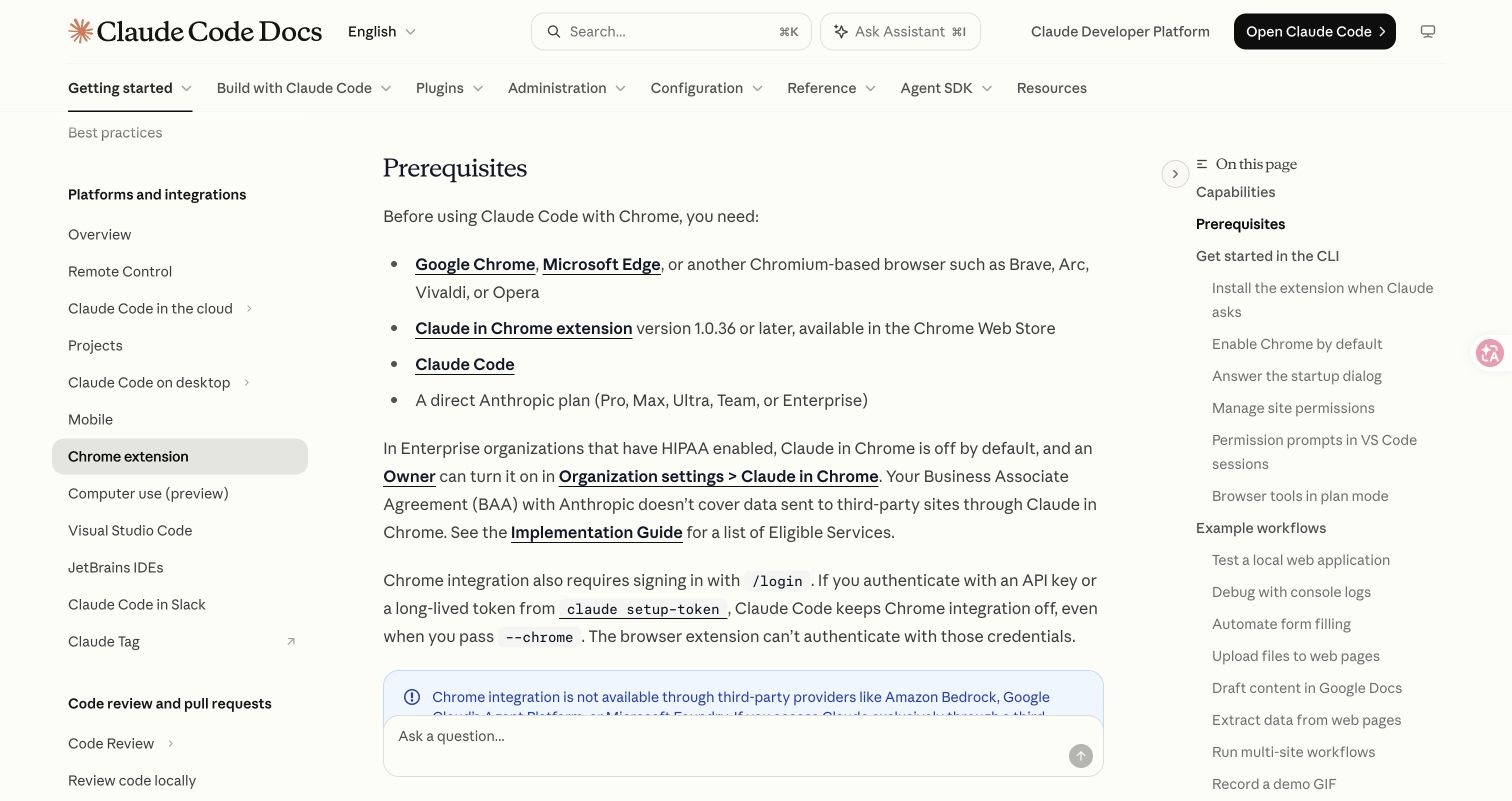
Source: Anthropic’s Chrome integration documentation, captured November 12, 2026. This is a documentation screenshot, not evidence of a completed browser task.
For a reproducible setup sequence, a four-row extraction exercise and symptom-by-symptom recovery, use the Claude in Chrome setup and troubleshooting guide.
Browser selection needs a qualification. Claude Code’s guide lists Chrome, Edge and other Chromium-based browsers, while the Help Center installation page still limits its installation instructions to Google Chrome. Use Chrome for the common documented path; do not assume another browser was tested because it shares Chromium. The Code integration explicitly excludes WSL.
The extension’s side panel is another entry point. Its current Cowork rollout can provide account-based session history across surfaces. That does not change the definition of Remote Control: an account-backed side-panel conversation is not automatically a window into your existing local terminal session.
Native app tasks: identify which computer-use surface you mean
Now consider: “Open my compiled macOS app, change its preferences and verify the displayed result.” The important control is inside a native application. A browser extension cannot supply that native-app interaction just because it is connected to the same assistant.
In the Claude Code CLI, Anthropic currently documents computer use as an interactive macOS research preview for Pro, Max and Ultra. It is unavailable with the non-interactive -p mode and is not available on Team or Enterprise plans. Enable the built-in computer-use server from /mcp, then grant the required Accessibility and Screen Recording permissions when prompted. App approval is a separate session-level decision.
That setup is specific to the CLI. The Claude Code Desktop reference documents its own desktop surfaces, including a Windows path. A Windows reader should follow that reference rather than interpret “CLI preview is macOS-only” as a statement that every Claude product lacks Windows computer use.
Computer use is also not unrestricted mouse-and-keyboard access to every application. The CLI documentation distinguishes permission tiers: browsers and trading applications are view-only through that computer-use channel, while terminals and IDEs are click-only. Browser actions should use the appropriate browser integration. If the native route can see a browser but cannot type into it, adding broader desktop permission is not the right first diagnosis.
For a first native-app acceptance test, choose an expendable local test project and make the expected outcome explicit:
Open the test application I built in this project.
Inspect its Preferences window and report the current theme label.
Do not modify files, accounts or system settings.
If the app is not available or permission is denied, stop and report that.
Finish with a screenshot of the visible label and identify the app window.
This template is a proposed verification task, not a recorded test result. A pass requires the correct app and visible label; a description of what its Preferences window probably contains does not pass. Once that read-only check works, a later task can specify one reversible change and the exact state that should appear afterward.
Remote Control: move the conversation, keep the execution local
Suppose Claude Code is working in your local repository, and you want to check its progress from your phone. That is a Remote Control use case. It does not require desktop screen control, and it is different from starting a new cloud coding session.
From an existing Claude Code session, use:
/remote-controlFollow the displayed connection link or QR code from the other device. The original computer must remain available and the Claude Code process must keep running. Sleep or a network interruption affects that connection; it does not move the job into a cloud runtime.
Before connecting, check the current prerequisites. Anthropic lists Pro, Max, Ultra, Team and Enterprise, but API keys are not supported. Team and Enterprise require owner enablement, and custom roles can impose further conditions. The documented feature is unavailable when ANTHROPIC_BASE_URL points to a host other than api.anthropic.com, or when using the listed third-party provider configurations. Keep a gateway-backed coding session separate rather than assuming a remote-session flag overrides its authentication.
A simple acceptance procedure is to create a harmless marker in a local test folder yourself, connect from the other device, and ask Claude to read that marker. Check the local terminal for the same conversation and result. That proves which environment the remote interaction reached. Do not use secrets, customer data or credentials as markers.
Remote Control can be combined with Chrome. The server-mode Chrome flag requires Claude Code v2.1.273 or later. The official documentation provides:
claude remote-control --chromeHere, Remote Control carries your conversation while the Chrome integration supplies browser actions on the connected machine. Each feature still needs its own eligibility and permissions. The presence of a remote conversation does not prove that Chrome connected, and a browser extension does not keep the local process running after you close it.
If connection fails, preserve the exact message. A policy denial, an unavailable local process and a custom API endpoint are different failures with different remedies. Use the official Remote Control troubleshooting sections; changing browser permissions cannot repair a stopped local process.
API computer use: the application owns the execution loop
A developer building their own product has another problem: “Given a screenshot and a task, how does my application ask a model what to do, execute that action, then verify completion?” That is the scope of the API computer-use tool.
The flow has separate responsibilities:
- Your runtime obtains an observation from the environment it controls.
- Your application sends the request using the supported model and tool contract.
- The model returns a tool call.
- Your application validates and executes the permitted action.
- Your application returns the resulting observation and checks the task’s completion evidence.
The API service does not turn your personal computer into an executor merely because you supplied a key. A production implementation needs a constrained environment, permission handling and an independent completion check. A returned success message is not the same as a file saved or a form accepted.
Our offline computer-use controller tutorial teaches that controller boundary with synthetic tests. Its included live adapter is explicitly unvalidated and follows a different tool contract; it is not a drop-in Claude adapter or evidence that an Ofox endpoint supports this feature.
When checking any provider, verify the endpoint, exact model and tool schema together. Ofox’s Anthropic protocol documentation describes its API surface; ordinary text compatibility should not be promoted into a claim that every Anthropic computer or browser tool is supported. Where compatibility has not been tested and documented, leave it unconfirmed.
Choose by the result you need to verify
| Your request | Start with | Verify before calling it complete |
|---|---|---|
| “Extract a table from these public pages.” | Chrome integration | Each value has a source; the saved file opens and preserves missing-data states |
| “Check a local website’s validation message.” | Chrome integration | The intended page was used and the expected visible state actually appeared |
| “Inspect a native application’s preferences.” | Computer use on a supported surface | Correct app/window, necessary permission, visible resulting state |
| “Continue my local coding task on my phone.” | Remote Control | Same local session and filesystem; original process remains available |
| “Ship browser or desktop automation inside my product.” | Appropriate API tools plus your own runtime | Supported contract, controlled execution, recovery and independent result checks |
These are task-selection criteria, not a speed ranking. They also explain why “install a Skill” is not a universal fix. A Skill can provide instructions for a workflow, but the host must still expose the needed browser, computer or API tools and have permission to use them.
Diagnose failures without switching the wrong layer
When the assistant cannot act, record where the failure occurred: model request, account entitlement, tool discovery, application permission, connection, or output verification. Change one relevant condition, then repeat the smallest task that failed.
For example, if a model request returns a genuine 429, the Claude Code rate-limit guide helps identify the limiting service. Installing the browser extension again does not raise that quota. Conversely, a disconnected extension is not evidence that you need more API credits. Ofox API requests have their own documented error handling, which applies only when the failing request actually uses that service.
Keep the final evidence aligned with the original request. A connected session is enough to prove connectivity, but not enough to prove a browser task, a native-app change or a usable automation product. Choose the feature that reaches the required surface, then verify the result there.