Claude Skills not loading in subagents? Check these four layers
Diagnose Claude Code subagent skills with preload and dynamic-call examples, directory checks, permission controls, and a downloadable diagnostic fixture.
 Ofox

If a Claude skill works in the main conversation but not in a custom subagent, check discovery, preloading, invocation and execution separately. Adding Skill to a tool list does not preload instructions. Adding a name to skills: does not grant every tool that the instructions need.
Current Claude Code documentation supports both startup preloading and dynamic skill invocation inside subagents. Treat older advice that subagents can never invoke skills as version-specific, not a current universal rule. The skills field loads instructions at startup; the Skill tool provides a separate route during execution.
This guide targets local Claude Code custom agents and project skills. It was checked against official documentation on November 18, 2026. The downloadable examples are editorial diagnostic fixtures: their files and expected-result checker were validated locally, but we did not run model inference or measure a success rate. Expected responses below are acceptance criteria, not captured Claude output.
Locate the failure before changing configuration
| What you observe | First layer to investigate | Useful evidence |
|---|---|---|
| The skill is unavailable in the parent session too | Discovery or invocation control | Resolved skill name, file location, frontmatter, policy |
| Parent can use it; custom agent ignores its conventions | Preloading or dynamic invocation | Agent definition actually selected; preload warning or Skill call |
| Skill call is denied | Tool access and permission rules | Exact denied tool and matching rule |
| Instructions are present but a script/file operation fails | Execution | File path, working directory, denied operation, script error |
| One folder works and another does not | Scope or name collision | Start directory, repository root, resolved skill source |
Keep one failing input and change one variable per run. Run each variant in a new parent session and a new subagent, so earlier results cannot leak into the next delegation. Keep the marker and expected answer out of the delegated task and automatically loaded project instructions. Otherwise moving files, granting tools and rewriting the description together can hide which change fixed the problem. For an overview of the concepts, see the Hooks, Subagents and Skills guide; this article focuses on isolating failures.
1. Build a small, observable skill
Use a disposable local directory. You need Claude Code installed and an existing authorized connection to a model. Record claude --version and the model/provider used before any inference run. A model request can consume your normal allowance or API balance; downloading this fixture does not run one.
Download the diagnostic project, or create the files below. The archive includes the same files, prompts, a result checker and instructions. Unzip it into a new folder, inspect it, then start Claude Code from that folder. The fixture has no hooks, network calls or credential files.
skill-diagnostic/
├── .claude/
│   ├── agents/
│   │   ├── audit-preloaded.md
│   │   └── audit-dynamic.md
│   └── skills/
│       └── sample-audit/
│           └── SKILL.md
├── sample.csv
└── check_result.py
Put this in .claude/skills/sample-audit/SKILL.md. The marker makes the skill’s formatting instruction observable; it is not a security mechanism or proof of how the instruction arrived.
---
name: sample-audit
description: Audit the synthetic sample.csv fixture and report missing amounts.
---
Read sample.csv in the working directory. Do not change any files.
Return exactly four lines, with no Markdown fences:
SKILL_MARKER=sample-audit-v1
ROWS=<number of data rows, excluding the header>
MISSING_AMOUNT_IDS=<comma-separated IDs, or none>
TOTAL_KNOWN_AMOUNT=<sum of nonempty amounts, two decimal places>
Keep IDs as text. A blank amount is missing, not zero.
The input sample.csv is deliberately small:
id,amount
0007,12.50
0008,
0009,7.50
Do not paste the four expected answer lines into the delegation prompt: that would let the agent reproduce them without using the skill. The experiment is useful only if the response has to combine the skill’s instruction with the input file.
2. Check preloading with a custom agent
Save .claude/agents/audit-preloaded.md:
---
name: audit-preloaded
description: Audit sample.csv using the preloaded sample-audit instructions.
tools: Read
skills:
  - sample-audit
---
Follow the preloaded audit instructions on sample.csv.
Do not read SKILL.md yourself. If the audit instructions are absent,
report PRELOAD_MISSING rather than inventing a format.
The current preload list accepts the first 32 distinct names. Preloading supplies the skill body, not every supporting file in its folder. Neither limit affects this one-skill fixture.
Start a fresh session after preparing the files, then ask:
Use the audit-preloaded subagent to audit sample.csv.
Return its result verbatim. Do not perform the audit in the parent.
Confirm that the transcript shows audit-preloaded was selected. This agent intentionally has only Read: a missing Skill tool call is normal for this preload experiment. A direct read of SKILL.md, or the parent doing the work, would invalidate the intended comparison. Those are alternate ways of obtaining the answer, not evidence that startup preloading succeeded.
The expected response is:
SKILL_MARKER=sample-audit-v1
ROWS=3
MISSING_AMOUNT_IDS=0008
TOTAL_KNOWN_AMOUNT=20.00
Copy only that agent’s response into result.txt and run python3 check_result.py result.txt. The checker validates the fixture’s four lines. It cannot prove the loading route, so also inspect the transcript and debug evidence.
For a failure control, replace sample-audit in the agent’s skills: list with a nonexistent name such as sample-audit-missing, then launch a fresh agent. The expected diagnostic is PRELOAD_MISSING; the exact prose is not guaranteed. Current documentation says missing or disabled preload entries are skipped with a debug warning. Restore the original name before continuing. If the agent still produces the normal result, inspect whether the parent supplied the instructions, the wrong agent was selected, or another file contained the marker.
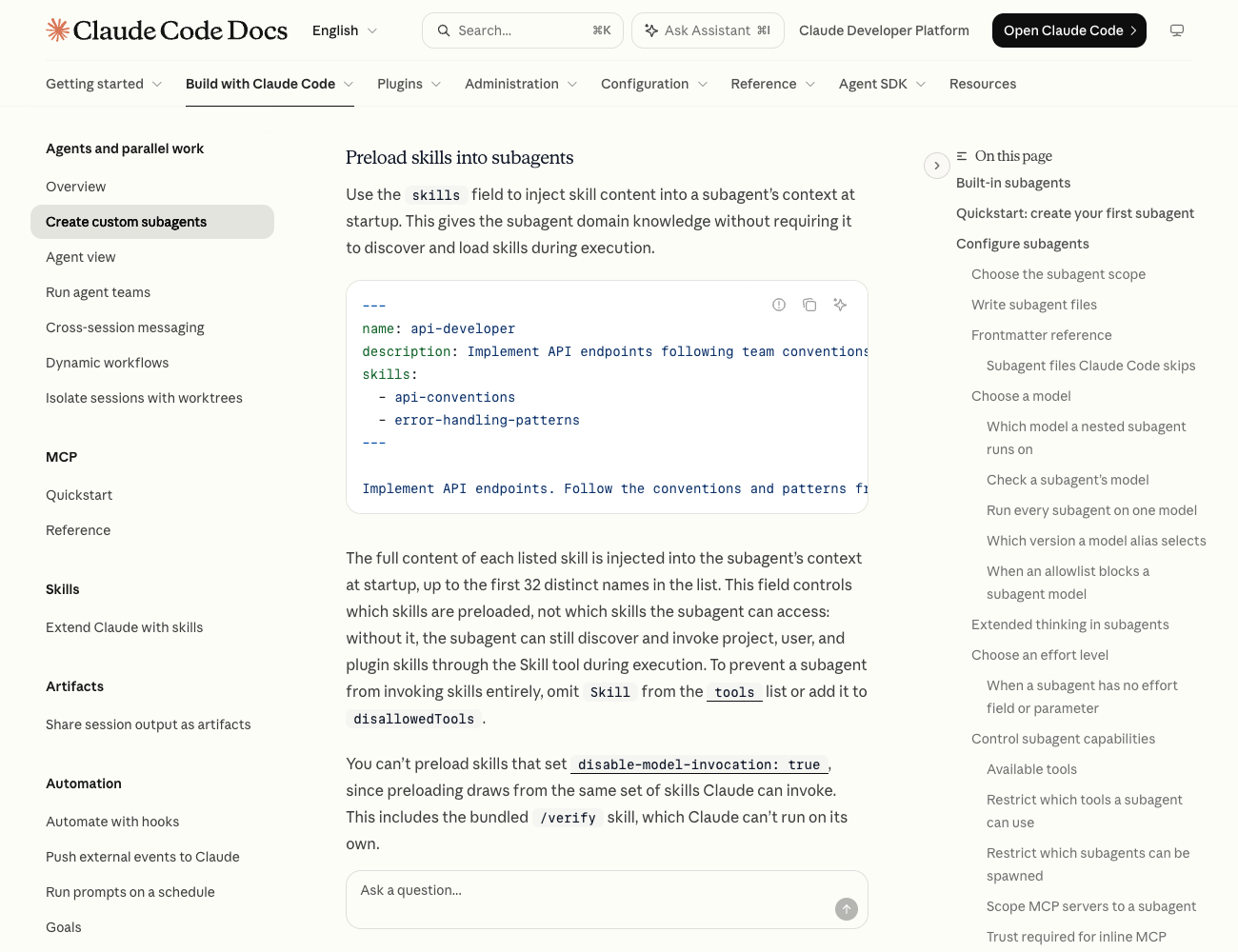
Official documentation captured for this article. This is a documentation screenshot, not a screenshot of a successful inference run.
3. Compare dynamic invocation without preloading
Save .claude/agents/audit-dynamic.md:
---
name: audit-dynamic
description: Audit sample.csv by invoking the sample-audit skill.
tools: Read, Skill
---
First invoke the sample-audit skill using the Skill tool.
Then follow it on sample.csv. Do not read SKILL.md directly.
If the skill cannot be invoked, report INVOCATION_FAILED and the reason.
This definition has no skills: field. Ask the parent to delegate to audit-dynamic and return its response verbatim. A successful dynamic-path check requires a Skill invocation for sample-audit in the agent transcript, followed by the same four-line result. A marker alone is insufficient.
Now remove Skill from this agent’s tools: list, keeping everything else fixed. The expected result is an invocation failure, because this definition requires a tool it no longer exposes. Restore Skill afterwards. Do not add skills: while testing this control: doing so would introduce the separate preload route.
This explicit test checks whether invocation is possible; it does not test whether Claude chooses the skill on its own. To test selection separately, use a fresh agent definition that retains tools: Read, Skill but removes the explicit sample-audit instruction and uses a neutral description such as Audit local CSV files. Give it an ordinary audit task without naming the skill, then inspect whether a Skill call occurs. If explicit invocation works but this separate selection check does not, examine the skill description and task match. A successful explicit call is not proof of automatic selection.
4. Check invocation controls and execution permissions
Use these changes individually in the disposable fixture, restoring the baseline after each check:
| One change | Expected distinction | Repair |
|---|---|---|
Add disable-model-invocation: true to the skill | Neither model-initiated dynamic invocation nor preloading should use it | Keep that flag for intentionally manual workflows; use an appropriate model-invocable skill for this experiment |
Add user-invocable: false instead | Hides the manual command; does not itself prohibit model invocation | Do not mistake command-menu absence for model unavailability |
Remove Skill from the dynamic agent’s explicit tool list | Dynamic path unavailable; unrelated to the preload agent | Expose Skill only where dynamic invocation is intended |
| Remove access to the input file | Instructions may be present but reading the data fails | Correct the narrow file/tool permission or location |
The two invocation flags serve different purposes; see control who invokes a skill. Do not remove a deliberately manual flag from a deployment or destructive-operation skill merely to make an agent use it automatically.
A tool being listed does not mean every use is permitted. Inspect Claude Code permission rules, including denies, managed policy and rules for the exact skill name. A skill’s allowed-tools cannot restore a tool excluded from the agent’s tool set or defeat a deny rule. For a real skill that calls a Python script, investigate Bash and the script path after establishing that the instructions loaded. Our fixture needs only Read for its actual audit, which avoids that extra variable.
Do not use bypassPermissions as a diagnostic fix. It changes the conditions you are trying to investigate and is unnecessary for a three-row read-only example.
5. Resolve directory and name problems
Check the project before moving a skill into your global personal directory:
pwd
claude --version
ls -l .claude/skills/sample-audit/SKILL.md
ls -l .claude/agents/audit-preloaded.md
ls -l .claude/agents/audit-dynamic.md
The agent file and skill file have different jobs and different directories. A file in .claude/agents/ does not become a skill because its text mentions “skill.” For this fixture, keep the folder name, frontmatter name and preload entry identical. Do not put a filesystem path or /sample-audit in the skills: list.
For a monorepo, a skill under packages/web/.claude/skills/ is not equivalent to a root-level skill. Nested discovery depends on which area Claude accesses. Start with the fixture at the project root to remove that uncertainty, then reintroduce the real subdirectory. If a command resolves to unexpected instructions, check personal and project name collisions and plugin namespaces. The official skill discovery and naming rules explain which source wins; globally moving every skill can create a new collision instead of fixing the original one.
If the file is ../shared/.claude/skills/sample-audit/SKILL.md, launch with claude --add-dir ../shared and check that the skill appears in the new session. Setting permissions.additionalDirectories alone grants file access but does not load that folder’s skills. For a nested skill, start from its owning subdirectory or use /add-dir on a supported version, then repeat the named invocation. Capture the start directory and any --add-dir arguments in the bug report. For relative supporting files, identify whether the path is relative to the skill directory or the working directory; our sample.csv explicitly uses the latter.
If you created the top-level skills directory after the session started, restart the session before diagnosing a missing skill. This fixture deliberately starts fresh after file creation.
6. Collect evidence when the minimal example still fails
Use a fresh local session with a private debug file, following the current CLI reference:
claude --debug-file ./claude-skill-debug.logReproduce one variant. Check the selected agent, resolved skill name, missing/disabled-skill warnings, Skill call when testing the dynamic route, and any denied Read or Bash operation. Review logs before sharing: they can include paths, prompts and other session data. Do not publish credentials or unrelated conversation history.
Use this compact report template:
Claude Code version / OS:
Model / provider (no secrets):
Working directory / repository root:
Agent name and definition:
Skill name, path and frontmatter:
Route: preload OR dynamic invocation
Exact prompt and synthetic input:
Expected result / actual result:
Selected-agent evidence / relevant tool call or warning:
Single change made / result after restoring baseline:
A launch, authentication, TLS or rate-limit failure happens before this audit can establish skill behavior. Route those symptoms to the Claude Code TLS troubleshooting guide or rate-limit troubleshooting. Retrying a rejected model request does not repair a misspelled preload name, and editing a skill does not fix a certificate error.
What about context: fork, the SDK and Ofox?
A skill with context: fork starts an agent to carry out the skill’s task. An agent with skills: starts from its agent instructions and receives extra skill content. Choose the direction that matches your workflow; they are not interchangeable frontmatter. See run skills in a subagent.
The custom agents used here should not be assumed to carry everything you discussed with the parent. Pass necessary task inputs explicitly. Claude Code also documents other fork behaviors; do not generalize this fixture’s isolation to every kind of agent or conversation fork.
If you launch through the Claude Agent SDK, separately check its filesystem settings and Skill-tool configuration in the SDK skills documentation. A terminal session discovering a local skill does not prove an SDK process started in another directory loads the same configuration.
If you already connect Claude Code through Ofox, check the Claude Code integration documentation for connection configuration and the error-handling reference for API failures. Provider connectivity and local skill loading are separate checks. Changing the API endpoint does not itself grant Claude account features or repair a local agent definition.
A useful completion criterion is specific: the intended agent starts, the intended loading route is visible, the four-line output matches the fixture, and the corresponding failure control behaves differently. Keep those records before putting the real workflow back together.