Codex CLI Workflow: The Setup Senior Devs Use in 2026
The real Codex CLI loop — AGENTS.md, plan mode, worktrees, GPT-5.5 vs GPT-5.4 Mini trade-offs, and the seven mistakes that waste your first week.
 Ofox
Ofox 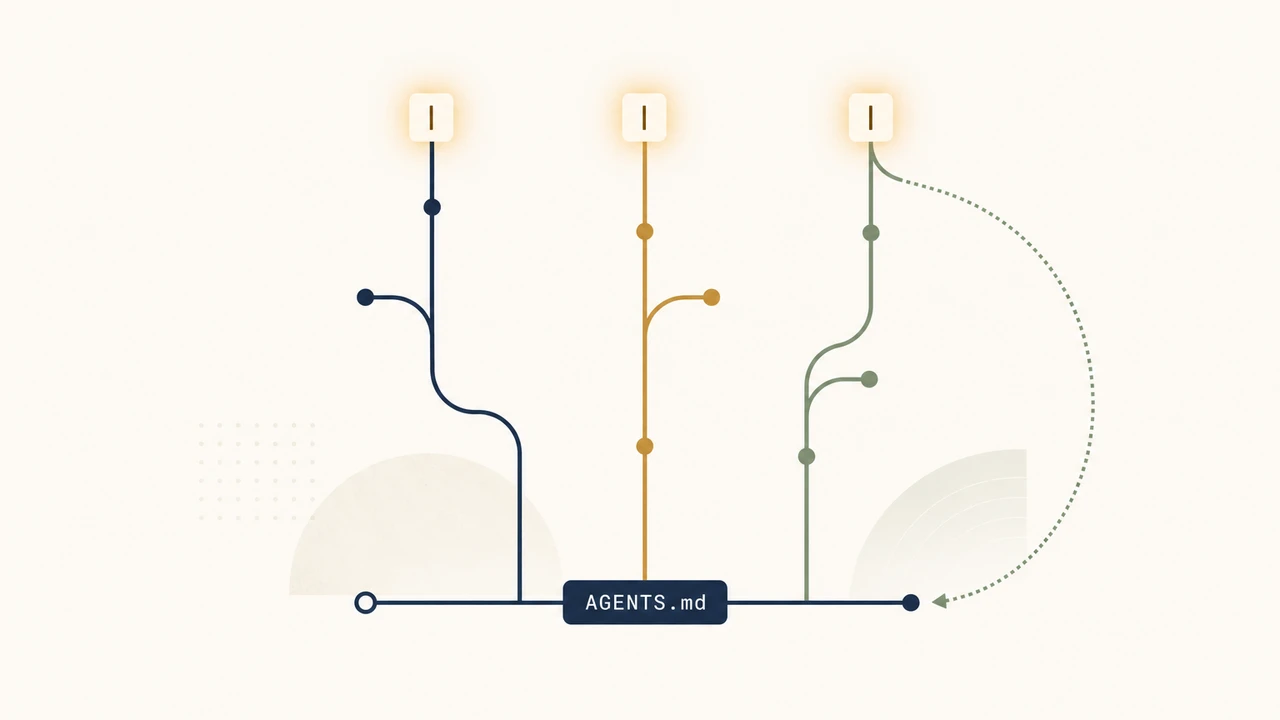
TL;DR
The Codex CLI users who ship the most are not the ones with the cleverest prompts. They are the ones who wrote AGENTS.md once, wired up two MCP servers, and let /plan do the thinking on anything ambiguous. Default workflow: plan-first for unclear tasks, just-do-it for clear ones, three to four worktrees in parallel, GPT-5.5 for thinking work and GPT-5.4 Mini for everything boring. This guide is the loop, the trade-offs, and the seven mistakes that eat your first week.
The leverage in Codex CLI is not the model. It is the 30 lines of AGENTS.md you wrote on day one and never touched again.
For setup and environment configuration, start at the Codex CLI configuration guide, or jump to the custom model providers guide if you need profiles, multiple endpoints, or rotating tokens. This article picks up where setup ends.
The honest end-to-end loop
Strip away the marketing and the daily Codex CLI loop in 2026 looks like this:
- Open a worktree for the task:
git worktree add ../proj-feat-auth feat/auth - Start Codex in it:
cd ../proj-feat-auth && codex - Decide planning vs. execution: ambiguous →
/plan, clear → just describe the change - Approve diffs with
/permissionsset to Auto for safe ops, Read-only when reviewing - Resume tomorrow with
codex resume --lastorcodex resume <SESSION_ID> - Encode anything you correct twice into AGENTS.md or a Skill
Versions 0.128.0 through 0.130.0 (released between April 30 and May 8, 2026, per the official changelog) added the persisted /goal workflow (experimental, off by default), modal vim editing in the composer, expanded permission profiles, and external agent session import. None of that changes the loop above. It makes each step less painful.
Bootstrap: the file that pays for itself in a week
The single highest-leverage thing you can do before your first session is write AGENTS.md at the repo root. Codex reads it on every session start. So does Claude Code (it reads CLAUDE.md — symlink one to the other). Treat it as living documentation: every recurring correction you make is a candidate to encode as a rule.
A working AGENTS.md is short and specific:
# AGENTS.md

## Stack
- Python 3.12, FastAPI, SQLAlchemy 2.x async
- pytest with anyio, never unittest
- Ruff for lint, Black for format, mypy --strict

## Don't
- Don't add comments that restate the code
- Don't import unittest.mock — use pytest fixtures
- Don't create new files in src/legacy/
- Don't run `alembic upgrade` without confirming first

## Do
- Use `from __future__ import annotations` in every new file
- Run `make test path=<file>` after edits, not full test suite
- Place new endpoints under src/api/v2/
Three rules of thumb that hold up in real teams:
- Start small. 30 lines beats 300. Long AGENTS.md files get ignored by the model just like your code style guide gets ignored by humans.
- Encode the diffs. When you find yourself rejecting the same Codex suggestion twice in one week, that is the next rule.
- Tools, not personality. “Be concise” is wishful. “Run
make testafter edits” is enforceable.
Plan mode vs. just-do-it: pick the right one
Plan mode (/plan or Shift+Tab) makes Codex gather context and ask clarifying questions before writing code. It is the right choice on ambiguous or multi-step work. It is the wrong choice when you already know what you want.
The split that actually works:
| Task shape | Mode |
|---|---|
”Add a debounce to the search input in SearchBar.tsx” | Just describe it |
| ”Refactor the auth flow so OAuth and SAML share a session model” | /plan first |
”Rename getCwd to getCurrentWorkingDirectory across the repo” | Just describe it |
| ”Diagnose why the staging deploy gets stuck on healthcheck” | /plan first |
| ”Format these 40 files with Black” | Just describe it (and use Mini) |
If you can name the file and the change in one sentence, skip planning. If you find yourself writing a paragraph to explain the task, plan mode will save you a half-hour of bad diffs.
Worktrees: how parallel sessions stop fighting
A git worktree is an isolated checkout of the same repo, sharing history but on its own branch and folder. It is how teams run three or four Codex sessions in parallel without thrashing each other’s editor state or build cache.
The pattern:
# One-time setup per task
git worktree add ../proj-feat-auth feat/auth
git worktree add ../proj-fix-cors  fix/cors
git worktree add ../proj-perf-list perf/list-render

# Three terminals, three Codex sessions, no interference
(cd ../proj-feat-auth && codex)
(cd ../proj-fix-cors  && codex)
(cd ../proj-perf-list && codex)

# Cleanup when done
git worktree remove ../proj-feat-auth
Why this beats branch-switching: each worktree has its own node_modules, its own .next or dist, its own pytest cache. Switching branches in a single checkout invalidates all of that. The “Codex vs Claude Code in April 2026” roundup of Reddit sentiment captures the consensus: developers running 4-6 parallel sessions on a single codebase is now ordinary.
The honest tradeoff: worktrees use more disk. On a 2 GB repo with 5 worktrees you are looking at 10 GB plus build artifacts. Cheap on an SSD, painful on a 256 GB laptop.
/goal: the workflow for tasks that span days
/goal is an experimental Codex CLI feature, off by default. You enable it from the /experimental picker in the TUI, or by adding goals = true under [features] in ~/.codex/config.toml; without that flag, typing /goal returns an unknown-command error. Once on, you declare an objective with /goal <objective>, check status with a bare /goal, and control the thread across sessions with /goal pause, /goal resume, and /goal clear. 0.128 introduced the persisted-state plumbing so goals round-trip across codex resume; 0.129 made the flag discoverable from inside /experimental and changed the lifecycle so paused goals stay paused after --resume unless you opt back in. The docs frame it for work where Codex can keep iterating against a verifiable stopping condition without your input for hours at a time.
Where it earns its place:
- A migration that touches 40 files and you want one running thread instead of 12 disconnected sessions
- An incident postmortem where you keep coming back to the same investigation
- A spike that you want to be able to drop and pick up without re-explaining context
Where it is overkill:
- Anything you can finish in one sitting —
codex resume --lastis enough - Throwaway exploration where you don’t want to commit to a thread
Skills, plugins, and the moment you stop pasting prompts
The repeatable-prompt problem: you write the same five-paragraph instructions for “do a code review on the diff” or “scaffold a new endpoint with the team’s conventions” every week. Skills package those instructions as a SKILL.md file plus any helper logic, and Codex applies them consistently.
The 0.128–0.130 releases added workspace plugin sharing with access controls, marketplace install/upgrade flows, and remote plugin bundle caching. The takeaway: skills and plugins are now first-class, not a power-user toy.
A working skill is small:
# review-pr

When invoked, run `git diff main..HEAD` and review every changed file
against AGENTS.md "Don't" list. Output:

- Per-file findings (severity: blocker/nit)
- A two-line summary fit for a PR comment
- Any test gaps you noticed

Don't make code edits. Don't open new files unrelated to the diff.
Add MCP servers in ~/.codex/config.toml or via the Codex App under Settings → MCP servers. The two that almost everyone benefits from on day one: a filesystem server scoped to the repo, and a git server. Anything beyond that, the official best-practices doc is right — add tools only when they unlock a real workflow you already do manually.
The three commands you’ll use every day
After a month, the muscle memory is:
codex resume --lastopens the session you closed five minutes ago, full context intact./permissionsflips between Auto (let it write), Read-only (let it look), and Full Access (let it run shell), mid-session./reviewaudits a diff or specific commit without modifying files. The fastest pre-PR sanity check in the toolkit.
Two more that look small and compound: Tab queues a follow-up prompt while Codex is still working on the previous one (no waiting), and Ctrl+R searches your prompt history (no rewriting yesterday’s prompt today).
Model selection: when GPT-5.5 is overkill
Switch with /model mid-session, or launch with --model gpt-5.5. The split that actually saves money on ofox pricing:
| Model | Input / Output ($/M) | When to use |
|---|---|---|
| GPT-5.5 | $5 / $30 | Default for plan mode, multi-file refactors, debugging unfamiliar code |
| GPT-5.4 Mini | $0.75 / $4.5 | Batch renames, formatting, scaffolding, “just do this obvious thing” |
| GPT-5.3 Codex | $1.75 / $14 | Code-specialized variant; useful when you want tighter pure-code generation |
| GPT-5.4 Nano | $0.20 / $1.25 | Quick “explain this 20-line snippet” or commit-message generation |
The heuristic: if you used /plan, you should be on GPT-5.5. If you didn’t, you can probably drop a tier. The Reddit consensus on the GPT-5 family (summary in this comparison post) is that the cheaper variants degrade noticeably on multi-file context but are basically indistinguishable on small clear tasks.
For routing patterns that go further (sending different task types to different providers) see the Claude Code hybrid routing pattern, which translates one-to-one to Codex CLI via custom endpoints.
Costs: where the bill actually comes from
Three patterns explain most “why is my Codex bill higher than expected” complaints:
- Plan mode on everything. Plan mode reads more of the repo to build its plan. Useful when the task warrants it, expensive when it doesn’t.
- No model split. Defaulting to GPT-5.5 for trivial edits is a 6-7x markup over Mini for no quality gain.
- Long sessions without
/clear. Context compounds. A six-hour session with no clears is paying for the same file reads ten times.
The structural fix is to consolidate billing across all your AI tools (Codex CLI, Cursor, Cline, Claude Code) through one endpoint, which is what an AI API aggregation layer is for. Practical advice on cutting raw token spend lives in the reduce AI API costs guide.
The seven mistakes that waste your first week
What people learn the hard way:
- Skipping AGENTS.md because “it’s just for big projects.” Wrong. Small projects get more leverage per line.
- Plan mode on everything. Burns tokens, slows the loop, doesn’t help on clear tasks.
- One worktree, many branches. Cache thrash, build re-runs, frustration.
- Full Access permissions in production repos. Drop back to Auto (workspace-write, asks before network or out-of-scope) or Read-only when the blast radius is real.
- Long-running sessions with no
/clear. Context grows, costs grow, model attention degrades. - Defaulting to GPT-5.5 for trivial work. See the cost section.
- Treating skills as advanced. A 10-line
SKILL.mdfor code review pays for itself in two days.
Where Codex CLI is weak
For balance: Codex CLI is not the right tool for everything. It struggles when:
- The repository has heavy framework magic (lots of decorators, codegen, runtime metaprogramming). It can’t always trace what calls what.
- The task is “design a new system.” Codex executes plans well. It is mediocre at picking which plan to execute when you genuinely don’t know what you want.
- You need a tool with a polished UI for non-developers. Codex CLI is a terminal tool by design.
For a head-to-head on which model wins for which coding task type, and where Codex CLI’s GPT-5.5 backend ranks against Claude Opus 4.7 and Gemini 3.1 Pro, see the best LLM for coding breakdown.
What this looks like end-to-end
A real day-in-the-life on a 50k-LOC backend, running through ofox at GPT-5.5:
- 9:00 —
git worktree add ../app-feat-billing feat/billing && cd ../app-feat-billing && codex - 9:01 —
/plan“Add Stripe webhook handling for invoice.paid, idempotent on event_id” - 9:08 — Plan looks good, approve, switch to default mode
- 9:30 — Diff in 6 files,
/reviewto sanity-check, then commit - 9:35 — Open second terminal, second worktree,
/model gpt-5.4-mini, batch-rename a deprecated module - 14:00 — Resume morning session with
codex resume --last, fix the test it missed - 17:00 — Drop a
/goalfor tomorrow’s spike on the queue migration so it survives the weekend
The first week of Codex CLI feels like it’s about prompts. The second week, you realize it’s about the four files you wrote on day one (AGENTS.md, two SKILL.md, one mcp config) and after that you basically stop thinking about the tool.
The model gets better, the CLI gets new features, the team adds more skills. The shape of the loop stays the same, and that is what separates the people who ship from the people who keep tweaking prompts.
Sources
- Codex CLI Features (OpenAI Developers)
- Codex CLI Changelog
- Codex Models Reference
- Codex Best Practices
- Codex vs Claude Code in April 2026
- Show HN: File-based sub-agents for Codex CLI
- ofox.ai model catalog and pricing
The first week also produces its own crop of errors. The Codex error index maps 15 of them to tested fixes.
Frequently Asked Questions
- Which model should I default to in Codex CLI?
- GPT-5.5 for any task that involves planning, multi-file edits, or unfamiliar code. Drop to GPT-5.4 Mini for batch renames, formatting passes, and one-shot scaffolding. Use GPT-5.3 Codex when you specifically want the codex-tuned variant for tight code generation. On ofox the prices are $5/$30, $0.75/$4.5, and $1.75/$14 per million tokens respectively.
- Do I need plan mode for every task?
- No. Plan mode (/plan or Shift+Tab) earns its keep on ambiguous or multi-step work. For a clear, single-file change, planning first is overhead. The honest rule: if you can describe the change in one sentence and name the file, skip plan mode.
- Why use git worktrees instead of just branches?
- Worktrees give each Codex session its own checked-out folder, so you can run two or three sessions in parallel without thrashing your editor or your build cache. With branches alone, switching contexts means stashing, rebuilding, and waiting on Codex to re-read the tree.
- Where does AGENTS.md sit relative to CLAUDE.md?
- They are the same idea — a top-of-repo file that any agent reads on session start. Codex reads AGENTS.md by default, Claude Code reads CLAUDE.md, and most newer tools read both. Keep one source of truth and symlink if you need to.
- Can I use Codex CLI through ofox to access GPT-5.5 from regions where OpenAI is unreliable?
- Yes. Set OPENAI_BASE_URL to https://api.ofox.ai/v1 and use your ofox key. Codex CLI uses the OpenAI protocol end-to-end, so the only change is the two environment variables. See the codex-cli-api-configuration-guide for the full setup.