Compare AI video models in Ofox with the same creative brief
Use Ofox multi-model selection, check parameter compatibility, and compare whole clips against your brief instead of treating rankings as production results.
 Ofox
Ofox 
A useful AI video model comparison starts with a shot you need to deliver. In Ofox Video, prepare the input, enable multi-select in the model picker and choose candidates that support your configuration. Judge the complete clips against the same acceptance criteria, then record actual attempts and usable results.
A public leaderboard or prediction-market percentage cannot tell you whether a model will preserve your garment’s print or keep a cup handle intact. Use those signals to form a shortlist, then perform a small task-specific trial. This article explains that trial; it does not publish invented scores or claim a benchmark winner.
What was checked: Ofox’s English creation interface on September 21, 2026, including model selection and compatibility warnings. The scene board below is separately generated practice artwork. No paid model-comparison results are presented here.
 Possible test subjects for object stability, movement and physical interaction. These are different briefs, not three models’ outputs. Use the same single-scene input within each comparison.
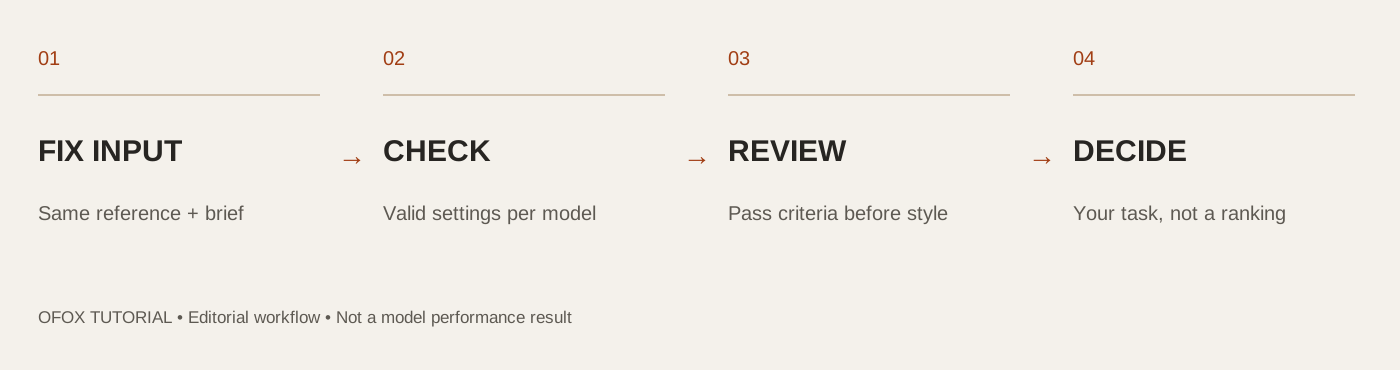 Editorial checklist for this guide; not measured model performance.
1. Define what would make a clip usable
Pick a task that resembles your actual work. A still product composition, a modest human movement and a physical interaction reveal different problems. Do not make your first test an elaborate montage with several people, changing locations, dialogue and rapid cuts.
Write rejection conditions before looking at the outputs. For a teapot shot, that could mean the handle and spout stay attached, the body does not change shape and the requested camera move occurs without a cut. A visually impressive clip that breaks those requirements still fails the task.
Download the comparison worksheet. It keeps requirements, configuration and review results separate, and deliberately starts with blank scores.
| Task | Example instruction | Inspect closely |
|---|---|---|
| Object stability | Small camera move around a still teapot | Handle, spout, rim and reflections |
| Human movement | One small weight shift or slow step | Limbs, clothing and foot contact |
| Physical interaction | A continuous pour into one glass | Vessel shape, water path and contact |
These examples are proposed tests, not evidence that a particular model is good or bad at them. For a real fashion campaign, use the garment-specific review workflow instead of generic visual appeal.
2. Keep the input and prompt fixed
Use one reference with permission to reuse it. Upload the same source file to each candidate, and keep its crop and aspect ratio unchanged where the supported configurations allow. If you are testing text-to-video, use the same scene description and do not supply a reference to just one model.
A simple object-stability prompt could be:
One continuous shot of the reference teapot on the table.
Move the camera slightly forward. Keep the teapot still and fully visible.
Preserve its handle, spout, lid and proportions. Keep the lighting stable.
No cuts, new objects, text, hands or liquid being poured.
Do not assume a seed value makes outputs equivalent across different models. The primary control here is the brief and supported setup; generated samples will still vary.
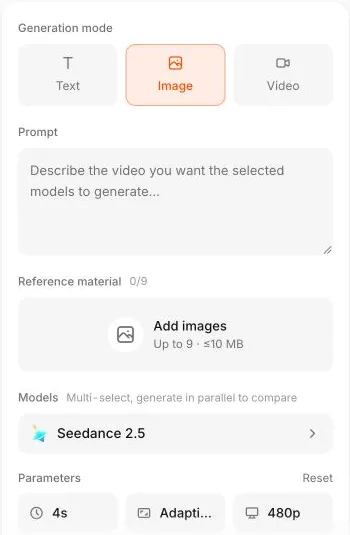 Set the input mode before deciding whether the same candidate list and parameters suit the task.
3. Enable multi-select, then check each model
Open the model selector and turn on Multi-select, generate in parallel to compare. Select your candidates. In the checked session, the video tool listed Seedance, Wan, HappyHorse and MiniMax families; searches for Kling and Veo found no matching model in that interface.
Start with a small shortlist, not every checkbox. The selector describes parallel generation, but each selected model still represents a separate requested result and may have a separate charge. Multiple selection is a convenience for testing, not a promise of a free comparison.
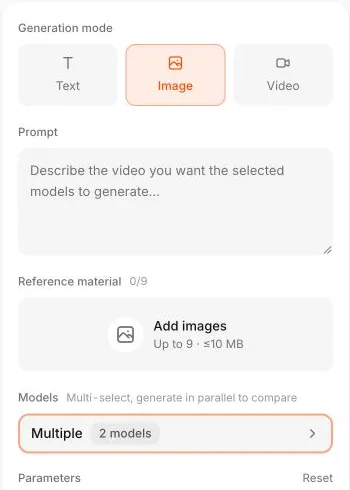 Actual two-model setup. The image documents selection, not successful outputs; inspect the estimate breakdown and compatibility warnings before submitting.
4. Resolve compatibility before you press Generate
During the UI check, selecting Seedance 2.5 and Wan 3.0 while keeping a four-second setting produced “This model does not support 4s” for Wan 3.0. The interface warned that unsupported settings can be rejected or substituted by providers. This is a concrete reason to inspect the per-model breakdown.
If candidates share a valid duration, resolution, input mode and audio setting, use that common configuration. If they do not, run each separately with valid settings and record the differences. You can still assess which delivers your brief, but that is not a like-for-like performance benchmark.
Check these fields before each trial:
- Model name and version actually selected.
- Text, image or video input mode and the source asset.
- Duration, aspect ratio, resolution and audio options.
- Estimate status, unsupported-setting warnings and the number of requested models.
- The comparison’s stop condition and spending ceiling.
An unavailable estimate is not a zero price. Do not submit a request whose cost you cannot assess under your own budget policy. This guide avoids fixed price claims because model, provider and configuration can change the bill.
5. Review full clips and keep rejected attempts
Watch each clip without its model label if that is practical in your editor. Apply the rejection rules first. Then compare framing, motion, continuity and how well the usable clip fits the edit. Inspect the full duration; thumbnails and a single selected frame are insufficient for video evaluation.
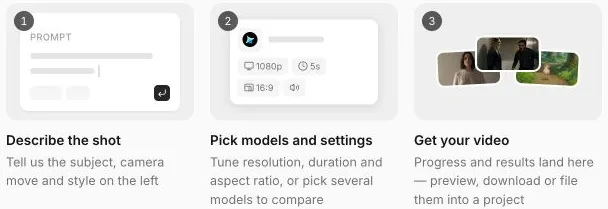 Download originals for closer inspection. The interface’s timing claim is not a measured latency result from this tutorial.
Record every attempt, including technical failures, rejected outputs and any editing needed. Separate a generation failure from a clip that completed but failed the creative brief. A successful request and a usable advertising asset are different outcomes.
For review consistency, describe the defect rather than assigning a mysterious numerical quality score. “Handle detaches halfway through the push-in” is more actionable than “physics: 6/10.” If two people review, have them use the same brief and record disagreements.
6. Choose by usable output for your task
A small trial can support a decision for that particular shot. It cannot establish the best video model overall. If several candidates pass, compare the actual spend, the number of attempts and the additional editing work. If none passes, simplify the shot or use original footage rather than declaring the least-bad clip a winner.
For your completed trial, calculate:
Usable rate = accepted clips / completed clips
Cost per accepted clip = total actual trial spend / accepted clips
Keep technical failures in a separate count and include their actual charges, if any, in total spend. If no clip is accepted, cost per accepted clip is undefined: report the spend and zero accepted clips instead of inventing a finite value. Different billed currencies or configurations should not be silently combined.
The separate cost-per-usable-clip guide discusses that budgeting question in more detail. This tutorial focuses on the creation interface and the trial record, not on reproducing a public leaderboard.
Frequently Asked Questions
- Is the highest-ranked model automatically best for my ad?
- No. Rankings use a particular evaluation method and sample. Test your actual references, motion and acceptance criteria before drawing a production conclusion.
- Can every selected model use the same parameters?
- No. Ofox can expose compatibility warnings for selected models. Use a supported common configuration or document the differences in separate trials.
- Does this article contain measured model scores?
- No. It documents a verified interface workflow and supplies a blank test worksheet. The practice scenes are not a benchmark dataset with completed results.