LLM API Gateway Guide: Choose the Right One (2025)
LLM providers had major outages in 2025. OpenRouter, LiteLLM, Portkey and Helicone compared, with a decision framework and code to start in five minutes.
 Ofox
Ofox 
Availability checked September 6, 2026: Anthropic still lists Opus 4.5 and Sonnet 4.5 as active on its own API. Neither appears in Ofox’s current v2 catalog, including the deprecated-model listing. References to these versions below describe historical model capabilities or official pricing, not confirmed Ofox availability. For runnable Ofox examples, select a model ID returned by your current catalog; do not assume an old ID is still callable.
Summary
If your AI application calls LLM APIs directly, you’re one provider outage away from downtime. In 2025, every major LLM provider — OpenAI, Anthropic, and Google — experienced at least one significant service disruption. An LLM API gateway sits between your app and these providers, giving you a unified interface, automatic failover, and centralized cost control. This guide walks through the real problems a gateway solves, provides a decision framework for choosing one, compares six leading solutions head-to-head, and includes working code to get started in five minutes.
The Problem: What Happens Without a Gateway
Here’s what goes wrong when your app calls LLM providers directly.
Scenario 1: Provider Goes Down, So Does Your Product
Your app calls api.openai.com directly. OpenAI has an incident. Your users see errors. Your team scrambles to hardcode a fallback to Anthropic — different SDK, different authentication, different response format. By the time you ship the hotfix, you’ve lost hours of uptime and user trust.
This isn’t hypothetical. In 2025 alone, every major LLM provider experienced at least one significant service disruption (source).
Scenario 2: The Multi-SDK Nightmare
You start with OpenAI. A few months later, Claude outperforms GPT on your use case, so you add the Anthropic SDK. Then Gemini launches a model with a million-token context window, so you add Google’s SDK too.
Now your codebase has three different SDKs, three authentication patterns, three response formats, and three sets of error handling logic. Switching models isn’t a config change — it’s a code change that touches half your stack.
# What multi-provider code looks like without a gateway
from openai import OpenAI
import anthropic
from google import genai

# Three clients, three auth patterns, three response formats
openai_client = OpenAI(api_key=os.environ["OPENAI_API_KEY"])
anthropic_client = anthropic.Anthropic(api_key=os.environ["ANTHROPIC_API_KEY"])
gemini_client = genai.Client(api_key=os.environ["GEMINI_API_KEY"])
Scenario 3: The Cost Black Hole
Each provider bills separately. Each team member has their own API keys. There’s no unified dashboard showing total spend across providers. You discover at month-end that someone left a batch job running against GPT-5 all weekend. Your API bill is 4x what you budgeted.
Without centralized cost tracking, you can’t answer basic questions: Which model costs the most per task? Would switching providers save money? Are there runaway processes burning tokens?
What an LLM API Gateway Actually Does
An LLM API gateway is a routing layer between your application and LLM providers. Think of it the way Stripe unified payment processors — an LLM gateway unifies AI model providers.
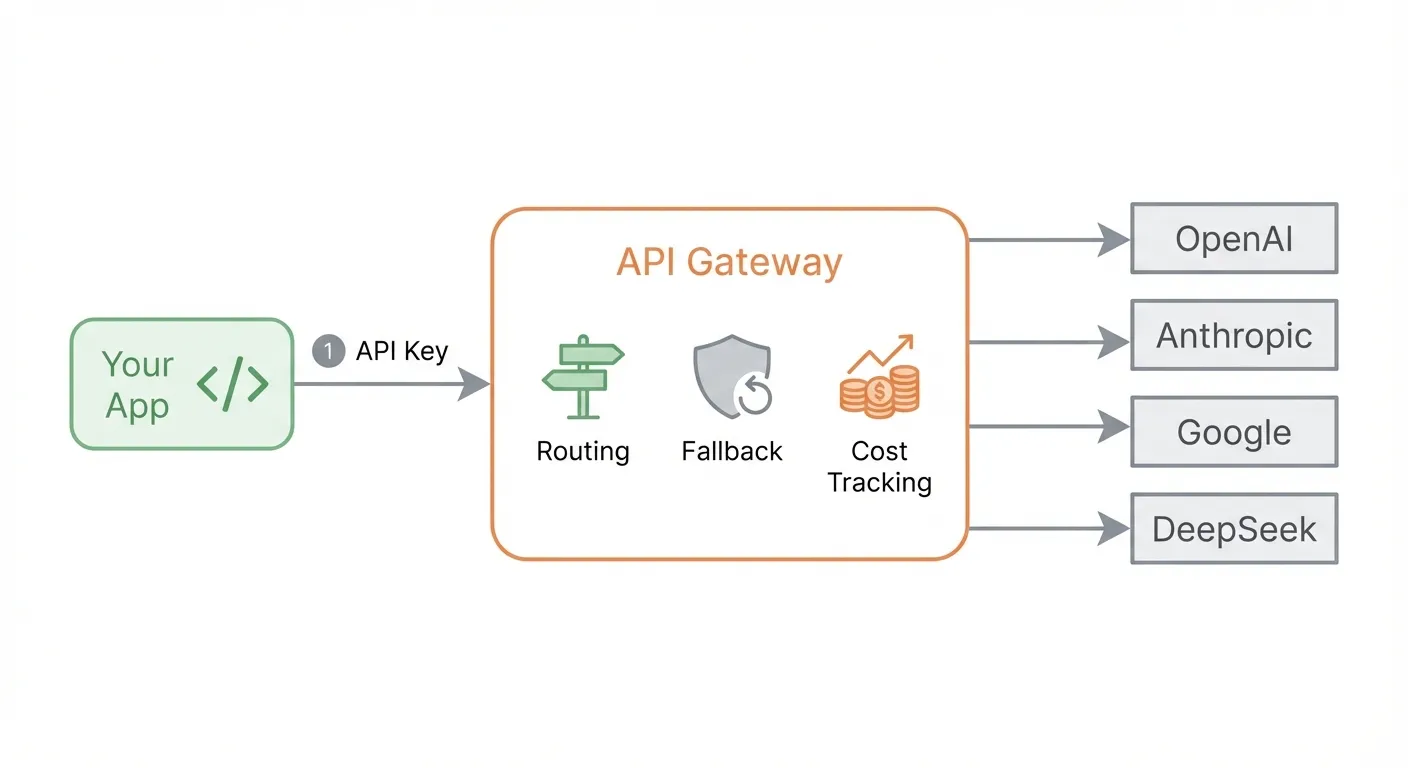
Core capabilities:
| Capability | What It Does |
|---|---|
| Unified API | One interface format for all providers — call GPT, Claude, and Gemini with the same code |
| Model Routing | Route requests to different models based on cost, latency, or capability |
| Automatic Fallback | If Provider A is down, transparently retry with Provider B |
| Cost Tracking | Centralized dashboard for spend across all providers |
| Key Management | One gateway key in your code; provider keys stay in the gateway config |
What a gateway is NOT:
- It’s not a general API management tool (like Kong or Apigee in their traditional form)
- It’s not a model hosting platform (you still need provider accounts)
- It’s not an abstraction that hides model differences (you still choose which model to call)
Decision Framework: How to Choose
Not every team needs the same gateway. Your choice depends on where you are.
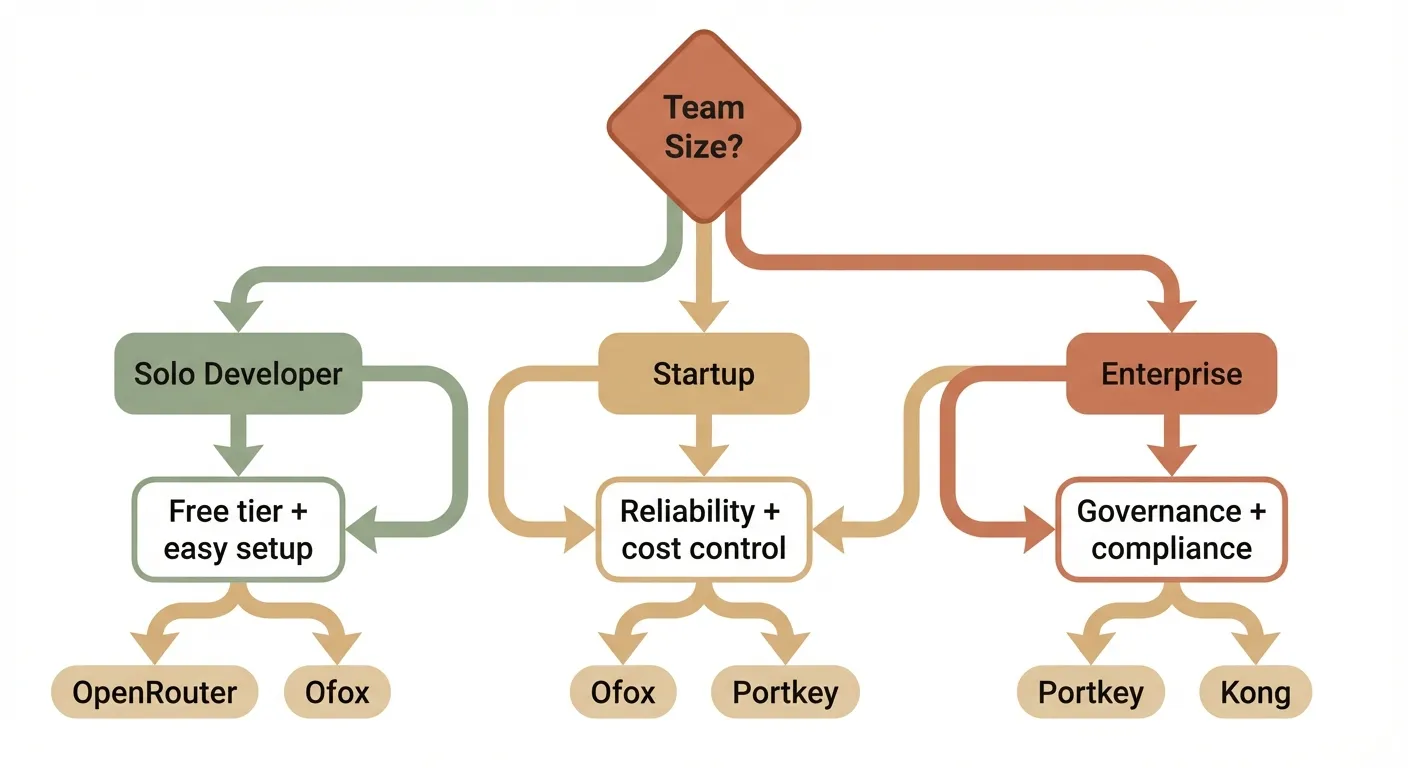
Solo Developer / Side Project
Your priorities: free tier, ease of setup, model variety.
You don’t want to manage infrastructure. You want to sign up, get a key, and start calling models. Look for:
- Generous free tier or low minimum spend
- Quick setup (under 5 minutes)
- Broad model catalog
Best fit: OpenRouter (largest model catalog) or Ofox (10+ free models, three-protocol native support).
Startup / Small Team
Your priorities: reliability, cost control, SDK compatibility.
You’re building a product. Uptime matters. Costs need to be predictable. Look for:
- Automatic failover between providers
- Usage tracking and budget alerts
- OpenAI SDK compatibility (minimal code changes)
- Streaming (SSE) support
Best fit: Ofox (unified API with routing and fallback) or Portkey (observability-focused).
Enterprise / Large Team
Your priorities: governance, compliance, self-hosting.
You need RBAC, audit logs, SOC2 compliance, and possibly air-gapped deployment. Look for:
- Role-based access control
- Self-hosted or VPC deployment options
- Compliance certifications
- SLA guarantees
Best fit: Portkey (enterprise governance) or Kong AI Gateway (built on Kong’s enterprise API platform).
Key Selection Criteria
When evaluating any gateway, score it on these six dimensions:
- Pricing model — Markup percentage, subscription fee, or free?
- Model coverage — How many models and providers are supported?
- SDK compatibility — Can you use official SDKs (OpenAI, Anthropic, Gemini) directly?
- Reliability — Fallback routing, retry logic, SLA?
- Self-host option — Can you deploy it on your own infrastructure?
- Developer experience — How long from signup to first API call?
Gateway Comparison
Here’s how six leading gateways compare across the criteria that matter most.
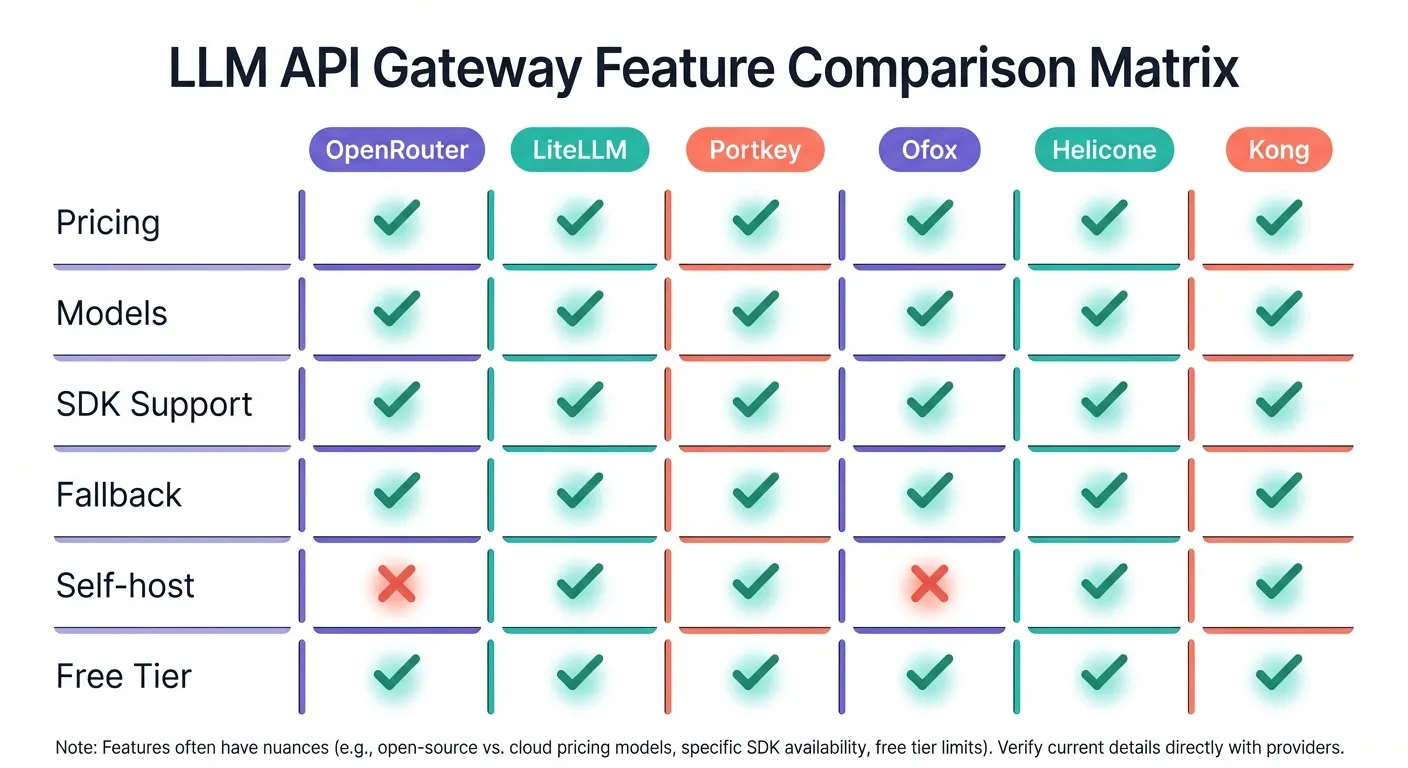
| Feature | OpenRouter | LiteLLM | Portkey | Ofox | Helicone | Kong AI GW |
|---|---|---|---|---|---|---|
| Pricing | 0% inference markup; 5.5% on credit purchases | Free (self-host) | Free tier → Enterprise ($5K+/mo) | Pay-as-you-go | Free 10K req/mo → $20/seat/mo | Enterprise pricing |
| Models | 300+ | 100+ (via config) | 200+ | 100+ | 100+ | Depends on config |
| OpenAI SDK | ✅ | ✅ | ✅ | ✅ | ✅ | ✅ |
| Anthropic SDK | ❌ | ✅ (translation) | ❌ | ✅ (native) | ❌ | ❌ |
| Gemini SDK | ❌ | ✅ (translation) | ❌ | ✅ (native) | ❌ | ❌ |
| Fallback Routing | ❌ | ✅ | ✅ | ✅ | ✅ | ✅ |
| Self-host | ❌ | ✅ | ✅ (Enterprise) | ❌ | ✅ | ✅ |
| Free Tier | Credits on signup | Free (OSS) | 10K logs/mo | 10+ free models | 10K req/mo | No |
| Setup Time | < 5 min | 15–30 min | < 5 min | < 5 min | < 5 min | 30+ min |
| Best For | Broadest model access | Full self-hosted control | Enterprise observability | Multi-SDK unification | LLM cost monitoring | Enterprise API management |
Sources: OpenRouter pricing, LiteLLM GitHub, Portkey pricing, Ofox docs, Helicone pricing, Kong AI Gateway.
What Stands Out
OpenRouter leads on model breadth — if you want access to obscure or newly released models, it likely has them first. The trade-off: no native SDK support beyond OpenAI, and no fallback routing.
LiteLLM is the go-to for teams that want full control. It’s open-source, self-hosted, and highly configurable. The trade-off: you’re responsible for uptime, updates, and infrastructure.
Portkey targets enterprises that need observability and governance. Rich logging, RBAC, and compliance certifications. The trade-off: advanced features require enterprise plans starting at $5K+/month.
Ofox is unique in supporting three protocols natively — OpenAI, Anthropic, and Gemini SDKs all work without translation. One API key works across all three. It also offers cost-based routing and automatic fallback. The trade-off: no self-hosted option.
Helicone started as an observability tool and grew into a gateway. Excellent cost tracking and analytics. The trade-off: gateway features are newer, and the pricing model (5% markup on pro plan) can add up at scale.
Kong AI Gateway brings enterprise API management to LLMs. If you’re already a Kong shop, it’s a natural extension. The trade-off: complex setup, enterprise pricing, overkill for small teams.
Getting Started: Your First Gateway in 5 Minutes
This example uses Ofox because it supports all three major SDKs natively, but the pattern applies to any gateway — swap the base URL and key.
Step 1: Get Your API Key
Sign up at the Ofox Console and create an API key.
Step 2: Call GPT with the OpenAI SDK
Change two lines — base_url and api_key — and your existing OpenAI code works through the gateway:
from openai import OpenAI

client = OpenAI(
    base_url="https://api.ofox.ai/v1",
    api_key="<your OFOXAI_API_KEY>"
)

response = client.chat.completions.create(
    model="openai/gpt-5.2",
    messages=[
        {"role": "user", "content": "What is the meaning of life?"}
    ]
)

print(response.choices[0].message.content)
Step 3: Switch to Claude — One Line Change
Same client, same code structure. Just change the model name:
response = client.chat.completions.create(
    model="anthropic/claude-sonnet-4.5",
    messages=[
        {"role": "user", "content": "What is the meaning of life?"}
    ]
)
That’s it. No new SDK. No new authentication. No code changes beyond the model string.
Step 4: Use the Anthropic Native SDK (Optional)
If you prefer Anthropic’s native SDK — for features like extended thinking or prompt caching — Ofox supports it directly:
import anthropic

client = anthropic.Anthropic(
    base_url="https://api.ofox.ai/anthropic",
    api_key="<your OFOXAI_API_KEY>"
)

message = client.messages.create(
    model="anthropic/claude-sonnet-4.5",
    max_tokens=1024,
    messages=[
        {"role": "user", "content": "What is the meaning of life?"}
    ]
)

print(message.content[0].text)
Step 5: Use the Gemini Native SDK (Optional)
Same idea for Google’s SDK — point it at Ofox and use the same API key:
# Gemini protocol — same key
from google import genai
client = genai.Client(
    api_key="<your OFOXAI_API_KEY>",
    http_options={"api_version": "v1beta", "base_url": "https://api.ofox.ai/gemini"}
)
response = client.models.generate_content(
    model="google/gemini-3.1-flash-lite-preview",
    contents="Hello!"
)
Step 6: Enable Fallback Routing
Add a provider parameter to automatically failover when your primary model is unavailable:
{
  "model": "openai/gpt-5.2",
  "messages": [{"role": "user", "content": "Hello"}],
  "provider": {
    "routing": "cost",
    "fallback": ["anthropic/claude-sonnet-4.5"]
  }
}
If GPT-5.2 is unavailable or rate-limited, the gateway automatically routes to Claude — your app never sees an error.
TypeScript Example
The same pattern works with TypeScript:
import OpenAI from 'openai'

const client = new OpenAI({
  baseURL: 'https://api.ofox.ai/v1',
  apiKey: '<your OFOXAI_API_KEY>'
})

const response = await client.chat.completions.create({
  model: 'openai/gpt-5.2',
  messages: [{ role: 'user', content: 'What is the meaning of life?' }]
})

console.log(response.choices[0].message.content)
Cost Analysis
Here’s the real cost of running AI API calls under different setups.
Scenario: A startup making 500,000 API calls per month, using a mix of GPT-5 and Claude models, with $2,000/month in raw model costs.
| Setup | Model Cost | Gateway Cost | Infra Cost | Total | Notes |
|---|---|---|---|---|---|
| Direct (3 providers) | $2,000 | $0 | $0 | $2,000 | No fallback, 3 SDKs to maintain, no unified billing |
| OpenRouter | $2,000 | ~$110 (5.5% on credits) | $0 | ~$2,110 | Largest model catalog, no fallback routing |
| LiteLLM (self-host) | $2,000 | $0 | $50–200/mo (server) | $2,050–2,200 | Full control, you manage uptime |
| Ofox | Pay-as-you-go | Included | $0 | Varies | 10+ free models, routing + fallback included |
| Portkey (Pro) | $2,000 | ~$240/yr base | $0 | ~$2,020 | Observability included; enterprise starts at $5K+/mo |
| Helicone (Pro) | $2,000 | $20/seat/mo | $0 | $2,020+ | Great analytics, 5% markup at scale |
The hidden cost of going direct: The table shows direct API calls are cheapest on paper. But factor in engineering time — maintaining three SDKs, building custom fallback logic, debugging three different error formats, and reconciling three separate invoices — and the total cost of ownership shifts heavily toward using a gateway.
FAQ
What is an LLM API gateway?
An LLM API gateway sits between your application and multiple AI model providers (OpenAI, Anthropic, Google, DeepSeek, etc.), providing a unified API interface. Instead of integrating with each provider separately — each with its own SDK, authentication method, and response format — you integrate once with the gateway. It handles format translation, authentication, failover, cost tracking, and model routing, so you write one integration instead of many.
Is an LLM gateway the same as an API management gateway like Kong?
Not exactly. Traditional API gateways (Kong, Apigee, AWS API Gateway) manage general HTTP APIs with features like rate limiting, authentication, and request transformation. LLM gateways are purpose-built for AI workloads — they understand token-based pricing, model-specific parameters (temperature, max_tokens), streaming via Server-Sent Events (SSE), and can intelligently route between different LLM providers based on cost, latency, or availability. Some tools like Kong AI Gateway bridge both worlds by adding LLM-aware features to a traditional API gateway.
What’s the difference between OpenRouter and LiteLLM?
OpenRouter is a hosted service — you sign up, get an API key, and start calling 300+ models immediately. Zero infrastructure to manage, but you pay fees on credit purchases. LiteLLM is open-source software you deploy on your own servers — maximum control, zero markup on API calls, but you’re responsible for server costs, uptime, updates, and scaling. Choose OpenRouter for speed and convenience; choose LiteLLM for control and cost optimization at scale.
Can I use my existing OpenAI SDK code with a gateway?
Yes, and this is the main selling point of most gateways. You typically change just two things: the base_url (from api.openai.com to the gateway’s endpoint) and the api_key (to your gateway key). Your existing prompts, parameters, and application logic remain exactly the same. Some gateways like Ofox go further by also supporting Anthropic and Gemini native SDKs — so you can use each provider’s SDK with its full feature set, all through a single API key.
Do LLM gateways add latency?
Negligible. Most hosted gateways add 10–50 milliseconds of overhead per request. High-performance self-hosted solutions like Bifrost add under 1 millisecond. For context, a typical LLM response takes 500–5,000ms to generate, so gateway overhead represents less than 1% of total response time. The latency savings from intelligent routing (automatically choosing the fastest available provider) often outweigh the gateway overhead.
Conclusion
An LLM API gateway is no longer optional for production AI applications. Individual developers should start with a hosted gateway that has a free tier; startups should prioritize fallback routing and cost visibility; enterprises need RBAC, compliance, and self-hosted deployment. Whichever you choose, migration is a two-line change — swap the base URL and API key, and your existing code works as-is.
Frequently Asked Questions
- What is an LLM API gateway?
- An LLM API gateway sits between your application and multiple AI model providers (OpenAI, Anthropic, Google, etc.), providing a unified API interface. It handles format translation, authentication, failover, cost tracking, and model routing — so you write one integration instead of many.
- Is an LLM gateway the same as an API management gateway like Kong?
- Not exactly. Traditional API gateways (Kong, Apigee) manage general HTTP APIs with rate limiting and auth. LLM gateways are purpose-built for AI workloads — they understand token-based pricing, model-specific parameters, streaming (SSE), and can route between different LLM providers intelligently. Some tools like Kong AI Gateway bridge both worlds.
- What's the difference between OpenRouter and LiteLLM?
- OpenRouter is a hosted service — sign up, get a key, start calling models. Zero infrastructure needed, but you pay a fee on credit purchases. LiteLLM is open-source software you self-host — maximum control and no markup, but you manage the server, updates, and uptime yourself.
- Can I use my existing OpenAI SDK code with a gateway?
- Yes. Most LLM gateways expose an OpenAI-compatible API. You typically change just the base URL and API key — your existing code, prompts, and logic stay the same. Some gateways like Ofox also support Anthropic and Gemini native SDKs.
- Do LLM gateways add latency?
- Minimal. Most hosted gateways add 10–50ms of overhead per request. Self-hosted solutions like LiteLLM or Bifrost can be even lower (under 1ms). For comparison, a typical LLM response takes 500–5000ms, so gateway overhead is negligible.