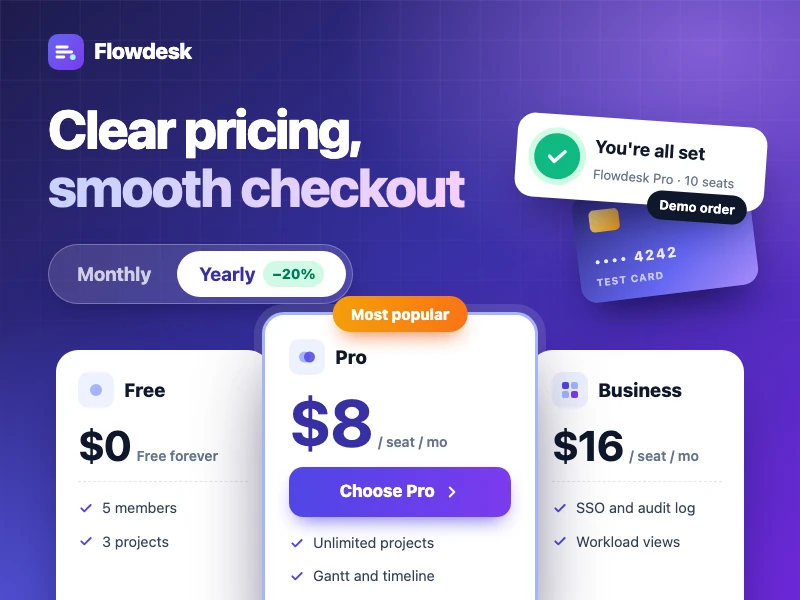
SaaS pricing & checkout
A SaaS pricing page with plan comparison, monthly / yearly billing and per-seat pricing, plus a complete demo checkout — great on phones too.
프롬프트
Build a pricing and checkout site for Flowdesk, a team task and project tool that brings tasks, projects and conversations into one workspace. The goal is to help visitors quickly see how the plans differ and buy without friction: a hero with a clear value proposition; Free, Pro, Business and Enterprise plan cards with the recommended plan highlighted, a monthly / yearly toggle and per-seat pricing by team size; a full feature comparison table and an FAQ; a footer with live chat, email and help center links; and a checkout flow of choose plan, account and team details, payment details (demo only, no real data collected), order summary with a promo code field, and finally a success page. Style: clean and conversion-focused with an indigo accent, mobile-friendly.
- 출처
- Ofox
사용 방법
- 1
‘똑같이 만들기’ 누르기
Ofox Chat가 열리고 이 요청이 미리 작성되어 있습니다. 로그인하지 않았다면 먼저 로그인하세요.
- 2
나만의 버전으로
프롬프트에서 강조된 부분을 내 내용으로 바꿔 보세요.
- 3
보내고 생성하기
보내면 Ofox Chat가 코드를 작성해 실행하고, 결과를 미리 보거나 내려받을 수 있습니다. 대화를 이어 가며 수정할 수도 있습니다.
자주 묻는 질문
무엇이 만들어지나요?
바로 열어 볼 수 있는 웹 페이지입니다. Ofox Chat가 코드를 작성해 샌드박스에서 실행으로 확인하며, 결과는 대화창에서 미리 보고 코드 파일은 내려받을 수 있습니다.
코딩을 할 줄 알아야 하나요?
아니요. 원하는 것을 평소 말로 설명하고, 처리할 파일이 있으면 함께 업로드하면 됩니다. 코드는 Ofox Chat가 작성하고 실행합니다.
프롬프트를 수정할 수 있나요?
네. 프롬프트가 Ofox Chat 입력창에 채워지며, 보내기 전에 내 주제로 바꾸거나 요구 사항을 더하거나 필요 없는 부분을 지울 수 있습니다.
프롬프트를 그대로 복사해 써도 되나요?
네. 프롬프트 카드 오른쪽 위의 '복사'를 누르면 일반 텍스트로 가져갈 수 있고, 다른 AI 코딩 도구에서도 쓸 수 있습니다.
비슷한 결과물
웹 페이지 프롬프트 더 보기



나만의 아이디어가 있다면, 바로 만들어 보세요
원하는 이미지를 한 문장으로 설명하면 Ofox Chat가 처음부터 만들어 드립니다.