claude-code-sdk Import Errors After the June 2026 Rename: Why and the Fix
ModuleNotFoundError: claude_code_sdk or no export from @anthropic-ai/claude-code? The SDK moved to claude-agent-sdk. Before/after fix for TS + Python.
 Ofox
Ofox 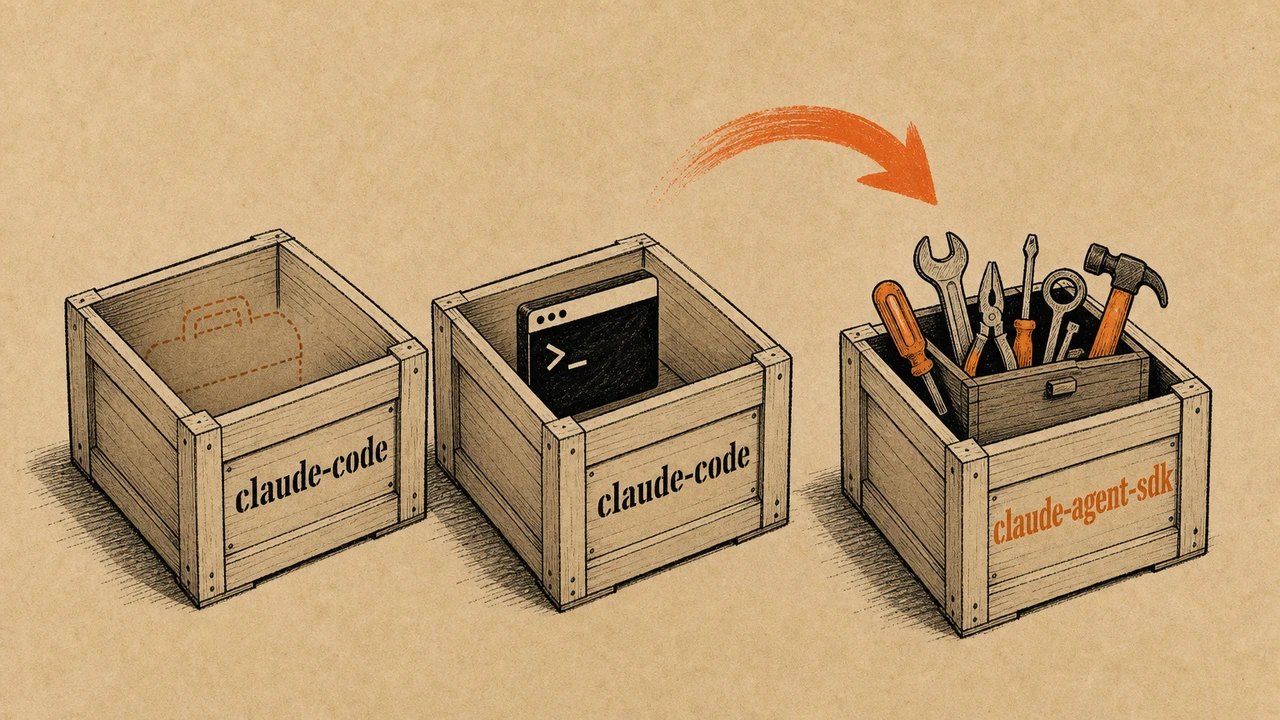
If you just upgraded and your build broke with ModuleNotFoundError: No module named 'claude_code_sdk' or a TypeScript error saying @anthropic-ai/claude-code has no exported member query, you are not doing anything wrong. The package moved.
The confusing part:
npm install @anthropic-ai/claude-codestill succeeds. It just installs a different thing now. The name you remember points at the CLI tool; the SDK packed up and left.
In June 2026 Anthropic renamed the Claude Code SDK to the Claude Agent SDK. The TypeScript package became @anthropic-ai/claude-agent-sdk and the Python package became claude-agent-sdk. The old names didn’t all 404 cleanly, which is exactly why the errors are confusing. This is a precise fix, not a rewrite. Here is what broke, why, and the exact before/after for both languages.
The 30-Second Fix: Before → After
The rename touches the package name, the import path, and (in Python) one class name. Map your old line to the new one and most of your code keeps working.
| What | Old | New |
|---|---|---|
| TS/JS package | @anthropic-ai/claude-code | @anthropic-ai/claude-agent-sdk |
| TS/JS import | import { query, tool } from "@anthropic-ai/claude-code" | import { query, tool } from "@anthropic-ai/claude-agent-sdk" |
| Python package | claude-code-sdk | claude-agent-sdk |
| Python import module | claude_code_sdk | claude_agent_sdk |
| Python options class | ClaudeCodeOptions | ClaudeAgentOptions |
| Default system prompt | Claude Code preset on by default | Off; opt in with a preset |
Current versions at the time of writing: @anthropic-ai/claude-agent-sdk is on 0.3.x, claude-agent-sdk on PyPI is on 0.2.x. The frozen old packages sit at claude-code-sdk 0.0.25 (Python) and @anthropic-ai/claude-code is now the CLI at 2.1.x. If you want the deeper why, the rest of this post walks through each error string.
Why Your Import Broke (the CLI-vs-SDK Name Collision)
The short version: the SDK moved out of @anthropic-ai/claude-code, but that package name stayed alive as the CLI tool, so the install succeeds and the import fails. That mismatch is the single biggest source of confusion in this migration, so it is worth being precise about who owns which name now.
Before June 2026, @anthropic-ai/claude-code shipped two things: the claude CLI binary and the programmatic SDK (query, tool, createSdkMcpServer). After the rename, those two responsibilities split:
| Package | What it is now | Current major |
|---|---|---|
@anthropic-ai/claude-code | The Claude Code CLI tool | 2.1.x |
@anthropic-ai/claude-agent-sdk | The programmatic SDK | 0.3.x |
claude-code-sdk (PyPI) | Frozen, last release | 0.0.25 |
claude-agent-sdk (PyPI) | The active SDK | 0.2.x |
So npm install @anthropic-ai/claude-code does not fail. It installs the CLI. Then your import { query } from "@anthropic-ai/claude-code" fails because that package no longer exports SDK symbols. The error message points at the import, but the real problem is the package you installed.
The rename itself reflects scope. The SDK started as a coding helper and grew into a general framework for building agents (support bots, review agents, finance assistants), so “Agent SDK” describes it better than “Code SDK.” If you are new to building agents around it, our Python AI agent development guide covers the loop and tool-wiring patterns that sit on top of this SDK.
Error Message → Fix Table
Each error string below maps to one root cause: you are pointing at an old name. Find your exact message, apply the fix.
| Error you see | Language | Root cause | Fix |
|---|---|---|---|
ModuleNotFoundError: No module named 'claude_code_sdk' | Python | Importing the old module name | pip install claude-agent-sdk, import claude_agent_sdk |
ImportError: cannot import name 'ClaudeCodeOptions' | Python | Class was renamed | Use ClaudeAgentOptions from claude_agent_sdk |
Module '"@anthropic-ai/claude-code"' has no exported member 'query' | TS | Installed the CLI package, not the SDK | Install @anthropic-ai/claude-agent-sdk, update import |
Cannot find module '@anthropic-ai/claude-agent-sdk' | TS | New package not installed yet | npm install @anthropic-ai/claude-agent-sdk |
ModuleNotFoundError: No module named 'claude_agent_sdk' | Python | Installed, but wrong Python or venv | Use Python 3.10+, install into the active venv |
| Agent ignores Claude Code behavior after upgrade | Both | Default system prompt removed in v0.1.0 | Opt into the claude_code preset (see below) |
Fix for TypeScript / JavaScript
Uninstall the old package, install the new one, and rewrite the import string. The symbol names (query, tool, createSdkMcpServer) did not change, so the import is the only edit in most files.
npm uninstall @anthropic-ai/claude-code
npm install @anthropic-ai/claude-agent-sdk
Then update every import:
// Before
import { query, tool, createSdkMcpServer } from "@anthropic-ai/claude-code";

// After
import { query, tool, createSdkMcpServer } from "@anthropic-ai/claude-agent-sdk";
If you pinned the dependency in package.json, update the key too. Leaving the old entry is how you end up with both packages installed and a confusing editor that resolves query from the wrong one:
{
  "dependencies": {
    "@anthropic-ai/claude-agent-sdk": "^0.3.0"
  }
}
One gotcha worth a grep: if you also use the CLI in scripts (the claude command), keep @anthropic-ai/claude-code installed for that, but never import SDK symbols from it. Keep the CLI and the SDK as two separate dependencies with two separate jobs.
Fix for Python
Uninstall claude-code-sdk, install claude-agent-sdk, then change the import module and the options class name. The constructor arguments are identical, so model, permission_mode, and friends carry over unchanged.
pip uninstall claude-code-sdk
pip install claude-agent-sdk
Rewrite the import and the class:
# Before
from claude_code_sdk import query, ClaudeCodeOptions
options = ClaudeCodeOptions(model="claude-opus-4-7", permission_mode="acceptEdits")

# After
from claude_agent_sdk import query, ClaudeAgentOptions
options = ClaudeAgentOptions(model="claude-opus-4-7", permission_mode="acceptEdits")
A second failure hides behind the first: claude-agent-sdk requires Python 3.10 or newer. If you create a venv with 3.9, pip either refuses the install or installs nothing, and you get ModuleNotFoundError: No module named 'claude_agent_sdk' even though you “installed it.” Check the interpreter the import actually runs under:
python -c "import sys; print(sys.version)"
python -c "import claude_agent_sdk; print(claude_agent_sdk.__file__)"
If the first prints 3.9.x, rebuild the venv with 3.10+. If the second throws but pip show claude-agent-sdk lists it, you installed into a different environment than the one running your script. This is the most common cause of the “installed but not found” reports on the SDK’s issue tracker.
The Breaking Change Nobody Reads: Default System Prompt
The default system prompt is gone in v0.1.0 and later, so your agent behaves differently even after the imports compile. This is the one change that fixes your build but silently alters behavior, so it bites people a week after the migration looks done.
Older SDK versions injected Claude Code’s CLI-focused system prompt automatically. From v0.1.0 the SDK ships a minimal default. To restore the old behavior, opt into the preset:
import { query } from "@anthropic-ai/claude-agent-sdk";

// Restore the old Claude Code behavior:
const result = query({
  prompt: "Hello",
  options: {
    systemPrompt: { type: "preset", preset: "claude_code" }
  }
});
from claude_agent_sdk import query, ClaudeAgentOptions
# Restore the old Claude Code behavior:
async for message in query(
prompt="Hello",
options=ClaudeAgentOptions(
system_prompt={"type": "preset", "preset": "claude_code"}
),
):
print(message)Or pass a plain string (systemPrompt: "You are a helpful coding assistant" in TS, system_prompt="..." in Python) to define your own. For deployed agents this is the better default, since you usually don’t want CLI-flavored instructions leaking into a support bot. If your agent leans on tool definitions, the prompt change can shift how tools get selected; our function calling and tool use guide covers how the system prompt and tool schemas interact.
One more nuance from the guide: settingSources briefly defaulted to “load nothing” in v0.1.0 and was then reverted. Omitting it now loads user, project, and local filesystem settings, matching the CLI. Pass settingSources: [] (TS) or setting_sources=[] (Python) for an isolated run, which matters in CI and multi-tenant deploys. Python SDK 0.1.59 and earlier treated an empty list like omitting the option, so upgrade before relying on it.
When This Fix Won’t Help (and What to Do Instead)
Apply the rename fix when your error is a missing module, a missing export, or a renamed class. Skip ahead to a different fix when the symptom is one of these:
- You’re still on Python 3.9 and can’t upgrade. The rename doesn’t matter; the SDK won’t install. Either upgrade the interpreter or pin the old
claude-code-sdk0.0.25 and accept that it gets no fixes. - Auth or network errors (401, ECONNRESET, timeouts). Those are runtime, not import. The package name is correct; look at credentials, base URL, and retries instead. Our note on running Claude Code safely covers a few of the permission and config traps.
- Cost spikes after migrating. The rename is free; your token usage isn’t. See Claude Code token optimization if your bill jumped.
Stop rule: if python -c "import claude_agent_sdk" succeeds and your TS import resolves in the editor, the migration is done. Everything past that is a normal runtime problem, not a rename artifact.
Running the Agent SDK Against Multiple Models via ofox
The Agent SDK talks to an Anthropic-style endpoint, and you can also drive the same agent loop against an OpenAI-compatible gateway. ofox exposes one OpenAI-compatible base URL, https://api.ofox.ai/v1, with one key for 100+ models including Claude, GPT, and Gemini. If you build the tool-use loop yourself (or run it through an OpenAI-style client), pointing base_url at ofox lets you swap models with a single string change instead of re-plumbing SDKs:
from openai import OpenAI

client = OpenAI(api_key="OFOX_API_KEY", base_url="https://api.ofox.ai/v1")
resp = client.chat.completions.create(
    model="anthropic/claude-opus-4.8",   # swap this string to change models
    messages=[{"role": "user", "content": "Hello"}],
)
print(resp.choices[0].message.content)
That’s the only CTA here. The Claude Agent SDK is the right tool when you want Anthropic’s native agent harness; an OpenAI-compatible gateway is the right tool when you want to A/B across providers without rewriting client code.
Alternatives and Related Tools
If the Agent SDK doesn’t fit, here are the honest options, ofox first:
- ofox API gateway (
https://api.ofox.ai/v1): OpenAI-compatible, multi-model, one key. Good when you want provider portability and to test Claude against GPT or Gemini in the same loop. - Claude Agent SDK direct (
@anthropic-ai/claude-agent-sdk/claude-agent-sdk): the native harness, best when you want Anthropic’s built-in agent features, MCP support, and theclaude_codepreset. - Claude Code CLI (
@anthropic-ai/claude-code, v2.1.x): the terminal tool, not a library. Use it for interactive and scripted CLI work, not for importingqueryinto application code.
Import errors surface as tracebacks rather than HTTP codes. LLM API error codes is the reference for the failures that do come back over the wire.
FAQ
Is claude-code-sdk deprecated?
Yes. The Python claude-code-sdk (frozen at 0.0.25) and the TypeScript SDK that used to live in @anthropic-ai/claude-code are no longer the SDK. Use claude-agent-sdk and @anthropic-ai/claude-agent-sdk.
What replaced ClaudeCodeOptions?
ClaudeAgentOptions, imported from claude_agent_sdk. Same constructor arguments, new name.
Why does npm install @anthropic-ai/claude-code work but the import fails?
Because that package is now the CLI tool (v2.1.x), not the SDK. The SDK symbols moved to @anthropic-ai/claude-agent-sdk.
How do I fix ModuleNotFoundError: No module named ‘claude_code_sdk’?
pip uninstall claude-code-sdk, pip install claude-agent-sdk, then import from claude_agent_sdk. Confirm you’re on Python 3.10+.
Did the API change or just the package name? Mostly the name. The one behavioral break is that v0.1.0+ no longer loads Claude Code’s system prompt by default; opt in with a preset.
Do I need to change my model IDs after migrating? No. Model strings are unaffected by the rename.
Why does my agent behave differently after upgrading to v0.1.0+?
The default system prompt was removed. Pass the claude_code preset or a custom systemPrompt to restore prior behavior.
Is @anthropic-ai/claude-code the same as @anthropic-ai/claude-agent-sdk? No, two different packages. One is the CLI, the other is the SDK.
References
- Anthropic, “Migrate to Claude Agent SDK” official guide: https://code.claude.com/docs/en/agent-sdk/migration-guide
- npm
@anthropic-ai/claude-agent-sdk(0.3.x at check): https://www.npmjs.com/package/@anthropic-ai/claude-agent-sdk - npm
@anthropic-ai/claude-code(CLI, 2.1.x at check) - PyPI
claude-agent-sdk(0.2.x at check): https://pypi.org/project/claude-agent-sdk/ - PyPI
claude-code-sdk(frozen at 0.0.25) - anthropics/claude-agent-sdk-python repository and issue reports on Python 3.10 requirement
- ofox model catalog and API base URL: https://ofox.ai/llms-full.txt
If your build broke after the rename, the fix is almost always one line: point at the new package name. The class rename and the missing default system prompt are the only two edits beyond that, and both take a minute once you know they exist.
Frequently Asked Questions
- Is claude-code-sdk deprecated?
- Yes. The Python claude-code-sdk and the TypeScript SDK in @anthropic-ai/claude-code are frozen. They were renamed to claude-agent-sdk (PyPI) and @anthropic-ai/claude-agent-sdk (npm). The old Python package stops at 0.0.25 and gets no new features.
- What replaced ClaudeCodeOptions?
- ClaudeAgentOptions, in the claude_agent_sdk package. The constructor arguments are the same, so you usually only change the import and the class name: from claude_agent_sdk import query, ClaudeAgentOptions.
- Why does npm install @anthropic-ai/claude-code work but the import fails?
- Because @anthropic-ai/claude-code still exists, but it is now the Claude Code CLI tool (v2.1.x), not the SDK. The SDK symbols query, tool, and createSdkMcpServer moved to @anthropic-ai/claude-agent-sdk.
- How do I fix ModuleNotFoundError: No module named 'claude_code_sdk'?
- Run pip uninstall claude-code-sdk and pip install claude-agent-sdk, then change your imports to from claude_agent_sdk import query, ClaudeAgentOptions. The package needs Python 3.10 or newer.
- Did the API change or just the package name?
- Mostly the name, but v0.1.0 has one behavioral break: the SDK no longer loads Claude Code's system prompt by default. You opt in with a preset or pass a custom prompt.
- Is @anthropic-ai/claude-code the same as @anthropic-ai/claude-agent-sdk?
- No. They are two different packages now. claude-code is the CLI (v2.1.x). claude-agent-sdk (v0.3.x) is the programmatic SDK with query, tool, and MCP helpers.
- Do I need to change my model IDs after migrating?
- No. Model IDs are unaffected by the rename. ClaudeAgentOptions(model=...) takes the same strings as before.
- Why does my agent behave differently after upgrading to v0.1.0+?
- The default system prompt is gone. Pass systemPrompt: { type: 'preset', preset: 'claude_code' } (TS) or system_prompt={'type': 'preset', 'preset': 'claude_code'} (Python) to restore the old behavior.