Gemini 4 Carbon API Pricing: Calculate the Cost of a Complete Task
Calculate Gemini 4 Carbon task costs with a tested Python ledger: current and December rates, cached input, thinking, retries, agent turns and separate tool charges.
 Ofox

To estimate a Gemini 4 Carbon task, add the known cost of every distinct attempt and continuation step: uncached input, cache-hit input, generated tokens including thinking, and separately billed tools. Choose the correct rate period before calculating. The visible final answer is only part of that accounting. A retry or an earlier agent turn can consume resources even when it does not produce the accepted deliverable.
This guide provides a complete downloadable Python calculator, a normalized input format and reproducible examples. It uses Google’s Standard USD rates for gemini-4-carbon, verified on November 15, 2026. It does not price Batch, Flex, Priority, negotiated contracts or Ofox routes. If you first need a working request, start with our Carbon API setup guide.
Ofox publishes this article. The calculator and CLI passed 24 offline tests. All token quantities and task outcomes in the worked examples are synthetic assumptions, not a measured model run or provider invoice. The kit does not call an API, load a key or automatically interpret raw provider usage. Its purpose is to make a confirmed usage ledger reproducible and catch common counting mistakes.
Select the exact model, tier and effective date
Google’s Carbon pricing table states the following Standard prices. Each rate is USD per one million tokens, not per request or per accepted task.
| Billable category | Through November 30, 2026 | Starting December 1, 2026 | Apply it to |
|---|---|---|---|
| Ordinary input | $2.00 | $4.00 | Input tokens that were not cache hits |
| Cached input | $0.10 | $0.20 | The actual cache-hit portion of input |
| Output, including thinking | $10.00 | $20.00 | The confirmed combined billable generated quantity |
As of the verification date, the December column is a future scenario, not the current price. For identical token quantities, these three token rates double. Separate tool fees do not automatically double with them. Google lists no Free tier for Carbon; a tool allowance does not make Carbon’s token processing free.
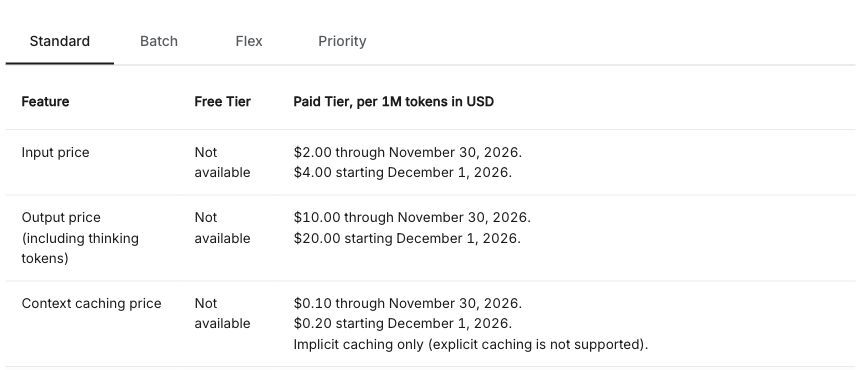
Real screenshot of the English official Carbon pricing table, cropped to the Standard token-rate rows without account information. It is a price source, not an invoice or an Ofox quote.
Keep model ID, service tier, currency, units and effective period together in your records. A price copied from a neighboring Gemini model or another inference tier is not enough to price a Carbon request. Our Google model-selection guide discusses task fit; this article does not establish that Carbon is the cheapest way to produce an equivalent result.
Google also bills some tools separately. Its Search grounding note says a single customer request can trigger multiple search queries, each relevant to tool billing. Shared allowances and limits must be checked in the current tool-price section. Do not multiply one flat tool charge by your application-request count unless that is the actual billing unit. The calculator takes a known separate USD tool charge, not a guessed number of tool invocations.
Normalize usage before applying a formula
The ledger uses our own field names. They are not Google or Ofox response-field names. Before inserting real values, read the contract for the exact endpoint, SDK version and execution mode, and preserve the raw usage record privately so you can explain the conversion.
| Ledger field | Required meaning | Mistake to avoid |
|---|---|---|
id | Unique identifier for one independently counted attempt or hop | Logging the same request twice under different snapshots |
input_total | All billable input in that row, including its cached subset | Treating an already uncached-only field as total input |
cached_input | Known cache-hit input within input_total | Assuming every eligible token hit the cache |
generated_including_thinking | Combined billable generated quantity, with thinking counted once | Adding thinking to a field that already includes it |
tools_usd | Known separate tool charge as a decimal string, including "0" only when known | Treating unknown fees or tool token counts as zero-dollar charges |
Google’s token-counting documentation exposes separate usage names such as total_input_tokens, total_output_tokens, total_thought_tokens, total_cached_tokens and total_tool_use_tokens. Their names alone are not a universal invoice-mapping rule. The documentation and SDK comments reviewed for this article do not establish one inclusion rule for output and thinking across every Carbon route and mode.
Use a conditional conversion: if the applicable contract confirms that its output total already includes thinking, use that combined quantity once. If it confirms that visible output and thinking are disjoint billable quantities, add them once to form the normalized field. If you cannot confirm the relationship, stop and mark the quantity unknown; do not choose either formula merely because the numbers look plausible. A tool-use token count is also not automatically a separate monetary fee.
Likewise, determine whether a usage object covers one request, one continuation hop or the accumulated interaction. Do not add cumulative streaming snapshots together. If a final total already includes earlier hops, either use that total once or use verified non-overlapping per-hop values. Mixing both overstates the task.
After normalization, the formula for a row is straightforward:
ordinary_input = input_total - cached_input
row_cost_usd = (
    ordinary_input * ordinary_input_rate
    + cached_input * cached_input_rate
    + generated_including_thinking * generated_rate
) / 1_000_000 + tools_usd

task_cost_usd = sum(cost of each non-overlapping row)
This subtraction is why cached input must be a subset of total input. Charging the full input at the ordinary rate and then adding the cached portion charges those tokens twice. Do not add a cache-storage fee to this Carbon formula: the cited Carbon rate is for implicit cache-hit input, and explicit caching is unsupported.
Run the complete calculator locally
Download the Carbon task-cost kit, extract it and enter carbon-task-cost-kit. The package contains cost.py, the calculate.py CLI, two test modules, two example ledgers and an English README. It uses the Python standard library; no model SDK, key or network call is needed.
Use Python 3.11 or newer. Run the tests before replacing the examples:
python -m unittest test_cost.py test_cli.py -vThe expected result is 24 tests passed: 16 calculator checks and eight CLI checks. They cover decimal arithmetic, cache subset validation, missing usage, duplicate IDs, invalid periods, duplicate JSON fields, malformed ledgers and exact CLI output. This is evidence about the local calculator, not validation of a provider’s billing implementation.
The supplied single-attempt.json contains one invented attempt:
[
  {
    "id": "illustrative-success",
    "input_total": 50000,
    "cached_input": 40000,
    "generated_including_thinking": 6000,
    "tools_usd": "0"
  }
]
Run the included scenarios:
python calculate.py single-attempt.json --period through-2026-11-30
python calculate.py single-attempt.json --period from-2026-12-01
python calculate.py retry-task.json --period through-2026-11-30
Their total USD results are "0.084", "0.168" and "0.234", respectively. The JSON output also breaks each row into ordinary input, cached input, generated tokens and tool charges. Money is emitted as decimal strings to preserve exact arithmetic, not rounded to cents at every intermediate line. Format a display value only after retaining the precise result.
To use your own ledger, copy an example to a new JSON file, insert values whose meaning you have confirmed, then run python calculate.py your-ledger.json --period through-2026-11-30 or the other explicit period. Review the component totals against a hand calculation before scaling to many rows. An empty ledger is rejected: it is not evidence that a completed task cost zero.
The program exits with an error for missing quantities, negative or non-integer token counts, cached input greater than total input, duplicate IDs, duplicate JSON fields and unexpected fields. Tool charges must be known nonnegative decimal values; use a string such as "0.01" in JSON. Unknown extra fields, including a separate thinking addend or per-row pricing override, are rejected to make normalization explicit. Keep human notes and source-record references in a separate file rather than dropping them silently into the accounting schema.
Recalculate the worked task scenarios
The following arithmetic uses invented normalized usage. It does not predict how many tokens Carbon will need for your prompt, whether it will hit a cache, or whether a result will pass your quality criteria.
One accepted attempt at the current rates
Assume total input is 50,000 tokens, including 40,000 cache hits; combined generated usage is 6,000 tokens; separate tools are known to cost zero. Ordinary input is therefore 10,000 tokens.
- Ordinary input:
10,000 × $2 / 1,000,000 = $0.020. - Cached input:
40,000 × $0.10 / 1,000,000 = $0.004. - Generated tokens including thinking:
6,000 × $10 / 1,000,000 = $0.060. - Total: $0.084.
The final text may contain fewer than 6,000 visible tokens; the example’s generated quantity is already combined and must not receive another thinking addend.
The same usage under the announced December rates
Holding those quantities fixed gives $0.040 + $0.008 + $0.120 = $0.168. That is exactly twice the token-only scenario, because all three cited Standard token rates double. It is a comparison of rate periods with identical usage, not a prediction that real December tasks will consume identical tokens.
If a separate known tool charge were $0.01 in both periods, the totals would instead be $0.094 and $0.178. Doubling the first total to $0.188 would incorrectly double that unchanged tool charge. The $0.01 is a hypothetical charge for this illustration, not a quoted Google tool price.
A failed first attempt followed by the accepted one
The included retry-task.json adds a first attempt with known usage of 50,000 uncached input tokens and 5,000 combined generated tokens, followed by the accepted example above. Both assume zero separate tool fees.
[
  {
    "id": "illustrative-failed-attempt",
    "input_total": 50000,
    "cached_input": 0,
    "generated_including_thinking": 5000,
    "tools_usd": "0"
  },
  {
    "id": "illustrative-success",
    "input_total": 50000,
    "cached_input": 40000,
    "generated_including_thinking": 6000,
    "tools_usd": "0"
  }
]
The first row costs $0.100 + $0.050 = $0.150. Adding the successful row produces $0.234 for the task, although the accepted attempt alone cost $0.084. “Failed” here means an assumed attempt with independently known billable usage; it does not claim that every rejected HTTP request incurs this charge.
A few controlled changes illustrate what the calculator is sensitive to:
| Synthetic scenario | Total USD | What changed |
|---|---|---|
| Current rates, 40,000 cache hits, 6,000 generated tokens | $0.084 | Baseline above |
| Current rates, no cache hits, same total input/output | $0.160 | All 50,000 input tokens use the ordinary rate |
| Current rates, 40,000 cache hits, 16,000 generated tokens | $0.184 | 10,000 additional combined generated tokens |
| December rates, baseline token quantities | $0.168 | Token-rate period only |
| Current rates, baseline plus known $0.01 tool charge | $0.094 | Separate tool charge only |
| December rates, baseline plus the same $0.01 charge | $0.178 | Changed token rates, unchanged tool fee |
These are calculations, not a model benchmark or a promise that a particular prompt change will save the displayed amount.
Understand cache eligibility and short agent turns
Google’s caching guide lists a 4,096-input-token minimum for Carbon implicit caching. Eligibility is not a cache-hit guarantee. The cited cached rate is 95% below the ordinary input rate for tokens that actually hit the cache; it is not a 95% discount on all tokens or the whole task.
Explicit cache creation and cached_content references are unsupported for Carbon. Do not add an explicit-cache ID merely to force the discounted column. Stable shared prefixes and similar requests close in time can improve the chance of implicit reuse, but actual reported cache-hit usage should drive your ledger. The documentation identifies usage.total_cached_tokens as cache-hit reporting; still check how it relates to the endpoint’s input total before normalization.
The same guide describes a separate Gemini 4 rule for multi-turn and agent loops: the full previous request is cached only when the new request adds at least 2,050 tokens, counting model output, thinking and function results. With a smaller addition, the last 2,050 tokens of the preceding request are reprocessed at the ordinary input rate.
That 2,050-token rule is not the same as the 4,096-token eligibility threshold. It does not say the entire conversation loses its cache, nor does it define a fixed surcharge to add to every turn. Once your normalized input and cache quantities already reflect the actual processing, adding another 2,050 tokens would double count. Use the rule to explain unexpected usage, not to invent extra usage on top of measured fields.
For example, two agent designs may keep the same long initial instructions yet produce different input bills because they append different amounts of new material per turn. Compare their actual cache and input records. Do not intentionally pad prompts just to cross a threshold without evaluating the added processing and whether the accepted task improves.
Budget for thinking, history and continuation
The Carbon documentation states that max_output_tokens limits combined thinking and output. It is not a dollar budget for a whole agent task. Input, tool fees, retries and later calls can still add cost outside a single response’s generated-token cap.
Carbon supports low, medium and high thinking, with medium as the documented default. Lowering thinking can change both consumption and the likelihood of a useful result. A lower-cost attempt is not necessarily a lower-cost accepted task if it needs more retries. Test the same task and acceptance standard before deciding which setting to use; this article supplies no quality experiment comparing those levels.
Long decode can span continuation hops. Server-side background continuation may expose an accumulated interaction, while a client-side loop may produce separate records. Carbon’s shared context includes input, reasoning and output, so a nominal large window is not an independent allowance for all three. Our Carbon setup guide covers request configuration and continuation choices; the cost ledger must follow the actual usage boundaries you receive.
For a multi-turn agent, track which history and tool results are included in each request. Even when the user adds one short sentence, the billed input may contain retained context. Conversely, a cached part should not be charged again as ordinary input if the normalized quantities distinguish it correctly. Never sum the final accumulated interaction and its constituent hops together.
A practical spending control has several parts: a per-response generated limit, a maximum number of agent steps, a policy for uncertain outcomes, and a task-level budget checked between steps. The calculator can evaluate known usage or an explicitly assumed forecast. It cannot guarantee that a request already in flight will stop at a dollar limit or infer an unreported charge.
Treat retries and missing usage as accounting questions
A client timeout does not establish whether the server ran the request. An HTTP error does not establish that every such attempt was charged, and a missing usage block does not prove zero consumption. Keep the request identity and classify the row as unknown until the provider record resolves it. Do not insert invented zeros merely to make the calculator accept a ledger.
Before retrying, separate authentication, access, quota, invalid parameters and transient failures. Our Gemini 4 API error guide provides a useful diagnostic breakdown, although its model-specific examples use Argon rather than Carbon. For applications on Ofox’s own API, use the relevant error handling and retry documentation; that does not establish that Ofox supports this Carbon route.
Record each genuinely distinct attempt once. A retry can be a new request, while a retrieval GET can simply fetch a result from existing work. Do not call both a second generation without checking the contract. Equally, two log entries for the same underlying attempt must not become two cost rows just because one is from your application and one from the provider.
Define success at the task level. For a coding task, a suitable acceptance record might identify the requested change, the relevant test result and whether the final artifact was accepted. For extraction, it might record schema validity and verified source matches. An HTTP 200 alone is not evidence of either outcome. Keep acceptance evidence beside the accounting ledger, with private source material protected.
When comparing alternatives, use the same task set and acceptance rules, include known unsuccessful attempts, and report unresolved usage separately. Cost per accepted task can then divide attributable spend by accepted tasks. If no tasks were accepted, report that fact rather than a fabricated finite cost per success. This article’s examples assume acceptance labels; they do not measure a success rate.
Reconcile the ledger with provider records
Start with a small task whose usage boundaries you can explain. Preserve the raw response privately, your normalization notes, exact model and tier, rate snapshot, billing period, distinct attempt IDs, calculator version and acceptance result. Run the ledger and compare the components with provider records. Investigate a discrepancy before multiplying the estimate by thousands of tasks.
If a task spans the price change, split rows into the applicable periods, calculate each group separately and add the exact totals. The CLI intentionally applies one explicit rate period to its entire input. It does not infer billing dates or time zones and rejects per-row overrides; use the provider’s actual effective-date treatment when assigning real rows. A future-price simulation remains a forecast even when the arithmetic is exact.
The calculated usage total is also distinct from invoice-level tax, currency conversion, negotiated adjustments and rounding. Preserve full decimal precision during the calculation and document any later display rounding. Do not rewrite a historical invoice using today’s price table.
For Ofox-supported models, the usage-tracking documentation explains request, token and cost breakdowns, and the billing documentation points to cost views and the model catalog. Our November 15 check traced the ofoxai/home-page catalog proxy at commit 0e0c8cc6e655b606466142aae0929a666fbaaf0e and captured all 133 entries in its current public response. No Carbon entry appeared in that snapshot. This is not proof of permanent unavailability, but it means this article has no verified Ofox Carbon rate to quote. Google’s rates above must not be presented as Ofox’s price.
Ofox’s request-content logs are a separate feature from usage and charge records. Content retention is off by default and, when enabled by an authorized team administrator, applies to subsequent requests within its configured scope. Do not assume old prompts can be recovered, or that saving full content is necessary just to count costs. Follow your team’s data-handling rules when collecting evidence.
The final deliverable is a ledger you can trace back to known usage, a specified rate period and an accepted task. If a quantity remains unknown, keep that limitation visible. A reproducible calculation with clear boundaries is more useful than a precise-looking total built from unverified assumptions.