Grok Imagine Video API Pricing by Resolution
Calculate Grok Imagine Video API pricing for 5, 10, and 15 second clips. Compare base and 1.5 rates, input charges, and budgets for repeat generation attempts.
 Ofox
Ofox 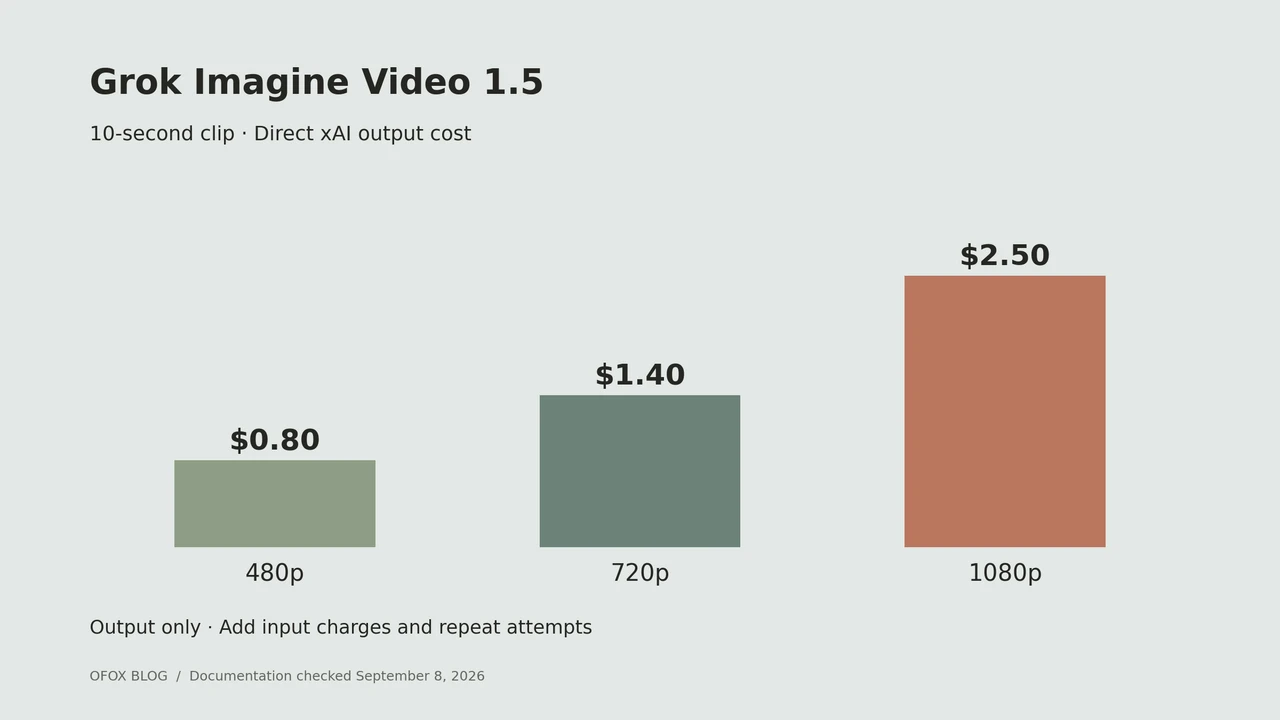
Grok Imagine Video API pricing depends on the model version, output duration, and resolution. For the direct Video 1.5 API, the listed output rates are $0.08 per second at 480p, $0.14 at 720p, and $0.25 at 1080p. A 10-second output therefore costs $0.80, $1.40, or $2.50 before applicable input charges. Source: Video 1.5 pricing.
This guide is for developers choosing a video-generation budget. Rates were checked on September 8, 2026; the totals are calculations from published prices, not measured invoices or quality benchmarks.
Start with the deliverable: choose the model, resolution, and clip length first. Then budget how many attempts you can afford. A per-second headline alone leaves out most of that decision.
Access note: this guide covers the direct xAI API. Grok Imagine is not currently listed in Ofox’s model catalog. An Ofox API key cannot be used for the direct-xAI examples here.
Contents: version comparison, clip costs, inputs, production budget, FAQ.
Base Video vs Video 1.5 pricing
| Direct xAI model | 480p / second | 720p / second | 1080p / second |
|---|---|---|---|
grok-imagine-video | $0.05 | $0.07 | Not listed on this model’s rate card |
grok-imagine-video-1.5 | $0.08 | $0.14 | $0.25 |
The base-model card lists an image input charge of $0.002 per image; Video 1.5 lists $0.01. Keep these model-specific charges with the corresponding output rate. Sources: base Video, Video 1.5.
For a budget comparison, a base-model 720p second and a Video 1.5 720p second are different products. The second costs twice as much on these listed rates. That arithmetic does not establish twice the quality, half the required retries, or an upgrade recommendation for every project.
A useful purchasing question is whether the requested feature or acceptable result requires the newer model. If it does, comparing against a cheaper configuration that cannot meet the brief will not help your production budget.
What does a 5, 10, or 15 second video cost?
The following table calculates Video 1.5 output charges only.
| Duration | 480p | 720p | 1080p |
|---|---|---|---|
| 5 seconds | $0.40 | $0.70 | $1.25 |
| 10 seconds | $0.80 | $1.40 | $2.50 |
| 15 seconds | $1.20 | $2.10 | $3.75 |
Calculation: requested seconds multiplied by the selected per-second rate. These estimates exclude image inputs, additional attempts, storage, and other project expenses. Download the video budget worksheet to reuse the assumptions.
The generation guide currently documents a 1–15 second range. The 1080p tier applies to Video 1.5 text-to-video and image-to-video; reference-to-video is capped at 720p. Capabilities also differ by mode: editing an existing video is not the same request as generating a new clip. Check the mode-specific limits before using a duration from this table. Source: video generation configuration.
When preparing a campaign, put the requested clip length into the brief. If an editor needs five seconds of usable movement, an arbitrary fifteen-second generation is not automatically the economical choice. The longer result may help the editor, but that extra headroom should be an intentional production expense.
Add input costs to the output budget
For a one-image, 10-second, 720p Video 1.5 request, the modeled cost is:
output: 10 × $0.14 = $1.40
image input: 1 × $0.01 = $0.01
estimated total: $1.41
A batch of 100 identical requests would therefore be modeled at $141, assuming no further charges or additional attempts. Record this as an estimate associated with those exact settings.
Do not reuse that formula unmodified for video editing or extension. A video input can introduce another billing component, and the supported duration or resolution can differ. Quote the actual endpoint and its input policy when asking a supplier for a production estimate.
Keep source-media preparation in a separate budget line as well. Creating the first frame through an image model is a distinct operation. An image-to-video workflow that begins with AI image generation has at least two generation stages to account for.
Budget for a batch of usable clips
Here is an illustrative production worksheet, not an estimate of Grok’s success rate:
| Planning assumption | Value |
|---|---|
| Final clips needed | 20 |
| Generation attempts allowed per final clip | 3 |
| Total planned requests | 60 |
| Chosen configuration | One-image input, 10 seconds, 720p, Video 1.5 |
| Modeled API cost per request | $1.41 |
| Planned API budget | $84.60 |
If a team spends the full allowance and accepts twenty clips, the modeled cost per accepted clip is $4.23. If it needs fewer attempts, the spend is lower. Measure the actual result before treating the allowance as a forecast.
Define acceptance criteria before generating. For a product clip, those might include consistent shape, correct label placement, no extra objects, and a usable camera move. A technically completed video can still fail editorial review. Choosing to generate a replacement adds another attempt to the production workflow.
For a wider budgeting framework, see our cost-per-usable-clip guide.
Compare providers using the same request specification
A provider comparison needs more than a model-family label. Give each supplier the same version, input mode, duration, resolution, reference count, and audio requirement. Ask how unsuccessful requests and input media are billed, then keep the date of the quote.
Avoid interpreting a low starting price as a price for every resolution. Likewise, an editing endpoint and a text-to-video endpoint may have different charging rules even when their names contain the same model family.
Use a small budgeted pilot to measure your own accepted-output cost when you are ready to buy. This article does not claim to have performed that paid test. Our video API provider comparison provides additional selection criteria beyond the token or second rate.
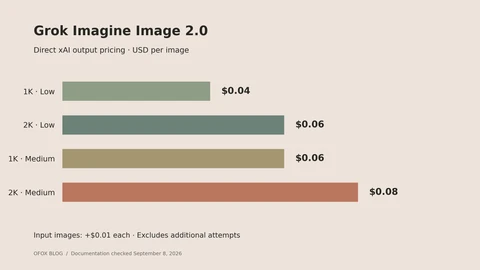
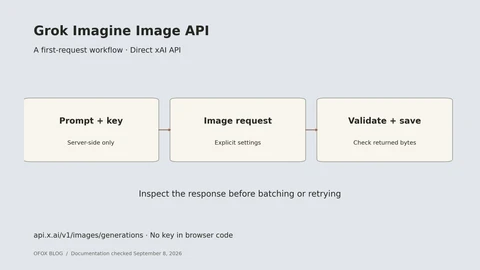
If your video workflow starts with an AI-generated first frame, budget that stage separately with our Grok image pricing guide and first-image API tutorial.
Frequently Asked Questions
- Is Grok Video 1.5 always $0.08 per second?
- No. That is the listed 480p output rate. Use the row for the requested resolution and add applicable input charges.
- How much is a 10-second 1080p clip?
- The Video 1.5 output-only calculation is $2.50. An image input or an additional generation attempt changes the overall task cost.
- Does the lowest price mean the cheapest finished video?
- Only if that configuration meets your requirements with an acceptable number of attempts. Track total spend and accepted clips together rather than comparing output rates in isolation.
- Can I use the same budget for every Grok video mode?
- No. Identify the generation, editing, or extension endpoint first. A mode-specific rate and input policy is a better basis for budgeting than the family name.