Create and Revise an Event Poster with Nano Banana 2.1
Create an event poster with Nano Banana 2.1, then change its headline and colors. Use complete prompts, real API outputs and a practical delivery checklist.
 Ofox
Ofox 
A useful poster workflow does more than produce an attractive first image. It gives you a way to change the headline, revise an illustration, and check that the date and other important details survived each edit. This tutorial walks through that process in the public Ofox Playground, then shows what happened when we sent the same three prompts through Ofox’s Nano Banana 2.1 API route.
Ofox publishes this article and provides the gateway used for the API test. We verified the public Playground interface, but did not complete an authenticated Playground generation. The three result images below are from API requests, not a claimed UI run. This article was AI-assisted, checked against real API and interface evidence, and independently AI-reviewed before publication.
Prepare a brief that can be checked
Before opening the model page, write down the poster’s required content separately from its visual preferences. For a real event, a small brief might contain:
| Field | Fill in before generating |
|---|---|
| Exact headline | [APPROVED EVENT NAME] |
| Exact date and time | [APPROVED DATE AND TIME] |
| Illustration | [SUBJECT AND REQUIRED COUNT] |
| Visual direction | [COLORS, MATERIAL, AND STYLE] |
| Delivery format | [SQUARE SOCIAL POST, PRINT HANDOFF, ETC.] |
These are placeholders, not details from a client event. Confirm the spelling, date, time zone, and any required venue or accessibility information with the event owner. If a line must be exact, put its approved wording directly in the prompt rather than asking the model to invent it.
The worked example deliberately has only two text lines. That makes it possible to inspect whether an edit changes the headline while leaving the time alone. It also requests three apples, an easy count to check visually. A production poster with a venue, URL, sponsors, and legal text needs a longer proofreading pass—and may be better finished in a layout editor.
Open the public Playground
- Open the Nano Banana 2.1 model page on Ofox. Confirm the model identifier shown is
google/gemini-nano-banana-2.1, not the oldergoogle/gemini-3.1-flash-image. - Find the embedded Playground and sign in if prompted. Its public interface shows prompt, image-attachment, and follow-up facilities; an authenticated generation may require an account and available usage.
- Start with a text prompt. For this poster, there is no reference image to attach. If you do attach a brand asset or existing poster, use material you have the right to upload and edit.
- Choose a square aspect ratio if that control is available. Treat the Playground’s aspect-ratio setting as best effort, as its interface warns—not as a promise of an exact pixel canvas or crop.
- Submit the first prompt, inspect the displayed image, and save a local copy using the available download control. If a download control is unavailable, check the image’s available save options. Keep the original before making follow-up changes.
- Send the next instruction as a follow-up in the same conversation, then save that result under a different filename. Repeat for the third turn. Do not replace the first prompt and start over if you want the model to work from the prior result and conversation.
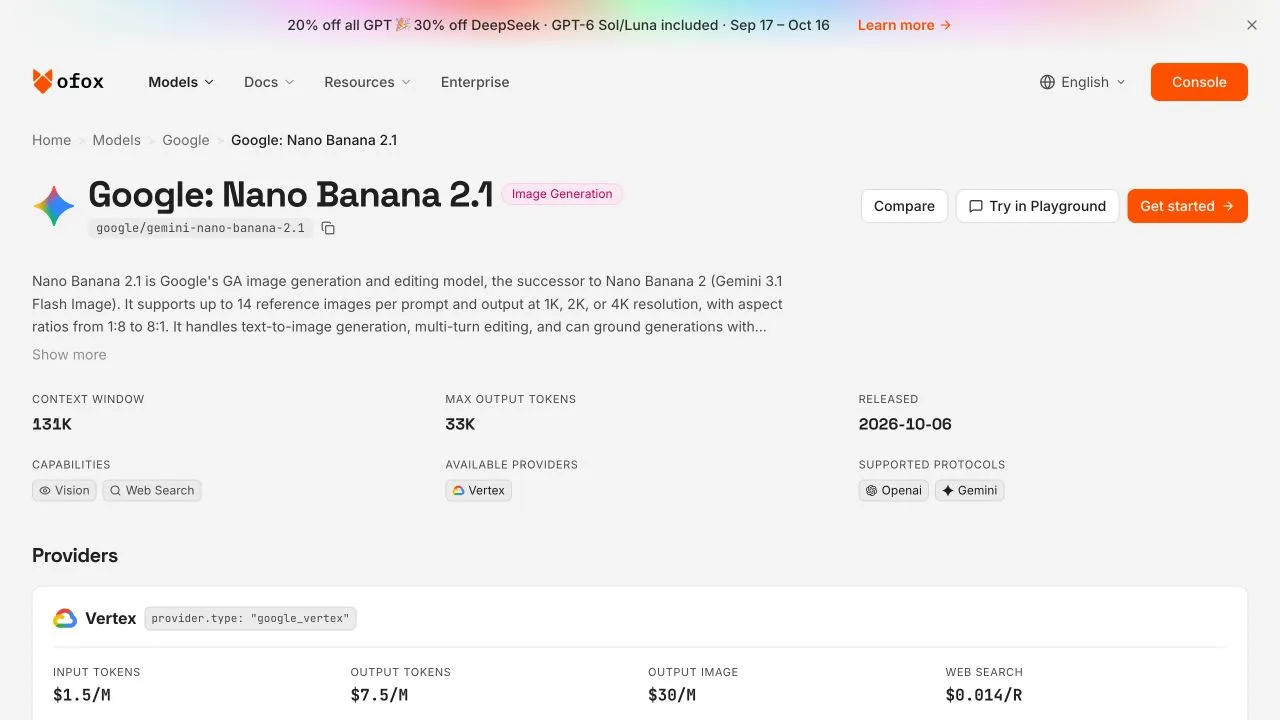
The public model page is evidence of the interface and its available workflow, not evidence that these example images were generated in an authenticated Playground session.
A Playground download is a raster image, not a layered poster document. Save each version rather than assuming you can later select and edit its text or bowl as separate objects. If you prefer a programmatic route or need explicit image configuration, see the Nano Banana 2.1 API guide.
Turn 1: Generate the base poster
Paste this prompt exactly for the worked example:
Create a square minimalist event poster on warm cream paper. Large exact headline: ORCHARD MARKET. Smaller exact line: SATURDAY 10 AM. Draw three red apples in a blue ceramic bowl below the text. No other text, no logos, no border.It specifies a hierarchy, exact words, a countable subject, colors, and an exclusion. After generating, read every letter of ORCHARD MARKET and SATURDAY 10 AM; do not judge text only from a small thumbnail. Count the apples, check that the bowl is blue, and look for stray text or logos. Also inspect the edges: “no border” is a request, not a guarantee.
Here is the first image from our Nano Banana 2.1 API chain:
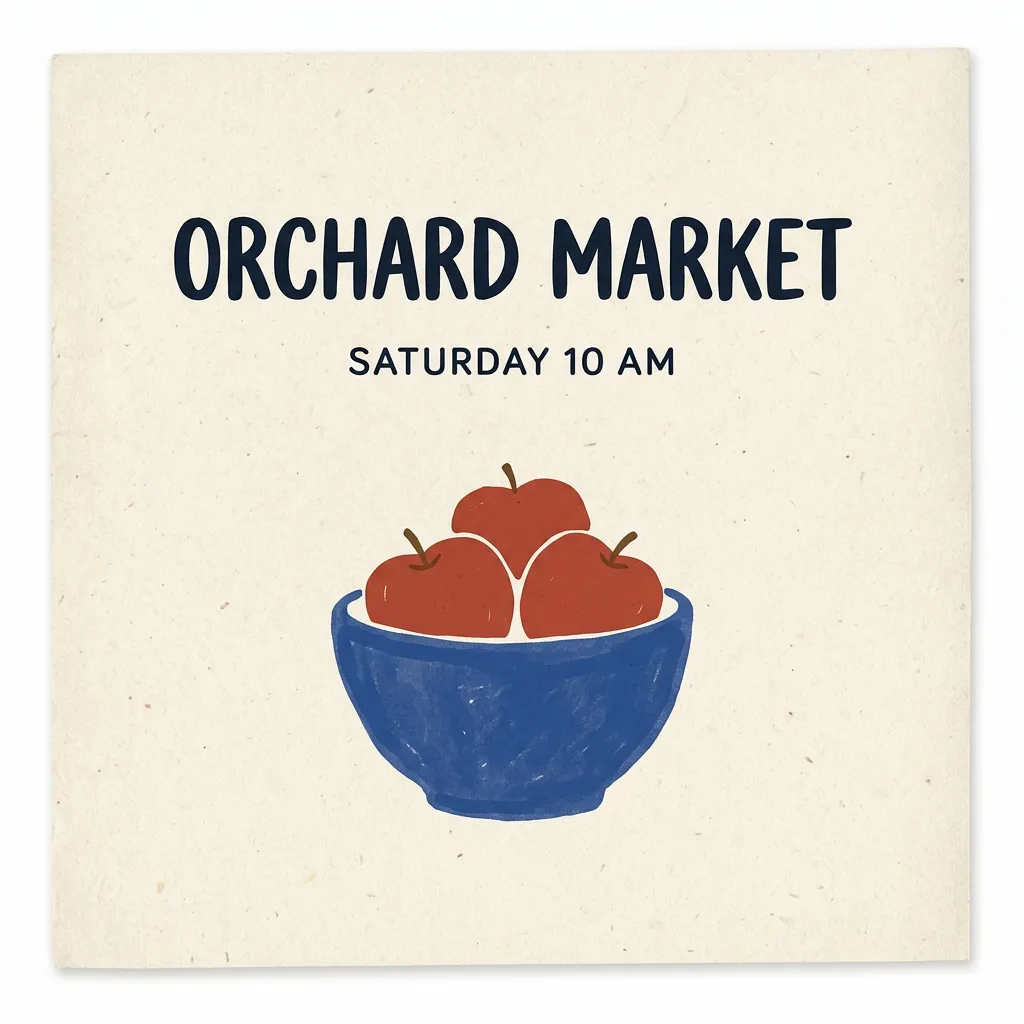
API test, first turn. Visual review found the requested words, three red apples, and a blue bowl. The composition also presents the poster as a paper sheet with an outside margin and shadow, despite the “no border” instruction.
That last point matters for delivery. A decorative sheet edge can look fine in a mockup but be wrong for a full-bleed social graphic or print file. If full bleed is mandatory, crop and inspect the result—or move the artwork into an editor with a defined canvas. Do not mistake a good-looking preview for proof that the edges meet a print specification.
Turn 2: Change the headline, not the brief
Keep the first result in the conversation and send this follow-up:
Change only the headline from ORCHARD MARKET to ORCHARD FAIR. Keep SATURDAY 10 AM exactly unchanged. Preserve the three red apples, blue bowl, cream background, composition and all other pixels as closely as possible.This is a useful editing pattern: name the one intended change, then identify what must remain. “As closely as possible” is deliberate. A generated image edit is not the same operation as replacing text in a layered design file; small textures, letter shapes, and surrounding pixels can be regenerated.
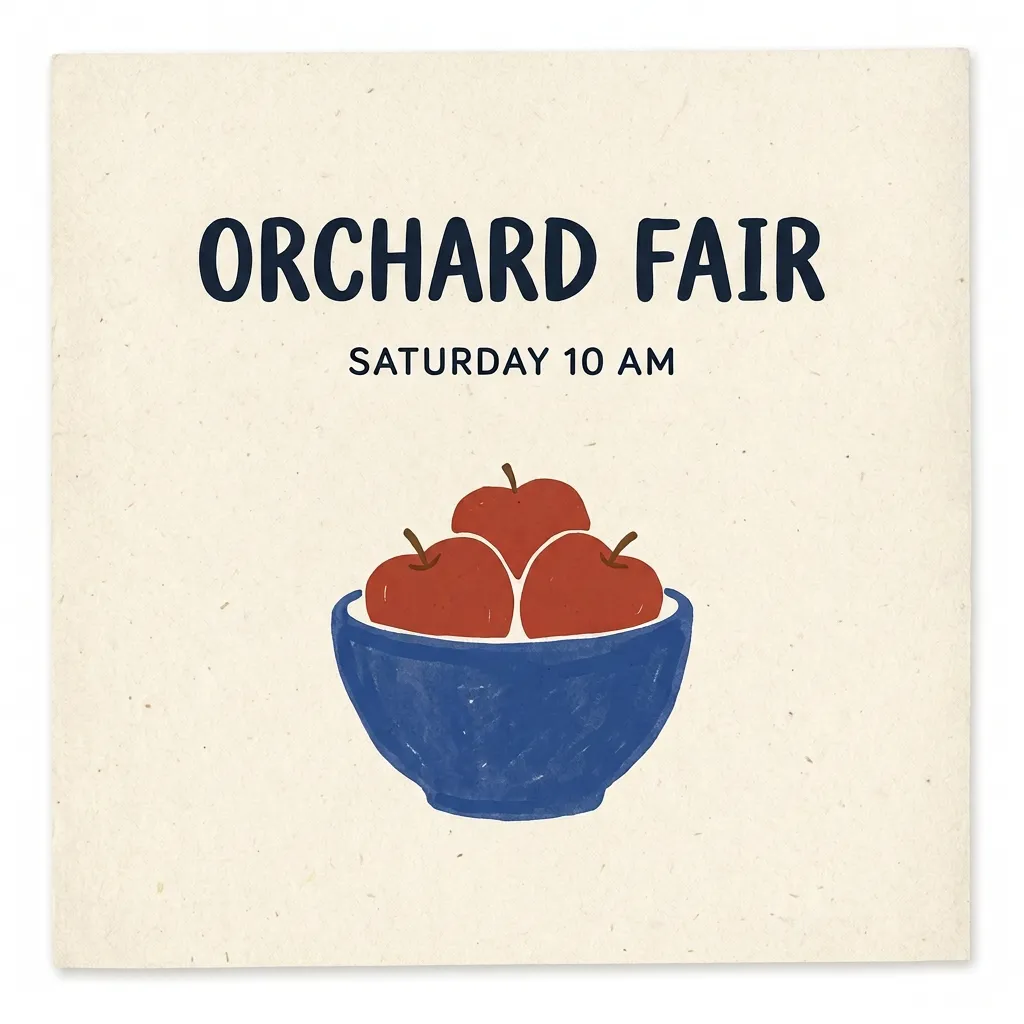
API test, second turn. Visual review found ORCHARD FAIR, retained SATURDAY 10 AM, and still found three red apples and a blue bowl.
Compare the saved first and second images side by side. Check the new headline letter by letter, then recheck the supposedly untouched date and time. Look at the lower illustration, background, margins, and crop too. In our test, the requested content survived visually, but the edit was not pixel-identical outside the headline. “Change only” should guide the model, not serve as a promise of a locked region. For work where an unchanged product or artwork area is critical, the masking approach discussed in preserving a product during an image edit may be a better workflow than relying on a text instruction alone.
If the edit changes the date or loses an apple, do not approve it because the headline looks right. Return to the saved first result and retry the headline request, or use an external editor for a precise text replacement. Preserve the original conversation and files so you can tell which version a follow-up was based on.
Turn 3: Change one illustration detail
With the headline edit still in the same history, send the third prompt:
Now change only the bowl from blue to dark green. Preserve ORCHARD FAIR, SATURDAY 10 AM, the three red apples and the layout.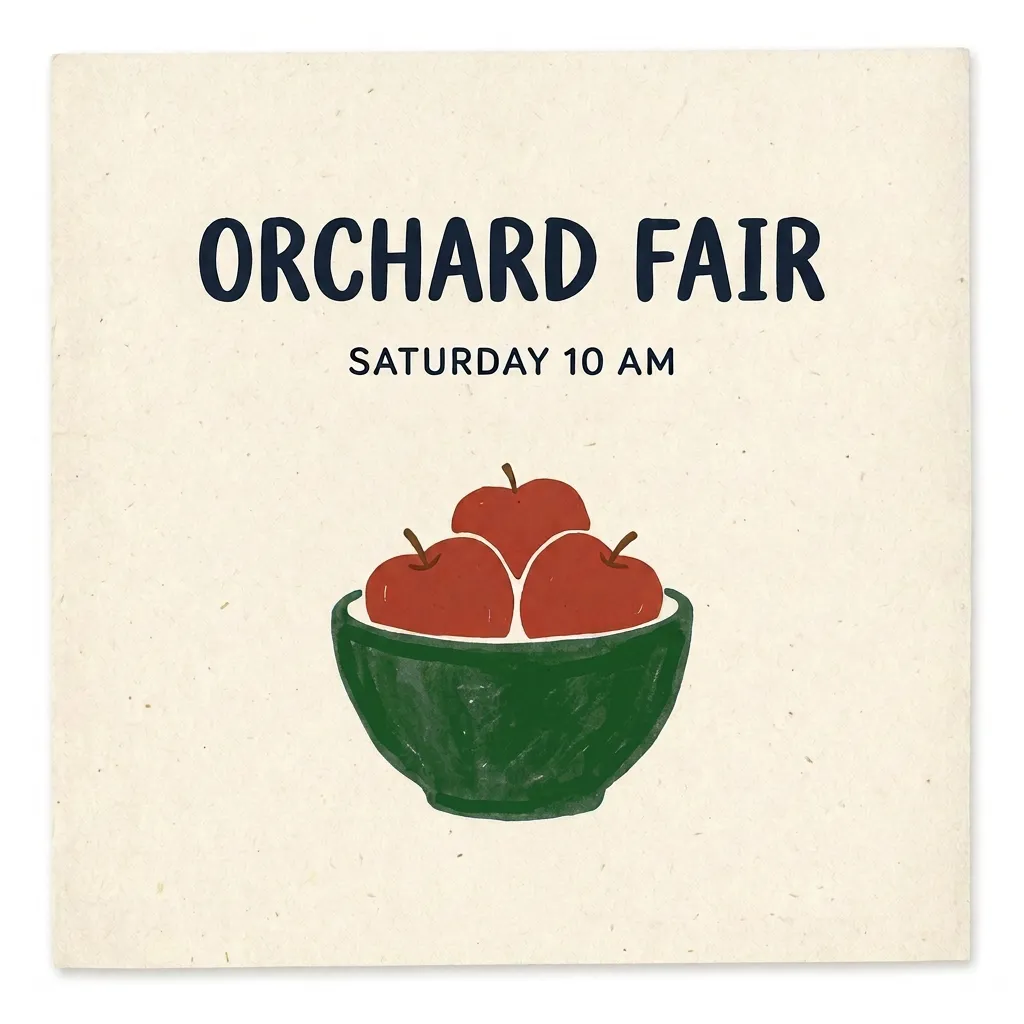
API test, third turn. Visual review found a dark green bowl while the requested headline, time, and apple count remained.
This turn shows why single-constraint edits are easier to assess than “make it better” requests. The intended difference is the bowl color. Compare the second and third files for that change, then check the headline, date, apple count, contrast, and crop again. The model can still redraw more than requested; the comparison is a review step, not a claim of pixel preservation.
Our test consisted of one three-turn chain for Nano Banana 2.1, with no repeat trials. All three API requests returned images successfully, but one short chain cannot establish a general success rate. We also ran the same prompts once on the older Nano Banana 2 model; both chains passed the listed visual text, count, and color checks. That observation is not an overall quality ranking. The Nano Banana 2.1 versus 2 comparison covers the distinction in more detail.
Proofread before calling the poster finished
Use the approved brief as the source of truth, not the prior generated image. At final size, check:
- Letters and numbers: headline spelling, date, time, punctuation, and any contact details. In this example, verify
ORCHARD MARKETon the first version andORCHARD FAIRon the headline-edited and final versions. VerifySATURDAY 10 AMindependently on all three. - Illustration requirements: three—not two or four—red apples, and the final dark green bowl.
- Legibility: sufficient visual contrast between text and background, especially after resizing for a feed or printing a small flyer.
- Edges and placement: no accidental crop of letters or illustration; no unwanted sheet margin if the deliverable must be full bleed.
- Unexpected additions: extra words, logos, decorative marks that could be mistaken for a logo, or a visible mark you have not accounted for.
A visually correct time in the example is not proof that a real event’s time is accurate. Have the approved event details at hand when proofreading. If exact brand typography, a logo lockup, or immutable legal text is required, generate an image or background and set the final text in an external editor on its own layer. A raster download does not give you dependable editable type.
For a localized poster, obtain an approved translation first. Put the approved text in the prompt line by line, then have a qualified reviewer proofread each line of the actual output, including dates and formatting. This example tested English text only; it does not validate spelling performance in another language.
What the API test establishes—and what the Playground does not
The images above came from Ofox’s native Gemini-compatible generateContent route for google/gemini-nano-banana-2.1. The test requested TEXT and IMAGE response modalities, with API image configuration of aspectRatio: "1:1" and imageSize: "1K". Each returned PNG was 1024 × 1024. Follow-up requests included the previous full model content and the new user turn, rather than rebuilding the conversation from an image alone. We did not set a seed or thinking level.
Those are API test conditions, not instructions to look for matching controls in the public Playground. Google documents image-generation capabilities and configuration, while Ofox’s page exposes its own public interface. A square choice in that interface remains best effort, and we did not test authenticated Playground output. Likewise, an optional Agent or other image workflow should not be described as automatically choosing Nano Banana 2.1; no authenticated Agent model selection was verified. For reference-image decisions beyond this text-only poster, see single versus two references for product scenes.
If a turn produces no downloadable image, first check whether generation completed and whether the response contains an image rather than text alone. Retry from the saved prior version rather than silently changing the brief. The no-image troubleshooting guide separates response handling from prompt and gateway issues; Google also maintains API troubleshooting guidance.
Export and hand off the right artifact
Save the base poster, headline revision, and final bowl revision as separate files, with names that identify their order. Then export or crop a copy for the intended placement and inspect that delivered copy again. If another person must make future date or sponsor changes, hand off the approved wording and a layered editor file you created separately—not just the model’s PNG.
You can download the example materials kit to keep the sequence together. If budgeting for repeated poster revisions matters, consult the Nano Banana 2.1 pricing guide rather than treating one successful image as a fixed per-poster price.
Finally, use only input imagery, marks, and copy you are entitled to use, and check the applicable Gemini API terms for your use. An image’s appearance—or the absence of an obvious visible watermark—does not establish ownership, exclusivity, or freedom from third-party rights. The practical finish line is an approved, proofread poster in the format your event actually needs.