OpenCode vs Codex CLI: Terminal AI Coding Agent Compared (2026)
OpenCode (190k stars, MIT, any model) vs Codex CLI (Rust, Apache-2.0, GPT-5-Codex). One is model-agnostic, one is OpenAI-native. Pick by your stack.
 Ofox
Ofox 
October 15 factual correction: The paragraph on switching models during a session has been corrected against current official documentation. The versions, gateway call results and prices below remain a July 29 historical snapshot; this update is not a new side-by-side test or a current price check.
TL;DR: OpenCode and Codex CLI are both terminal-first coding agents, and they disagree about one thing that decides everything downstream: which models you are allowed to run. OpenCode is a model-agnostic harness (any of 75+ providers, swapped mid-session) with an MIT license and a desktop app on the side. Codex CLI is OpenAI’s own agent, written in Rust, locked to OpenAI’s endpoint by default, with the strongest sandbox in this category and a config file that opens the door to other providers, though that door is narrower than it was a few releases ago. If your stack is multi-model or you distrust lock-in, OpenCode. If you live inside OpenAI and want the tightest safety story, Codex. The rest of this piece is about the edges where that choice actually bites, including one we found by running both against the same gateway.
TL;DR: Which One Should You Pick?
Skip the essay if you already know your constraints. Here is the decision by scenario.
| Scenario | Pick | Why |
|---|---|---|
| You run Claude, GPT, and open-weight models depending on the task | OpenCode | Model-agnostic by design, swap without restarting |
| You are all-in on OpenAI and want GPT-5-Codex tuned in | Codex CLI | First-party defaults, no gateway needed |
| You auto-approve shell commands and need real isolation | Codex CLI | OS-level sandbox is more hardened |
| You want a desktop app and IDE extension, not just a TUI | OpenCode | Ships TUI, desktop, and editor surfaces |
| You want one API key for every model | OpenCode | Codex needs the Responses API, which not every proxied model exposes |
| You care about avoiding single-vendor lock-in | OpenCode | Community-governed, MIT, no default vendor |
| You migrate from Claude Code and want an import path | Codex CLI | Built-in import of Claude Code and Cursor config |
Both are free and open source. Both run in your terminal. The split is philosophy, not price.
The Five-Minute Comparison
The specs that change how each one feels day to day, verified against each project’s repository and docs on 2026-07-29.
| OpenCode | Codex CLI | |
|---|---|---|
| Maintainer | Anomaly (community, formerly sst) | OpenAI (first-party) |
| Repository | anomalyco/opencode (old sst/opencode links 301 here) | openai/codex |
| Language | TypeScript | Rust |
| License | MIT | Apache-2.0 |
| Latest release | v1.18.9 (2026-07-28) | 0.146.0 (2026-07-29) |
| GitHub stars | ~190,800 | ~102,400 |
| Install | npm i -g opencode-ai | npm i -g @openai/codex |
| Default model | None, you choose | OpenAI GPT-5-Codex family |
| Model support | Any of 75+ providers via models.dev | OpenAI, plus gateways that expose the Responses API |
| Config file | ~/.config/opencode/opencode.json | ~/.codex/config.toml |
| Project instructions | AGENTS.md | AGENTS.md |
| Surfaces | TUI, desktop app, IDE extension | TUI, non-interactive exec, mobile remote |
| Sandbox | Permission prompts | OS sandbox (seatbelt / Landlock) plus approvals |
Two lines in that table carry most of the weight. “Default model: none” is the whole OpenCode thesis. “Default model: GPT-5-Codex” is the whole Codex thesis. Everything else follows from those two facts.
OpenCode: The Model-Agnostic Harness
OpenCode treats the model as a runtime argument, not a product decision. It ships with no default provider. On first run you connect one, and from there the model is a thing you pick per session, or per message, from a list of 75+ providers wired in through models.dev. Claude, GPT, Gemini, GLM, a local Ollama build, they are all just entries in /models.
That design has a few real consequences.
You are not tied to anyone’s roadmap. When a new model lands and shows up in the models.dev registry, it shows up in OpenCode without a client update. The harness does not care who made the model, which is the point.
It is a full agent, not a thin wrapper. OpenCode runs a plan agent and a build agent, switchable with a keystroke. Plan mode is read-only and proposes an approach without touching files; build mode executes. It integrates Language Server Protocol servers, so for TypeScript, Python, Rust, Go, and a long tail of other languages, the model sees real type information and compiler diagnostics rather than guessing from raw text. It speaks MCP, supports custom tools, and runs multiple sessions in parallel on the same project.
It is not only a terminal tool. Alongside the TUI there is a desktop app and an IDE extension. If you want the agent loop but not the terminal, OpenCode has a surface for you. Codex leans harder into the terminal and the exec pipeline.
Where it bites: model-agnostic means you own the model decision, including the failure modes. Point OpenCode at a weak or misconfigured provider and you get weak or misconfigured output, and the harness will not save you from a bad routing choice. There is also a known rough edge in the provider registry. On a brand-new install, a freshly added provider can fail to appear on the very first invocation because the registry cache has not been written yet. Run the models command once to warm it, and it resolves. Worth knowing before you script a setup and assume the first call is authoritative.
OpenCode treats the model as a runtime argument, not a product decision. That single choice is why it wins the multi-model case and loses the “just works out of the box” one.
Codex CLI: OpenAI’s First-Party Agent
Codex CLI comes from OpenAI, and it shows in every design decision. It is written in Rust, so it is a fast single binary rather than a Node process. It ships pointed at OpenAI’s own endpoint and the Codex-tuned GPT-5 models, and for the default user that means zero configuration: install, authenticate with your ChatGPT account or an API key, and start coding.
The strengths cluster around trust and safety.
The sandbox is the best in this comparison. Codex isolates command execution with OS-level primitives, seatbelt on macOS, Landlock and seccomp on Linux, and puts approval modes on top. You choose how much rope the agent gets: suggest only, auto-edit within the workspace, or full auto inside the sandbox. An agent-run rm is confined by construction, not by the model choosing to behave. If you auto-approve tasks or run anything you did not write, that isolation is the feature you are actually buying.
It is a first-party citizen of the OpenAI stack. The /review command does inline code review without touching your working tree. Subagents parallelize work. Codex Remote lets you drive a connected Mac or Windows host from the ChatGPT mobile app. The /import command pulls Cursor and Claude Code settings, MCP servers, plugins, and commands into Codex, which makes migration a command rather than a weekend.
It is not locked to OpenAI, despite the defaults. Add a [model_providers.<id>] block to ~/.codex/config.toml pointing at a compatible gateway and Codex will call whatever that gateway serves. The door is there. You just have to open it by hand, which is the honest difference from OpenCode, where the door is open by default.
The catch is which protocol counts as compatible, and the answer changed. Codex used to accept wire_api = "chat", meaning any Chat Completions endpoint. That value is gone. In the 0.146.0 source the WireApi enum has exactly one variant left, Responses, and passing chat is not ignored, it is a hard startup error:
wire_api = "chat"is no longer supported. How to fix: setwire_api = "responses"in your provider config.
That message links to discussion #7782, filed under the title “Deprecating chat/completions support in Codex,” which is about as unambiguous as deprecations get. Chat Completions is the near-universal dialect. The Responses API is not. Every tutorial written before that change now produces a config that will not load, and every gateway that only proxies Chat Completions is now out of reach.
Where it bites: the OpenAI-first defaults are a comfort until you want to leave. Model freedom in Codex is a config task, not a menu, and the protocol boundary is real and has moved in OpenAI’s favor. You cannot point base_url at Anthropic’s native API and expect it to work, because that is not the Responses API. You route non-OpenAI models through a Responses-capable gateway or you do not route them at all, and as the next section shows, “Responses-capable” turns out to be a per-model property rather than a per-gateway one.
Head-to-Head: The Differences That Change Your Day
Six dimensions, and who takes each. “Winner” here means “better for most people optimizing for that axis,” not a universal verdict.
| Dimension | OpenCode | Codex CLI | Winner |
|---|---|---|---|
| Model freedom | Any provider, swap live | OpenAI default, others only if served over Responses | OpenCode |
| Sandbox and safety | Permission prompts | OS-level sandbox plus approvals | Codex CLI |
| Out-of-box setup | Choose a provider first | Install and go on OpenAI | Codex CLI |
| Surfaces | TUI, desktop, IDE | TUI, exec, mobile remote | Tie |
| Governance and lock-in | Community, MIT, no vendor | First-party OpenAI | OpenCode |
| Migration from Claude Code | Shared AGENTS.md convention | Built-in import command | Codex CLI |
If you scan that column, the pattern is clear. OpenCode wins on freedom and independence. Codex wins on safety and on being turnkey inside one vendor. There is no dimension where one is strictly ahead on everything, which is exactly why the recommendation is conditional rather than a single name.
Setup and Daily Workflow, Measured
Forget invented quality scores. The honest, checkable differences are in how many steps each tool needs to do the same job, and where the friction sits.
Getting to a first response with a non-default model. In OpenCode, you export the provider’s key, open the TUI, run /models, and pick. No file to edit. In Codex, a non-OpenAI model means writing a model_providers block in config.toml first, then checking that the model you want is actually served over the Responses API, then selecting it. OpenCode is fewer steps for the multi-model case by design; Codex is fewer steps if the model you want is OpenAI’s, because then there are zero steps.
Switching models mid-task. OpenCode offers /models inside a running session. Codex also supports interactive model switching: use /model to choose an available model, then /status to verify the active session configuration, as described in the official Codex command guide. The --model option and named profiles remain ways to select a model when starting a session; they are not the only way to change it. The models available depend on your account, workspace and provider configuration. A model appearing in a picker does not establish compatibility with every provider route or tool workflow.
Running a shell command. OpenCode asks for permission. Codex runs it inside the sandbox under whichever approval mode you set, so the isolation holds even when you say yes. Same prompt on the surface, very different blast radius underneath.
Project instructions. Both read AGENTS.md, the same convention Cursor and others adopted, so a repo that already has one works in either agent with no changes. This is the quiet win of the last year: your project’s agent instructions are now portable across tools.
First Run, Side by Side
The fastest way to feel the difference is to install both and reach a first response. OpenCode, with a model you supply:
npm i -g opencode-ai
export OFOX_API_KEY=sk-your-key      # any OpenAI-compatible provider works
cd your-project
opencode                              # /models to pick, Tab to toggle plan/build
Codex, on OpenAI’s defaults, which is the case it optimizes for:
npm i -g @openai/codex
cd your-project
codex                                 # authenticates with ChatGPT or OPENAI_API_KEY
Notice what each command assumes. OpenCode’s happy path expects you to name a provider, and rewards you with a menu. Codex’s happy path expects you to be an OpenAI user, and rewards you with zero setup. Neither is wrong. They are optimizing for different first users, and the install experience tells you which user each team pictured.
Extensibility: MCP, Skills, and Subagents
Past the model question, both agents are extensible in similar shapes, with different maturity in each corner. This is where “first-party” starts to show as polish rather than philosophy.
| Capability | OpenCode | Codex CLI |
|---|---|---|
| MCP servers | Yes | Yes, namespaced registration |
| Reusable prompts | Custom tools and agents | Skills and slash commands |
| Subagents / parallelism | Parallel sessions | Subagents (multi-agent) |
| Read-only analysis | Plan agent, Tab to switch | /review, no working-tree edits |
| Remote / mobile | Desktop app, IDE, /share | Codex Remote from the ChatGPT app |
| Theming | Yes | Limited |
Both speak MCP, so the same context servers and tool integrations plug into either one. Codex leans into a structured extension model, skills, namespaced MCP, and slash commands that feel governed by a team that ships a product. OpenCode leans into surfaces, giving you the same agent in a terminal, a desktop window, and your editor, plus a /share flow for handing a session to a teammate. The read-only story is a nice mirror of their philosophies: OpenCode gives you a dedicated plan agent you flip into, while Codex gives you a /review command that critiques without touching your tree. Same goal, two idioms.
One practical note on speed. Codex is a Rust binary, so it starts fast and stays light. OpenCode runs on Node, which is not slow in any way you will notice while a model is thinking, but it is a heavier process at rest. For most people the model’s latency dwarfs the tool’s, and this never matters. If you script a fleet of headless agents, it can.
One Key, Two Very Different Model Menus
Here is the part where the two philosophies stop being abstract, and where we stopped guessing and ran the thing. Both agents accept a gateway base URL, so one key can cover the billing for Claude, GPT, Gemini, and open-weight models. What one key does not guarantee is that both agents can reach all of them. We set both up against ofox.ai on 2026-07-29 and the results were not symmetric.
OpenCode: one environment variable, zero config file. Because ofox is a built-in provider in the models.dev registry, OpenCode discovers it the moment the key is present.
export OFOX_API_KEY=sk-your-key
opencode            # /models now lists ofox/... entries, pick one
That is the whole setup. No file, no provider block, and because OpenCode talks Chat Completions, everything the gateway serves is on the menu.
Codex CLI: one config block, and a shorter menu than you expect. Codex needs the gateway declared once in ~/.codex/config.toml.
model = "openai/gpt-5.5"
model_provider = "ofox"

[model_providers.ofox]
name = "ofox.ai"
base_url = "https://api.ofox.ai/v1"
env_key = "OFOX_API_KEY"
wire_api = "responses"
requires_openai_auth = false
wire_api = "responses" is not a preference, it is the only value current Codex releases accept, so your gateway has to expose a Responses-compatible endpoint rather than just Chat Completions. requires_openai_auth = false is the default and keeps Codex from showing the ChatGPT login flow, so it reads the key from env_key instead. Full key list is in the Codex config reference.
What actually ran
We pointed Codex 0.146.0 at that config and asked each model to reply with one word, using codex exec --sandbox read-only. This is the result we did not expect going in.
| Model | Codex CLI via gateway | What came back |
|---|---|---|
openai/gpt-5.5 | Works | Normal completion, 12.7k tokens billed for the turn |
anthropic/claude-sonnet-5 | Fails | tools.0.custom.strict: Extra inputs are not permitted |
deepseek/deepseek-v4-pro-0423 | Fails | Encrypted content is not supported with this model. |
x-ai/grok-4.3 | Fails | Same encrypted-content error |
z-ai/glm-5.2 | Fails | HTTP 503, No providers support endpoint 'responses' |
Note the asymmetry, because it is the most useful thing in this piece. GLM is the only one of the four the catalog flagged as unsupported ahead of time. Claude, DeepSeek, and Grok are all listed under /v1/responses and failed anyway. The endpoint list is a pre-filter, not a guarantee.
Three different failures, one theme. GLM never reaches the model at all because the gateway does not proxy it under /v1/responses. DeepSeek and Grok are reachable but reject the reasoning.encrypted_content field Codex attaches to every request, and that field is hard-coded in client.rs rather than exposed as a setting, so there is no config escape hatch. Claude is reachable and accepts encrypted content, but chokes on the shape of Codex’s freeform apply_patch tool.
We then ran the identical prompt through OpenCode 1.18.9 on the same key, same gateway, same machine. All four of the models Codex could not reach answered normally, and so did a plain chat/completions call from the SDK. That is the tell: this is a protocol seam between Codex and the gateway layer, not a model problem and not a gateway being down.
How to check before you commit. The gateway’s model list reports which endpoints each model is served under, so you can screen ahead of time instead of debugging a config:
curl -s https://api.ofox.ai/v1/models \
  -H "Authorization: Bearer $OFOX_API_KEY" \
| jq -r '.data[] | select(.supported_endpoints | index("/v1/responses")) | .id'
On 2026-07-29 that returned 67 model IDs. The catalog carries 123 entries, but 18 of those are image, video, embedding, and transcription models that expose neither text endpoint, so the denominator that matters is 105 text models: 102 served over chat completions, 67 over Responses. Those two sets overlap almost completely without nesting. 64 models offer both, and exactly three are Responses-only (openai/gpt-5.2-codex, openai/gpt-5.3-codex, openai/gpt-5.4-pro).
Counted by family, the Claude, GPT, DeepSeek, Doubao, and Grok text models were covered end to end. Qwen (10 of 21), MiniMax (7 of 9), and Kimi (2 of 5) were covered in part, so per-model checking matters even inside a family you assume is supported. Gemini and GLM had no Responses entry at any version, and neither did Kimi K3. Treat that list as the outer bound of what Codex could reach and then test the specific model, because as the table above shows, being listed is necessary and not sufficient.
None of this touches OpenCode, which is the practical argument for it if your model strategy is genuinely mixed. It is also worth saying plainly: this is a Codex-side protocol decision, it broke every Chat-Completions-only gateway at once, and it will presumably shake out as gateways build fuller Responses shims. It is a true thing about today, not a permanent verdict.
The same key works from code too, which is how you A/B two models on the same task without either agent in the loop. Same base URL, swap one string, no protocol seam to worry about.
Python: run the same task on two models
from openai import OpenAI

client = OpenAI(
    api_key="sk-your-ofox-key",
    base_url="https://api.ofox.ai/v1",
)

task = "Refactor this function to remove the nested loop, keep behavior identical."

for model in ["anthropic/claude-sonnet-5", "z-ai/glm-5.2"]:
    resp = client.chat.completions.create(
        model=model,
        messages=[{"role": "user", "content": task}],
    )
    print(f"\n=== {model} ===")
    print(resp.choices[0].message.content)
Node: same shape
import OpenAI from "openai";

const client = new OpenAI({
  apiKey: "sk-your-ofox-key",
  baseURL: "https://api.ofox.ai/v1",
});

const task = "Write a Postgres migration to add a nullable created_by column.";

for (const model of ["anthropic/claude-sonnet-5", "openai/gpt-5.5"]) {
  const resp = await client.chat.completions.create({
    model,
    messages: [{ role: "user", content: task }],
  });
  console.log(`\n=== ${model} ===`);
  console.log(resp.choices[0].message.content);
}
The model IDs are literal. They are what you paste into OpenCode, and what you paste into Codex for whichever subset it can currently reach. That is the honest version of the portability pitch: the agent is the harness and the model is a variable, but only one of these two agents lets you change that variable freely today.
What that costs
Gateway pricing on the three models used above, read from the ofox model pages on 2026-07-29. These are per million tokens.
| Model | ofox model ID | Input | Output |
|---|---|---|---|
| Claude Sonnet 5 | anthropic/claude-sonnet-5 | $2 / M | $10 / M |
| GLM-5.2 | z-ai/glm-5.2 | $1.4 / M | $4.4 / M |
| GPT-5.5 | openai/gpt-5.5 | $4 / M (list $5) | $24 / M (list $30) |
GPT-5.5 was carrying a 20% promotional discount on the day we checked, so the $4 and $24 figures are the ones you would actually be billed and the struck-through $5 and $30 are the list prices. Promos expire; read the model page rather than trusting this table in six months. The other two had no discount applied.
The point of the table is not the absolute numbers, it is the spread. GLM-5.2 costs roughly a fifth of GPT-5.5 on output at promo pricing, so the “reason with the strong model, grind with the cheap one” workflow is a real bill difference, not a rounding error. OpenCode makes that toggle a keystroke. Codex, per the test above, could not reach two of these three models at all, which is the same finding arriving as a line on an invoice rather than an error string: the cost lever exists only for the agent that can pull it.
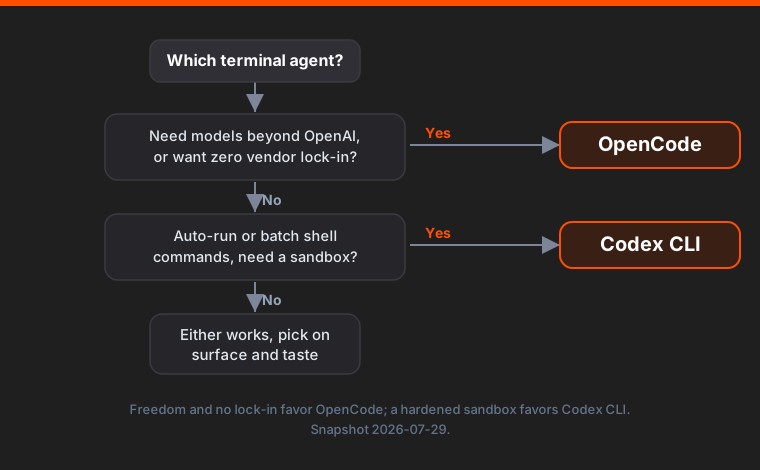
If you want the choice as a picture rather than a paragraph, it collapses to two questions.
When to Pick OpenCode
Choose OpenCode if any of these describe you. You route work across multiple model vendors and want that to be a menu, not a migration. You are wary of tying your daily driver to a single company’s pricing and roadmap. You want the agent outside the terminal too, in a desktop app or your editor. You value that the project is MIT-licensed and community-governed, with no default vendor collecting a toll. The model-agnostic design is the reason to be here, and if you would not use it, you are paying for flexibility you do not need.
When to Pick Codex CLI
Choose Codex CLI if you are already inside the OpenAI world and want the defaults to just work, if you auto-approve or batch-run tasks and need the OS-level sandbox that Codex has hardened more than anyone else in this category, or if you are migrating off Claude Code and want the import command to do the boring part. The Rust binary is fast, the safety story is the strongest here, and the first-party integration with the ChatGPT app and Codex Remote has no equivalent on the OpenCode side. If you rarely reach past OpenAI’s own models, the config work that unlocks other providers is work you will never do, and that is fine. If you do expect to reach past them, read the protocol section above before you build a plan on it, because today that door opens onto a smaller room than the docs imply.
When Neither Is the Right Call (and What to Use Instead)
If you barely leave your editor, a terminal agent is a tax on your workflow, and a Cursor or a Zed with an inline assistant will fit your hands better. If your job is a fixed pipeline, generate this, review that, ship on a schedule, you do not want an interactive agent at all, you want a script calling a model API directly, which is why the code examples above call the gateway without either CLI in the loop. And if you are comparing four agents rather than two, our four-way terminal agent comparison covers Claude Code and DeepSeek TUI alongside Codex, with the price and daily-driver angles laid out.
The terminal agent is a specific tool for a specific taste: you want the model in your shell, watching your files, running your commands. If that is not the taste, neither of these is your answer, and reaching for the wrong shape of tool is a more common mistake than picking the wrong one of the two.
Choosing Codex, its error index maps every failure we have reproduced to a fix.
FAQ
See the questions and answers above in the page metadata; the same set is rendered here for readers and search engines. If you are choosing between these two agents, the two facts that settle most decisions are: OpenCode is model-agnostic and Codex CLI is OpenAI-first, and Codex has the harder sandbox while OpenCode has the wider model menu.
References
- github.com/anomalyco/opencode (the former
sst/opencodepath 301s here) - github.com/openai/codex
- codex-rs/model-provider-info/src/lib.rs at rust-v0.146.0
- openai/codex discussion #7782
- opencode.ai/docs
- Codex CLI config reference
- models.dev
- ofox model pages
Related reading: OpenCode setup guide, Codex CLI custom model providers, Codex config.toml deep dive, and migrating from Claude Code to Codex.
Frequently Asked Questions
- Is OpenCode better than Codex CLI?
- Neither is strictly better. OpenCode is a model-agnostic harness that runs any model from any provider, so it wins when you want to swap models freely or avoid vendor lock-in. Codex CLI is OpenAI's first-party agent with a hardened sandbox and the GPT-5-Codex family tuned in, so it wins when you live inside the OpenAI stack and want the tightest safety story. Pick by your model strategy, not by a leaderboard.
- Can Codex CLI use models other than OpenAI's?
- In principle yes, in practice less than you would hope. Codex now speaks only the OpenAI Responses API: wire_api = chat was removed and current releases refuse to start with it, so a gateway has to expose /v1/responses, not just /v1/chat/completions. You declare it with a model_providers block in ~/.codex/config.toml. Support is then per model, not per gateway. Testing Codex 0.146.0 against ofox.ai on 2026-07-29, GPT-5.5 worked end to end while Claude Sonnet 5, DeepSeek V4 Pro, Grok 4.3, and GLM-5.2 all failed, for three different reasons. Codex still cannot talk to Anthropic or Google native APIs directly.
- What language and license is each one?
- OpenCode is written in TypeScript and licensed MIT, shipped on npm as opencode-ai. Codex CLI is written in Rust and licensed Apache-2.0, shipped on npm as @openai/codex. Both are open source, and both read an AGENTS.md file for project instructions.
- Which terminal coding agent is more popular in 2026?
- By GitHub stars, OpenCode leads at roughly 190,000 versus about 102,000 for Codex CLI as of late July 2026. Stars measure attention, not daily active users, and Codex benefits from being bundled with ChatGPT subscriptions, so the real usage gap is narrower than the star gap suggests.
- Do I need a separate API key for each model?
- No, and this is where the two agents split hardest. OpenCode speaks Chat Completions, so one aggregator key reaches Claude, GPT, Gemini, and open-weight models, and ofox shows up as a built-in provider from a single environment variable. Codex needs the Responses API, which fewer models are proxied under, so one key still covers the billing but not the whole menu. On ofox as of 2026-07-29, Codex reached GPT-5.5 and none of the four non-OpenAI models we tried. Check any gateway's per-model support before you count on it.
- Which is safer for running shell commands?
- Codex CLI has the more mature sandbox story. It isolates command execution with OS-level primitives (seatbelt on macOS, Landlock and seccomp on Linux) and layers approval modes on top, so an agent-run command is confined by default. OpenCode has a permission system too, but Codex's sandbox has had more hardening. If you run untrusted or auto-approved tasks, that gap matters.
- Can I migrate my Claude Code setup to either one?
- Yes. Codex CLI ships an import command that pulls Cursor and Claude Code settings, MCP servers, and commands into its own config. OpenCode reads the same AGENTS.md convention, so project-level instructions carry over with little editing. Model routing has to be reconfigured in each tool's own format.