How to summarize multiple PDFs with AI and check every source
Use three downloadable PDFs to build a source-linked summary in Ofox Chat. Check file coverage, page numbers, conflicting dates, budgets and missing decisions.
 Ofox
To summarize several PDFs with AI, upload the documents together, request a file-by-file reading inventory, and require a filename and page number for each important conclusion. Ask for conflicting statements and missing information separately. A fluent combined paragraph can otherwise hide an unread document or turn a proposal into a decision.
This walkthrough uses Ofox Chat and three short downloadable documents. The outcome is a brief report, a table of conflicting dates and amounts, and a list of questions that the source material cannot answer. You can check every claim against six pages rather than taking the agent’s confidence as evidence.
Ofox publishes this guide. We ran the task on November 3, 2026 in the Japanese interface with the visible Balanced mode, using English synthetic PDFs. These are not customer records. The run does not establish accuracy for scanned PDFs, hundreds of pages, complex diagrams or every language. The interface mode alone does not identify a fixed backend model.
Prepare a small evidence pack
Download these sample documents:
Each has two pages. All describe the fictional Project Cedar, but they play different roles. The brief proposes a pilot date and a budget ceiling. The meeting notes suggest a different date and another budget plan. The supplier gives a quote with exclusions. None is a final approval or invoice.
For your own files, preserve the original filenames or give them short, stable names before uploading. Make a simple manifest: filename, document date, version, page count, and role. A filename containing “final” is not evidence of approval. Likewise, a later document does not automatically supersede every earlier statement.
Only upload documents you are authorized to process. Start with a redacted copy when checking a new service. Password-protected, scanned and image-heavy files need separate handling; this example uses selectable text.
Upload all files in one conversation
Start a new Ofox Chat conversation. Choose the add control and Upload local files. In the Japanese interface these are 追加 and ローカルファイルをアップロード. The file picker accepted multiple files in this run. Confirm all three filenames appear as attachments before sending the task.
For repeated work, keep one project per conversation unless comparing projects is intentional. If a file is missing from the attachment list, fix that first. An instruction naming a file cannot substitute for uploading it.
Request the result in your desired language. Use this English adaptation of the tested Japanese instruction:
Summarize the three attached PDFs together.
First list each filename, reading status and verified page range.
For every important conclusion, cite the filename and physical PDF
page number. Count the first page as page 1. If a page number cannot
be verified, say so rather than inventing it.
Separate confirmed decisions, proposals, quotations and unknowns.
When dates or amounts differ, make a comparison table with sources
and status; do not silently choose one or merge their meanings.
Do not confuse a budget ceiling with actual spending. Retain tax,
travel and scope conditions. If an owner or deadline is absent,
write "not stated".
Finish with questions requiring confirmation and a short sourced
report. Provide a downloadable Markdown file that contains it.
Report all unread files or pages explicitly.
For a large packet, first request just the inventory and extraction. Confirm the coverage before asking for a synthesis. Splitting by logical sections can help isolate missing material, but keep the filenames and original page ranges attached to every extract. Do not replace the original page numbers with the numbering of a temporary excerpt without explaining the mapping.
Check coverage before checking the prose
The observed run listed all three files, pages 1–2 for each, and no unread pages. That is the agent’s coverage report, not independent proof. We checked the generated report against all six source pages.
Use this acceptance table for the sample:
| Source | Page 1 must contribute | Page 2 must contribute |
|---|---|---|
| 01-project-brief.pdf | December pilot; December 8 proposed | EUR 12,000 ceiling; approval not granted; approver unassigned |
| 02-meeting-notes.pdf | December 15 suggested, still unconfirmed | EUR 9,500 unapproved plan; Mina to verify quote; no action deadline |
| 03-vendor-proposal.pdf | EUR 10,200 including training; valid until November 15 | Taxes and travel excluded; December 8 delivery not guaranteed; scope needs confirmation |
If the summary mentions the quote but omits the exclusions on the second page, the source was not adequately represented even if it appears in the inventory. If the agent reports a page as unreadable, retain that limitation in the final report and resolve it before using conclusions that depend on that page.
Preserve the difference between dates
The sample has three kinds of date: a proposed pilot, a suggested replacement, and quote validity. They must not become one deadline.
| Date | Meaning | Evidence |
|---|---|---|
| December 8, 2026 | Initial pilot proposal, not confirmed | Brief, page 1 |
| December 15, 2026 | Suggested pilot change, still awaiting confirmation | Meeting notes, page 1 |
| November 15, 2026 | Quote expiration, not Mina’s action deadline | Vendor proposal, page 1 |
The supplier’s inability to guarantee December 8 delivery does not establish that December 15 is guaranteed. The generated Japanese report explicitly kept the proposed date separate from delivery feasibility.
For a real project, ask which document explicitly approves or replaces a prior date. If no document does, write “unconfirmed” and identify the person who needs to decide only if that person is actually specified. A model-generated suggestion can appear in a recommendations section, but not in the record of agreed decisions.
Do not add unlike financial numbers
The three monetary figures describe different things:
| Amount | Status | What remains unknown |
|---|---|---|
| EUR 12,000 | Unapproved budget ceiling | Approver; whether tax/travel belong within the ceiling |
| EUR 9,500 | Finance proposal, unapproved | Relationship to the ceiling and detailed scope |
| EUR 10,200 | Supplier quote including training | Taxes, travel and final scope |
Their sum, EUR 31,700, would not be a valid project cost. Nor can the report confidently call the quote “within budget”: the budget is unapproved and the final cost with exclusions is unknown. It is acceptable to state the arithmetic difference between two numbers if clearly labeled, but the difference does not resolve scope or approval status.
The observed report retained the three statuses and did not claim a final total. This is the kind of useful uncertainty a summary should preserve. Removing it to make the report shorter would change the meaning of the documents.
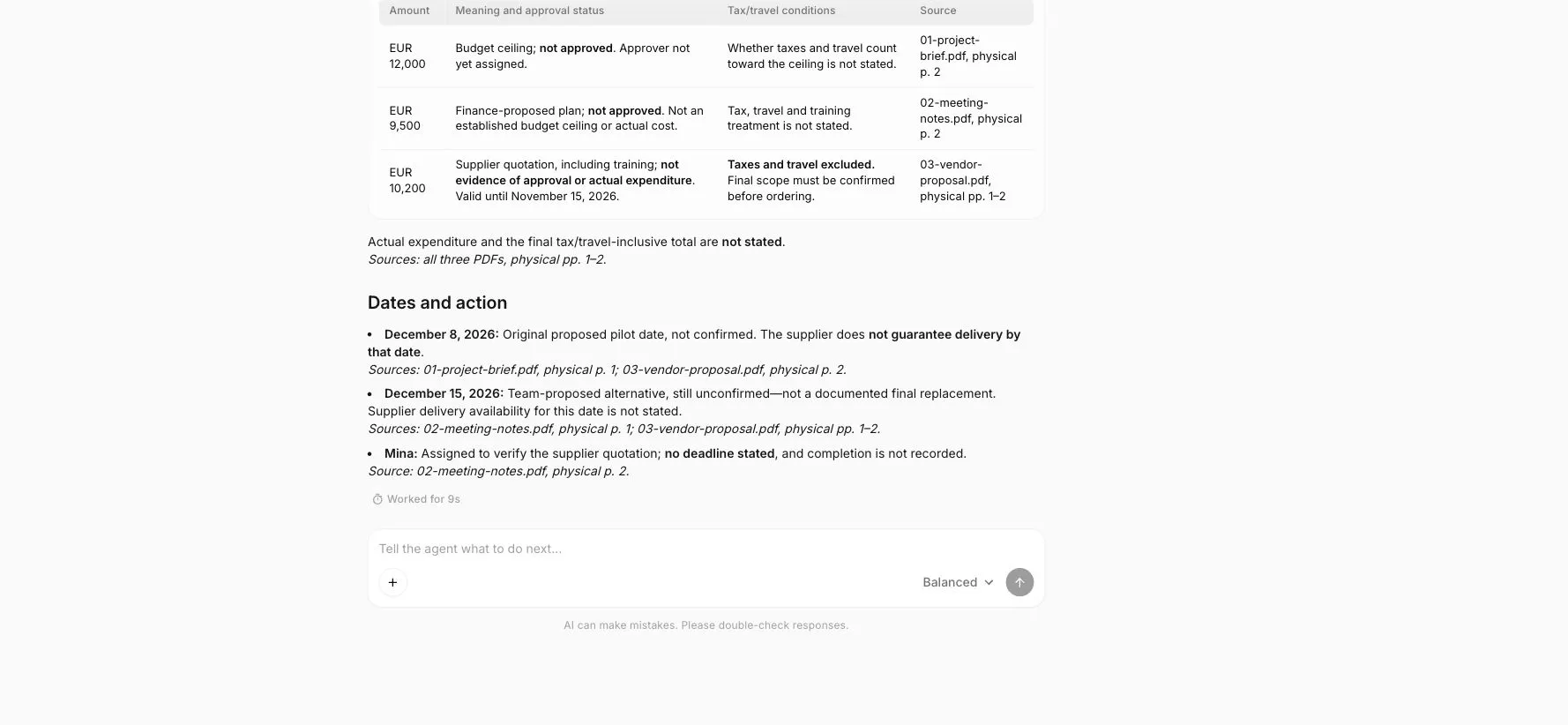
Actual Ofox Chat screenshot: an English adaptation of the already checked Japanese result, not an independent rereading of the PDFs. The screenshot is cropped to the response area.
Inspect the final report and its download
The run produced project-cedar-summary-ja.md. We downloaded it and checked its conclusions and physical-page references against the input. It included the coverage list, integrated summary, date and amount tables, responsibilities, questions and a short final report.
You can download the original Japanese Markdown report to inspect the delivered structure and citations. The English tables in this tutorial explain its checked findings.
Before handing a report to someone else, open the downloaded file. Confirm it contains the same material as the chat, not merely a title or a truncated excerpt. Markdown is plain text with headings and tables; the .md file is not a PDF or Word document. Request and separately inspect a different format if the recipient needs one.
Check the most consequential statements directly in the source: amount, units, exclusions, approval status, dates, named owners and action deadlines. In this sample, Mina is responsible for checking the quotation, but no deadline is given. The report must not borrow the quote expiration date and present it as her agreed deadline.
Generated follow-up questions are useful, provided they are labeled as questions. “Who approves the budget?” is supported by an unassigned approver. “Mina must approve the budget by November 15” invents both the role and the deadline.
Fix common failures without losing traceability
| Failure | Corrective action |
|---|---|
| One PDF is missing | Reattach it, ask for its page coverage, then rebuild only conclusions affected by it |
| Page number is wrong | Specify physical numbering and ask the agent to verify the cited passage in the original file |
| Scanned text is unreadable | Use a permitted OCR workflow, check recognition errors, and preserve page mapping before summarizing |
| Conflicting figures become one answer | Request a table of original values, status, scope, date and source; prohibit silent reconciliation |
| The report invents a decision | Require an approving passage or mark it unresolved |
| Later files overwrite older evidence | Ask whether supersession is explicit; preserve the earlier statement if it is not |
| A download is absent | Ask for an actual attached output, then open it; a promise to create it is not delivery |
For example, a precise correction is: “The report says December 15 is confirmed. Meeting notes page 1 says it still needs confirmation. Change that status, list the unresolved delivery question, and identify every conclusion affected by the correction.” This makes the repair auditable and avoids restarting a whole report unnecessarily.
Turn a summary into a useful work product
A reliable output has four layers: what each file says, which statements agree or conflict, what remains unknown, and what the reader should verify next. Keep those layers visible when shortening the report for a manager.
Try the supplied pack in Ofox Chat before uploading a larger project. If your next task is numerical analysis, use the AI Excel workflow to check rows, missing values and totals. For broader document and presentation prompting, see the Sonnet document, slide and spreadsheet examples. A source-linked summary gives the next task a stronger starting point; it does not replace the final source check.
Related Docs
For a later move from this browser task to a programmatic workflow, consult the Ofox API documentation. API setup is separate from the Chat steps demonstrated here.