Claude Sheets vs Excel: which work can you move today?
Compare Claude Sheets with Excel by task, workbook dependencies, collaboration and export requirements. Use a small fixture to check a migration before relying on it.
 Ofox

Claude Sheets is a candidate for a lightweight shared tracker built through conversation. Keep Excel when the workbook depends on advanced spreadsheet features, established automation, or a delivery process you cannot reproduce in Sheets. Moving a simple table and moving a business-critical workbook are different decisions.
Anthropic introduced native Sheets and Whiteboards on November 10, 2026. Sheets supports collaborative editing, formulas and multiple tabs inside Claude; it is separate from the Claude integration that works inside Excel. Anthropic’s launch announcement explains that distinction in the broader product update.
This is a documentation-based comparison checked on November 12, with an original synthetic migration exercise. We did not benchmark the two products, purchase a Claude plan, or validate a Claude Sheets export. The downloadable data and its expected arithmetic were checked locally with Python. That gives you a concrete acceptance test, not a claim that either product has passed it.
Decide from the workbook’s dependencies
Start with the file you need to maintain, rather than a list of AI features. A workbook may look like a grid while relying on a refresh pipeline, protected cells, hidden calculation tabs or a colleague’s macro. Recreating the visible rows does not recreate those dependencies.
| Work you need to deliver | Starting choice | What would change the decision? |
|---|---|---|
| Six-person project tracker with dates, owners and a budget | Try a bounded Sheets pilot | Required controls or handoff checks fail |
| Existing workbook refreshed with Power Query | Keep the Excel workflow | You intentionally rebuild and validate the refresh process elsewhere |
| Financial model with VBA or DAX dependencies | Keep its existing environment | Every dependency has an approved replacement, not merely a similar-looking output |
| A one-time narrative about a small CSV | Either may fit | Judge the explanation against independently calculated totals |
| Spreadsheet edited mainly from a phone | Check the mobile requirement first | Basic viewing is sufficient for the people receiving it |
| Numbers that must remain synchronized with a warehouse | Evaluate the data connection separately | A dated static export is actually acceptable |
These are recommendations based on task requirements, not measured speed or accuracy rankings. The tutorial in this cluster supplies a small project tracker you can reproduce. For broader tool selection, use the office-agent comparison, which addresses a different question: choosing an environment for a whole task.
The current limitations that matter
Anthropic lists Sheets as paid-plan beta, with a 100,000-cell limit. Its current exclusions include pivot tables, protected ranges, VBA, macros, Power Query and DAX. Mobile access is basic read-only. It cannot pull live data from connected apps or serve as a data source for Docs, decks and dashboards. Check the current Sheets limitations before a migration; these are launch-era constraints, not permanent predictions.
For context, Microsoft’s Excel specifications list 1,048,576 rows by 16,384 columns per worksheet. Those dimensions do not promise that a huge workbook will run well on your machine. Memory, formulas and the workbook’s structure still matter. Nor should a cell count be compared with a row count: a 2,000-row table with 50 populated columns already contains 100,000 data cells before headers or additional calculation areas. That is arithmetic illustrating scale, not a test of Sheets’ allocation rules.
Do not use the large Excel limit as a reason to reject a six-row tracker. Equally, do not treat a successful small tracker as proof that a larger workbook will migrate. Match the test to the dependency that could break your actual task.
Native Sheets is not Claude for Excel
If the team needs Excel’s file and calculation environment, adding AI assistance there may be a smaller change than moving the workbook into a different editor. If the task starts with a new lightweight tracker, native Sheets may be the simpler experiment. The question is where the authoritative working file should live.
Avoid ambiguous requests such as “analyze this in Claude” when evaluating alternatives. Record whether the result is a native Sheets artifact, a generated downloadable file, or a workbook edited through an integration. A claim about one route does not establish the behavior of another.
Run a migration test with results you can calculate
Download the synthetic tasks CSV and offline validator. Keep the source file unchanged. The exercise contains six task IDs, one missing owner, an overspend and two overdue incomplete tasks. All amounts are USD; the reference date is November 12, 2026.
| Check | Expected result | What a mismatch could reveal |
|---|---|---|
| Unique IDs | T001 through T006, each once | Dropped or duplicated rows |
| Total budget | $1,300 | Numeric parsing or range error |
| Total spent | $480 | Missing values or incorrect aggregation |
| Remaining budget | $820 | Wrong subtraction or range |
| Overdue and incomplete | T002, T006 | Date boundary or status logic error |
| Overspent | T002, by $40 | Negative balance hidden or reversed |
| Missing owner | T006 | A fabricated assignment or omitted exception |
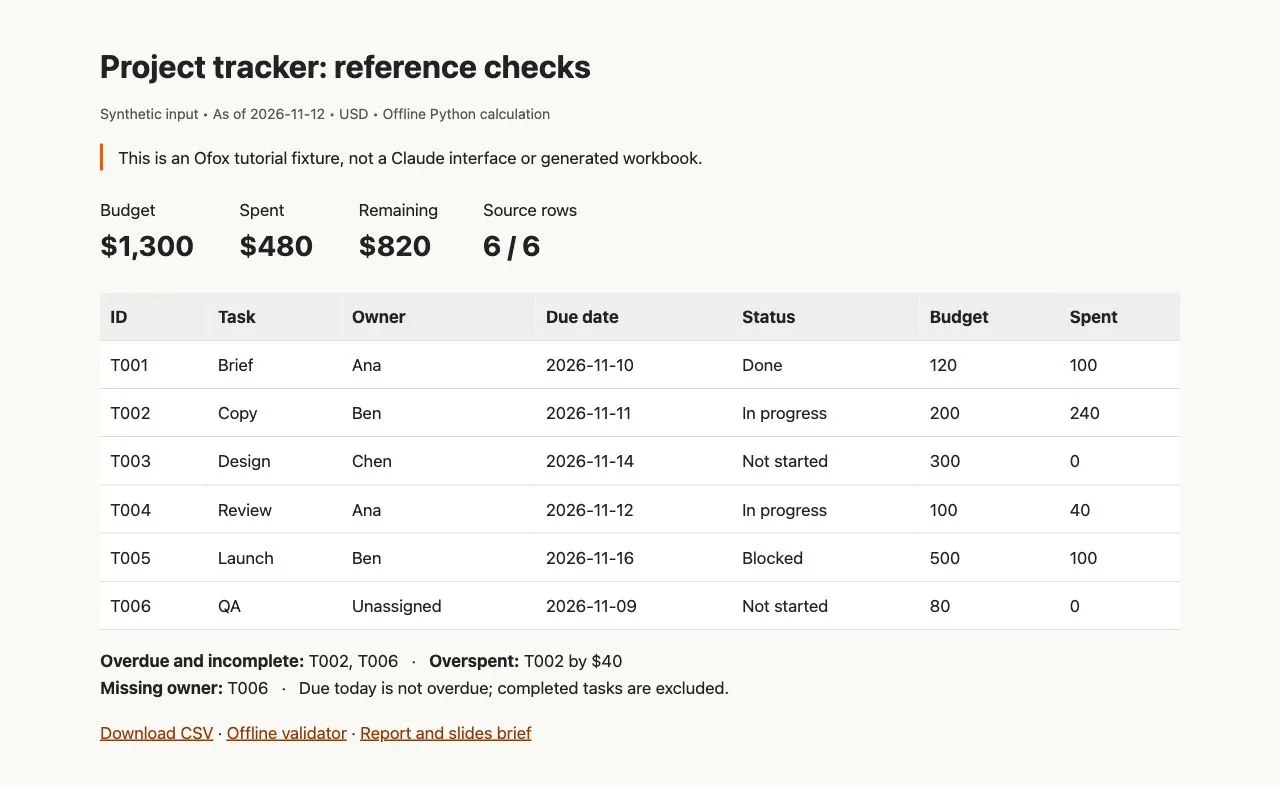
Our local fixture report. This is an independently calculated reference, not a Claude Sheets output or product screenshot.
The distinctions in the final three rows are deliberate. A blocked task is not necessarily overdue. A completed task with an old due date should not remain in the overdue list. A task due on the reference date is due today, not overdue under a strict “earlier than” rule.
Run the validator beside the CSV with python3 validate.py. It checks the supplied fixture and computes the reference results without network access. It does not execute spreadsheet formulas or validate formatting. After exporting your own result as CSV, use python3 validate.py exported.csv to check that the original IDs, amounts, dates, statuses and owners survived. Additional calculated columns are ignored; inspect their formulas separately.
Test edits, then test the handoff
A first generation is only a starting point. In a copy of your pilot, change T002’s spending from 240 to 180. The expected total spending becomes 420, remaining budget becomes 880, and the overspent list becomes empty. The overdue list stays T002 and T006 because spending did not change due dates or status.
This is a useful dependency test: if every visible metric changes, the model may have rewritten unrelated assumptions. If no metric changes, the summary may contain fixed numbers rather than linked calculations. Restore the original value before running the fixture validator, which intentionally expects the original input.
Then export a file and reopen it in the application the recipient actually uses. Check five things:
- Every source ID remains present and unique.
- Dates mean the same calendar day, particularly across locales.
- Totals match before and after export.
- A changed input updates the expected dependent cells.
- Formatting and charts remain usable enough for the delivery requirement.
Record the file format and result. A CSV can be useful for checking row values but is not a workbook-format preservation test. If formulas, multiple tabs or presentation details matter, test the workbook export as well. Never conclude that an export is fully compatible merely because a file downloaded successfully.
Collaboration requires an ownership decision
Decide who may change source values, who reviews derived numbers and where the approved version is stored. For this exercise, the missing owner should remain visibly unassigned until a person makes that decision. An AI-generated name would make the tracker look complete while making it less trustworthy.
Use a small non-sensitive pilot before moving business data. Keep the original workbook and label the pilot as a copy. If your organization requires specific contractual or data controls, have the owner check the product and plan against those requirements; this article is not a compliance assessment.
Do not replace an established approval process with an editable shared table. A collaboration feature answers who can work together; it does not decide which changes are authorized business decisions.
When the pilot fails
If the result loses IDs, ask for a row-by-row comparison with the source instead of regenerating an attractive summary. If dates shift, supply ISO dates and a fixed reference date. If a total is wrong, inspect the range and data type before changing the wording of the entire prompt. For a general CSV-to-analysis workflow and reconciliation examples, see AI Excel data analysis.
If the missing behavior is an explicitly unsupported dependency, stop treating it as a prompting problem. Keep that stage in Excel or redesign it deliberately. Claude API schema errors belong to a different execution route: our artifact-schema 400 troubleshooting guide is relevant only if you are implementing a coded integration and actually receive that error, not when the Sheets tile is absent.
Make the decision after a bounded pilot
Move the tracker only if it preserves the source, calculates the intended rules, supports the required collaboration and survives the recipient’s handoff. Keep Excel if a required dependency fails. Use a hybrid workflow when the AI-assisted drafting stage helps but the established workbook remains the source of truth.
For the next step, follow the Claude Sheets tutorial or use the Claude office feature guide to choose between a sheet, document, deck and dashboard. Ofox publishes this guide; if you want to compare another work environment, start a task in Ofox Chat with the same synthetic input and acceptance criteria. That link does not provide Claude Sheets access or imply feature equivalence.