LLM API cache costs: calculate reads, writes and real bills
Calculate LLM API cache costs without double-counting tokens. Separate reads, writes, output and retries, with a worked example and provider-specific checks.
 Ofox
Ofox 
Calculate an LLM API bill by separating ordinary input, cache reads, cache writes and output, then adding applicable fees and billed retries. A low cache-read rate does not mean all input receives that rate. A cache write can carry a different charge, and a repeated prompt is not proof of a cache hit.
This article replaces the old historical-price comparison with a method you can use for your own account. The numerical example below is synthetic, not a customer bill or an Ofox tariff. Official behavior was checked on September 16, 2026.
What changed in OpenAI’s caching rules?
The current OpenAI guide distinguishes model generations. For GPT-5.6 and later, it lists cache reads at 0.1 times the ordinary input rate and cache writes at 1.25 times that rate. The write rate replaces the ordinary rate for those tokens; it is not an additional 1.25-times fee on top.
Earlier model groups have different behavior. Do not keep using the blanket statement that OpenAI cache writes are free, or apply the newer multiplier to every model and gateway.
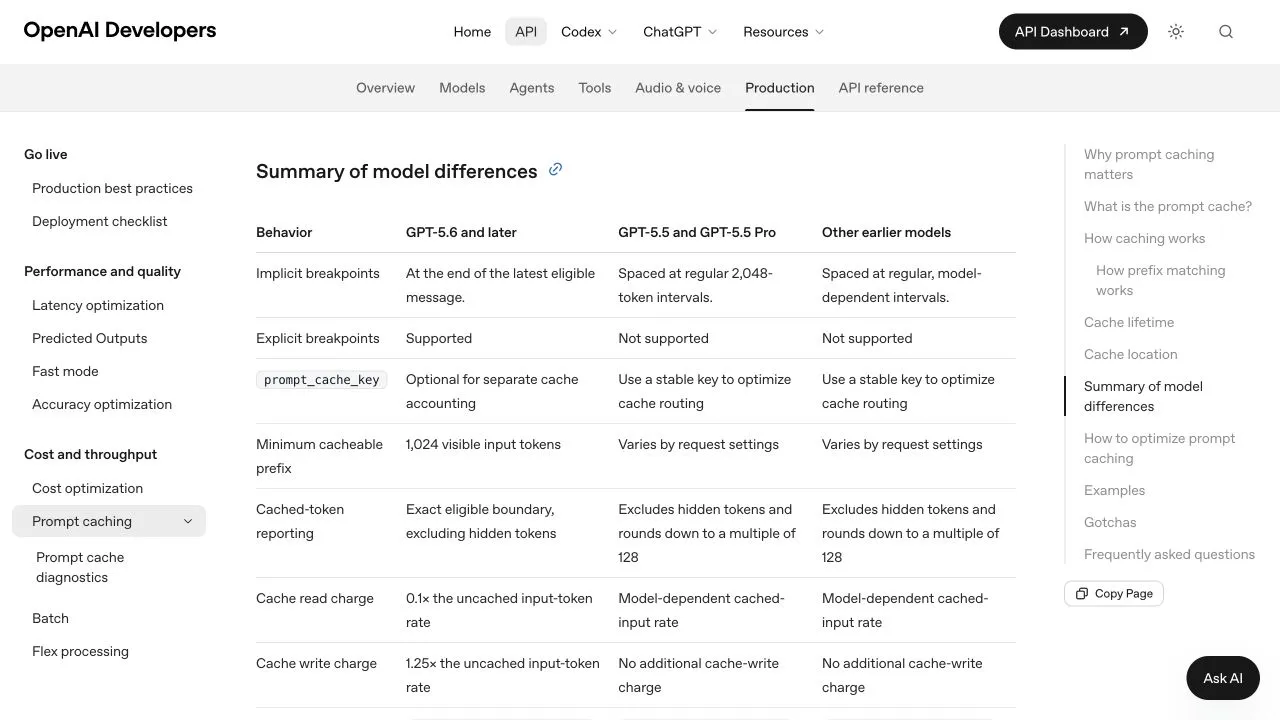
OpenAI documentation captured September 16, 2026. The table describes OpenAI API behavior, not a universal gateway price or a Codex subscription allowance.
For Anthropic, the official prompt-caching guide describes cache creation and cache reads separately, with different write rates for retention choices. Confirm the current model and retention setting before calculating. No claim is made here that Anthropic secretly changed a default retention time.
Normalize counters before applying prices
You need mutually exclusive billing categories. Some APIs include cached tokens inside total input; others report ordinary input and cache categories separately. Adding both a total and its subcategories charges the same tokens twice in your spreadsheet.
For the OpenAI Responses usage shape documented in the current caching guide:
ordinary input = input_tokens
               - input_tokens_details.cached_tokens
               - input_tokens_details.cache_write_tokens
Do not copy that subtraction into another API without checking its schema. Missing fields are not evidence that a category is free. If the schema or logs are incomplete, label the estimate incomplete and reconcile with the provider’s charge record.
For a normalized record, the formula is:
request cost = (ordinary_input * ordinary_rate
              + cache_read * read_rate
              + cache_write * write_rate
              + output * output_rate) / 1,000,000
              + additional charges
This version assumes rates quoted per million tokens in one currency. Convert per-token, per-image or other units before combining them. Do not mix a provider’s model list price with another route’s cache price.
Worked example: one write and nine reads
Synthetic assumptions: a stable 10,000-token prefix; an ordinary rate of $2 per million; write rate 1.25 times ordinary; read rate 0.1 times ordinary. There are ten requests: the first writes the entire prefix and the next nine fully reuse it. Ignore variable suffixes, output, tools and all other costs to isolate this prefix.
| Prefix processing | Calculation | Cost |
|---|---|---|
| First write | 10,000 × $2.50 / 1,000,000 | $0.025 |
| Nine reads | 9 × 10,000 × $0.20 / 1,000,000 | $0.018 |
| Total with reuse | $0.025 + $0.018 | $0.043 |
| No reuse baseline | 10 × 10,000 × $2 / 1,000,000 | $0.200 |
The prefix cost is 78.5% lower in this example. It is not a claim that a complete application bill falls by 78.5%. With no reuse, writing the prefix costs more than ordinary processing under these assumptions. Cache expiry, routing changes, additional writes or changed prefixes alter the result.
Measure hit rate across the same requests
For an API where total input includes cache reads, aggregate read tokens and input tokens first, then divide. Do not take an unweighted average of request-level percentages: one short request and one very long request should not have equal influence on a token-based rate.
Record the following for a daily or workload-level review:
| Field | Why it matters |
|---|---|
| Date, model and selected route | Prevents mixing different tariffs or services |
| Ordinary, read and write tokens | Separates the input billing categories |
| Output and billed reasoning categories | Explains cost beyond input; avoid overlap with inclusive totals |
| Retention setting and prefix changes | Helps investigate lost reuse |
| Attempts, failures and final charge | Includes billed work that did not yield an accepted result |
| Accepted tasks or images | Connects expenditure to useful output |
For a published pricing claim, retain the source and check date. Ofox prices should be verified against the GitHub-backed catalog implementation and current data for the selected route, rather than copied from an older blog paragraph. Our provider verification checklist describes the evidence to retain.
Why a cheaper rate can still produce a larger bill
A route with a cheaper ordinary-input price can still cost more if it generates more output, achieves less cache reuse or needs more attempts. Likewise, a more expensive model can sometimes complete a task with fewer repairs. Those are possibilities to test, not rankings established by this worksheet.
Compare like-for-like workloads and report cost per accepted result alongside total cost. For model choice, see the Astra and Sol comparison. For image work, use the Image 2.5 pricing guide, because token categories and other output units need separate treatment.
Frequently Asked Questions
- Does an identical prompt guarantee a cache hit?
- No. Eligibility, retained entries, exact prefix matching and provider behavior matter. Check the reported usage instead of assuming reuse.
- Can I calculate Codex weekly allowance from API token prices?
- No. An API cost calculation is not an official conversion for a ChatGPT subscription allowance. Check the actual Codex usage window separately.
- Does a missing cache-write field mean zero cost?
- Not necessarily. It can mean the selected API or logging layer does not expose that category. Confirm the schema and reconcile the charge before drawing a conclusion.