Seedream 5.5: what changed, where to try it and what to check
Understand Seedream 5.5 access, transparent output, editing and text improvements. Compare versions and use a practical checklist before moving production work.
 Ofox
Seedream 5.5 is ByteDance’s image-model release announced on November 9, 2026. Its main changes concern repeated editing, transparent assets and image detail, including text. Those are useful reasons to evaluate it, but a launch announcement does not establish that your account, API provider or export path supports every capability.
This guide separates the announced model from the service you can actually use. It also gives you a small evaluation plan for deciding whether to move an existing design workflow. We checked official material and Ofox’s public catalog on November 10. We have not run paid Seedream 5.5 generations for this article, so the prompts and acceptance criteria below are proposed tests, not reported model results.
What is new in Seedream 5.5?
ByteDance’s launch announcement describes more stable successive edits, native RGBA output and improvements in realism and text rendering. Its demonstrations and evaluation results are manufacturer evidence, not an independent Ofox benchmark.
The practical questions are narrower than whether the model is “better”:
| Announced direction | A useful task to evaluate | What counts as a usable result |
|---|---|---|
| Repeated editing | Change one product detail, then make a second revision | Required details remain correct in the final file, not just the first preview |
| Transparent output | Produce an isolated asset for a slide or product layout | The downloaded file has useful transparency and clean edges on the destination background |
| More natural rendering | Create a scene with materials that matter to the brief | Material, lighting and object geometry survive close inspection |
| Improved text | Create a poster with fixed copy | Every required string is correct and readable at the actual delivery size |
A model may pass one task and fail another. A visually attractive output with the wrong date is not an acceptable event poster. An asset that looks isolated on white is not necessarily transparent. A clean first edit does not tell you whether a later edit preserved a small label.
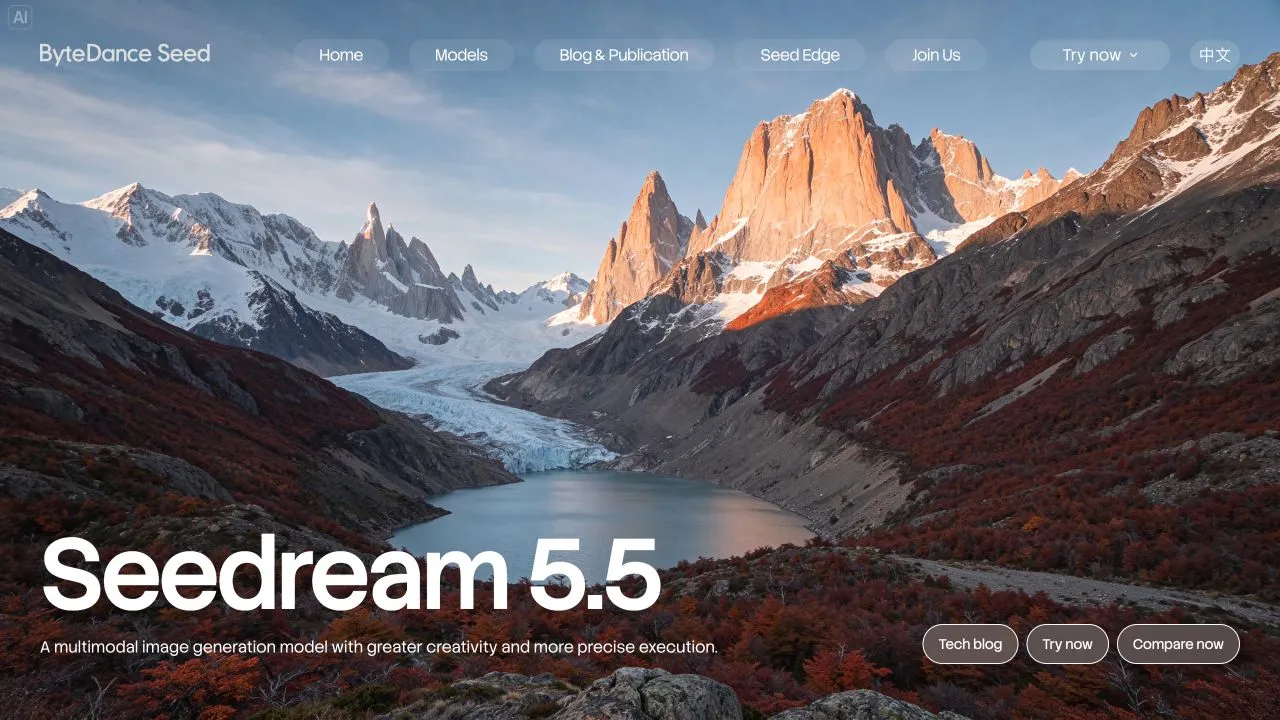
Official English product page captured November 10, 2026. This is a screenshot of ByteDance’s page, not an Ofox generation or evidence of account access.
Where can you try it?
Start from the official Seedream 5.5 page rather than a third-party page that only includes the model name in its headline. Follow its product or playground links, then inspect the model selector in the service you reach.
The Chinese launch notice says rollout is taking place across Jimeng, Doubao, Doubao Work and Volcengine Ark. It describes these entry points:
- Jimeng web: creation, then generation or canvas, then the Seedream 5.5 model choice.
- Doubao app or web: image generation, then the Seedream 5.5 choice.
- Doubao Work: skills, then Seedream 5.5.
- Ark experience center: visual models, image generation, then Doubao-Seedream-5.5.
These are the vendor’s published routes. Availability can differ by account and region; we did not complete a signed-in generation through them. If your selector does not show the version, do not assume a nearby “Seedream” option is equivalent. Record the visible version and use the platform’s support channel to clarify access.
For a first test, save four details together: service name, selected version, generation date and the original downloaded file. A screenshot of a model selector helps document which service you used, but it does not replace the output file or establish the backend beyond what the service reports.
Is Seedream 5.5 available through Ofox?
We did not find Seedream 5.5 in the Ofox public catalog checked on November 10. The same snapshot listed these earlier models:
| Ofox public ID | Catalog version | Do not infer |
|---|---|---|
volcengine/doubao-seedream-5.0-pro | Seedream 5.0 Pro | That selecting it invokes 5.5 |
volcengine/doubao-seedream-5.0-flash | Seedream 5.0 Flash | That it supports 5.5’s new output behavior |
You can inspect the current Ofox model catalog and model directory. A listing is evidence of catalog availability, not proof that a particular request, parameter or export format works. Before building an integration, confirm the exact model ID, supported endpoint, request fields and returned data with that provider.
There is deliberately no invented Seedream 5.5 Ofox request in this guide. Renaming a 5.0 model ID to include 5.5 is not an integration procedure. Likewise, parameters copied from another image model may be rejected or interpreted differently. Use our image API error guide to separate invalid IDs, unsupported request fields, authentication problems and request failures once you have an actual endpoint and response.
Open Ofox Chat if you want to work with the image tools currently available in your account. Check the available model before generating; this link is not a claim that Seedream 5.5 has launched in Ofox Chat.
Seedream 5.5 versus 5.0: what should change in your evaluation?
The version names matter. Seedream 5.0 Lite was announced in February, while Seedream 5.0 Pro arrived in July. Neither is another name for the November 5.5 release. The 5.5 launch also says a Pro version will follow; do not label the initial release “5.5 Pro” without a separate confirmed release.
This is a documentation-based comparison, not a measured ranking:
| Your current workflow | Why evaluate 5.5 | What you should keep unchanged during comparison |
|---|---|---|
| Cut out a generated object after generation | Native transparency could remove a separate cleanup step | Subject, canvas, required edge detail and destination background |
| Revise the same image repeatedly | The release focuses on preserving unedited content | Original source, edit sequence and protected details |
| Generate a poster, then manually replace errors | Text quality is a highlighted improvement | Exact copy, hierarchy, output size and proofing method |
| Run a stable 5.0 API integration | A new model might suit specific tasks | Existing production route until the replacement passes your checks |
Do not compare a high-resolution 5.5 result with a compressed 5.0 preview and call the difference a model advantage. Download originals, use equivalent settings where the services expose them, and label any unmatched settings. If you cannot obtain both versions under comparable conditions, publish a feature comparison rather than a performance claim.
A reasonable decision can be task-specific: keep an existing route for routine drafts and evaluate the new one only for transparent asset delivery. You do not need to migrate every workflow at once.
A compact evaluation you can repeat
Use one fictional product or an asset you have permission to process. Avoid confidential customer material for the first test. Write the acceptance requirements before looking at results so that an attractive image does not move the goalposts.
Test 1: reusable transparent asset
Ask for one isolated object with a transparent background. Download the original file, check its alpha channel and composite it over white, dark and saturated backgrounds. Inspect the edge at the intended display size and at full resolution. Reject an opaque checkerboard, a white fringe or an entirely invisible output.
Follow the Seedream 5.5 transparent PNG guide for a complete prompt and a local checker. The checker does not call a model or consume API credits.
Test 2: two controlled revisions
Choose a source containing a clear foreground object, a small label and a background reference detail. Make one change per turn. Save every output and record which accepted revision became the next input. Compare each revision with its immediate parent and inspect the final version against the original requirements.
Use the multi-turn editing workflow to define protected areas, detect drift and recover from a bad revision. The manufacturer’s long edit demonstrations are not a promise that your asset will survive the same number of turns.
Test 3: a poster with fixed copy
Prepare the exact headline, date, time, venue and action line. Keep the copy constant across model runs. Inspect the final image against that manifest; do not rely on the model to certify its own spelling. If critical details are wrong, keep the image as background artwork and add the verified text in a design tool.
The poster text and prompt guide includes a complete fictional brief, a correction prompt and a field-by-field proofing process.
How to compare cost without inventing a price
We are not quoting a verified Seedream 5.5 Ofox price. Product credits, API pricing and bundled subscriptions are different billing systems. Check the selected service’s current terms and the actual charge for the request you are evaluating.
For your own test, record:
service and exact model:
resolution / output dimensions:
number of requests and returned images:
credits or currency charged:
accepted final assets:
manual cleanup time:
failed attempts and whether charged:
Divide the total charge by the number of accepted assets to calculate your observed generation cost per accepted asset. If none pass, report zero accepted assets and the money spent; do not divide by zero or report the nominal cost of a successful result. Keep manual time separate unless you explicitly assign it an hourly cost. A cheaper request can still be a more expensive workflow when it requires several reruns and cleanup.
Common access and output problems
The model is missing from the selector. Confirm the service and account. A global announcement does not mean every regional product or provider has rolled out the model. Do not substitute another version without relabelling the test.
The provider says the model ID is invalid. Obtain the ID from that provider’s current documentation or catalog. Product names, upstream IDs and gateway aliases are not interchangeable.
The picture looks transparent but exports with a background. Inspect the original download, not a screenshot or chat preview. Follow the alpha check before regenerating; the export path may be the issue.
One edit succeeds but another detail changes. Return to the last accepted revision. Narrow the next change and decide whether exact compositing is more appropriate than further generation.
The headline is correct but small print is wrong. Proof every required string. Move essential copy to an editable text layer when image generation cannot meet the accuracy requirement.
For now, treat Seedream 5.5 as a new candidate with specific capabilities to verify. The useful deliverable is an asset that passes your task’s checks, plus enough records to reproduce the workflow—not a model name attached to an attractive preview.