Seedream 5.5 poster prompts: keep headlines and small print correct
Build a poster from an approved copy sheet, use complete prompts and proof the exported image. Includes a fictional brief, correction workflow and reusable CSV.
 Ofox
To make a poster with Seedream 5.5, start with approved copy, separate the text hierarchy from the visual brief and proof every required string in the downloaded result. If a date, price or other essential line is wrong, a good-looking layout is still a failed delivery. Keep a fallback: generate the artwork and add exact copy as editable text.
ByteDance’s launch announcement describes improved text rendering. This is a vendor claim, not a guarantee of error-free typography. The prompts below are templates we have prepared, not Seedream 5.5 outputs we have generated. The example event is fictional; replace its details before using it for any real publication.
Choose between a finished image and editable copy
There are two useful production routes:
| Route | Appropriate when | Main tradeoff |
|---|---|---|
| Generate artwork and copy together | You need to explore a poster concept with a fixed, short message | Text is part of the raster image and must be checked after every revision |
| Generate artwork with reserved text space, then typeset | You need exact copy, frequent changes or multiple languages | You must complete the layout in a design or presentation tool |
The second route is often easier to control when the same campaign has several dates, locations or language versions. Changing editable text does not require generating the background again. The first route can help explore how visual treatment and wording interact, but an image file is not an editable design document.
Neither route removes the need to proof the final export. A design tool can clip text, substitute fonts or make small copy unreadable after resizing. The acceptance target is the file and size the reader will actually see.
Confirm access and prepare a copy sheet
Check the Seedream 5.5 version and access guide first. As of our November 10, 2026 catalog check, we had not found Seedream 5.5 in Ofox’s public model list. This article does not claim that a particular Ofox Chat account can select it or that any prompt enables an unavailable model.
Before generation, put the exact copy in a document or spreadsheet. Keep it separate from visual instructions so that the words cannot be mistaken for a description of the scene. The downloadable kit includes poster-copy.csv with this fictional English brief:
| Field | Approved text | What to inspect |
|---|---|---|
| Headline | Repair instead of replace | Exact words and order |
| Subtitle | Bring one small household item | No omitted or added words |
| Date | Saturday 21 November 2026 | Day, date, month and year |
| Time | 10:00–12:00 | Both times and the separator |
| Venue | Studio 4 | Correct numeral |
| Price | Free entry | No contradictory price elsewhere |
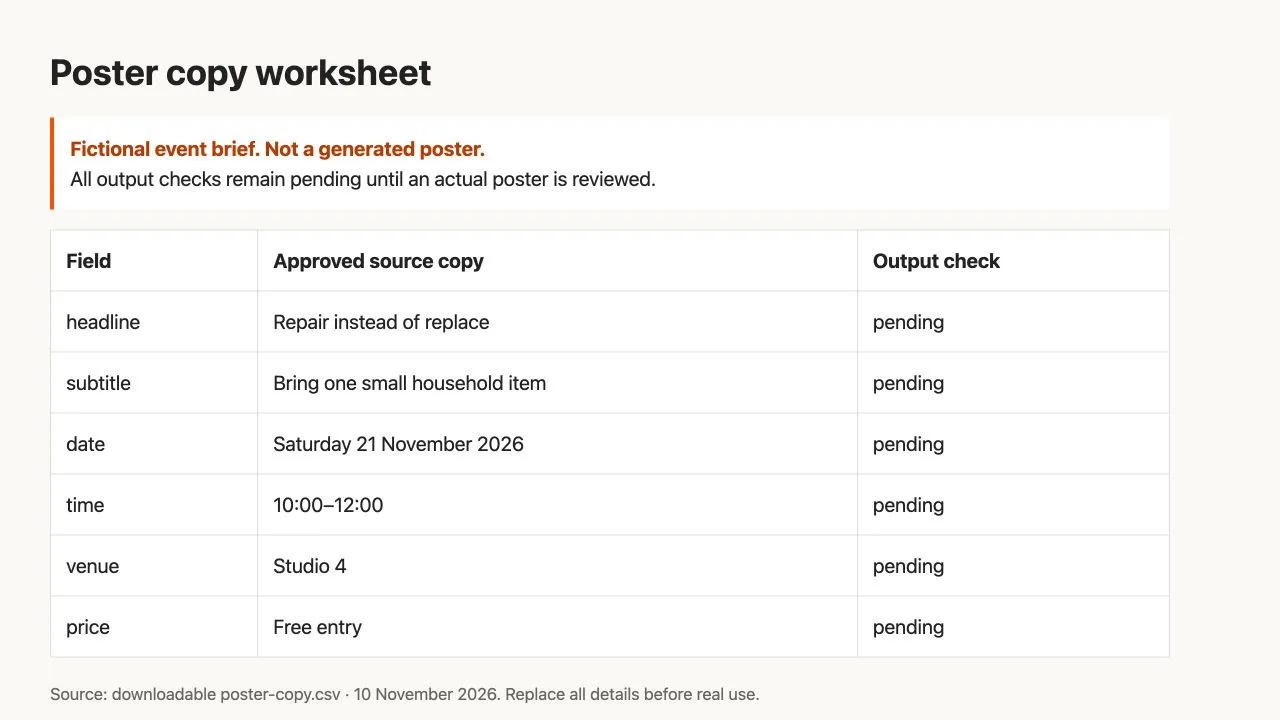
Actual browser view of the supplied CSV rendered as a worksheet. This is a fictional source brief, not a generated or approved poster.
Also record the final delivery size, orientation and channel. A poster intended for a phone screen needs a check at that size. A larger raster file can provide more pixels, but it does not guarantee correct spelling, readable hierarchy or suitable print preparation.
For a real event, verify the underlying details before writing the prompt. An image model should not decide whether the date, address or price is accurate. If the source brief is wrong, perfect rendering will faithfully reproduce the wrong information.
Prompt 1: compose a poster with short, fixed copy
This complete template separates layout, exact strings and restrictions. Replace the fictional brief with approved material. The prompt has not been tested with Seedream 5.5.
Create a portrait event poster for a fictional community repair workshop.
Use a warm off-white background, dark charcoal text and a restrained orange accent.
Include a simple illustration of a repaired desk lamp in the lower half.
The illustration must not compete with the event details.

Text hierarchy:
1. Large headline in the upper third.
2. Smaller subtitle directly below it.
3. Date, time and venue in a clearly separated information block.
4. A short entry statement near the bottom.

Use only these exact text strings:
Headline: Repair instead of replace
Subtitle: Bring one small household item
Date: Saturday 21 November 2026
Time: 10:00–12:00
Venue: Studio 4
Entry statement: Free entry

Do not paraphrase, translate, duplicate or invent any text.
Do not add a logo, sponsor, web address, QR code or extra event details.
Use straightforward letterforms and enough space between the information lines.
Keep every required line fully inside the canvas with a clear margin.
Select the actual aspect ratio and size through the interface if supported. A sentence in a prompt is not proof that the service will return a particular pixel dimension. Save the original output and record the selected settings with the copy sheet.
If a draft looks crowded, reduce content or give the information block more space before demanding smaller type. A dense poster is harder to proof and harder to read, even when all characters are technically present.
Proof the image in two passes
Pass 1: exact content
Open the original downloaded file next to the copy sheet. Inspect one field at a time and mark it as correct, incorrect or unreadable. A missing field is incorrect; an uncertain character is not a pass.
Check short lines carefully. A wrong 4 in the venue or an omitted digit in the time can be more damaging than an imperfect decorative heading. Look for duplicated lines and invented details elsewhere in the image as well as the expected text block.
OCR can help flag differences, but it is not the final judge. It may miss a stylized letter, normalize punctuation or misread a correctly drawn character. Compare any OCR discrepancy with the visible image. Do not ask the same model to describe its output and treat that description as proof that the pixels contain the right words.
Pass 2: readability and layout
View the poster at the actual display size. Verify that the headline is identifiable, the information block is legible and no important line is cut off. Then inspect at full resolution for malformed letters, broken joins and crowded spacing.
The two passes answer different questions. A line can be spelled correctly but too small to read. A beautiful line can contain the wrong date. Keep both results in the review column of the CSV instead of marking the whole poster “looks good.”
Prompt 2: correct one field without rewriting the brief
If only one field is wrong and the layout is otherwise acceptable, try a controlled correction from that saved draft:
Edit the attached poster. Change only the date line to:
Saturday 21 November 2026

Preserve the headline, subtitle, time, venue and Free entry statement exactly.
Keep the illustration, background, layout, margins and all other content.
Do not add new text or change the wording of any other line.
This is an untested correction prompt. After the edit, recheck all required fields, not just the date. A local instruction can still produce a broader visual change. Use the multi-turn editing workflow to keep an accepted parent and inspect protected areas.
Set a stopping rule before repeating paid generations. For example, a team can decide to try one targeted correction and then typeset essential copy manually if it still fails. That is an editorial workflow choice, not an estimate of Seedream’s success rate. Record attempts and charges if you are evaluating cost.
Prompt 3: generate artwork, then add exact text yourself
When exact text is essential, ask for a background designed to accommodate it:
Create a portrait background illustration for a community repair workshop poster.
Use warm off-white, dark charcoal and one restrained orange accent.
Place a simple repaired desk lamp illustration in the lower half.

Leave a large quiet area in the upper third for a headline.
Leave a separate uncluttered area below it for date, time and venue.
Keep the bottom margin clear for a short entry statement.

Do not draw any letters, numbers, words, logos, labels, signatures or QR codes.
Do not fill the reserved text areas with decorative objects or strong texture.
Import the downloaded artwork into your design or slide editor. Set it as the background, add the approved strings as editable text and keep those layers separate. Use a font with the characters your language needs. Export a preview, compare every field with the copy sheet and check the final dimensions.
If you need an isolated decorative element instead of a complete background, use the transparent PNG prompt and verification guide. Confirm actual alpha before placing the asset over the poster. A white rectangle around an illustration can disrupt the layout even when the illustration itself is good.
Localize the copy, not just the prompt
For a Japanese, Russian, German or Brazilian Portuguese version, prepare a separately approved copy sheet in that language. Do not ask the image model to both translate and render essential event information in one unreviewed step.
Text length, line breaks and font coverage can change the composition. Inspect diacritics, punctuation, numerals and any script-specific forms in the actual export. A short English headline fitting in one line does not establish that the translated version will fit in the same space.
The rollout evidence reviewed for this guide does not establish a measured accuracy rate for each of those languages. Do not turn a general text-rendering claim into a language-specific guarantee. For multilingual campaigns, the artwork-plus-editable-text route gives you a clear way to retain a common visual while approving each language independently.
Diagnose the failure before spending on another attempt
| Problem | Likely workflow question | Next step |
|---|---|---|
| Missing information line | Was the copy too dense or the instruction ambiguous? | Simplify the hierarchy and reserve explicit space |
| Wrong date or price | Was the source brief correct, and did the output match it? | Correct the brief or field; reproof the entire result |
| Garbled small text | Is the copy readable at delivery size? | Increase space, reduce copy or typeset separately |
| Text changes after an illustration edit | Was the full poster regenerated? | Return to an accepted parent or preserve editable text layers |
| Original is clear but published version is blurry | Was the export or upload resized/compressed? | Compare the original, export and published asset |
| Request returns an error, not an image | Is the ID or parameter supported by this provider? | Read the error and consult the image API troubleshooting guide |
Finish by delivering the approved image, the copy sheet and, when available, the editable source. Keep an explicit note of any manual typography or compositing. That makes the work reusable for the next event and keeps a model-assisted concept from being mistaken for a fully verified final poster.