Test an OpenAI-compatible API before connecting it to an agent
Run separate checks for chat, strict JSON, a full tool-call round trip, SSE completion and validation errors. Includes a Python probe and local failure tests.
 Ofox

A successful chat request does not prove that an OpenAI-compatible API can run your agent. Test the operations the agent needs: structured output, a complete tool-call round trip, streaming completion and usable errors. Record the endpoint and exact model for each test. Compatibility is a property of a particular route, request and response—not a permanent badge for a provider.
This guide supplies a small Python probe for the Chat Completions shape. It sends at most six requests and performs no automatic retries. It is deliberately separate from an OpenCode, Copilot or n8n setup tutorial: configure the client after checking the route it will call, then test the client itself. A pass here does not certify Responses API support, load handling or every parameter your application uses.
Download the probe and understand its scope
Download check_api.py. Its five checks cover six requests because a tool round trip requires the initial model call and a second call containing the tool result.
| Check | What the script requires | What a pass does not prove |
|---|---|---|
| Basic chat | A parsed Chat Completions response containing the requested short answer | Tool calling, streaming or vision |
| Structured output | Strict-schema request accepted; returned JSON passes the schema and known-value checks | Every JSON Schema keyword or reliable extraction from arbitrary data |
| Tool round trip | Correct function name, arguments and call ID; local result sent back; exact final answer | Streaming tool arguments, parallel tools or remote tool safety |
| Streaming | SSE content type, parsed events, expected text, stop and [DONE] | Responses event compatibility or reconnect behavior |
| Validation error | An invalid field type produces HTTP 400/422 and a JSON error object | All error types, retry policy or provider billing rules |
The local regression harness replaces HTTP calls with fixed responses; it opens no sockets and does not need a key. Place it beside check_api.py, install the dependencies below, then run:
python test_check_api.py
python -O test_check_api.py
On November 7, 2026, all nine fixtures produced their expected outcomes in both modes: a valid exchange, a truncated stream, a wrong tool answer, a wrong tool type, invalid schema values, a wrong chat answer, null content, an authentication error and a rate-limit error. These are actual local checker tests, not hosted-model calls. A fixture passing means its observed status matched the expected status; the intentionally broken responses should not all return PASS. Do not cite a mock PASS as a live provider result. A real result needs its own dated run record, route, model and usage evidence.
Establish the endpoint and cost boundary
Copy the documented API root for the selected provider. For example, a root ending in /v1 becomes /v1/chat/completions in this script. Do not supply a full /chat/completions path or a model detail page as the root. Check whether the selected model supports this protocol before spending time on credentials.
For Ofox, start with the current API documentation and the exact model’s documentation. “OpenAI-compatible” does not mean a model supports every OpenAI endpoint. If your model requires Responses for tools, use the Responses migration walkthrough instead of trying to fix this Chat Completions probe by changing only the URL.
Choose a low-cost model you are authorized to call, inspect its current price and set an account-level spending limit where available. The probe requests a small output-token cap and uses synthetic prompts, but a token parameter is not a guaranteed dollar cap. A provider can reject or handle that parameter differently, and reasoning-token behavior varies. Do not run it against an expensive model merely because the examples are short.
The default cap field is max_completion_tokens. If the provider documents max_tokens for the selected model, use the corresponding flag below. A rejection of the cap field means you must align the request with the documented contract; it does not prove that the provider cannot generate text.
Install and run one controlled test
Use a current Python 3 environment with a supported TLS library. Create a virtual environment so the test does not change your application’s dependencies:
python3 -m venv .venv
source .venv/bin/activate
python -m pip install requests jsonschema
Set LLM_API_KEY using your usual local secret-management method. Do not put the key in the command line, a public notebook, a screenshot or the downloaded script. Use a temporary, limited credential when your provider supports one.
python check_api.py \
  --base-url https://api.example.com/v1 \
  --model YOUR_EXACT_MODEL_ID \
  --token-field max_completion_tokens \
  --max-output 256 \
  --out first-run.json
api.example.com and YOUR_EXACT_MODEL_ID are placeholders; substitute the documented endpoint and your actual model. The script requires HTTPS except when explicitly running a local loopback fixture. It disables redirects so a misconfigured destination cannot silently forward the bearer credential elsewhere. It refuses to overwrite an existing report; give a repeat run a new filename.
It uses connection/read timeouts and checks a best-effort deadline between complete SSE lines. This is not a hard wall-clock timeout: a server that trickles an incomplete line can keep a read active. Run this starter interactively, interrupt a stalled request and do not use it as an unattended production health monitor without implementing a real process-level deadline and response-size limits.
Read the results as evidence, not a score
PASS means the returned value met this specific check. FAIL means the request was rejected or an expected contract condition was not met. UNKNOWN means a transport problem or an unexpected shape prevented a reliable conclusion. Read the detail field and the actual HTTP status before deciding what to change.
A network failure is not evidence that tool calling is unsupported. A 401 is not a JSON Schema failure. A 429 during the deliberately invalid request is not proof that the server validates parameter types: it may have rejected the request before reaching validation. The checker therefore does not accept authentication or rate-limit errors as a successful validation-error test.
Do not average the five labels into “80% compatible.” An agent that requires tools cannot use a route merely because four unrelated checks passed. Keep a requirement matrix for your application and mark each operation required or optional.
A real six-request run through Ofox
On November 7, 2026, we ran the downloadable checker against https://api.ofox.ai/v1 with the account-listed model ID openai/gpt-6-luna, requesting max_completion_tokens: 256. There were six requests, including the deliberately invalid request, and no retries. The actual machine-readable result records response timings and returned usage.
| Check | Observed result |
|---|---|
| Basic chat | PASS: the required answer and normal completion |
| Structured output | PASS: schema and the known SKU/quantity values matched |
| Tool round trip | PASS: the second response equaled 17 |
| Streaming | PASS: text, finish reason and [DONE] were present |
| Invalid parameter | PASS: HTTP 400 with a JSON error object |
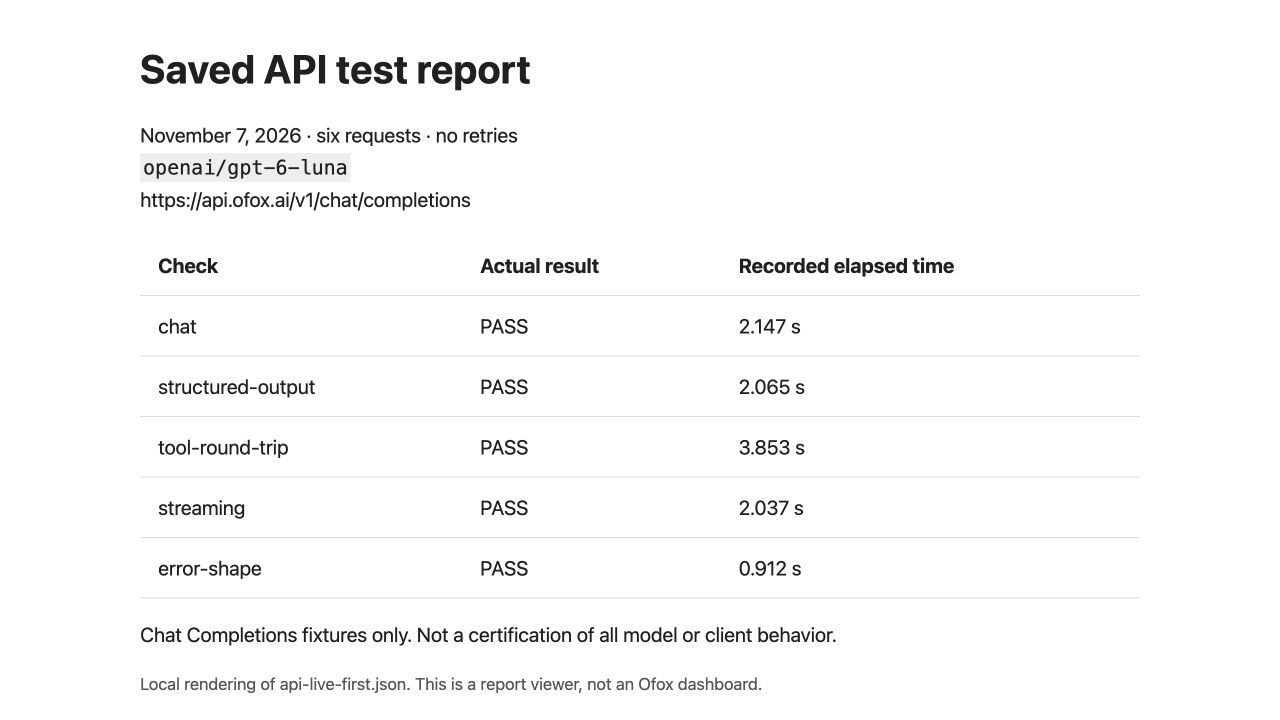
This screenshot renders the saved JSON locally; it is not an Ofox dashboard or an additional live test.
These results describe this model, route and fixture at the time of the test. They do not certify all models, prove strict-schema enforcement internally, or establish compatibility with Responses, streaming tool arguments, fallback or your agent client’s additional parameters. The invalid request returning 400 is the expected successful check, not a service outage.
Why the tool result must go back to the model
A response containing tool_calls only establishes the first half of the interaction. The application must validate the call, execute an allowed tool and return its result with the matching call ID. The second model response must use that result correctly.
The probe exposes one read-only local lookup, lookup_stock. The synthetic SKU 000102 returns a fixed stock of 17. It checks the tool type, name, JSON arguments and call ID before returning that result. It then requires the final answer to equal 17 exactly. It never executes shell commands or arbitrary function names supplied by a model.
This narrow task makes a failure easy to investigate. If the first call is correct but the second request fails, inspect the tool-result message shape and call ID rather than switching models immediately. If the final answer is 170, that is a failure, not a success because the string happens to contain “17.” The checker uses explicit validation exceptions; its checks remain active when Python runs with optimization enabled.
For real applications, validate arguments against your schema, restrict allowed operations and handle permissions before execution. A valid tool call is not authorization to send an email, make a payment or modify a database.
Distinguish valid JSON from a completed task
The structured-output fixture asks for {"sku":"000102","quantity":3}. The schema requires the SKU to be a string, the quantity to be an integer, both fields to exist and no additional properties. The checker validates the schema, then compares the values with the known task answer. One conforming answer does not prove that the server enforced strict mode: a model could produce it even if the gateway ignored the field. Treat this as observed behavior for the supplied fixture, not proof of server-side schema enforcement.
This catches different failures. JSON can parse while the SKU loses its zeros. A value can have the correct type but be wrong. A server can reject the strict-schema request even when ordinary JSON-mode responses are supported. Those are different capabilities, so preserve the exact request rather than silently removing strict to get a green result.
The OpenAI structured-output documentation distinguishes structured responses from function calling. Use the contract for your chosen endpoint; copying a response-format field from one API shape into another is not a compatibility test.
If extraction is your actual task, continue with a known-answer document and the text-to-JSON validation workflow. A tiny fixed schema is only an initial probe.
Check the end of a stream
A stream that prints some text can still be incomplete. This probe reads SSE events, combines text deltas, records a finish reason and requires the Chat Completions [DONE] sentinel. It fails a truncated stream even if the partial text looks reasonable.
This is the selected profile’s expectation, not a universal rule for all APIs. Responses uses different event shapes. Providers can also differ in how they report usage at the end of a stream. The probe does not request stream_options and records absent streamed usage without treating absence alone as a failure. Test the provider’s documented usage option separately if your billing or monitoring depends on it.
After a disconnect, avoid blindly replaying a workflow that may already have performed a side effect. First determine whether any tool or downstream action ran. Our stream-disconnect troubleshooting article covers a specific client failure; a generic network retry cannot guarantee an agent resumes safely.
Resolve failures at the layer that owns them
| Observation | Investigate first |
|---|---|
| Every request returns 401/403 | Credential, account access and endpoint authorization |
| 404 or model-not-found | Actual URL, model ID and account availability; see model-not-found troubleshooting |
| Chat passes, strict schema fails | Documented response-format support and accepted schema subset |
| Tool request fails immediately | Protocol, model capability and request fields |
| Tool result request fails | Call ID, message history and tool-result format |
| Stream produces text but never completes | SSE framing, proxy buffering, connection termination and profile mismatch |
| n8n credentials pass but execution fails | The operation’s actual endpoint; see n8n endpoint diagnosis |
Once the required checks pass, configure OpenCode’s custom provider or your chosen client and repeat a small task through it. The client may send fields this probe never uses. Preserve both results rather than assuming a direct API pass guarantees the application’s behavior.
Before sharing a report, remove private endpoint names, request IDs or account-specific content if present. The sample report contains only synthetic task output, model identity, timings, statuses and usage; it does not write the key. Keep your own dated evidence when changing a model version or provider route. That is more useful than a blanket “compatible” label.