Summarize a long PDF in chunks without losing pages or source references
Split a PDF into traceable batches, keep original page numbers, resolve amendments and check what the summary missed. Includes a 24-page practice file and splitter.
 Ofox

When a PDF is too large to process reliably in one pass, divide it into identified batches, extract evidence from each, and merge the evidence before writing the summary. Splitting the file alone is not enough. You need to know which original pages reached the assistant, which facts were retained, and whether a later amendment changes an earlier answer.
This tutorial provides a small, author-created 24-page practice report and a local splitting script. The file is deliberately easy to inspect. It demonstrates page tracking and conflicting revisions; it is not an experiment showing that 24 pages exceed a model’s context window, nor a benchmark of long-context recall.
Diagnose the limit before splitting
“Too long” can mean different things. An upload can fail because of a file-size restriction. A scanned document may have no extractable text. A request can exceed the selected model’s input allowance. A response can stop because the output allowance is too small. A tool can also accept the file but use retrieval, so you cannot assume the entire document entered a single model request.
These failures require different remedies. Compressing images can reduce bytes without reducing extracted text. Asking for a shorter summary changes the output request, not necessarily the input. Changing the model name does not fix an upload route that rejects PDFs.
Check the interface’s exact error, whether the file is searchable, its page count and the task you asked for. Record the model and date when evaluating a service; limits and supported inputs can change. Our context-window explanation separates context size from output limits. Do not estimate a hard token limit by multiplying megabytes or pages by a universal constant.
Get a document with a known answer
Download the 24-page project report, splitter and reference facts. Keep the reference facts out of the assistant’s input until you evaluate the result.
The report includes an initial USD 120,000 pilot budget on page 1, a launch date of December 15, 2026 on page 12, a launch-date amendment on page 17 and a budget amendment on page 22. Page 9 explicitly identifies itself as intentionally blank apart from its identifying note. This tests whether the workflow distinguishes “reviewed and no relevant content” from “not processed.”
The target output is a decision table with the current launch date, current budget, their previous values and source pages, plus the dependency that could block the pilot. A fluent overview that omits the amendments does not complete that task.
Make a coverage manifest before sending anything
For the practice file, use Python 3 and PyMuPDF in an isolated environment:
python3 -m venv .venv
source .venv/bin/activate
python -m pip install pymupdf
python split_report.py sample-project-report.pdf report-batches \
  --max-pages 6 --max-chars 12000
The script creates a new output directory, four batch PDFs, four text files and manifest.json. You can also download the prepared practice batches; these were generated by the script, not by a model. It refuses to reuse an existing directory so you do not silently replace an earlier test. Each text page begins with its source filename and original PDF page number. The manifest records the source SHA-256, total pages and the original pages in each batch.
The character limit is a workflow control, not a tokenizer. The six-page limit keeps this exercise easy to review. Tune both to the actual model, content density and output budget. If one page alone exceeds the character target, the script records it as oversized rather than silently cutting it. Split that page by meaningful sections and keep the page reference attached to every section.
The script’s assertion verifies that each original page is assigned once. That establishes file coverage, not that the model read every page. You still need the per-batch evidence and final checks below.
Inspect pages with missing or misleading text
A page with empty extracted text enters needs-visual-review-or-OCR. It must not automatically be marked blank. It could contain a scanned table, diagram or handwritten note. Open the original page, determine whether it is relevant, and supply an image or OCR result through an interface that supports it.
PyMuPDF’s page documentation describes text extraction and OCR as distinct operations. This starter script uses text extraction; it does not silently invoke an OCR engine or promise to understand charts. A PDF that already has text can still have a bad reading order. Check multi-column pages, footnotes and tables in the rendered document before relying on the extracted sequence.
If a table spans a boundary, move the split to a natural break or include the adjoining page as explicit overlap. When using overlap, record it in the manifest and deduplicate evidence by source page and fact, not by deleting similar sentences indiscriminately. The provided splitter makes non-overlapping page batches; it does not automatically infer section or table boundaries.
Extract evidence from one batch at a time
Use the batch PDF when page layout matters, and the labeled text when a text route is appropriate. Keep batches separate enough that you can identify their outputs. Attach the relevant batch plus manifest.json, or paste that batch’s mapping into the request. For example, batch 3 contains original pages 13–18; page 5 in its split PDF is original page 17. The text file already carries original-page markers. Do not attach the reference-answer JSON during extraction. In a file-capable assistant such as Ofox Chat, confirm the attachment and use the original-page map rather than trusting the split PDF’s page counter.
Use this prompt with each batch:
Read only this attached batch of the synthetic project report.
The supplied manifest maps batch pages to original PDF pages.

Return two tables:
1. Coverage: every assigned original page, status (reviewed, no relevant
   content, unreadable, or missing), and a short reason.
2. Evidence: decision/risk, exact value or date, approval/effective date
   if stated, original source page, a short supporting excerpt, and whether
   the source says it supersedes another value.

Extract the pilot launch date, budget, blocking dependencies and their
amendments. Preserve old and new values; do not silently reconcile them.
Do not guess facts from another batch. A blank page is reviewed only after
you inspect it. Report unreadable pages and missing attachments explicitly.
Do not use web sources or invent page references.
Save each response with its batch number. A single final paragraph gives you nothing to reconcile if the model skips a page. For private reports, attach only material you are authorized to process and remove irrelevant sensitive sections before sharing.
Merge evidence before writing prose
After all four batches have evidence tables, merge those tables rather than asking the model to remember four long conversations. Preserve a separate record for each supported assertion. Resolve a newer value only when the document establishes that it replaces the old one; chronological order alone is not always sufficient.
Merge these four evidence tables for the same source report.
For each current decision, retain the earlier value, the amendment,
approval date, original pages and supporting excerpts. Mark unresolved
conflicts instead of choosing silently. Identify missing batch outputs.

Produce:
- A current-decisions table.
- A superseded-values table.
- A page coverage table for original pages 1 through 24.
- A short summary supported only by the reconciled evidence.
List any claim that still requires checking against the original PDF.
For the practice file, the current launch date is January 12, 2027, supported by page 17, which explicitly supersedes page 12. The current budget is USD 135,000, supported by page 22, which explicitly supersedes page 1. Page 8 says the vendor security review must complete before the pilot begins. Keep those references visible next to their claims.
Do not feed the known answers into the extraction prompt and then report that the model found them. Use them only for evaluation. If the model gets a value wrong, preserve that first result and show the correction separately.
Check three kinds of completeness
Input coverage: the manifest assigns all 24 original pages; every expected batch exists. A successful upload is not evidence that all files were processed.
Processing coverage: each batch output lists its assigned pages, including the no-relevant-content status for page 9. Self-reported coverage is useful bookkeeping, but is not proof by itself. Check the page contents independently.
Answer coverage: the final answer includes the required date, budget and dependency, with the right amendments and source pages. Check facts from the beginning, middle and end rather than only the first paragraph. In real documents, also inspect an unrequested but material exception to test whether the summary is hiding a limitation.
The practice exercise can pass only when all three layers agree. A 24/24 coverage counter with an obsolete date is a failed answer. A correct date with invented source page 25 is also a failed answer.
What the real four-batch test returned
On November 7, 2026, we attached the four batch PDFs and manifest.json to one Ofox Chat conversation, without the reference answers or the unsplit PDF. The request required a separate evidence sheet for each batch before merging decisions, one coverage row per original page, supporting quotations, preserved earlier values and an exceptions sheet. This was one conversation processing four prepared batches, not four isolated model sessions or a test of a maximum context window.
Download the actual audit workbook and Markdown decision report. The workbook contains four batch sheets plus Coverage, Decisions and Exceptions.
| Acceptance check | Observed and independently checked result |
|---|---|
| Original-page coverage | Exactly one coverage row for each page 1–24; no missing or duplicate page IDs |
| Supporting excerpts | All 29 evidence-row quotations matched their cited original pages after whitespace normalization |
| Launch amendment | January 12, 2027 on page 17; earlier December 15, 2026 value on page 12 retained |
| Budget amendment | USD 135,000 on page 22; earlier USD 120,000 on page 1 retained |
| Security dependency | Page 8 retained as a prerequisite; completion remained unknown |
| Page 9 | Retained as non-substantive, not silently omitted |
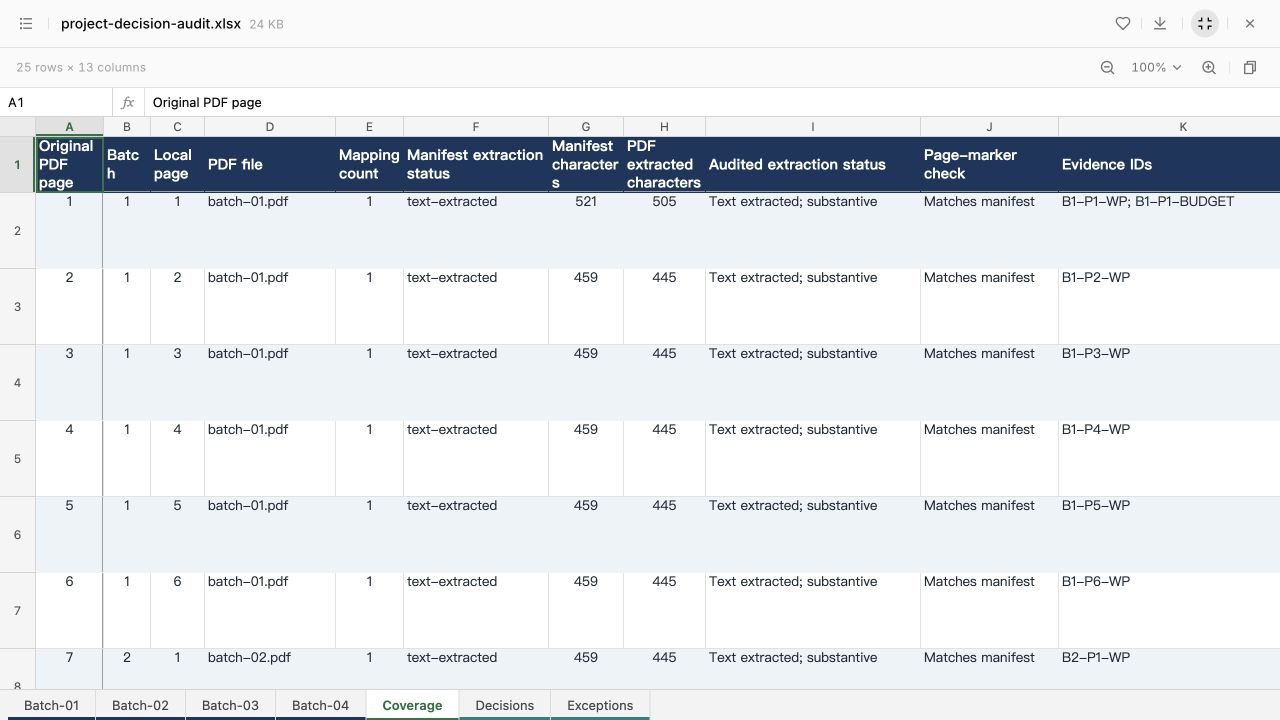
The model also flagged two audit limits. It could not verify the unsplit PDF’s hash because that file was not attached; we subsequently checked the hash locally against the original. Its extracted character counts differed from the manifest on all pages. We reproduced the difference: the preparation script counts get_text(sort=True).strip(), while the audit counts matched get_text() without stripping. Different text-ordering and whitespace representations can change character counts without changing page coverage. We kept the original output’s caveat rather than rewriting it to claim the model had resolved something it had not.
This is why a discrepancy deserves investigation instead of automatic deletion or a blanket failure label. In your own workflow, record the extraction method and normalize it before comparing counts. Check the cited page text separately; matching counts alone would still not prove correct interpretation.
The sample contains short, searchable pages with explicit amendments. It demonstrates provenance and reconciliation, not reliable reading of every long, scanned or complex report. A real document with uncertain approval authority should keep that uncertainty in the decision table.
Recover without rerunning the whole document
| Failure | Focused recovery |
|---|---|
| An entire batch is missing | Process that batch and regenerate the evidence merge |
| Correct fact, wrong page number | Reopen the source and repair the original-page mapping |
| Final output uses the old budget | Supply both evidence rows and the amendment wording; retain the superseded amount |
| One scanned page has no text | Render/OCR that page and add it with the same original page ID |
| A response stops midway | Mark the output incomplete; reduce the batch or output scope and rerun that batch |
| Merge prompt becomes too large | Merge into section-level evidence tables with references, then merge those tables; preserve originals |
A useful repair request names the failed evidence: “Recheck original page 17 and its statement about page 12; update the current launch date and retain the old value in the superseded table.” Avoid a broad “make the summary more accurate,” which gives no verifiable target.
Deliver a summary somebody else can audit
Keep the original PDF, source hash, manifest, batch outputs, merged evidence, final summary and unresolved issues together. If exporting a PDF report, use the deliverable-verification checklist to check the actual downloaded file, not just a preview. For several independent documents rather than one long document, use the separate multiple-PDF comparison workflow.
Start with the practice report in Ofox Chat and keep the source-page column through every revision. The goal is not merely to fit the file into a request. It is to preserve enough evidence that a colleague can check the answer without repeating the whole task.