Create editable SVG illustrations and animation with Fable 5.2
Follow two real Fable 5.2 API calls: generate a grouped SVG, recolor its main sail and add motion. Download the outputs, prompts and validation evidence.
 Ofox

Fable 5.2 can produce SVG code that a browser renders as editable vector artwork. In our two-call example, it created a grouped sailboat illustration, then changed the main sail’s color and added gentle motion while preserving the vector geometry. You can download both files and reproduce the requests below.
This is visual coding, not native image generation. Anthropic’s Fable 5.2 specification lists text and images as inputs and text as output. An SVG is text describing shapes; a browser or vector editor turns those instructions into a picture. That distinction explains both the useful editability and the limits: the output must be valid code, and attractive artwork is not guaranteed by a successful response.
We tested the Ofox Anthropic-compatible endpoint on November 11, 2026, using anthropic/claude-fable-5.2, low effort and an 8,192-token output cap. This is a small original illustration, not a benchmark against other models or a test of complex 3D scenes. Ofox publishes this guide.
Download the actual outputs
The Fable SVG example kit contains the first SVG, the revised animated SVG, the exact request bodies, returned text and usage evidence, and a structural comparison. It contains no API key. Keep the original and revised files separate so you can inspect what changed.
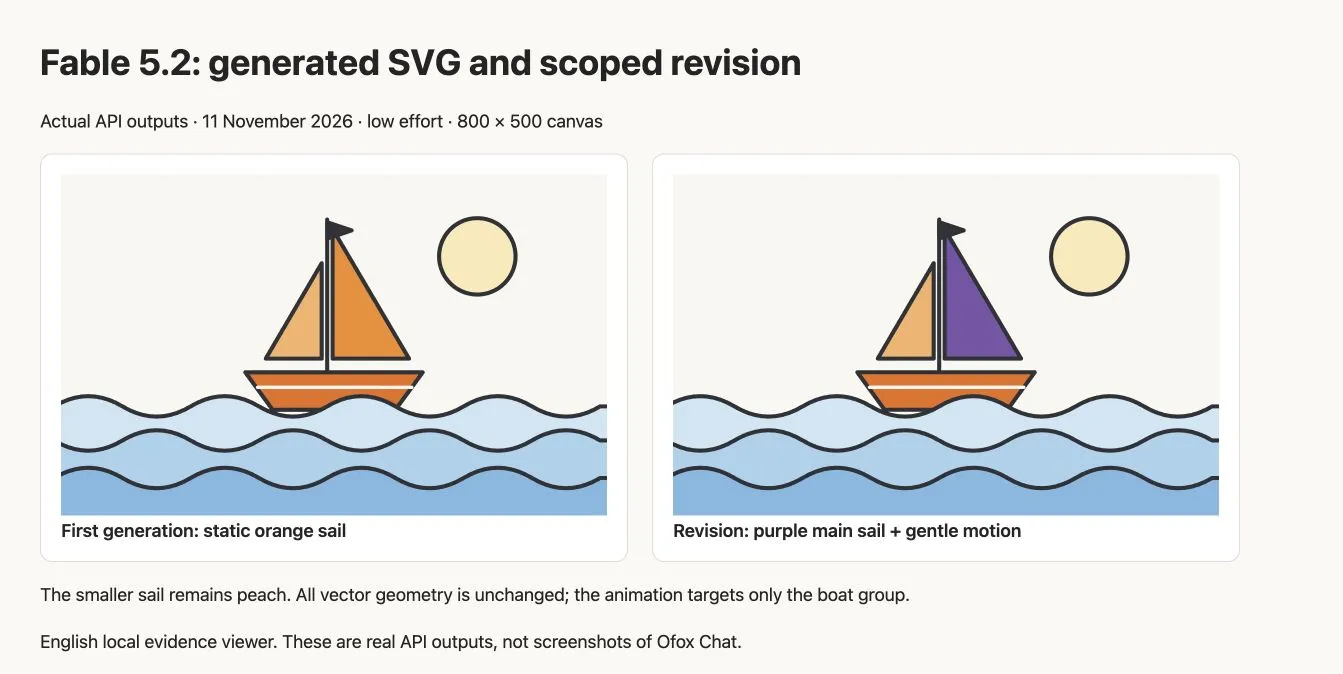
Browser screenshot of the real API outputs in our English local evidence viewer. This is not the Ofox Chat interface. The article cover is a separate conceptual illustration.
| Check | First output | Revised output |
|---|---|---|
| Canvas | 800 × 500 with matching viewBox | Preserved |
| Named groups | boat, sail, waves, sun | Preserved |
| Embedded raster images or external resources | None found in these files | None found |
| Main sail | Orange | Purple #7953A9 |
| Smaller sail | Peach | Still peach |
| Vector geometry | Initial paths and shapes | Unchanged in our XML comparison |
| Motion | None | Boat group bobs; sun and waves remain static |
The smaller sail matters. “Change the sail” was interpreted as changing the large orange sail, not every sail-shaped region. If your intention is to recolor both, name both components. This is a useful example of why a plausible-looking revision still needs comparison against the actual request.
Define the artwork as editable components
Start with the intended use: a small illustration for a web page, a diagram that will be recolored, or a simple animation. Ask for meaningful group IDs, a canvas and a few constraints. A vague request for an amazing illustration gives you little basis for checking whether the result is useful.
Our first prompt was deliberately bounded:
Return ONLY a complete standalone SVG, no markdown. Create an original
flat vector illustration of a small orange sailboat riding three blue
waves under a pale circular sun. Canvas 800x500, viewBox 0 0 800 500.
Off-white background, charcoal outlines, orange sail, pale blue water.
Organize editable groups with IDs boat, sail, waves, sun.
Use vector paths and shapes, no raster images, no external URLs,
no scripts, no foreignObject, no animation in this first version.
Include title and desc. Keep the geometry clean and readable at 320px
width. This is a small reusable illustration, not a complex artwork;
keep SVG under 8000 characters.
Those constraints create specific acceptance checks. The groups make a later animation targetable. The viewBox makes scaling predictable. Excluding external resources makes this example easier to move between machines. The size limit reduces the chance of requesting an unnecessarily elaborate file; it is a prompt request, not an enforced server-side SVG limit.
The result is intentionally simple. It does not establish that Fable can recreate a photograph, preserve a trademark exactly or automatically produce production-ready motion graphics. For converting an existing raster design, use the separate PNG-to-editable-SVG workflow, where fidelity to an input is the primary test.
Make the first API request
The exact tested request is available as first-request.json in the ZIP. Set your own key in the shell environment using your normal secret-management process. Do not put it in the JSON, a browser script, a screenshot or a committed file.
curl --fail-with-body https://api.ofox.ai/anthropic/v1/messages \
  -H "x-api-key: $OFOX_API_KEY" \
  -H "anthropic-version: 2023-06-01" \
  -H "content-type: application/json" \
  --data-binary @first-request.json \
  -o first-response.json
The relevant request fields are:
{
  "model": "anthropic/claude-fable-5.2",
  "max_tokens": 8192,
  "output_config": {"effort": "low"},
  "messages": [{"role": "user", "content": "YOUR COMPLETE SVG BRIEF"}]
}
The short JSON above shows the configuration; the downloaded request includes the full prompt. The Ofox model identifier differs from the direct Claude API identifier claude-fable-5-2. Do not mix provider model names and base URLs. See the Fable 5.2 API guide and Ofox Messages API reference for setup.
Fable’s adaptive thinking is always enabled according to its specification. Low effort is a reasoning-effort setting, not a request to disable thinking. We did not add temperature, top_p or forced tool selection to this example. If a migrated request returns 400, follow the Fable 5.2 parameter and tool-choice troubleshooting guide before changing the drawing prompt.
Extract and inspect the SVG before rendering
The response is a JSON envelope. Collect the blocks whose type is text, then save the SVG markup; do not save the entire response as an .svg file. Check that the response completed and contains a closing </svg> tag. A response stopped by the output cap may contain an unfinished document even if some of the picture is visible in a forgiving viewer.
import json
import re
from pathlib import Path

response = json.loads(Path("first-response.json").read_text())
if response.get("stop_reason") != "end_turn":
    raise RuntimeError("Inspect the response before accepting the SVG")
text = "\n".join(block.get("text", "")
                 for block in response.get("content", [])
                 if block.get("type") == "text")
match = re.search(r"<svg\b[\s\S]*?</svg>", text)
if not match:
    raise RuntimeError("No complete SVG found")
Path("first.svg").write_text(match.group())
Extraction is not sanitization. Inspect the file for scripts, event handlers, external URLs, foreignObject and embedded images before using generated markup in a website. For this small sample we inspected the actual files and found no such active or external content. Do not treat a simple string check as a security guarantee for arbitrary SVGs.
Open the trusted output in a browser, then in your target vector editor if that is the destination. Check the silhouette, layering and negative space. The waves in this example overlap the bottom of the hull, as expected for a boat on water. A correct XML document can still have visually wrong stacking or a clipped subject.
Request a scoped revision
The second request included the original user prompt and returned SVG as conversation context, followed by this instruction:
Return the complete revised SVG only. Change the sail from orange to
purple #7953A9. Preserve all geometry, group IDs and other colors.
Add gentle 6px vertical bobbing only to the boat group using internal
CSS keyframes, a 3-second loop. Include a prefers-reduced-motion: reduce
rule that disables animation. Keep the sun and waves static.
No scripts, external URLs or raster images.
Use revision-request.json with the same endpoint to reproduce the second call. This example replayed the visible SVG text; it is not a tool-calling transcript or a demonstration of preserving hidden thinking. If you are carrying tool history between model versions, use the separate Agent switching guide rather than adapting this minimal exchange blindly.
Our structural comparison found one fill change among the existing shapes and groups. Path coordinates, IDs and other shape attributes were preserved. The model also updated the accessible title and description and added an internal style block. That is more precise than claiming the file was otherwise byte-for-byte unchanged.
Verify animation and preserve a static fallback
The revised SVG uses CSS keyframes on #boat, moving it upward by six units at the midpoint of a three-second loop. In the browser we observed the boat’s transform change between two samples while the sun and waves had no animation. The CSS contains a reduced-motion rule; we inspected that rule but did not toggle the operating system preference during this test.
Open revision.svg directly to see the motion. A screenshot shows only one frame, and a PNG export will also be static. Some editors or document applications ignore SVG CSS animation even though a browser plays it. Keep first.svg as the static source, or create an explicitly static copy of the revised artwork when that is the required delivery format. Do not promise that inserting an animated SVG into PowerPoint, an email or a design tool will preserve motion.
If you place multiple SVGs inline in the same HTML document, repeated IDs and global CSS selectors can interact. Use unique ID prefixes or isolate each SVG as an image resource. Our evidence viewer displays each file separately so the revised boat’s animation does not affect the original.
For a GIF deliverable, capture or render a sequence of frames and encode that sequence separately. SVG animation and an exported GIF are different files with different tradeoffs. The GIF workflow guide explains timing and export checks; do not simply rename the SVG extension.
What these two calls cost and what they prove
| Call | Input tokens | Output tokens | Observed request time | Catalog-based estimate |
|---|---|---|---|---|
| Initial illustration | 234 | 872 | 11.09 seconds | $0.036752 |
| Scoped revision | 1,245 | 985 | 10.07 seconds | $0.049360 |
| Total | 1,479 | 1,857 | Two individual requests | $0.086112 |
These estimates use the November 11 Ofox catalog fields of $0.000008 per input token and $0.00004 per output token. The returned cache counters were zero. The calculation is input tokens × input rate plus output tokens × output rate; it is not a verified final account debit. Request times include the observed round trip and are not a general speed benchmark. More detailed art, longer conversations and retries can change both time and cost.
The evidence supports a narrow conclusion: this route produced a valid, grouped vector illustration and a controlled animated revision on this brief. It does not establish broad artistic superiority or a success rate. The useful outcome is the inspectable file and the reproducible method.
If you prefer a conversational task, start in Ofox Chat and specify SVG output, editable groups and the exact revision. This article’s calls used the API; we did not verify that a particular Chat mode selects Fable 5.2 or exposes these API parameters. Use the API workflow when reproducing the model-specific result matters.