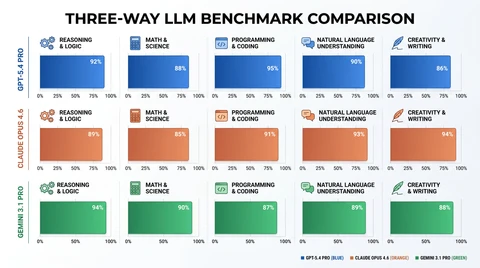
GPT vs Claude vs Gemini: Production API Comparison for Real-World Use
OpenAI GPT, Anthropic Claude and Google Gemini APIs compared for production — latency, cost structures, error handling, rate limits, and when to use each.
 Ofox
Ofox 
TL;DR: OpenAI’s GPT models are optimized for speed and structured output, Anthropic’s Claude models offer strong reasoning with cost efficiency, and Google’s Gemini models provide extended context capabilities at competitive pricing. This guide compares all three flagship model families across latency, pricing, rate limits, error handling, and real-world production scenarios to help you pick the right model for your stack.
Why This Comparison Matters
Most model comparisons focus on benchmark scores and reasoning quality. This one focuses on what matters when you’re running these models in production: API reliability, response latency, cost per request, rate limit behavior, and error recovery patterns.
If you’re building a customer-facing application, a RAG pipeline, or an agent system, these operational characteristics often matter more than a few points on MMLU. Here’s what you need to know about OpenAI’s GPT, Anthropic’s Claude, and Google’s Gemini when you’re actually running them at scale.
Model Overview
All three model families are available via ofox.ai, which provides a unified OpenAI-compatible API for accessing GPT, Claude, and Gemini models with a single API key.
| Provider | Model Family | Positioning |
|---|---|---|
| OpenAI | GPT-4o, o1 series | Flagship models optimized for speed and structured output |
| Anthropic | Claude Sonnet, Opus, Haiku | Balanced models with strong reasoning (Sonnet), maximum capability (Opus), or speed (Haiku) |
| Gemini 1.5 Pro, 2.0 Flash | Multimodal models with extended context support |
Note on Model Names: This article compares provider families, not specific version numbers. Model versions evolve rapidly — check ofox.ai/models for current model availability and naming conventions.
Key Differences at a Glance
OpenAI’s GPT models are optimized for speed and instruction-following. They excel at structured output, function calling, and high-throughput scenarios where you need consistent sub-second response times.
Anthropic’s Claude Sonnet is positioned as a balanced model between Haiku (fast) and Opus (powerful). It delivers strong reasoning quality at a competitive price point, making it ideal for cost-sensitive production workloads that still need reliable output.
Google’s Gemini models are multimodal flagships with extended context support. They can handle large documents and long conversation threads.
Pricing Comparison
Important: Specific per-token pricing varies by provider and usage tier. The models are available via ofox.ai with pay-as-you-go pricing. For current rates, check:
- OpenAI’s official pricing page for GPT models
- Anthropic’s pricing page for Claude models
- Google’s pricing page for Gemini models
General Cost Patterns (based on typical provider pricing structures):
- Claude Sonnet is generally positioned as a cost-efficient option
- Gemini models typically offer competitive pricing for high-volume workloads
- OpenAI’s GPT models are positioned as premium options optimized for performance
When evaluating costs for your use case, consider:
- Input vs output token ratios in your workload
- Whether you can leverage prompt caching (all three providers support it)
- Volume discounts available through your provider
Latency and Throughput
Response latency matters for user-facing applications. Performance characteristics vary based on:
- Geographic region and network conditions
- Request complexity and token count
- Current provider load and capacity
General Performance Patterns:
- OpenAI GPT models: Optimized for low latency and high throughput, typically deliver fast time-to-first-token
- Anthropic Claude models: Balanced performance profile suitable for most production workloads
- Google Gemini models: Performance varies with context size; optimized for large-context workloads
For Interactive Applications: If sub-second response time is critical (chatbots, code assistants), test all three providers in your target region to measure actual latency.
For Batch Processing: Latency differences matter less when processing documents or background jobs. Focus on cost and context window instead.
Rate Limits and Concurrency
Rate limits determine how many requests you can send in parallel. Provider rate limits vary by account tier and usage patterns.
When using ofox.ai: The platform provides unlimited RPM/TPM (requests per minute / tokens per minute) by aggregating capacity across multiple regions. This eliminates the rate limit bottlenecks common with direct provider APIs.
Direct Provider APIs (if not using ofox.ai):
- OpenAI, Anthropic, and Google all enforce RPM and TPM limits
- Limits vary by account tier (free, pay-as-you-go, enterprise)
- Check your provider’s documentation for current tier limits
Production Tip: When rate limits are enforced, APIs return a 429 status code with a Retry-After header. Implement exponential backoff with jitter to handle rate limit errors gracefully.
Error Handling and Reliability
Production APIs fail. Here’s how each model handles errors and what you need to know about retry strategies.
Common Error Patterns
All three providers return standard HTTP error codes:
Rate Limiting:
429 Rate Limit Exceeded/429 Resource Exhaustedwhen you exceed RPM/TPM- Response includes
Retry-Afterheader indicating when to retry
Service Availability:
503 Service Unavailable/529 Overloadedduring high-demand periods or maintenance- These are transient errors that should be retried with exponential backoff
Request Errors:
400 Bad Request/400 Invalid Requestfor malformed JSON, invalid parameters, or schema violations- These require fixing the request, not retrying
Retry Strategy Recommendations
For all three models, implement exponential backoff with jitter:
import time
import random

def call_api_with_retry(model, prompt, max_retries=3):
    for attempt in range(max_retries):
        try:
            response = client.chat.completions.create(
                model=model,
                messages=[{"role": "user", "content": prompt}]
            )
            return response
        except RateLimitError as e:
            if attempt == max_retries - 1:
                raise
            retry_after = int(e.headers.get("Retry-After", 1))
            jitter = random.uniform(0, 0.1 * retry_after)
            time.sleep(retry_after + jitter)
        except ServiceUnavailableError as e:
            if attempt == max_retries - 1:
                raise
            backoff = (2 ** attempt) + random.uniform(0, 1)
            time.sleep(backoff)
Reliability Note: All three providers maintain high availability, but transient errors can occur during peak demand or maintenance windows. Design your application to handle these gracefully with retries and fallback strategies.
Context Window and Long-Context Performance
Context window size determines how much text you can send in a single request. This matters for RAG pipelines, document analysis, and long conversations.
Context Window Capabilities:
- OpenAI GPT models: Support extended context for multi-turn conversations and code review
- Anthropic Claude models: Handle long documents and extended conversations
- Google Gemini models: Designed for very large context workloads including entire codebases
Long-Context Use Cases:
- Multi-turn conversations: All three providers handle typical chat sessions
- Document analysis: Claude and Gemini excel at processing long documents
- Codebase analysis: Gemini’s extended context is ideal for processing entire repositories
Performance Note: All three providers maintain reasoning quality across their context windows, but retrieval accuracy can degrade slightly for information buried in the middle of very long contexts (the “lost in the middle” problem). For best results, place critical information at the beginning or end of your prompt.
Function Calling and Structured Output
All three providers support function calling and structured output, but with different implementation approaches.
Function Calling Reliability
OpenAI GPT models: Strong function calling capabilities. Reliably generate valid JSON schemas and handle complex nested functions. Well-suited for applications that depend on structured output.
Anthropic Claude models: Robust function calling with Anthropic’s tool use API. Well-documented and reliable for most production use cases.
Google Gemini models: Support function calling with Google’s function calling API. Requires validation on the client side as with any LLM-generated structured output.
Structured Output Example
All three providers support JSON mode for guaranteed valid JSON output:
from openai import OpenAI

# Works with any provider via ofox.ai
client = OpenAI(
    api_key="your-ofox-api-key",
    base_url="https://api.ofox.ai/v1"
)

response = client.chat.completions.create(
    model="gpt-4o",  # or claude-sonnet-4-6, gemini-1.5-pro
    messages=[
        {"role": "system", "content": "Extract structured data from user input."},
        {"role": "user", "content": "John Doe, age 30, lives in New York"}
    ],
    response_format={"type": "json_object"}
)
Best Practice: Always validate structured output on the client side, regardless of which provider you use. LLMs can occasionally produce unexpected schemas or field values.
When to Use Each Provider
Use OpenAI GPT When:
- Latency is critical: You need fast response times for interactive applications
- Structured output is important: Your application depends on reliable function calling or JSON schemas
- Performance is a priority: You need consistent, high-quality output for production workloads
- Budget allows for premium pricing: You can invest in performance-optimized infrastructure
Best for: Chatbots, code assistants, real-time agents, customer support automation
Use Anthropic Claude When:
- Cost efficiency matters: You need strong reasoning quality at a competitive price point
- Reasoning quality is important: You’re handling complex tasks that benefit from Claude’s capabilities
- You want balance: You need a middle ground between cost and performance
- Instruction-following is key: Tasks that require careful adherence to complex instructions
Best for: Content generation, document summarization, code review, general-purpose assistants
Use Google Gemini When:
- Extended context is critical: You need to process large documents or long conversation threads
- Cost efficiency is important: You’re processing high volumes and need competitive pricing
- Multimodal input is required: You need to process images, audio, or video alongside text
- Large-scale processing: You need to handle batch processing or high-concurrency workloads
Best for: Document analysis, codebase search, RAG pipelines, batch processing, multi-tenant applications
Migration and Multi-Model Strategies
You don’t have to pick just one provider. Many production applications use multiple models for different tasks.
Common Multi-Model Patterns
Routing by Task Complexity:
- Simple queries → Cost-efficient model
- Medium complexity → Balanced model
- High complexity or latency-sensitive → Performance-optimized model
Routing by Context Length:
- Short context → Any model based on other requirements
- Medium context → OpenAI GPT or Anthropic Claude
- Very long context → Google Gemini
Fallback Strategy:
- Primary: Your preferred model for the task
- Fallback 1: Alternative model if primary is rate-limited
- Fallback 2: Third option if both are unavailable
Switching Models with ofox.ai
ofox.ai provides a unified OpenAI-compatible API, so switching models is as simple as changing the model parameter:
from openai import OpenAI

client = OpenAI(
    api_key="your-ofox-api-key",
    base_url="https://api.ofox.ai/v1"
)

# Try OpenAI GPT first
try:
    response = client.chat.completions.create(
        model="gpt-4o",
        messages=[{"role": "user", "content": "Explain quantum computing"}]
    )
except RateLimitError:
    # Fall back to Claude
    response = client.chat.completions.create(
        model="claude-sonnet-4-6",
        messages=[{"role": "user", "content": "Explain quantum computing"}]
    )
For a complete migration guide, see OpenAI SDK Migration to ofox.ai.
Cost Optimization Strategies
Running these models at scale gets expensive. Here are proven strategies to reduce costs without sacrificing quality.
1. Use Prompt Caching
All three models support prompt caching, which reduces costs for repeated prompts. Caching is particularly effective for:
- Applications with repeated system prompts
- Few-shot examples that don’t change
- RAG systems with static context
Check your provider’s documentation for specific caching discount rates and implementation details.
2. Route by Complexity
Use a lightweight classifier to route simple queries to cheaper models:
def route_request(query):
    complexity = estimate_complexity(query)  # Simple heuristic or small classifier
    if complexity < 0.3:
        return "gemini-1.5-pro"  # Cost-efficient option
    elif complexity < 0.7:
        return "claude-sonnet-4-6"  # Balanced option
    else:
        return "gpt-4o"  # Performance-optimized option
3. Optimize Token Usage
- Compress prompts: Remove unnecessary whitespace, use abbreviations
- Limit output tokens: Set
max_tokensto the minimum required length - Use streaming: Stop generation early if you detect a complete answer
For more cost optimization strategies, see How to Reduce AI API Costs.
Conclusion
OpenAI's GPT models excel at speed and structured output, Anthropic's Claude models balance reasoning quality with cost efficiency, and Google's Gemini models handle extended context workloads — pick based on your production constraints, not benchmark scores.For most production applications, we recommend testing all three providers with your actual workload to measure real-world performance. Consider using Anthropic Claude as a starting point for balanced performance, OpenAI GPT for latency-sensitive tasks, and Google Gemini for large-context workloads. A multi-model strategy often provides the best balance of cost, performance, and reliability.
All three providers are available via ofox.ai with a unified OpenAI-compatible API. Sign up for a free account to test all three with $5 in free credits.