Nano-Banana Image API: Complete English Tutorial
TL;DR: Nano-Banana is an image generation model accessible through ofox.ai’s unified API at https://api.ofox.ai/v1/images/generations. It uses OpenAI-compatible endpoints, supports sizes from 256×256 to 1792×1024, and returns base64-encoded images. This guide covers authentication, parameters, code examples in Python/JavaScript/cURL, and production tips.
What Is Nano-Banana?
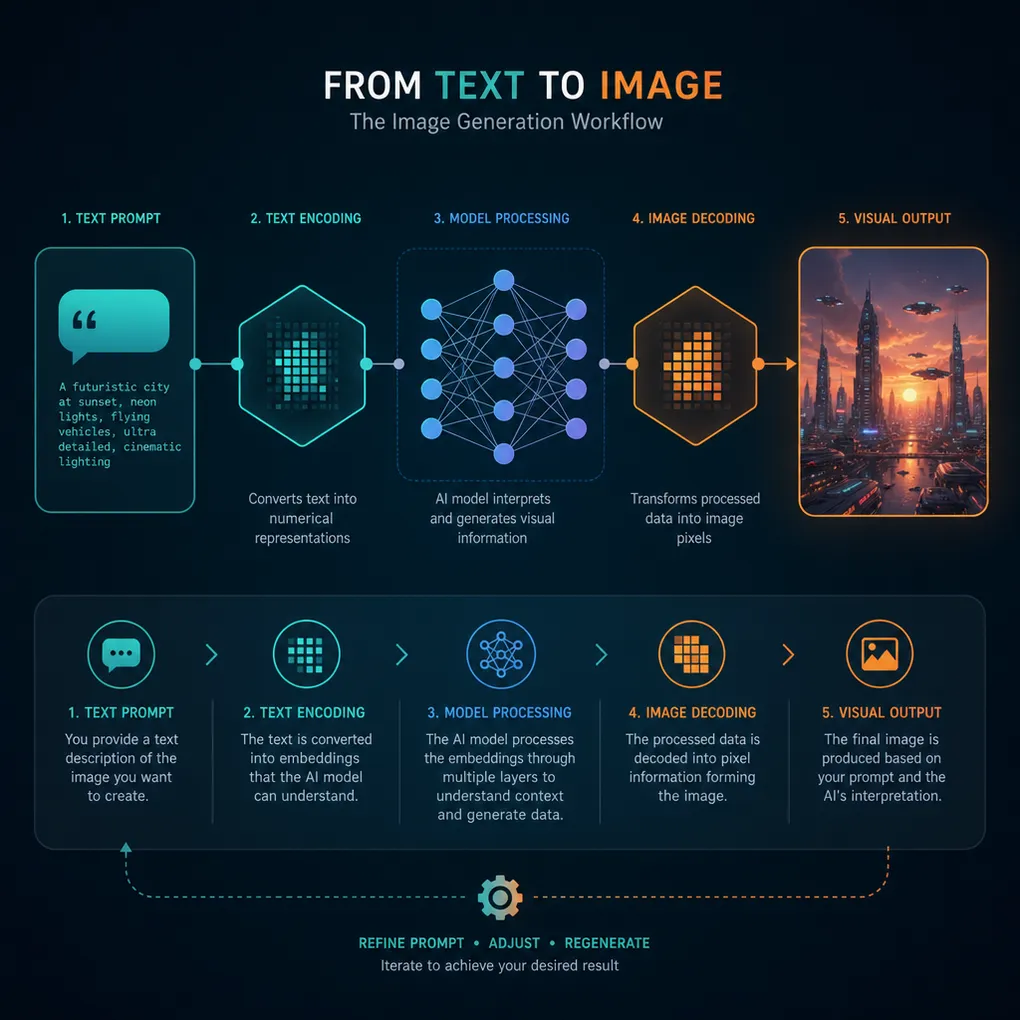
Nano-Banana is an image generation model provided by Banana and available through ofox.ai’s model catalog. Unlike text-based LLMs, it takes natural language prompts and outputs PNG/JPEG/WebP images.
Key characteristics:
- Provider: Banana
- Access: OpenAI-compatible API via ofox.ai
- Endpoint:
POST https://api.ofox.ai/v1/images/generations - Output formats: PNG, JPEG, WebP
- Supported sizes: 256×256, 512×512, 1024×1024, 1536×1024, 1024×1536, 1792×1024, 1024×1792, or
auto
Nano-Banana sits alongside other image models on ofox.ai like Flux 2 Max, Seedream 4.5, and Qwen-Image-Turbo. All share the same API structure, making it easy to switch models by changing the model parameter.
Why Use ofox.ai for Nano-Banana?
- Unified interface: One API key for Nano-Banana, GPT-Image-2, Gemini Flash Image, and 50+ text models
- OpenAI SDK compatibility: Drop-in replacement for
openai.images.generate() - No vendor lock-in: Switch between image models without rewriting code
- Transparent pricing: Pay-per-token with no hidden fees (check ofox.ai/en/models for current rates)
Getting Started
1. Get Your API Key
Sign up at ofox.ai and copy your API key from the dashboard. Store it securely:
export OFOX_API_KEY="your_key_here"2. Basic cURL Example
curl -X POST 'https://api.ofox.ai/v1/images/generations' \
  -H 'Authorization: Bearer YOUR_OFOX_API_KEY' \
  -H 'Content-Type: application/json' \
  -d '{
    "model": "banana/nano-banana",
    "prompt": "A red apple on a wooden table, studio lighting",
    "size": "1024x1024",
    "quality": "high",
    "output_format": "png"
  }'
Response:
{
  "created": 1777385517,
  "data": [
    {
      "b64_json": "iVBORw0KGgoAAAANSUhEUgAA...",
      "index": 0
    }
  ],
  "model": "banana/nano-banana",
  "size": "1024x1024",
  "quality": "high",
  "usage": {
    "input_tokens": 14,
    "output_tokens": 208,
    "total_tokens": 222
  }
}
The image is base64-encoded in data[0].b64_json. Decode and save it:
echo "iVBORw0KGgoAAAANSUhEUgAA..." | base64 -d > output.pngPython Integration
Using OpenAI SDK
ofox.ai is OpenAI-compatible, so you can use the official SDK:
from openai import OpenAI
import base64

client = OpenAI(
    api_key="YOUR_OFOX_API_KEY",
    base_url="https://api.ofox.ai/v1"
)

response = client.images.generate(
    model="banana/nano-banana",
    prompt="A futuristic cityscape at sunset, cyberpunk style",
    size="1024x1024",
    quality="high",
    response_format="b64_json"
)

image_data = base64.b64decode(response.data[0].b64_json)
with open("cityscape.png", "wb") as f:
    f.write(image_data)

print(f"Tokens used: {response.usage.total_tokens}")
Using Requests Library
import requests
import base64

url = "https://api.ofox.ai/v1/images/generations"
headers = {
    "Authorization": "Bearer YOUR_OFOX_API_KEY",
    "Content-Type": "application/json"
}
payload = {
    "model": "banana/nano-banana",
    "prompt": "A minimalist logo for a tech startup",
    "size": "512x512",
    "quality": "medium",
    "output_format": "png"
}

response = requests.post(url, headers=headers, json=payload)
result = response.json()

image_bytes = base64.b64decode(result["data"][0]["b64_json"])
with open("logo.png", "wb") as f:
    f.write(image_bytes)
JavaScript/Node.js Integration
Using OpenAI SDK
import OpenAI from 'openai';
import fs from 'fs';

const client = new OpenAI({
  apiKey: process.env.OFOX_API_KEY,
  baseURL: 'https://api.ofox.ai/v1'
});

const response = await client.images.generate({
  model: 'banana/nano-banana',
  prompt: 'A serene mountain landscape with a lake',
  size: '1024x1024',
  quality: 'high',
  response_format: 'b64_json'
});

const imageBuffer = Buffer.from(response.data[0].b64_json, 'base64');
fs.writeFileSync('landscape.png', imageBuffer);

console.log(`Tokens: ${response.usage.total_tokens}`);
Using Fetch API
const response = await fetch('https://api.ofox.ai/v1/images/generations', {
  method: 'POST',
  headers: {
    'Authorization': `Bearer ${process.env.OFOX_API_KEY}`,
    'Content-Type': 'application/json'
  },
  body: JSON.stringify({
    model: 'banana/nano-banana',
    prompt: 'Abstract geometric pattern in blue and orange',
    size: '1024x1024',
    quality: 'high',
    output_format: 'webp'
  })
});

const result = await response.json();
const imageBuffer = Buffer.from(result.data[0].b64_json, 'base64');
fs.writeFileSync('pattern.webp', imageBuffer);
API Parameters Reference
| Parameter | Type | Required | Description |
|---|---|---|---|
model | string | ✅ | banana/nano-banana or other image models |
prompt | string | ✅ | Natural language description (max ~500 chars) |
quality | string | ✅ | low, medium, high, standard, hd, or auto |
size | string | — | 256x256, 512x512, 1024x1024, 1536x1024, 1024x1536, 1792x1024, 1024x1792, or auto (default: 1024x1024) |
output_format | string | — | png, jpeg, or webp (default: png) |
n | number | — | Number of images (1–10, default: 1) |
background | string | — | transparent, opaque, or auto |
Notes:
quality: "hd"produces sharper results but costs more tokens- Larger sizes (
1792x1024) increase token usage output_format: "webp"reduces file size by ~30% vs PNG
Real-World Use Cases
1. Blog Post Hero Images
Generate unique featured images for articles:
prompts = [
    "Abstract data visualization with flowing lines, tech aesthetic",
    "Minimalist workspace with laptop and coffee, top-down view",
    "Futuristic AI brain network, glowing nodes on dark background"
]

for i, prompt in enumerate(prompts):
    response = client.images.generate(
        model="banana/nano-banana",
        prompt=prompt,
        size="1792x1024",  # 16:9 aspect ratio
        quality="high"
    )
    save_image(response, f"hero_{i}.png")
2. Product Mockups
response = client.images.generate(
    model="banana/nano-banana",
    prompt="Smartphone mockup showing a weather app, clean UI, white background",
    size="1024x1536",  # Portrait orientation
    quality="hd"
)
3. Social Media Graphics
response = client.images.generate(
    model="banana/nano-banana",
    prompt="Instagram post template, pastel gradient, space for text overlay",
    size="1024x1024",  # Square format
    quality="medium",
    output_format="jpeg"
)
4. Batch Generation
response = client.images.generate(
    model="banana/nano-banana",
    prompt="Icon set for a productivity app, flat design, colorful",
    size="512x512",
    quality="medium",
    n=5  # Generate 5 variations
)

for i, img in enumerate(response.data):
    save_image(img.b64_json, f"icon_{i}.png")
Prompt Engineering Tips
Be Specific
❌ Vague: “A nice landscape”
✅ Specific: “Mountain valley at golden hour, pine trees in foreground, snow-capped peaks, dramatic clouds”
Specify Style
Include artistic direction:
- “photorealistic, 8k, studio lighting”
- “flat design, minimalist, pastel colors”
- “watercolor painting, soft edges, muted tones”
- “isometric 3D render, low poly, vibrant”
Control Composition
- “centered composition”
- “rule of thirds”
- “top-down view”
- “close-up macro shot”
- “wide-angle landscape”
Avoid Ambiguity
❌ “A person with a thing”
✅ “A woman holding a red umbrella, rainy city street”
Cost Optimization
- Start with lower quality: Use
quality: "medium"for drafts,"high"for finals - Choose appropriate sizes: Don’t generate 1792×1024 if you need 512×512
- Use WebP format: Saves bandwidth without quality loss
- Batch requests: Generate multiple variations in one call with
nparameter - Cache prompts: Reuse successful prompts to avoid trial-and-error costs
Check current token pricing at ofox.ai/en/models — image generation typically costs more per request than text completion but less than video generation.
Error Handling
from openai import OpenAI, APIError, RateLimitError

client = OpenAI(
    api_key="YOUR_OFOX_API_KEY",
    base_url="https://api.ofox.ai/v1"
)

try:
    response = client.images.generate(
        model="banana/nano-banana",
        prompt="A serene beach at sunset",
        size="1024x1024",
        quality="high"
    )
except RateLimitError:
    print("Rate limit hit — wait and retry")
except APIError as e:
    print(f"API error: {e.status_code} - {e.message}")
except Exception as e:
    print(f"Unexpected error: {e}")
Common errors:
- 401 Unauthorized: Invalid API key
- 429 Rate Limit: Too many requests — implement exponential backoff
- 400 Bad Request: Invalid parameters (check
size,quality,modelvalues) - 500 Server Error: Temporary issue — retry after a few seconds
Comparing Nano-Banana to Other Models
ofox.ai offers multiple image generation models. Here’s when to use each:
| Model | Best For | Speed | Quality |
|---|---|---|---|
| Nano-Banana | General-purpose, balanced cost/quality | Fast | Good |
| Flux 2 Max | High-fidelity photorealism | Slower | Excellent |
| Seedream 4.5 | Artistic styles, illustrations | Medium | Very Good |
| Qwen-Image-Turbo | Rapid prototyping, low cost | Very Fast | Decent |
| GPT-Image-2 | OpenAI ecosystem integration | Fast | Good |
Switch models by changing the model parameter — all other code stays the same.
Production Checklist
- Store API keys in environment variables, not code
- Implement retry logic with exponential backoff
- Validate user prompts (filter inappropriate content)
- Set reasonable timeouts (image generation can take 5–15 seconds)
- Log token usage for cost tracking
- Cache generated images to avoid redundant API calls
- Use CDN for serving generated images at scale
- Monitor rate limits and implement queuing if needed
Next Steps
- Explore other models: Try Gemini Flash Image or Flux 2 Max for different styles
- Combine with text models: Use Claude Opus 4.7 to generate prompts, then feed them to Nano-Banana
- Build multimodal apps: Check the Multimodal AI API Guide for vision + generation workflows
- Reduce costs: Read How to Reduce AI API Costs for optimization strategies
The Nano-Banana API through ofox.ai gives you production-ready image generation with the simplicity of OpenAI’s interface and the flexibility to switch models as your needs evolve.