Perplexity alternatives for research reports you can actually verify
Choose a research workflow by sources, files and revision needs. Inspect an Ofox web-research report, the factual errors its review caught, and the corrected evidence ledger.
 Ofox

Consider Claude for iterative research plus file authoring, Gemini Deep Research for a research-plan-to-report workflow, Gemini Notebook for a selected source collection, and Ofox for a specified memo-and-evidence-file handoff. Keep Perplexity when its search and ongoing project workflow already meet the need. A replacement should improve a concrete step: finding sources, checking claims, delivering files or updating the conclusion.
A report with citations can still be wrong. Our Ofox test produced a useful Word memo and Excel evidence ledger, but independent review found an outdated capability claim and an incorrect test-plan count. The corrected files are available below. That experience is more useful for choosing a tool than another unverified “most accurate research agent” list.
Ofox publishes this guide. We ran a new public-web research task on November 6, 2026, inspected the downloaded files, reopened official sources independently and requested a correction. We did not complete a Perplexity run because the browser remained at a security-verification page. The other candidates are documented comparisons, not same-task output benchmarks. No library migration, private connector access or speed/price ranking was performed.
Name the layer you want to replace
Searching for a current answer is different from maintaining a project with files, shared context and connected sources. Perplexity’s current Projects documentation says Spaces are now Projects and describes a persistent file system, Brain and connected apps within Computer. It would be inaccurate to compare today’s product as if it only returned isolated web answers.
If your work relies on that continuing context, downloading one report is not a complete migration. Inventory source files, instructions, decisions, unresolved questions and access settings. Recreate only the context needed for the new task, and verify the new workspace’s permissions separately. A PDF export does not transfer connectors or memory.
For a one-off report, the relevant boundary is simpler: can a reviewer open the delivered file and verify consequential claims without access to your chat? Ask for an evidence ledger that travels with the report, not just an impressive answer length.
| Your next task | Candidate | Why it is relevant | What remains to check |
|---|---|---|---|
| Continue an established research project with shared files | Keep Perplexity | Current Projects workflow includes persistent context and sources | Your exact mode, entitlement and file handoff |
| Investigate a question through multiple searches and create files | Claude | Research and office-file creation are separately documented | Research availability, source access and claim accuracy |
| Review a plan, research the web and export a report to Docs | Gemini Deep Research | Documented research-plan and report workflow | Selected sources, export and later edits |
| Work from a deliberately chosen evidence collection | Gemini Notebook | Sources can be imported or discovered and selected | Whether the collection covers the question and saved outputs are current |
| Deliver a memo with a claim-level spreadsheet and revise both | Ofox Chat | Actual files and correction cycle inspected here | Every important claim still needs source review |
Four alternatives with different working assumptions
Claude: iterative research and separate file capabilities
Claude Research is documented as multiple searches that build on one another. It requires web search to be enabled and is available on eligible paid plans. The documentation distinguishes mobile web research from connector use on web or desktop, so do not assume the same source coverage across devices.
Its file-creation guide separately describes downloadable documents and spreadsheets. That combination makes it worth evaluating for a report plus evidence ledger. We did not run this topic in Claude; neither capability description establishes that the resulting claims would pass the checks below.
Gemini Deep Research: inspect the plan and destination
Google’s guide describes a research plan you can edit before starting, Google Search included by default, selectable sources and report export to Google Docs. Consider it when the report will be reviewed or edited in that document workflow.
Check the selected sources before execution. A report that uses only the open web answers a different question from one that includes private Drive material. For this comparison we used public documentation only; we did not connect private services or evaluate Gemini’s generated report. Inspect any exported report for claim-level citations and make a separate ledger if the reviewer needs one.
Gemini Notebook: curate the evidence set
Google’s current Gemini Notebook source guide describes imported and discoverable sources, including web URLs and PDFs. This is useful when you want to choose which material the answer should use rather than treating the whole web as equally eligible evidence.
Coverage becomes an editorial responsibility: an answer may be faithful to selected sources while missing a newer source you never added. The guide also says existing studio outputs do not change when a source is updated or deleted. Verify and regenerate the affected output explicitly. This is a documented workflow comparison, not a run of the research case below.
Ofox Chat: a report and a ledger that can be corrected together
Our Ofox task searched current official documentation for a practical migration question and produced DOCX and XLSX files. It then revised both after source-based corrections. That is a useful workflow if the handoff requires a written conclusion and a spreadsheet a reviewer can filter by claim, source or unknown.
The initial errors prevent a blanket accuracy recommendation. Ofox’s useful contribution here was an inspectable deliverable and a successful correction cycle, not a reason to skip review. The browser mode was Balanced; we did not verify a fixed underlying model identifier.
A real open-web task, not a pasted-source demonstration
The research question was: How could an individual move a reference library among Zotero, Mendeley Reference Manager and Paperpile, and what must be checked for PDF attachments? This is a concrete office/research task with official sources, format distinctions and potential version conflicts.
We asked Ofox to browse official documentation only, distinguish facts from unknowns, and deliver:
- A Word decision memo with routes, tradeoffs and unresolved questions.
- An Excel ledger with claim IDs, exact URLs, page titles, access dates, supporting evidence and verification status.
- A proposed ten-reference acceptance pilot, clearly marked as not run.
This was a live retrieval-and-writing test. The underlying library migration was never executed. These are different activities: producing a migration report does not prove that an attachment imported correctly.
The first output contained 27 claim rows and recorded ten opened official pages, alongside three unread-source gaps. A bibliography was therefore available from the start. It still needed substantive checking.
What the fact check changed
A metadata file is not the whole export package
The first report relied on an older Zotero field-mapping page and overstated a limitation around RIS and attachments. Independent review found later Zotero annotation guidance describing accompanying files with RIS/BibTeX export and annotation inclusion.
The corrected distinction is that a standalone RIS file contains metadata, while an export workflow can save PDFs beside it. Saying “RIS does not contain PDF binaries” is not equivalent to saying “this application cannot export attachments through a RIS-based workflow.” Current MODS behavior remained unverified rather than being guessed from the older page.
The lesson for research-tool evaluation is to inspect the scope of the claim, not just the presence of a credible domain. Two official pages can address different operations or different dates. The report must reconcile that difference.
A library export and an individual PDF export are separate operations
The revision also clarified Mendeley Reference Manager. Its library metadata export and its documented individual PDF-with-annotations export are separate routes. The individual-file page does not establish bulk export or correct relinking in the destination application.
This is a common failure pattern in product research: a limitation of one workflow becomes a claim that the product lacks a capability altogether. A useful ledger records the operation and version alongside the product name.
Even a proposed test needs arithmetic and settings checks
The planned pilot had ten reference records and nine PDFs across eight, not seven, parent records. The file-count sequence was 1, 1, 0, 1, 1, 1, 0, 2, 1, 1. Counting nonzero entries resolves the discrepancy without any product claim.
The revision also added Paperpile’s documented duplicate-handling rules: a default duplicate-skip setting and a separate rule for duplicates within one uploaded file. The proposed pilot now separates those conditions instead of assuming that toggling one setting guarantees both near-duplicate records survive. No duplicate-handling outcome was actually observed.
Inspect the corrected handoff
Download the revised Word memo and revised Excel evidence ledger. They retain the original 27 claim IDs and add six entries, for 33 total. Four additional official pages were opened during the revision; the source inventory distinguishes those reads from the original ten.
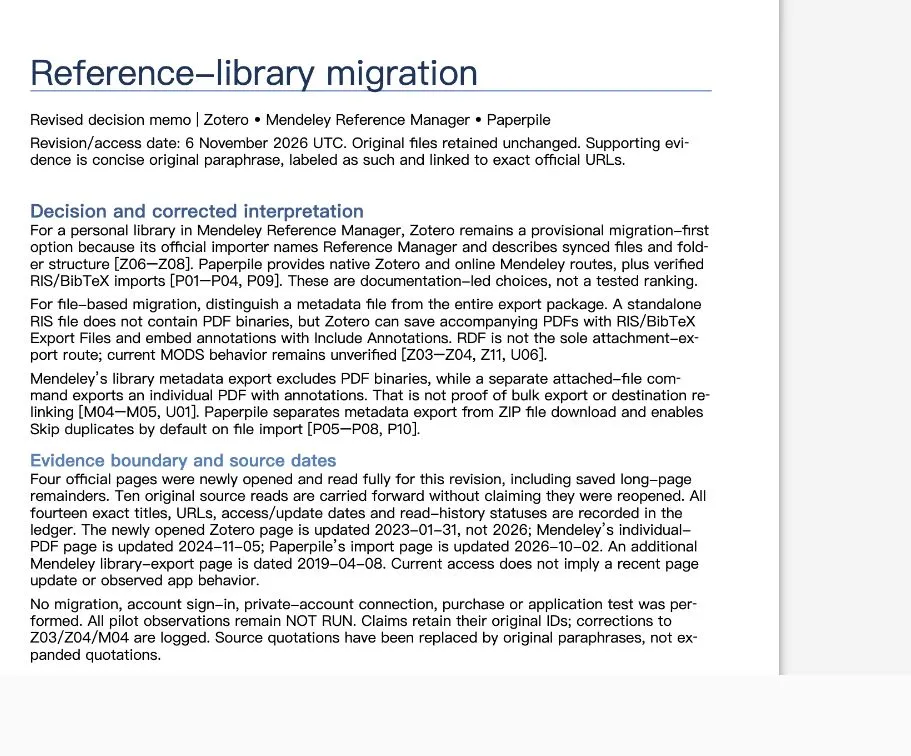
Actual English DOCX preview, cropped to the document. The accompanying spreadsheet contains source URLs, status and the correction history.
Independent AI review checked the corrected claims and counts. All three previously unread-source gaps were closed, while unresolved behavior—including current MODS handling and several destination-file fidelity questions—remained marked unknown. Supporting text was changed to short original paraphrases with source URLs. The original flawed outputs remain in the internal audit archive; the public downloads are the corrected versions.
The files’ pilot rows remain NOT RUN. The suggested migration routes are documentation-led choices, not a tested ranking of reference managers. Current access dates are also separate from page-update dates: reading an old page today does not make its contents newly updated.
A claim-level review you can apply to any research tool
A reviewer needs to answer more than “does the link open?” Use this ledger structure:
| Field | What it prevents |
|---|---|
| Claim ID and exact statement | A source being attached to a vague paragraph rather than a checkable claim |
| Product, version and operation | Confusing Mendeley Desktop with Reference Manager, or bulk with individual export |
| Exact URL and page title | A homepage or search snippet standing in for supporting evidence |
| Access date and page-update date | Today’s retrieval being mistaken for recent documentation |
| Short supporting paraphrase and location | A citation that discusses the topic without supporting the conclusion |
| Status: documented, observed, inferred or unknown | Documentation being presented as an actual test |
| Conflict, corrective action and affected outputs | Fixing one cell while the memo keeps the old claim |
For each consequential recommendation, open the source and read enough context to identify the operation, limitations and date. Search snippets are useful for discovery, not sufficient evidence for the final statement. When two pages disagree, record the conflict, prefer the more directly applicable evidence and retain uncertainty if the conflict cannot be resolved.
Several websites repeating the same original announcement do not provide independent confirmation. Trace syndicated or copied claims back to the origin. Conversely, an inaccessible page should be recorded as unread, not treated as support because its title sounds relevant.
A reusable report brief and revision method
Research [specific decision] for [reader and intended use]. Use public
primary sources from [allowed organizations/domains]. Open the pages;
do not treat search snippets as final evidence. State the research date.

Deliver a DOCX memo and XLSX claim ledger. For each consequential claim
include ID, product/version/operation, exact URL, title, access date,
visible update date, concise original supporting paraphrase and status.
Separate documented facts, observed tests, editorial inferences and unknowns.
List unread sources and conflicts. Do not infer absent capabilities from
an unread page. No private connectors or purchases are part of this task.

Provide a practical verification protocol, labeled NOT RUN unless actually
executed. Check its counts and acceptance criteria independently.
After the first result, choose a claim that would change the decision. Reopen its original source and look for more directly applicable official documentation. If you find a conflict, submit a bounded correction:
Recheck claim [ID] against [exact new source URL]. Explain the scope or
version conflict with the prior source. Correct the memo, ledger, summary
and recommendation wherever affected. Keep supported claim IDs stable,
preserve the originals and return separately named revised files.
Record new reads and remaining unknowns; do not convert a proposed test
into an observed result.
Then verify the files themselves. Confirm the ledger and prose agree, the links resolve to the intended pages, and the revision did not erase unrelated caveats. If a source is still inaccessible, narrow the conclusion or leave it unresolved. If the tool cannot produce a ledger, build one from the checked claims before handing over the report; a polished document alone is not proof of completeness.
Migrate the task before migrating the workspace
Start with one recurring research deliverable and an acceptance checklist. Preserve the existing Perplexity project and export its necessary files, source list and instructions. Do not assume the new tool can access private share links or inherit connector permissions. Run the same bounded question in the candidate, compare consequential claims and inspect the actual handoff format.
Include review and repair in the comparison. We did not measure end-to-end labor savings or compute an accuracy percentage from this small case. The meaningful result was that the errors were visible in a claim ledger, traceable to specific sources and correctable across both files.
Keep Perplexity if its ongoing project organization and current outputs already serve the work. Try Ofox Chat or another candidate when you have a specific unmet requirement for a verifiable file handoff. If the evidence is already in PDFs rather than on the web, the ChatPDF alternatives guide tests filename/page references and source-version replacement instead.
For a broader view before settling on a tool, our 12 AI agents guide compares research, writing, presentations, visual creation and everyday workflows.
Related Docs
Ofox documentation covers integration. This article’s evidence comes from the browser research workflow and downloaded files, not an API benchmark.