ChatPDF alternatives for comparing PDFs and delivering an Excel file
Compare Ofox, Claude, Gemini Notebook and Acrobat by citation checks and file handoff. Inspect real quote PDFs, an editable workbook and a revised-source test.
 Ofox
Keep ChatPDF if your main job is reading documents and checking cited answers. Evaluate Ofox or Claude when you need a separate editable workbook and memo; consider Gemini Notebook for a selected source collection, or Acrobat when review should stay close to the PDFs. The reason to switch is the next task you must complete, not the mere fact that you have several documents.
ChatPDF already documents multi-file conversations through folders. Describing it as a single-PDF-only tool would give the wrong advice. The more useful comparison is whether you can verify a statement, normalize different units and conditions, then hand over a file someone else can edit.
Ofox publishes this guide. On November 6, 2026, we ran a real ChatPDF guest conversation with one synthetic PDF and an Ofox task with three synthetic PDFs, followed by a source revision. We independently inspected downloaded XLSX and DOCX files. These were digital, text-based PDFs, not scans; no OCR, large-document or accuracy-rate benchmark was performed. The other alternatives are based on current official documentation, not runs of this packet.
What ChatPDF did correctly in our test
We uploaded a two-page fictional chair quotation. Page 1 stated three packs of four chairs at EUR 360 per pack, total EUR 1,080 including tax. Page 2 stated that the included tax rate was 20%.
ChatPDF answered the focused question about the amount excluding tax with EUR 900 = 1,080 / 1.20. It cited the total on page 1 and tax condition on page 2. Clicking the second citation took the PDF pane to page 2 and highlighted the tax sentence.
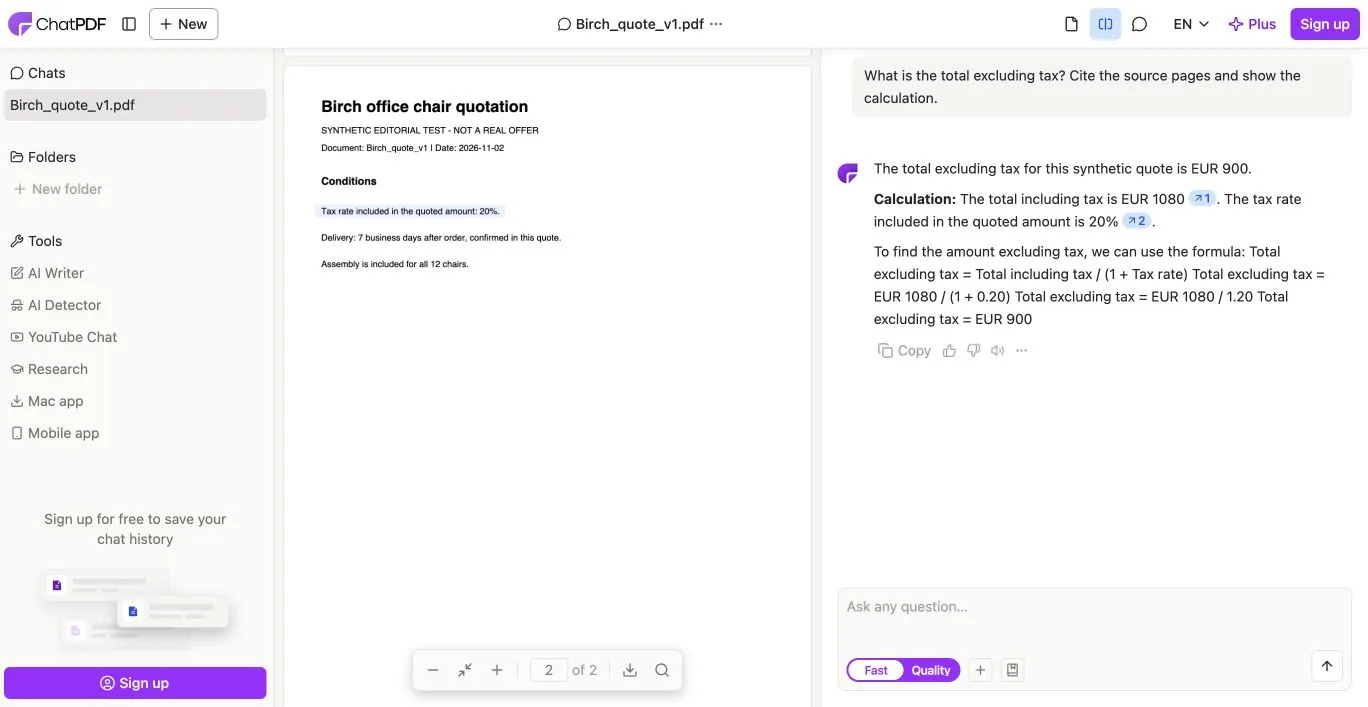
Real English ChatPDF interface and synthetic input. The visible citation supports a specific calculation; it is not evidence that every answer is accurate.
An earlier compound request for a table, conditions and XLSX export produced no visible response before we reloaded. The shorter calculation request succeeded. A separate export request then returned a statement that this chat could not create a downloadable editable XLSX; no workbook was delivered. That describes our guest session and request, not an exhaustive claim about every current ChatPDF plan or tool.
For reading and checking that one value, ChatPDF met the need. We did not run its multi-file folder workflow. Its official site documents both multi-file chats and PDF-linked citations, so missing multi-file test access must not be presented as a missing product capability.
Choose by the next operation
| Candidate | Useful reason to evaluate it | Boundary to test |
|---|---|---|
| Keep ChatPDF | Ask questions with the PDF beside the answer and follow citations | Does the available workflow deliver the editable file you need? |
| Ofox Chat | Turn several PDFs into a source-linked XLSX and matching DOCX | Units, unknowns, formulas and version changes need inspection |
| Claude | General document analysis and downloadable office-file creation | Require filename/page references and inspect actual exported files |
| Gemini Notebook | Work with a deliberately selected collection of sources | Source changes do not automatically revise already generated studio outputs |
| Acrobat AI Assistant / PDF Spaces | Compare documents and inspect citations within a PDF-oriented workflow | Verify the specific output and editing route, not just PDF conversion support |
Ofox: comparison files you can continue working with
In the Ofox run below, the result included formulas, source references and original source text, plus a decision memo. Replacing one quote updated both outputs and retained the earlier version as superseded history. This is a concrete reason to try a task-to-file workflow when the recipient needs to calculate or amend a comparison.
It does not establish a replacement for every PDF annotation, collaboration, signing or storage feature. The output is a new file; the original PDF is not itself edited. We used the browser’s Balanced setting, which is a mode label rather than a verified fixed model identifier.
Claude: general-purpose file authoring
Claude’s file-creation guide documents downloadable spreadsheets and documents. It is a relevant candidate for the same output-oriented brief. Confirm that file creation is available in your workspace.
We did not test these PDFs in Claude. Give it the source manifest and acceptance rules below, and check the resulting citations against the actual pages. A supported PDF input or XLSX output does not, by itself, establish a correct cross-document comparison.
Gemini Notebook: selected sources and explicit output refresh
Google’s current help names this product Gemini Notebook. Its source guide describes PDF and other document imports, source selection and some auto-synced sources. It also states that updating or deleting a source does not change studio outputs already generated from it.
This route is worth considering when a maintained source collection is the center of the work. After a quote revision, check both the selected source and the saved answer or artifact; a current source does not make an old conclusion current. We did not run a notebook in this test or verify an XLSX export route.
Acrobat: keep review close to the document
Adobe documents AI Assistant across multiple documents and viewing source citations in PDF Spaces. This makes it a candidate when document inspection is already part of an Acrobat workflow.
Do not infer a formula-bearing comparison workbook from general PDF-to-Excel conversion. Extracting page content and building a normalized, recalculable supplier comparison are different tasks. We did not generate an Acrobat output here; use the actual quote packet to test the specific route and entitlement you would use.
The three-PDF packet: similar prices, different meanings
The inputs are deliberately short enough to audit completely. Download Aster v1, Birch v1 and Cedar v1. Each is two pages, clearly marked as a synthetic editorial test, and contains quoted rows plus a separate conditions page. None is a real offer.
| Quote | Stated basis | Correct comparison treatment |
|---|---|---|
| Aster | 12 chairs × EUR 85 net; EUR 90 net delivery; 20% tax | EUR 1,110 net / 1,332 gross for known scope; assembly excluded and unpriced |
| Birch v1 | 3 packs of 4 × EUR 360 including 20% tax; delivery and assembly included | 12 chairs; EUR 1,080 gross / 900 net for the package |
| Cedar | 12 chairs × EUR 78 net; delivery price pending; tax and assembly unspecified | EUR 936 is chairs-only net, not a comparable delivered-and-assembled total |
Cedar’s smaller visible number is not proof that it is the cheapest complete option. Aster’s assembly cost cannot be treated as zero. Birch’s included delivery has zero separately charged delivery in the quote, but the service’s internal allocation is unknown. These distinctions change the decision even when every extracted number is correct.
Delivery status also matters. Aster says estimated 10 business days, Birch v1 says confirmed 7 business days in the quote, and Cedar leaves the date to be confirmed. No order date is supplied, so the agent should not invent a calendar arrival date. A quoted confirmation is not evidence that a real delivery occurred.
Inspect the original deliverables
Ofox returned an original comparison workbook and decision memo. Independent inspection found six sheets, 45 formulas and the text of all six PDF pages retained. Key figures were tied to filename, page and quoted row or conditions.
The workbook calculated Aster’s known total and Birch’s tax-derived net correctly, while retaining Cedar’s unresolved delivery, tax and assembly. The recommendation stayed conditional on scope and requirements rather than declaring a universal price winner. We inspected formula expressions and cached results; we did not separately perform a desktop recalculation of this PDF-derived workbook.
For your own output, trace at least one difficult value all the way through: source page → extracted amount and unit → formula → comparison row → written recommendation. Checking only the final table can miss a correct-looking number attached to the wrong supplier or version.
Replace a quote, then check the decision again
We uploaded Birch v2, dated November 6. It supersedes v1, increases the pack price to EUR 380 and changes delivery from confirmed 7 business days to estimated 12 business days. Delivery and assembly remain included.
The expected revised package is 3 × 380 = EUR 1,140 gross, or EUR 950 net plus EUR 190 tax. Compared with v1, that is EUR 60 more gross and EUR 50 more net. The recommendation must also lose its confirmed-timing advantage; simply changing the price is incomplete.
The revised XLSX and revised DOCX passed independent comparison. Aster and Cedar’s checked facts, formula text, cached values and source comments were unchanged. Birch’s current values and citations pointed to v2; v1 remained only as labeled history. The memo and change log reflected the new delivery uncertainty.
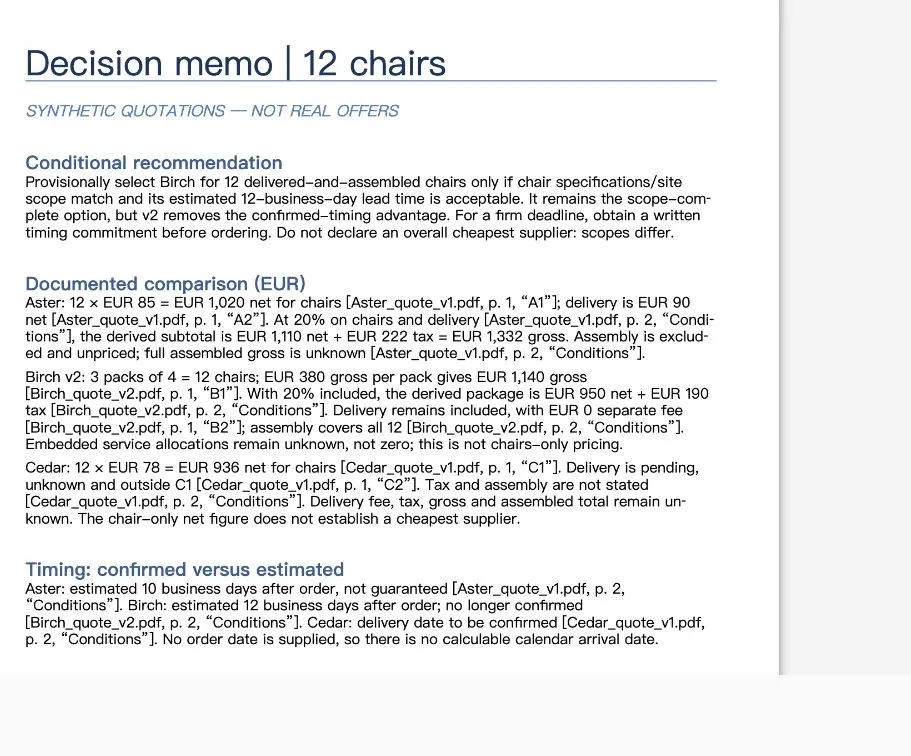
English DOCX preview, cropped to the document. This is an actual output from the uploaded digital PDFs, not a generated illustration or OCR demonstration.
The revision retained all 45 formula expressions and updated the relevant cached results. That is a useful observed result on this small packet, not a guarantee that any longer or scanned contract will behave identically.
A brief that makes the comparison auditable
Use an explicit source inventory and state which revision is active. Upload only documents you are entitled to share with the chosen service. For an initial evaluation, these synthetic files avoid exposing private quotations.
Compare the attached [filenames and active versions] for [specific task].
Normalize quantities and units before comparing amounts. Separate net,
tax and gross. Mark missing charges or conditions UNKNOWN, never zero.
Do not rank totals with different scopes as directly comparable.
For each consequential value cite filename, PDF page and row/section.
Distinguish stated, calculated, estimated, confirmed and missing facts.
Deliver an editable XLSX with formulas, sources and unresolved questions,
plus a DOCX memo whose recommendation uses the same facts.
List any unread pages. Do not invent an order date or delivery guarantee.
For a later revision:
Replace [old filename] with [new filename] as the active source.
Keep the old version only as explicitly superseded history.
Update affected amounts, conditions, citations and recommendations in
both outputs. Preserve unrelated suppliers and their source references.
Return separately named files and a concise before/after change log.
These instructions do not eliminate errors. They make errors easier to identify and the output easier to reject or repair.
Acceptance and recovery before handoff
- Read the source inventory. Confirm every expected PDF and page was processed. If a page is unreadable, resolve it before treating the comparison as complete.
- Check the common basis. Convert packs to units; keep currency and tax scope explicit. For missing taxes or services, request clarification instead of inventing an all-in total.
- Follow citations. Open the actual page. Confirm that it supports the amount, condition and active version, not merely a nearby sentence.
- Inspect the workbook. Check formulas, units, blanks and error cells. Recalculate a copy in your receiving spreadsheet application when further calculation matters.
- Read the recommendation against the table. A deadline change or excluded service may matter more than a price change. Require the memo and workbook to agree.
- Verify a source revision. Old figures must not remain in current summaries or citations. Keep history separately, and preserve an untouched baseline for rollback.
If the input is a scan, first establish that the relevant text, decimal marks and table rows were read correctly. This guide provides no OCR accuracy evidence. If a tool cannot deliver the needed file, retain its cited answer for reading and move the structured data through a separately checked export or spreadsheet step. Do not pretend a copied chat table is already a working calculation model.
Keep the reading tool when reading is the task
For a focused question like the tax calculation, our ChatPDF result was useful and easy to verify. Moving to another tool would be unnecessary if that is the full job. A separate-file route becomes more relevant when colleagues need to change inputs, review exceptions or receive a memo that stays consistent with a revised quote.
Try the supplied packet in Ofox Chat if that file handoff is your requirement. For the next step, the Copilot Excel alternatives guide shows why a correct recalculation can still leave stale explanatory text. For open-web evidence rather than supplied PDFs, use the Perplexity alternatives comparison.
For a broader view before settling on a tool, our 12 AI agents guide compares research, writing, presentations, visual creation and everyday workflows.
Related Docs
Ofox documentation covers programmatic integration; this test used browser uploads and downloadable files.