Genspark alternatives for reports, spreadsheets and slides
Choose a Genspark alternative by the work you need to hand over. Compare editing and export boundaries, inspect real files, and use a practical migration plan.
 Ofox

The useful Genspark alternative is often a replacement for one part of your work, not the entire workspace. Consider Claude for general file authoring, Ofox for an instruction-to-file workflow, Gamma for a presentation-centered editor, and Plus AI for work that should stay inside PowerPoint or Google Slides. Keep Genspark when its integrated research, editors and file organization already solve the task.
A report, a spreadsheet and a slide deck create different handoff problems. A report needs traceable claims. A spreadsheet needs usable values and formulas. A presentation needs the right editing objects after export. Comparing all three with one “best agent” score hides the reason you would switch.
Ofox publishes this guide. We checked official documentation and captured Genspark’s English Slides entry page on November 5, 2026; we did not run or export a Genspark project. The concrete output checks below come from Ofox and a separate same-brief Gamma presentation test. Documentation, interface screenshots and tested outputs are identified separately. No success-rate, speed or price ranking is implied.
Start with what Genspark already provides
Genspark is more than a single chat box. Its AI Slides guide describes Professional and Creative modes, a guided workflow, conversational changes and multiple export destinations. The AI Docs guide distinguishes directly editable Rich Text/Markdown formats from preview-based Web Doc/Word workflows. The AI Sheets guide documents spreadsheet import, formulas and export. AI Drive provides a common file workspace.
Those distinctions affect migration. If you use several editors and reuse files across projects, replacing the chat alone may create more manual transfers. Conversely, if all you need is a weekly editable deck, replacing only that step may be enough.
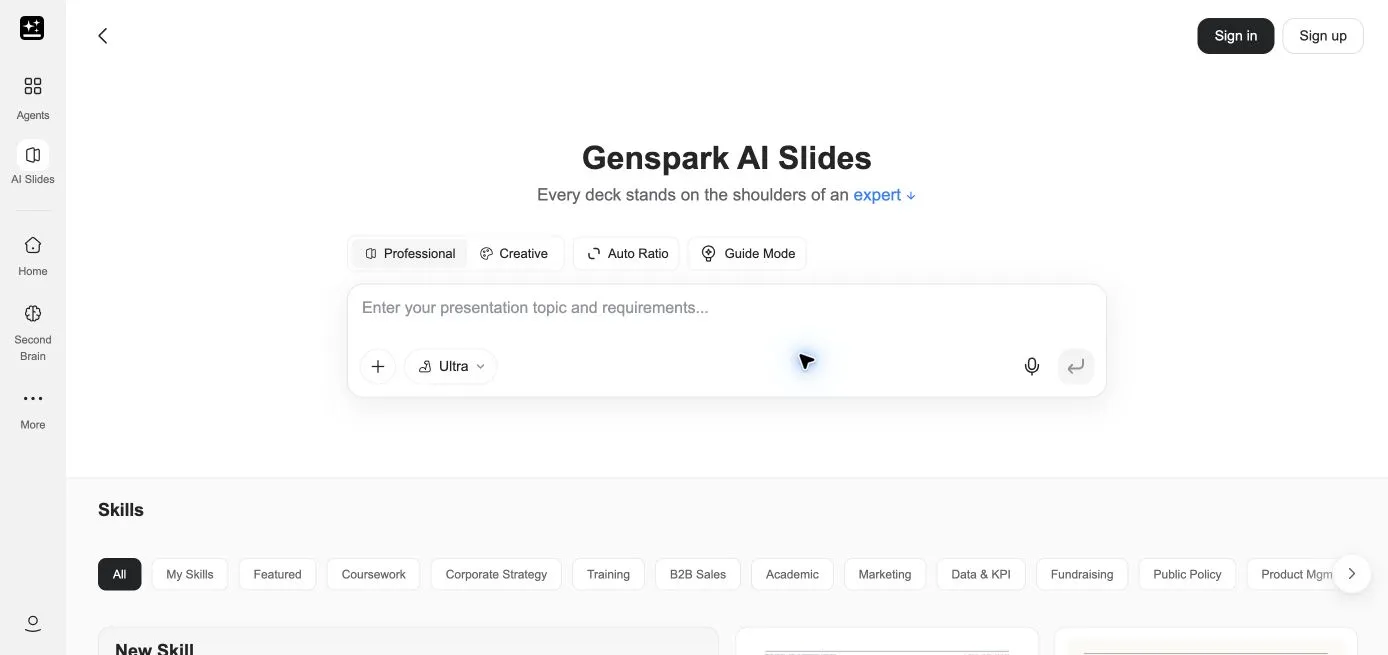
Real signed-out Genspark entry page. It documents the visible workflow, not a completed generation or export test.
Before changing tools, distinguish a product limitation from a format or plan limitation. Genspark’s documentation states that slide exports require an eligible paid plan. Its Docs workflow also has format-specific editing and export behavior, and a document’s format is fixed after content creation. A new tool will not necessarily solve the problem if the original mistake was choosing a preview-oriented format when you needed direct text editing.
Which replacement fits which task?
| Your actual task | Candidate | Reason to consider it | Main tradeoff |
|---|---|---|---|
| Produce different office file types from one analytical conversation | Claude | Officially supports creating Word, Excel, PowerPoint and PDF files | Generated files still need content and object checks; workspace tools must be enabled |
| Deliver a report plus a matching evidence workbook, then revise the pair | Ofox Chat | Downloaded, checked original and revised files in this guide | Small synthetic test; not a full replacement for a shared drive or every editor |
| Develop and present a visually designed deck in a web editor | Gamma | Presentation workflow plus PowerPoint export; native table observed | Web editability and exported chart editability can differ |
| Keep presentation work inside PowerPoint or Google Slides | Plus AI | Native application workflow documented by the vendor | Import/rewrite behavior and your template need their own test |
| Maintain linked research, multiple editors and shared file organization | Keep Genspark | Existing integrated workflow may avoid repeated transfers | Inspect the exact export format, permissions and plan entitlement |
Claude: broad file authoring
The official file-creation guide makes Claude a reasonable candidate when the output could be a document, spreadsheet or presentation. The relevant code-execution and file-creation environment must be available. That capability is not a promise that a generated workbook has correct formulas, or that a presentation preserves a corporate master.
Choose a concrete acceptance task before evaluating it: “create a DOCX memo and XLSX claim ledger from these sources” is more useful than “replace Genspark.” We did not run the supplied packet in Claude. Treat it as a documented candidate, not a measured winner.
Ofox: a specified file and a controlled revision
Ofox is worth evaluating when you want to describe the deliverable in a conversation and download the result. In our English Balanced-mode run, it produced a Word decision memo and Excel evidence ledger from synthetic source excerpts. A later source amendment updated both files while preserving the earlier evidence. The mode is a UI setting, not a verified fixed model identifier.
The strongest reason to try this route is that you can inspect the delivered files and ask for a bounded change. It does not establish a substitute for every Genspark collaboration, storage or visual-editing feature. The source-backed report comparison contains the full input, original and revised files, and approval-status checks.
Gamma: presentation editing with an export boundary
Gamma fits a presentation-centered workflow where people refine and present inside its web editor. Its export documentation explicitly supports native editable PowerPoint tables, enabled by default. Our same-brief test confirmed a native table in a Free-account export.
The chart in that particular export was an image. Gamma’s completion message described it as editable in Gamma; we did not independently test changing its data in the web editor. If your colleague must change the monthly chart data in PowerPoint, this distinction matters more than the initial visual polish. See the Gamma alternatives export test for the original files and a scoped revision comparison. It does not demonstrate how every Gamma template or chart exports.
Plus AI: keep the deck in its destination application
Plus AI’s PowerPoint workflow is relevant when the working file already belongs in Office. Its web guide also distinguishes web generation/export from add-in use. This can reduce application switching, but we did not measure time saved.
Be careful when importing an existing Genspark deck. The file-upload guide describes remixing or generating from existing content, requires Pro or Team for upload, and says images, diagrams and charts are not extracted from the source document. Importing content is not the same as faithfully preserving every slide object. Keep the original deck and test the difficult slides first.
Compare exports at the object level
Genspark’s Slides FAQ notes that complex HTML tables and charts can be converted to images or shapes. This is narrower and more useful than a blanket “editable PowerPoint” claim. An exported file may contain editable text while a chart cannot accept new data.
For spreadsheets, check a different boundary. An XLSX extension does not establish that formulas survived rather than being replaced by values. Open a copy, change an input and verify recalculation. Check dates, currencies, sheet names and source rows. Genspark’s documented Sheets support is a capability statement, not an accuracy result for your workbook.
For reports, verify that the downloaded document includes the claims and their source locations. A bibliography alone may be insufficient when a reviewer must trace a disputed sentence. A report and an evidence ledger should agree on which statements are facts, proposals or unknowns.
| Deliverable | Minimum useful inspection | Failure that should stop the handoff |
|---|---|---|
| DOCX report | Open it; trace consequential claims to source ID and location | Proposal described as approved; source references missing |
| XLSX analysis | Inspect formulas and units; change an input in a copy | Static values presented as live calculations; totals no longer reconcile |
| PPTX deck | Edit text, table cells and chart data in the destination app | Required chart is a picture; fonts or layout make content unreadable |
| Shared project | Check exported files, source bundle and recipient access | Export mistaken for a transfer of workspace permissions or history |
A concrete evidence pack you can inspect
The synthetic report case contains a proposed EUR 12,000 ceiling, an unapproved EUR 9,500 finance proposal and a EUR 10,200 vendor quote excluding tax and travel. The task is to retain their different meanings, not sum them or declare the quote approved.
Ofox delivered a Word memo and Excel ledger. The ledger has 18 claims, six unresolved questions and six proposed actions. We checked those entries against the supplied source sections. The files preserve the missing action deadline and distinguish quote validity from a deadline assigned to a person.
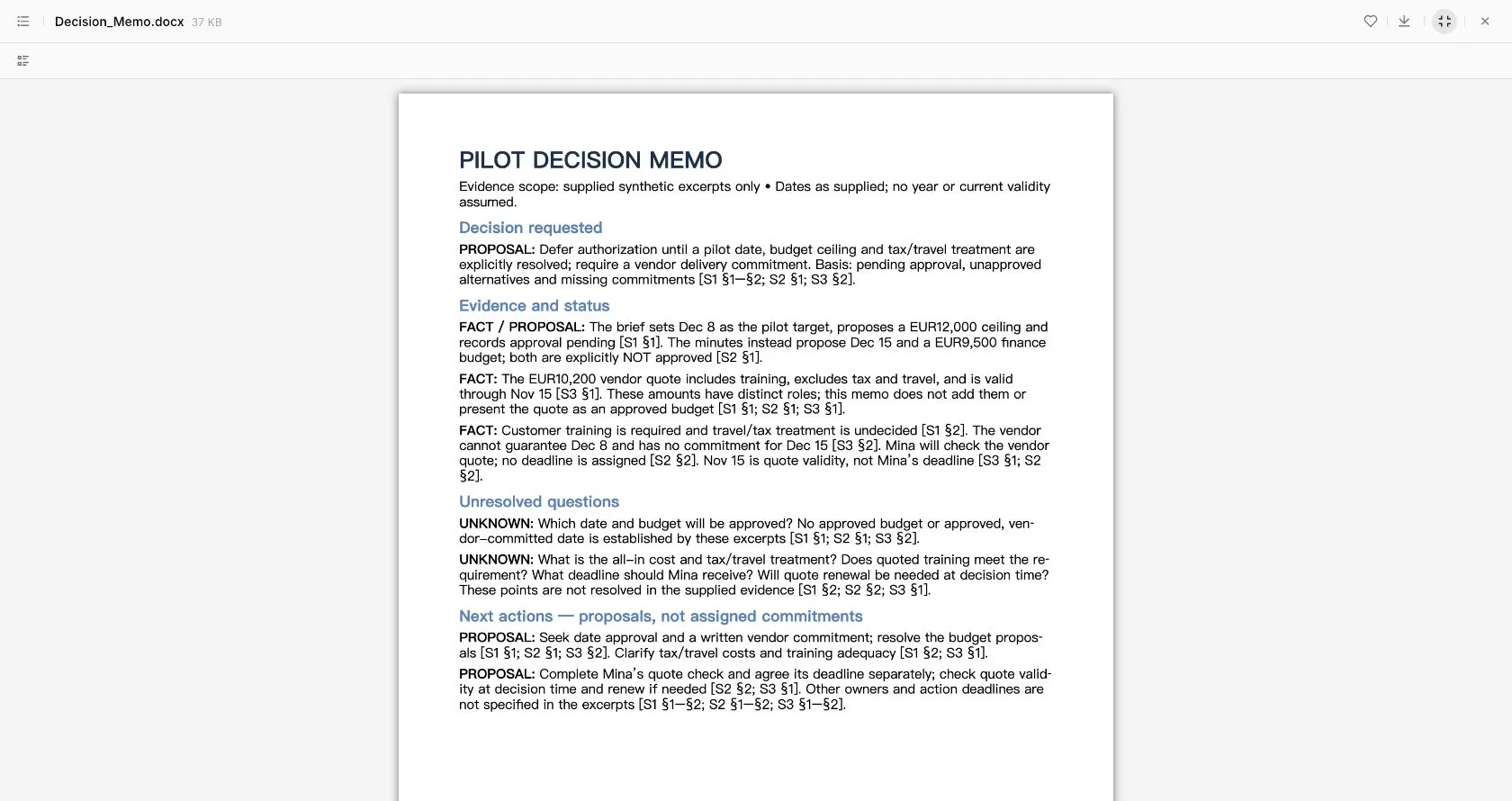
English browser preview of the generated DOCX. Sources were pasted synthetic excerpts, not uploaded PDFs; this is not an OCR or large-file test.
For slides, a separate three-slide task used April 120, May 150 and June 135 orders, total 405. The downloaded Ofox PPTX contains editable text, a native table and a native chart with embedded spreadsheet data. A request to revise only the third slide changed only that slide’s risk text; the other package members were unchanged. That demonstrates one successful scoped file revision, not guaranteed behavior on every deck.
These are examples of evidence to request from any candidate. They are not a head-to-head Genspark benchmark: no Genspark output was generated in this review.
Migrate one recurring task first
- Pick the bottleneck. Write the recipient, file format, required editing operations and unacceptable errors. “Finance must update chart data in PowerPoint” is a testable requirement; “better agent” is not.
- Save an intact baseline. Keep the Genspark project, a current export, source documents and any calculation inputs. Record the current document format and export entitlement. Do not delete the old project during evaluation.
- Transfer evidence separately from instructions. Recreate the source manifest, task constraints and output requirements in the candidate. A share link alone may not give it access to your source files or prior context.
- Run a bounded task. Generate the actual deliverable and inspect it in the receiving application. Compare content and data before judging the appearance.
- Apply one real revision. Change a source fact or a single section. Check that affected content updates and unrelated content survives. Save both versions.
- Rebuild the handoff deliberately. Set appropriate access on new files, identify the authoritative version and tell collaborators where future edits belong. Do not assume exports transfer comments, history, project organization or permissions.
Here is a reusable evaluation brief. Replace the bracketed fields and include the actual source material:
Use only [attached or pasted source IDs]. Do not browse unless explicitly
requested. Deliver [exact file types] for [recipient and task].
Preserve [figures, units, approved wording and required objects].
Separate facts, proposals, approvals and unknowns. Cite each consequential
claim by source ID and page or section. Do not invent missing information.
Include a source inventory and report anything you could not read.
After the first delivery, change only [specific section or object], keeping
[unaffected material] unchanged. Return a new version and list changes.
When the replacement is not worth it
Stay with Genspark when the current editor and export meet the recipient’s needs and the shared workspace avoids repeated source transfers. If only a single chart needs repair, exporting and rebuilding that chart may be enough. If the issue is a missing entitlement, compare the total workflow cost—including manual repair and migration—rather than treating a free generation button as free delivery. We have not calculated a price winner here.
If a candidate cannot produce the required file, retain the existing route while testing another. If it loses source references, require a separate ledger before handoff. If it changes unrelated content during a revision, return to the saved baseline and narrow the change request. These failures are specific enough to diagnose; a generic quality score is not.
Try the synthetic pack in Ofox Chat when file delivery is your priority, or evaluate the other candidates at the specific step they are designed to serve. A successful switch leaves you with less repair work and a usable handoff—not simply another account.
Related Docs
Ofox API documentation covers programmatic integration; it is separate from the browser Chat workflow described here.