NotebookLM alternatives for reports that keep their sources
Compare NotebookLM, Claude, Ofox and Perplexity Projects for work reports. Follow a real Word-and-Excel example that preserves citations and approval status.
 Ofox
For a source-backed work report, the useful NotebookLM alternative depends on what happens after you understand the sources. Keep Google’s notebook workflow for source exploration and supported exports; consider Claude or Ofox when you want direct DOCX/XLSX creation from instructions; consider Perplexity Projects when collecting and organizing research is the larger problem. Do not switch merely to obtain a report: Google’s product already has reporting and export features.
The harder requirement is preserving evidence when a report leaves the notebook. A Word document needs usable source identifiers. A spreadsheet needs the same claim statuses as the report. When a new approval arrives, both files must change without turning a budget decision into a purchase authorization.
Ofox publishes this guide. We tested Ofox in its English interface on November 5, 2026, using synthetic pasted excerpts and Balanced mode. The visible mode does not identify a fixed backend model. Google, Claude and Perplexity comparisons below use official documentation; this is not a four-product accuracy benchmark. The Google notebook app redirected our session to an unsupported-location page, so we did not perform a generation test there. That local access result does not establish availability for other users.
NotebookLM is now called Gemini Notebook
Google’s current product page and Workspace administration documentation identify the product as Gemini Notebook. The public FAQ describes the change from NotebookLM as a rename of the same product, with existing notebooks retained. We keep “NotebookLM alternatives” in this guide because it identifies the product readers are trying to replace; do not interpret the new name as a separate migration destination.
Before choosing a replacement, check whether the existing export solves your problem. Google’s notebook creation and Studio guide documents exporting reports to Docs and report tables to Sheets. It separately describes Data Tables exports with citations in a second tab. Do not assume every report-table export has that same citation arrangement.
The export is a handoff, not a live connection. Google’s notes export guidance explains that changes in the exported file do not sync back and sharing permissions do not carry over. If a colleague edits the document, decide whether that document or the notebook becomes the authoritative version. Otherwise two apparently current reports can diverge.
Keep the notebook workflow when source-grounded reading, questions and supported Studio outputs meet the need. A whole-platform switch adds unnecessary work if your only missing step is a supported export. This guide concerns written work reports, not replacing every audio, video or study feature.
Choose the alternative by the missing step
| Need | Candidate | Why it belongs on the shortlist | What this guide does not establish |
|---|---|---|---|
| Explore a bounded source collection, then export a report | Gemini Notebook, formerly NotebookLM | Existing source notebook and documented report exports | No local generation test; export is not live synchronization |
| Turn instructions and evidence into editable office files | Claude | Documented Word, Excel, PowerPoint and PDF creation | No same-source accuracy or citation test here |
| Deliver a Word memo and a matching Excel evidence ledger, then revise both | Ofox Chat | Actual downloaded original and revised files in this guide | One small synthetic packet, not large-document or OCR reliability |
| Collect research in a persistent project and constrain sources | Perplexity Projects | Official project workflow with files and research context | Not proof that every claim survives export with complete citations |
Claude is a candidate for the authoring stage. Its file-creation documentation describes editable office outputs when the relevant execution and file-creation tools are enabled. Ask for a source appendix and claim ledger explicitly; the ability to create a DOCX does not itself guarantee correct citations. Workspace controls and enabled tools matter.
Ofox Chat fits a file-delivery workflow when the report and ledger are the products you need to hand off. The example below shows both outputs, the conflicting source statements, and a later amendment. It is a concrete use case rather than a claim that Ofox replaces all notebook functions. For the separate task of reading uploaded PDFs and checking physical page numbers, use the multiple-PDF summary walkthrough.
Perplexity Projects is the current name to evaluate. The official change announcement describes Spaces becoming Projects, and the Projects page describes persistent context, files and scoped research sources. That is relevant when finding and maintaining the evidence collection is the bottleneck. It is not evidence that a generated deliverable has the same source controls as a notebook; inspect the final claims and source scope separately.
A practical test: three sources that disagree
Our test uses pasted synthetic excerpts, not uploaded PDFs or customer records. That distinction matters: no OCR, page extraction or document-length claim can be inferred from it. The excerpts include dates and amounts with different meanings:
| Source | Statement | Status that must survive |
|---|---|---|
| S1, brief §1, Nov 1 | Dec 8 pilot target; EUR 12,000 proposed ceiling | Approval pending |
| S1 §2 | Training required; tax/travel treatment undecided | Requirement plus unresolved scope |
| S2, minutes §1, Nov 3 | Dec 15 and EUR 9,500 proposed | Neither approved |
| S2 §2 | Mina will check the quote | No deadline assigned |
| S3, quote §1, Nov 4 | EUR 10,200 includes training, excludes tax/travel; valid through Nov 15 | Quote, not approved budget or spending |
| S3 §2 | Dec 8 not guaranteed; no Dec 15 commitment | Delivery unresolved |
The three amounts must not be added. The quote’s expiry must not become Mina’s deadline. A later proposal is not automatically an approval, and the absence of a Dec 8 guarantee does not imply a Dec 15 guarantee.
Use this complete test prompt in a new conversation:
Use only these synthetic source excerpts, no web browsing. Create a
downloadable English Word report (.docx) and an evidence ledger (.xlsx).
Every factual claim in the report must cite a source ID and section;
distinguish facts, proposals and unknowns.
S1 Project brief §1, dated Nov 1: pilot target Dec 8, proposed budget
ceiling EUR12000, approval pending.
S1 §2: customer training required; travel/tax treatment not decided.
S2 Meeting minutes §1, dated Nov 3: Dec 15 proposed instead, NOT approved;
finance proposes EUR9500, also NOT approved.
S2 §2: Mina will check the vendor quote; no deadline assigned.
S3 Vendor quote §1, dated Nov 4: EUR10200 includes training, excludes tax
and travel; valid through Nov15.
S3 §2: vendor cannot guarantee Dec8; no commitment for Dec15.
Deliver: one-page decision memo plus claim/source/status ledger, unresolved
questions and next actions. Do not add the three amounts or treat quote
expiry as Mina's deadline. Include source excerpts in an appendix so the
files stand alone.
We downloaded the Word memo and Excel evidence ledger. The report cites source IDs and sections; its appendix retains the supplied excerpts. The ledger contains 18 claims, six unresolved questions and six proposed actions. Checking those rows against the source text found the three amounts kept separate, the missing deadline retained, and proposed actions distinguished from commitments.
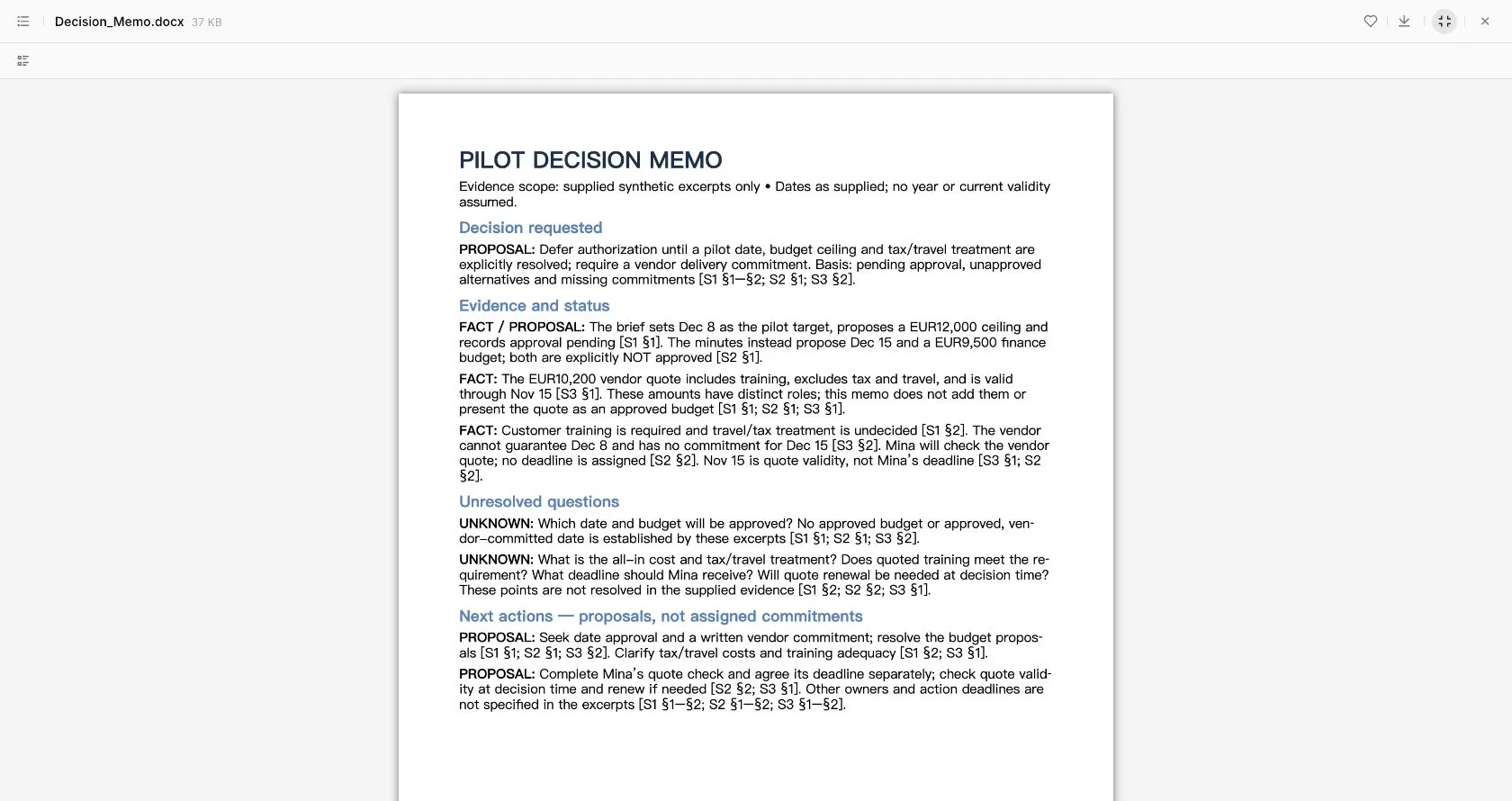
Real Ofox DOCX preview. The first page is the memo; the source appendix follows. This browser preview and file-content inspection do not establish identical pagination in every Word application.
A citation label alone is not enough. We checked whether the cited passage actually supports the adjacent statement. For example, “Mina will check the quote” belongs to S2 §2; “valid through Nov 15” belongs to S3 §1. Joining those two facts into “Mina must finish by Nov 15” would be an unsupported conclusion even if both source labels appeared next to it.
Add one approval without approving everything
The follow-up introduced two new source sections:
Update both deliverables using this additional synthetic source,
preserving the original source excerpts and showing which earlier
proposals are superseded.
S4 Approval note §1, dated Nov 5: management approves a budget ceiling
of EUR11000 excluding tax and travel; no pilot date is approved.
S4 §2: Mina must finish the quote check by Nov 10.
Do not interpret this as vendor selection, purchase approval or a delivery
commitment. Deliver Decision_Memo_Revised.docx and Evidence_Ledger_Revised.xlsx.
Mark the newly resolved questions and keep date approval, vendor commitment,
training adequacy, tax/travel and quote validity checks unresolved.
The important acceptance criteria are narrow. The current ceiling becomes EUR 11,000 excluding tax and travel. Mina’s deadline becomes Nov 10. The earlier budget proposals remain in the historical evidence, while the new approval governs ceiling-setting. Neither change establishes the total project cost, a selected supplier, permission to buy or an approved delivery date.
Download the revised memo and revised ledger to compare the versions. Our file inspection found 22 claims, six questions, six actions and eight source sections. All six original excerpts were preserved. The budget-ceiling question and Mina’s deadline question were marked resolved only within those scopes; date approval, all-in cost/tax/travel, training adequacy and quote-validity checks remained unresolved. Neither file treated the amendment as supplier selection, purchase approval or a delivery commitment. Use the appendix and status fields to review exactly what changed. A chat message announcing “updated” is not enough: both delivered files must reflect the new source, and both must preserve the unresolved conditions.
Move a real project without losing its evidence
- Inventory the sources. Record a stable ID, filename or URL, date, version and relevant page or section. Keep the underlying files outside a single chat. A copied answer without its supporting material is not a complete migration.
- Export what already exists. Preserve the original notebook output before editing it elsewhere. Check whether citations remain clickable or require a separate source table. For Google exports, verify sharing on the new file rather than assuming notebook access carried over.
- Name the source boundary. State whether the new tool may browse, use only attached files or combine both. If external research is allowed, label it separately from internal project evidence.
- Generate the deliverable and its ledger together. Require claim, source location, status, uncertainty and last applicable update. Request the actual file types the recipient needs, not merely “a report.”
- Check consequential claims and amendments. Compare amounts, exclusions, dates, owners and approvals against the originals. After an update, review both the narrative and ledger; an updated paragraph with a stale spreadsheet is still a failed handoff.
For a large packet, first ask for a file-and-section inventory, resolve unreadable material, and then synthesize. This small excerpt test provides no evidence for scans or long documents. If a source is unreadable, retain the limitation and do not fill its gaps with confident prose.
Common migration failures and repairs
| Failure | Repair |
|---|---|
| Citation points only to a notebook the recipient cannot access | Include an authorized source extract or accessible source file with stable ID and location |
| Exported document and notebook disagree | Choose one authoritative version; record the update date and reconcile deliberately |
| New evidence erases old proposals | Preserve historical rows and mark the specific superseded status |
| Approved ceiling becomes an approved purchase | Separate ceiling, supplier selection, purchase authorization and delivery commitment |
| Report changes but ledger does not | Request both files again, identifying the affected claim IDs and source sections |
| Formatting hides uncertainty | Restore explicit “proposed,” “not approved” or “not stated” wording near the claim |
Use Ofox Chat for the supplied file-delivery example if that is the missing part of your workflow. Stay with Gemini Notebook when its source exploration and exports already work, evaluate Claude for broader file authoring, or evaluate Perplexity Projects for research organization. The successful replacement preserves the relationship between a claim and its evidence after the work leaves the app.
Related Docs
Ofox API documentation describes programmatic workflows separately from the Chat test in this article.