CC-Switch Configuration
CC-Switch is a powerful multi-model management tool that integrates OfoxAI and other AI providers in a single interface. With usage query support, you can now monitor your OfoxAI API consumption in real-time.
Prerequisites
- Registered OfoxAI account with API Key (Get API Key )
- Installed and configured CC-Switch
Configuration Steps
Step 1: Add OfoxAI Provider
Add a new provider in CC-Switch with the following configuration:
| Configuration | Value |
|---|---|
| Provider Name | ofoxai-claude (or custom name) |
| API Base URL | https://api.ofox.ai/v1 |
| API Key | Your OfoxAI API Key |
Step 2: Enable Usage Query
The image below shows how to configure usage query in CC-Switch:
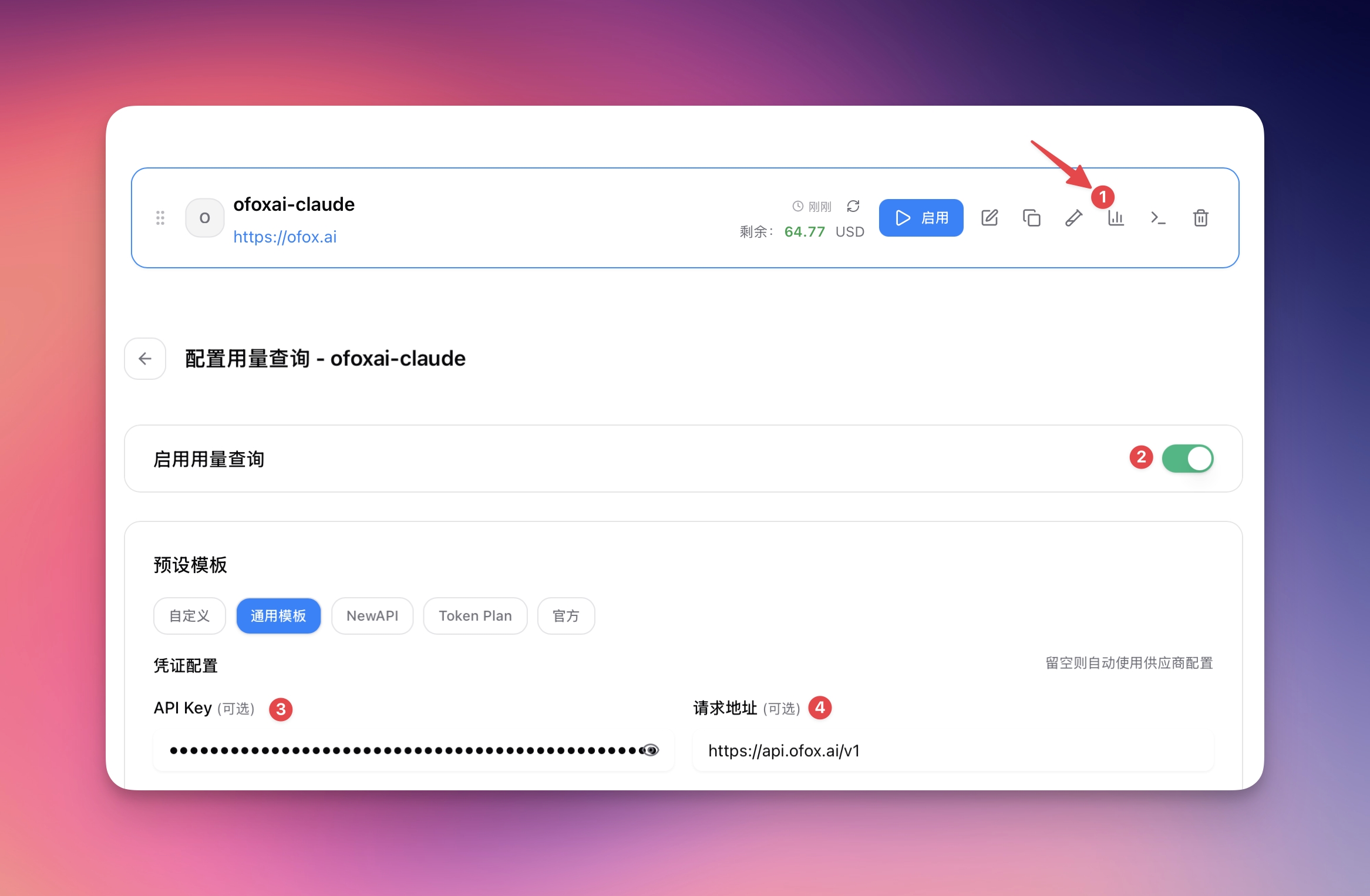
Configuration highlights:
- Enable Usage Query — Toggle the green switch on the right (see image marker ②)
- API Key — Enter your OfoxAI API Key (marker ③)
- Request Endpoint — Set to
https://api.ofox.ai/v1(marker ④) - Template — Select 通用模板 (Universal Template) for best compatibility
Step 3: Verify Configuration
After configuration, you can:
- View real-time usage statistics in the CC-Switch dashboard
- Monitor API call counts and token consumption
- Track costs and budget usage
Usage query works by periodically calling the OfoxAI API to fetch account statistics. Ensure your API Key has sufficient permissions.
Never commit API Keys to public repositories. Use environment variables or secure key management systems to store your API Key.
Supported Models
Through OfoxAI, CC-Switch can access 100+ AI models. See OfoxAI Model Marketplace for details.
FAQ
Q: How frequently does usage data update?
Usage data typically updates within a few minutes after API calls, depending on OfoxAI’s processing speed.
Q: How do I disable usage query?
Simply toggle off the usage query switch for the provider in CC-Switch. This won’t affect normal API calls.
Q: Does usage query consume API quota?
No. Usage query uses a dedicated statistics API and does not count against your API call limits.
Q: Can I add multiple OfoxAI accounts?
Yes. You can add multiple OfoxAI provider configurations in CC-Switch using different API Keys.