DeepSeek Harness Setup
DeepSeek Harness (command name dsh) is DeepSeek’s official open-source agent harness, built on an everything-is-a-plugin architecture — models, tools, skills, sessions, sandboxes and the UI are all swappable plugins. It calls the official DeepSeek API by default; point its model plugin at OfoxAI and the same harness reaches 100+ models.
This tool still uses manual setup. Ofox Desktop does not auto-configure DSH yet. If you also use Codex, Claude Code, Gemini CLI, OpenCode, OpenClaw or Hermes on an Apple silicon Mac, Ofox Desktop can detect and configure those supported tools .
dsh is in developer preview and its maintainers state that breaking changes are expected. This guide is written against @deepseek-ai/dsh 0.1.2-rc.1.
Setup Steps
1. Install dsh
Install Node.js first. dsh ships on npm as @deepseek-ai/dsh and provides the dsh command once installed.
macOS
npm install -g pnpm          # skip if already installed
pnpm add -g @deepseek-ai/dsh
dsh --version
pnpm’s global bin directory must be on your PATH; run pnpm bin -g to find it.
pnpm may warn Ignored build scripts: node-pty, koffi … during installation. Ignore it — both packages ship prebuilt binaries for every platform and need no local compilation.
To try it without installing globally:
npx @deepseek-ai/dsh web2. Configure the OfoxAI provider
dsh keeps its configuration under $DSH_HOME — ~/.dsh on macOS and Linux, %USERPROFILE%\.dsh on Windows. Pick either route below.
Pick the Base URL that matches your network: use api.ofox.ai on international networks, and api.ofox.io from mainland China. They mirror the same service — the same API key works on both, and the path is /v1 either way.
Web UI (recommended)
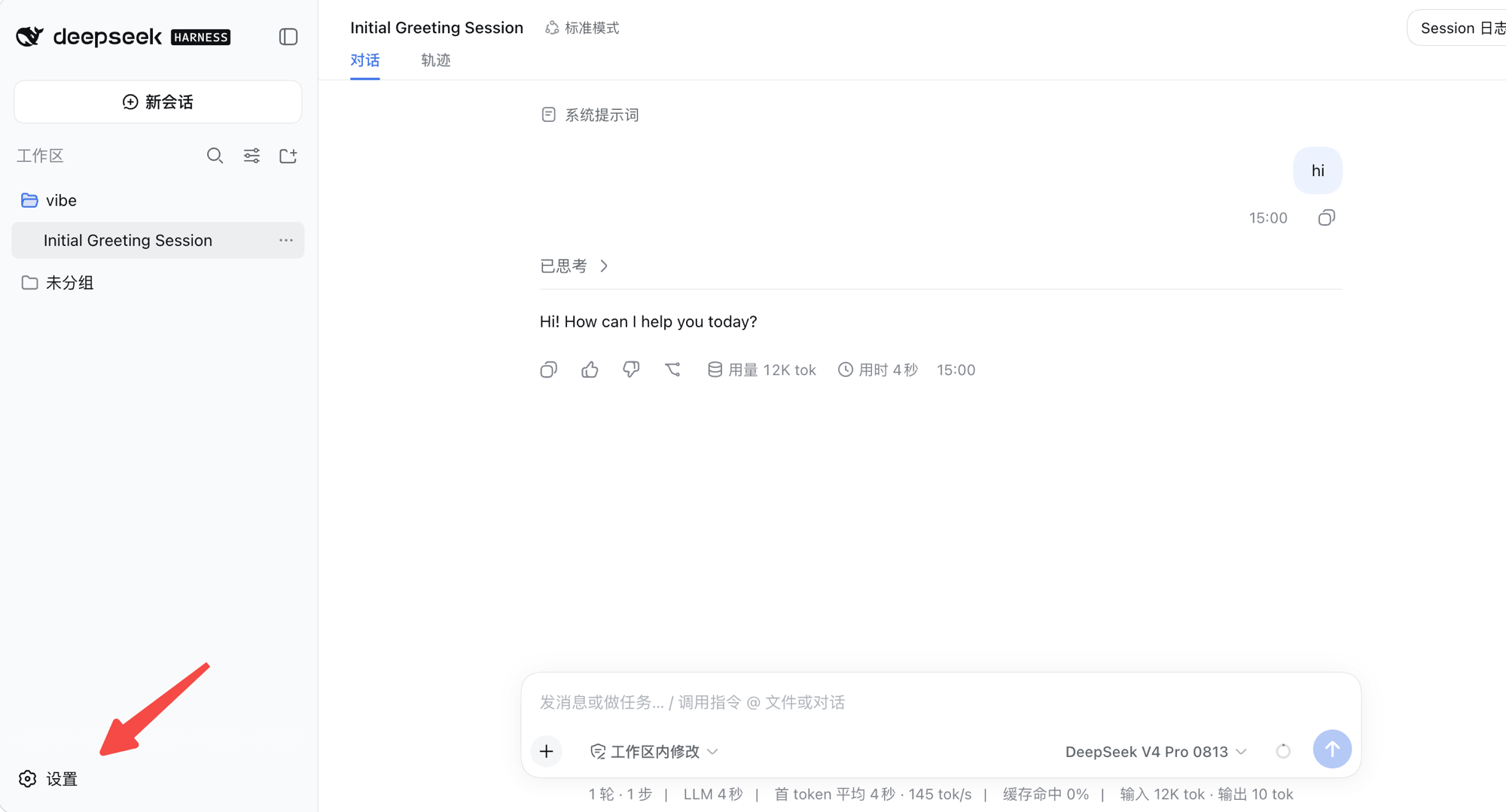
dsh webThe terminal prints a tokenized URL (http://127.0.0.1:3080 by default) and opens your browser. Click Settings in the bottom-left corner:
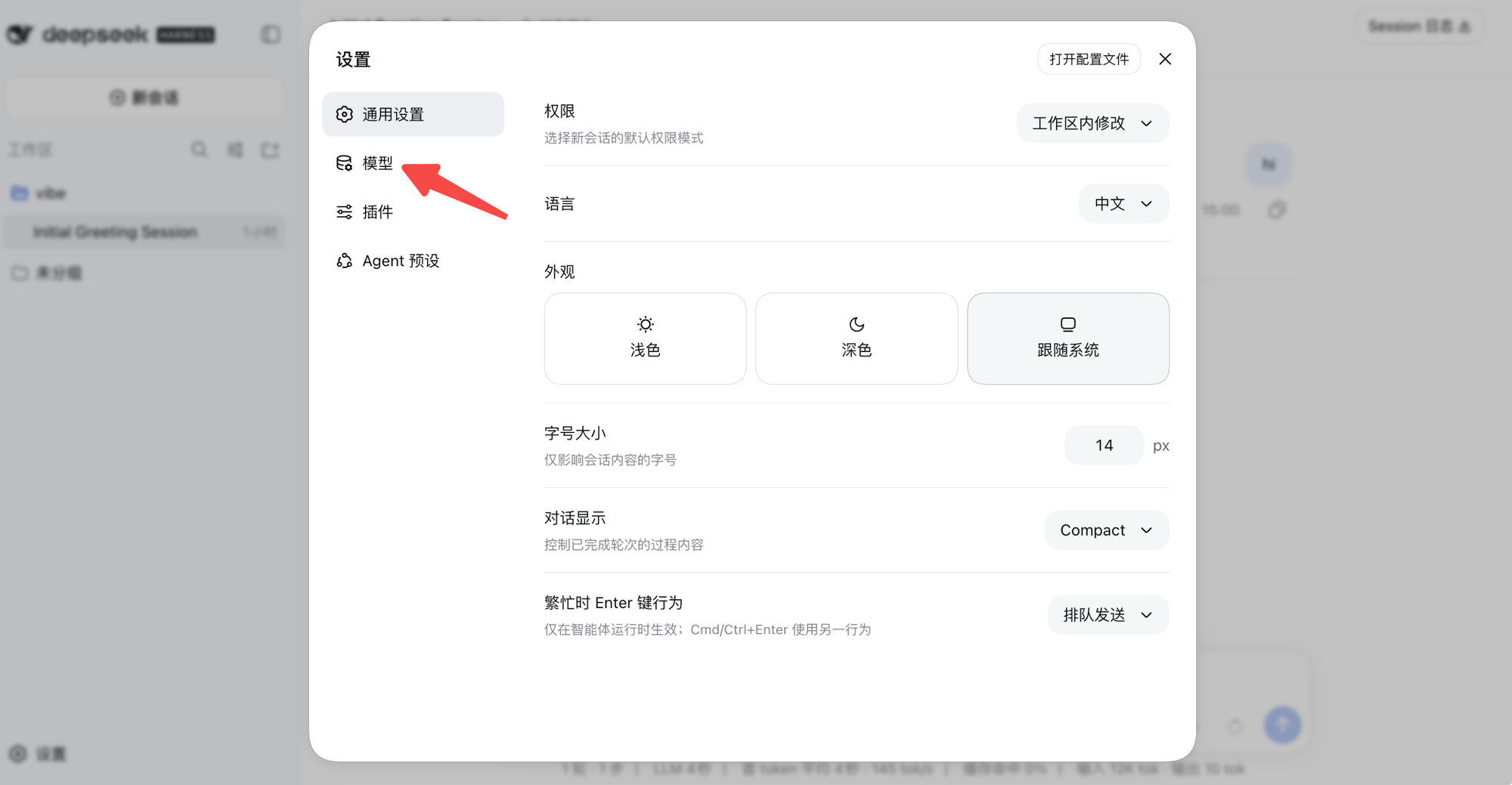
Switch to Models in the left-hand nav:
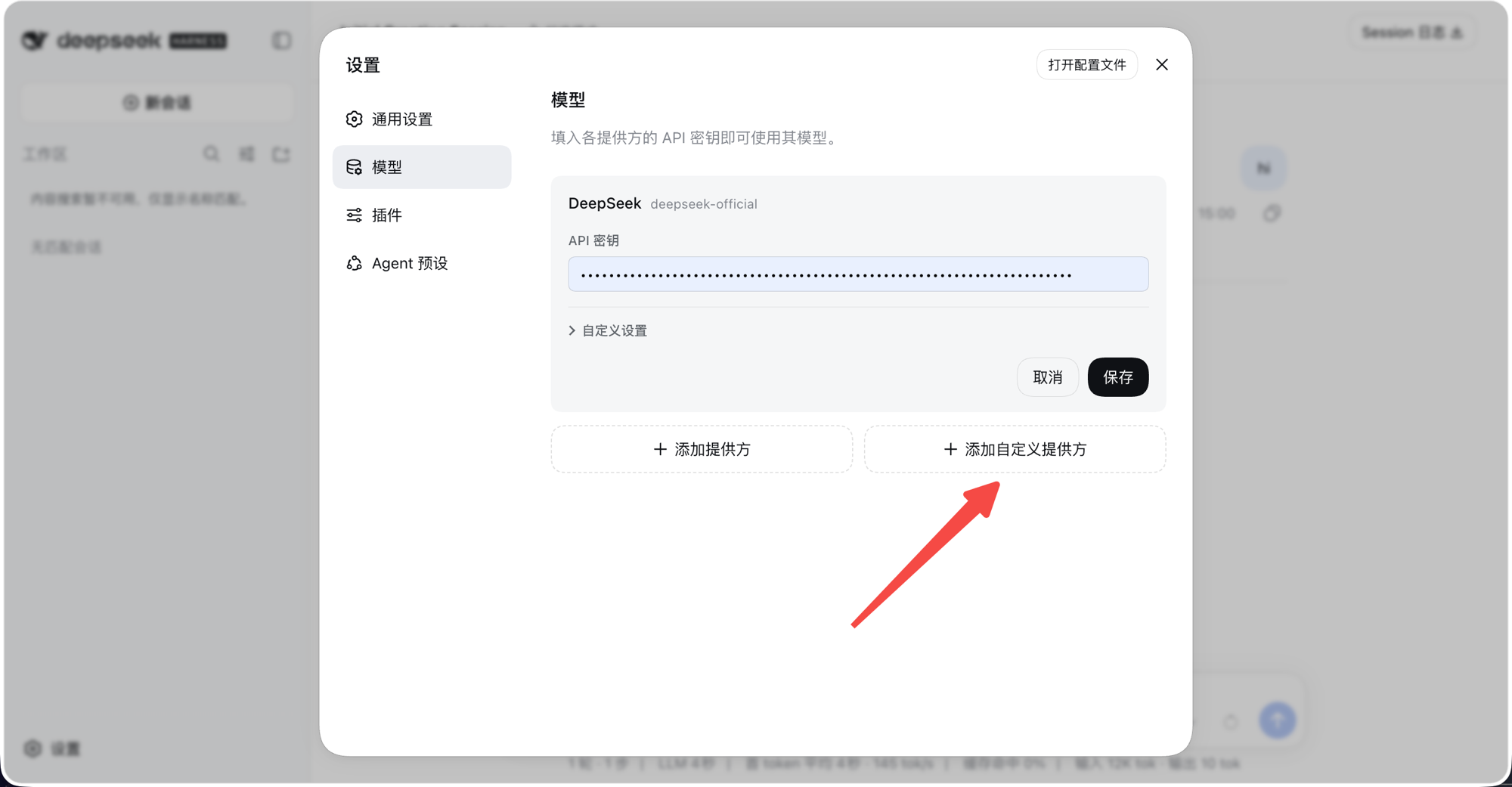
The built-in deepseek-official entry talks to DeepSeek directly, so routing through OfoxAI means adding a custom provider — click Add a custom provider:
Fill in the fields below, then click Fetch available models:
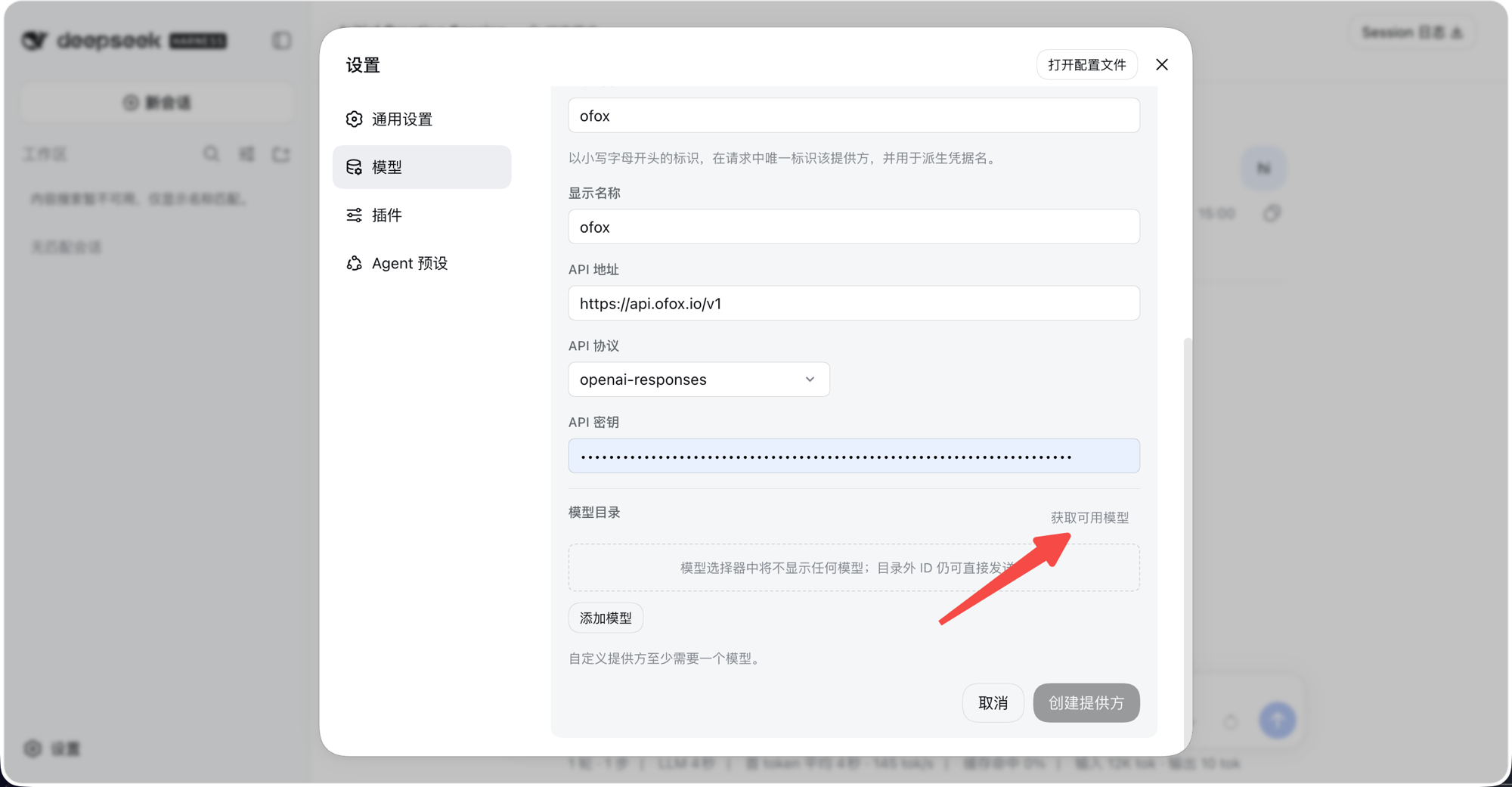
The screenshot shows API protocol set to openai-responses — that is the form’s default, and only DeepSeek models accept it. Choose openai-completions to cover the whole catalog.
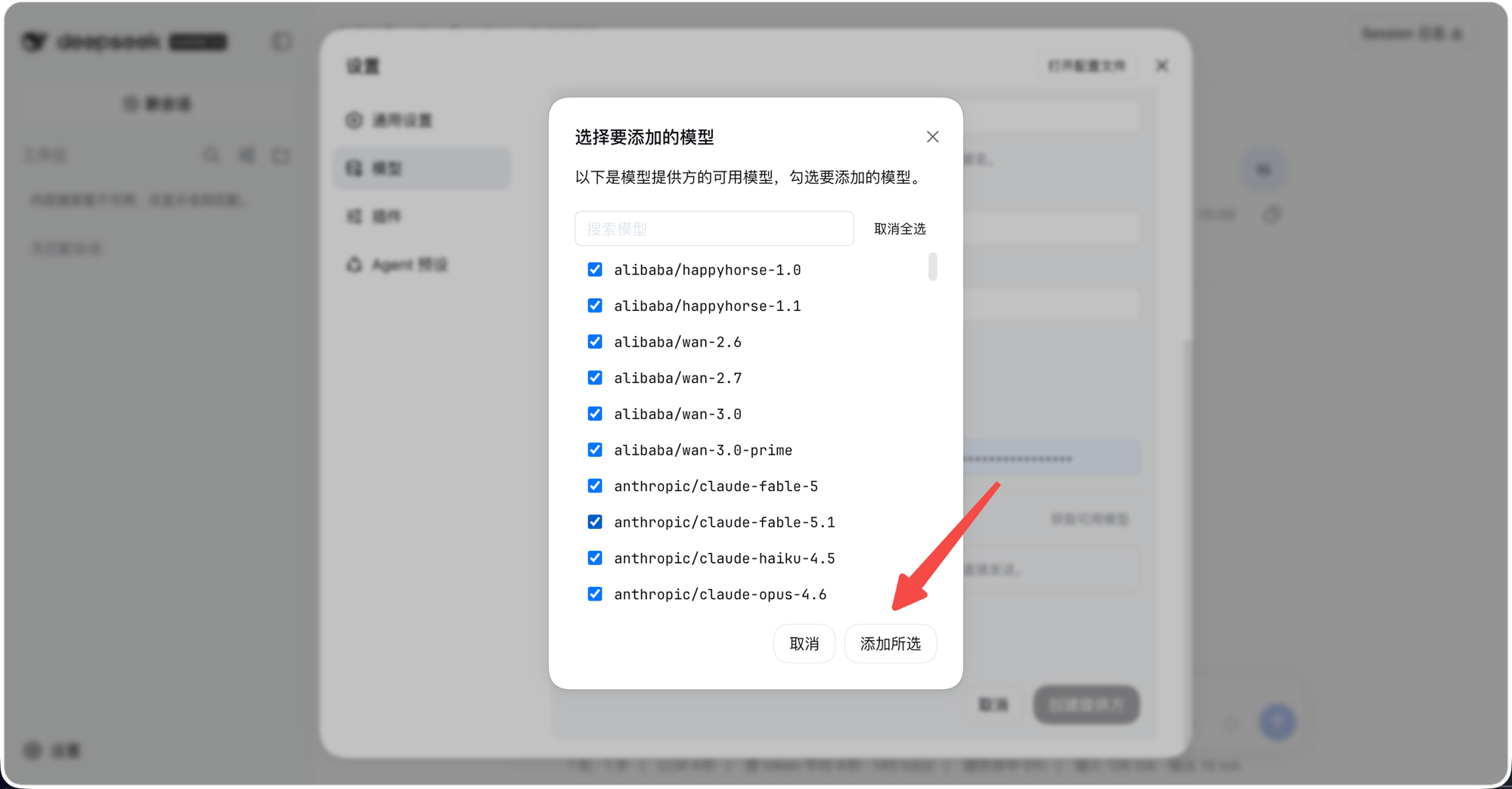
Tick the models you want, click Add selected, then click Create provider back on the form:
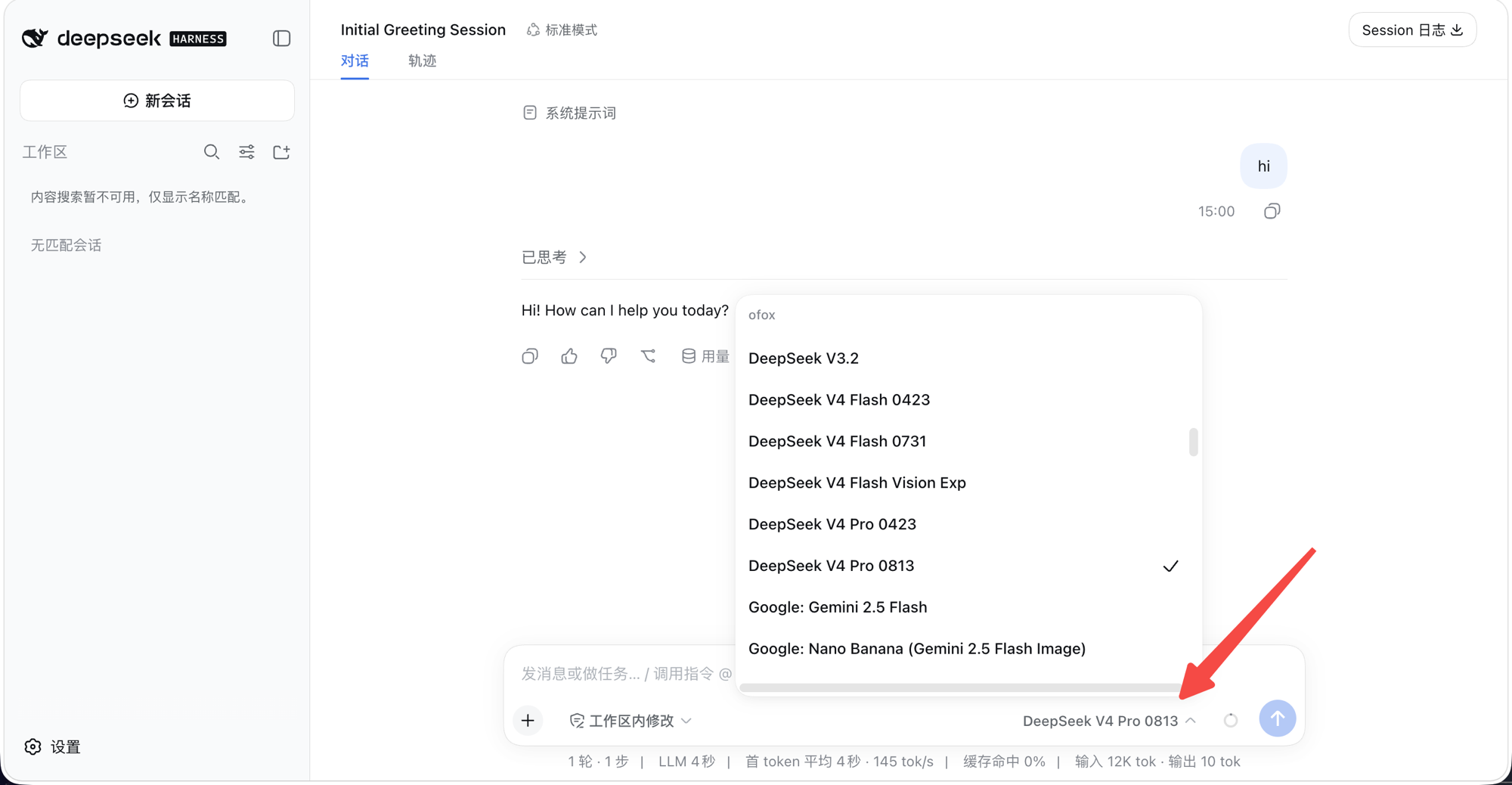
Back in the session view, first-time users must pick a workspace (the project directory dsh is allowed to read and write). Every model under the ofox group is then available in the model picker at the bottom right of the composer:
The key is written to $DSH_HOME/.credentials.yaml (readable only by your own OS user) and the provider configuration to $DSH_HOME/settings.yaml. Both take effect immediately, with no restart.
Model IDs must include the vendor prefix — anthropic/claude-sonnet-5.5, not the bare claude-sonnet-5.5, which is rejected. Browse the full catalog in the Model Marketplace .
3. Set the API key
apiKeyEnv names a credential rather than holding the key itself. dsh resolves it in a fixed order: the environment dsh was launched in, then $DSH_HOME/.credentials.yaml, then your project’s .env, then your home .env. If you used the Web UI, the key is already stored and you can skip this step.
macOS
export OFOX_API_KEY=<your_OFOXAI_API_KEY>4. Verify
dsh --profile headless "Reply with exactly: OK. Do not call any tools."An OK back means the model layer is reaching OfoxAI. For day-to-day work, launch the web interface with dsh web, or run a single task and exit with dsh --profile headless "run the tests".
Platform differences
The configuration file contents are identical on all three platforms — only paths and environment-variable syntax differ.
Troubleshooting
TIMEOUT: Request timed out. — dsh is a Node application and does not read http_proxy / all_proxy, so a working system proxy does not mean dsh can connect. If the domain in baseURL is unreachable on your network, users in mainland China should switch to the mirror https://api.ofox.io/v1.
MISSING_CREDENTIAL — the credential named by apiKeyEnv resolved to nothing. Confirm the environment variable is live in the terminal that launched dsh, or that the key is stored in $DSH_HOME/.credentials.yaml. The other cause is picking the wrong model: the built-in deepseek-official route lists its models in the picker even with no key configured, under names close to your custom route’s.
The reply is empty and nothing errors — the easiest trap to hit: pairing api: openai-responses with an Anthropic model ends the request normally (finish reason: stop) but returns no content. Move that model to an openai-completions route, or to an anthropic-messages route pointed at https://api.ofox.ai/anthropic.
INVALID_REQUEST / HTTP 400 endpoint_not_supported — the payload reads Model '…' does not support the /v1/responses endpoint on this platform. Please use /v1/chat/completions instead. Google and Qwen models do this under openai-responses. Again, switch api to openai-completions.
Plugin loading fails with a duplicate-route error — the same route name was registered twice. Check whether both $DSH_HOME/cordis.patch.yml and settings.yaml define ofox.
Advanced: configuring through the patch layer
settings.yaml holds runtime user settings and takes effect on the next request. To change plugin composition itself — swapping or disabling a plugin — use the patch layer at $DSH_HOME/cordis.patch.yml:
- id: llm-pi-ai
  config:
    providers:
      ofox:
        apiKeyEnv: OFOX_API_KEY
        api: openai-completions
        baseURL: https://api.ofox.ai/v1
- id: agent-default-model
  config:
    provider: ofox
    model: deepseek/deepseek-v4-pro-0813
Run dsh web --dump-config to print the composed plugin tree and confirm your configuration applied.
Recommended models
For recommended models, see the Model Marketplace .
dsh is iterating quickly and its configuration fields may change between versions. Cross-check against the official DeepSeek Harness repository .